🚀 Elevate your workspace with flawless 4K clarity and seamless USB-C power!
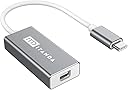
The ITD ITANDA USB-C to Mini DisplayPort Adapter delivers crisp 4K video and audio output by connecting USB-C devices to Mini DisplayPort displays. Designed for professionals using Apple MacBook 2017 and other compatible devices, it offers plug-and-play convenience without extra drivers or power. Its compact, durable design is perfect for on-the-go productivity, supported by an 18-month warranty and lifetime support.
| Unit Count | 1 Count |
| Item Weight | 0.04 Pounds |
| Package Quantity | 1 |
| Item Dimensions | 8.25 x 6.75 x 0.1 inches |
| Finish Types | Projector |
| Color | black |
| Warranty Type | Limited |
| Current Rating | 1 Amps |
| Connector Type Used on Cable | USB Type C, DVI |
| Number of Ports | 2 |
| Compatible Devices | Monitor, PC |
| Specific Uses For Product | Monitor |
A**R
Perfect for 2016 MacBook Pro owners. Works in Tandem with your existing adapters,
This adapter does successfully work in tandem with display port adapters. If you just bought a Mac Book Pro you probably have a handful of Display Port to XXX adapters and this device will help you greatly. You can tandem this adapter to your existing dongles to use them on your new Macbook. In particular this adapter- Allows my Macbook pro to drive a Sony 4k TV at 4k 30hz when coupled to a display port to HDMI adapter.- Allows me to use my powered apple dual link DVI to display prot adapter drive my Dell 30" Dual Link DVI 2560x1600 monitor off of my 2016 macbook pro. This is a tough test. If you need to do this read the last paragraph otherwise skip it.I did find one of my off brand HDMI to Display Port cables will not work with this adapter. OK it is not 100% it only does the hard and important stuff.Mac Users with Dell Dual Link DVI Monitors: I do not believe any passive adapter will give you Dual Link DVI to Display port conversion. They will give you single link DVI but that will not drive 2560x1600 monitors. If you need to connect a new Mac Book Pro to an older Dell Dual Link DVI monitor this adapter can help you. I wanted to connect a Macbook Pro 2016 to a Dual link DVI monitor ( Dell 30" 3000 series ). I have not found a USB-c to Dual Link DVI adaptor. There are plenty of USB-c to Single Link DVI adaptors, these will not drive a 2560x1600 Dell. The Apple Dual Link DVI to display port adapter will allow use of 2015 and earlier apple computers with a display ports. If you have an apple and one of these Dell monitors you probably already have the apple POWERED Dual link DVI to Display Port adapter. The Apple adapter has a USB lead , a Dual Link DVI plug and a display port plug. The USB is used only for power. You can use any USB phone charger on the USB lead. Then you can use this adapter to convert the display port to USB-c. You cannot directly power the apple adapter off the USB-c port through the adapter. You do need to somehow get power to the USB lead on the apple adapter, and a phone charger works fine.
B**T
Mini DisplayPort Workhorse
I would like to start off by saying there is a difference between Thunderbolt 2 and Mini DisplayPort (eben though their ports/plugs look so dang similar). If you think this is a Thunderbolt adapter, you would be mistaken. Apple's proprietary Thunderbolt 2 and 3 can connect via display port but not vice versa.What this means....Attempting to connect Apple iMac or Apple Display as monitor for MacBook:If you are attempting to connect your MBP with an older iMac that has a Mini Display Port on the back of it, then all you need is a Mini Display port cable and this adapter. Then it is just plug-and-play like any other monitor.However...If you are attempting to connect an older iMac or Apple Display that has a Thunderbolt port, this adapter might not work. In this case you will want an adapter that is Thunderbolt 2 to 3. And if it is an older iMac (not an Apple Display) you will have to place that machine in Target Display Mode.
E**L
Can't get it to work with Apple 30" Cinema Display via Apple MDP to dual-link DVI adapter
I have not been able to get this adapter to work with my 30" Apple Cinema Display and my 2017 15" MacBook Pro via Apple's mini-displayport to dual-link DVI adapter. The USB 2.0 part of the link seems to work, but the display is not detected. This display works perfectly when it is connected to an older (2015) 15" Macbook Pro from one of its built-in mini-displayport sockets via the same Apple adapter.I notice that at least a couple of people have indicated that this adapter does work with a 30" Cinema Display via Apple's MDP to dual-link DVI adapter. That was the reason I purchased it. However, in my case it does not seem to work. Not sure what the difference might be.Update: I just tried using the display + Apple MDP<->dual-link DVI adapter with the OWC USB-C dock via its mini-displayport socket and the setup works perfectly. So, the display and DVI adapter work just fine from this laptop. It is just that this (ITANDA) USB-C to mini-displayport does not seem to work with the combination I have.
T**N
It is great for what it is, but think thru the implications of not being able to charge a phone/tablet/laptop at the same time.
I bought this looking to add a dual display to a new laptop that I purchased for when I am at home. I bought it knowing what it was. And it met those expectations nicely.It is small and light and worked perfectly. I was able to push 2 displays, with the first monitor chained into the second, once the first was configured properly to pass the signal on.However, and this is my fault not a failing, of the adapter. It does USB-c to mini Display Port only. No power pass-thru for charging the laptop when this is in use. I thought I could live with this and charging on the only other port on the machine another USB-C. However I found the price of a second adapter high enough to be frustrating.I would still have given this 5 stars until I found another adapter here on Amazon from another company, Belinda, that is this same adapter but that also includes the PD so that the laptop can be charged at the same time and it costs even less at $18.99. It just struck me as odd that a much smaller device without any power features was, when I ought it, $2 more than one with the extra features.
Trustpilot
2 months ago
1 month ago