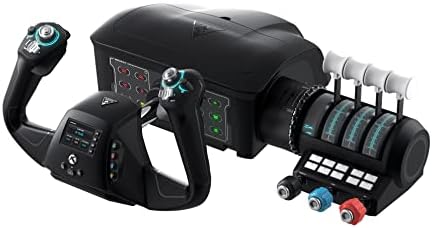

✈️ Elevate your flight sim game — command the skies like a pro!
The Turtle Beach VelocityOne Flight Universal Control System is a premium, all-in-one flight sim controller designed for Xbox Series X|S, Xbox One, and Windows 10/11. Engineered by aeronautical experts, it features a true 180° yoke rotation, modular throttle quadrant with trim wheel, integrated rudder and brake controls, plus a full-color flight management display for real-time configuration. Perfect for both casual flyers and aspiring pilots, it delivers an immersive, authentic flying experience with easy USB setup and extensive customization options.


| ASIN | B09JM8SX8G |
| Best Sellers Rank | 1,473 in PC & Video Games ( See Top 100 in PC & Video Games ) 1 in PC Flight Controls |
| Country of origin | China |
| Customer reviews | 4.1 4.1 out of 5 stars (2,330) |
| Item model number | TBS-0715-02 |
| Language | English |
| Product Dimensions | 48.29 x 18.29 x 49.53 cm; 4.54 kg |
| Rated | Not PEGI rated |
| Release date | 10 Dec. 2021 |
C**T
Nice quality. A lot of controls and just one USB cable.
Very happy, no issues, great upgrade from a Saitek yoke. Fantastic software support on the Turtle Beach website. Using this on PC with FS2020. I haven't played flight sims for nearly 8 years, so basically a newbie all over again. I had a Saitek yoke in the cupboard for those 8 years. I plugged it in and it died after powering up. Meh. So the big question was - get another Saitek (now Logitech) or "something else". There aren't many options out there for flight yokes. This VelocityOne at £330 is 3x the price of a Logitech yoke. But you get a solid yoke with brake buttons and rudder control, a really nice trim wheel, light aircraft push/pull controls, jet throttle controls, a bank of red/green status messages, a nice menu system on the yoke for changing all sorts of stuff, and really good software support. If you want to use the status panel you need to get the SIP (Status Information Panel) app from Turtle Beach. FS2020 knows all about inputs (joysticks, yokes, etc) but doesn't cater for outputs (like the status panel). The SIP software is a bridge between FS2020 (and 2024) and the panel. I've tried it and it works great, but I'm not currently using it as I've a steep learning curve as it is. The hat switches are maybe a little "clacky" but I find everything else good quality. I'm getting into VR so wont need the hat switches for "look left, look right" anyway. It comes well packaged; a brown cardboard box. Inside is another brown cardboard box. Inside is the Turtle Beach box. Inside is heavy duty "egg box" packing to protect the goods. I don't think this is overpriced at all. It has more control things than I need right now, but I can grow into it as I develop my flightsim skills. One single USB cable which covers a whole bunch of controls. Simples.
C**K
WOW
Update: I feel it shouldn't be legal to manufacture something and claim that it does X, Y and Z when only X and Y work. For example, the warning lights behind the yoke look great, but they're all permanently lit and don't seem to do anything. Chatter around the Internet is that Turtle Beach are yet to get these functions working!! So you've made a product and it doesn't do what you've marketed it as doing?? That's misleading and surely not legal. That, along with the sticky yoke (it's just not smooth moving back and forth and jerks a little, but I hear it's something that fixes itself over time)..........is the only reason I don't like this system. But there are 100 reasons I do it like also..... Original review below... I’ve wanted this for ages. It was released but sold out quick, then it came in stock yesterday so I didn’t hesitate any longer to buy! Glad I got it! Came earlier today. The set up is easy to follow but takes time because you have to find a suitable place for it to go and then you have to connect cables. Then after plugging into Xbox you’ll end up tweaking some of the controls to suit your needs. For example, on the customisable panel on the throttle quadrant you can programme around 10 buttons I think to do what you want. I set to things like flaps up/down, landing gear, auto pilot, switch from external view to cockpit view etc. so the set up took a while. The flying itself takes a little getting used to if like me you’ve just moved away from using the Hotas One joystick. It’s like learning to drive in a Mini and then buying a Porsche. So many buttons to customise and memorise. But it’s awesome and feels very much like a real plane. Makes this whole set up feel less of a “game” and more of a real flying experience. I can’t recommend this enough. It works on PC as well as my xbox series S. no hassles at all setting up or using. The mrs wanted me to wrap it up for myself for Xmas day. She’s mental! it got opened and used right away… and you will too like a kid on Christmas Day! Enjoy
C**E
Great all-in-one Xbox Series S/X rig for MSFS2020
I could easily have bought a different setup IF I was playing on PC, but on Series S/X (I have both) this really is the best option. Well packaged, colour coded cables and an excellent fitting system. No bits sticking out under the table once the built in clamps are anchored. Really neat. Smooth operation of all parts except the push/pull yoke has stiff spots. Not an actual issue, as we have assurances from the manufacturer that it beds in and smooths out, confirmed by one YouTuber yesterday after he used it for two weeks. The prop engine controls work very well (Throttle, Prop and Mixture) and feel like a real prop plane. The jet engine levers will allow you to fly a quad engined plane smoothly. On prop planes they double the other controls and add a flaps lever. For that, they feel a little “loose”, but I already have a fix in mind with a simple rubber sheath to increase the drag on them. The Trim Wheel is fantastic, closest I have seen to the real thing, just make sure you’re not on “EASY” level on all settings, because FS2020 auto trims for level flight to help beginners. Easy to find and turn it off. The many buttons, twin hats, additional 4way hats, and full set of Series X buttons are all fully configurable. There are two presets in the Flight Sim already for Prop or Jet, but you can make as many new ones as you like. I use the XBox controller or a mouse for the FS2020 menus, just because the sim is designed that way, but once in the plane, you don’t need to take your hands off the yoke rig. The initial yoke stiffness and slightly floppy levers are the only reason I took one star off an otherwise excellent rig. I may buy some pedals in the future togo with it, but coping well with the responsive triggers on the yoke. Currently working my way through the tutorials, landing challenges and so forth, with some free flights gradually learning where the default controls are before messing with them. The buttons are illuminated (your choice of colours) and stickers and spare panels are provided, with more functionality to be added in future updates. There’s also an XBox app to let you update the Firmware without a PC. I think that covers most of it. Worth the purchase price in my opinion.
Y**R
Buenos controles, buen producto en general, aunque el primero que me llegó tuvo el mismo problema que llegue a leer en algunos comentarios, que el joke se quedaba trabado en alguna posición en mi caso se trabó en la posición de cabeceó arriba, lo devolví y pedí el segundo, antes de ponerlo a prueba actualice los controles a su versión de software más reciente, dado esto al ponerlo a prueba en el simulador no he teniendo ningún problema y ya casi tengo un año ocupándolo, tanto para el MFS 2020 y el 2024. Mi consola es un Xbox serie X.
H**D
I purchased same unit last year June for my Son but he didn't open it for several months and then after opening we found some software issue and tried to sort it by myself and manufacturer support team but didn’t work, I inform the issue to Amazon (seller was Amazon) for the first time after 14 months of purchase and they accept to replace it with a new one 😍 which working perfectly now. Thank you so much Amazon team, you guys are amazing.
Y**Y
FlightSimulator2020用に購入しました。今どきのジョイスティックはfirmwareを持っていて多機能ですね。まさに多機能な操作が必要なFlightSimulatorのジョイスティックにはうってつけです。物が到着してすぐにアップデートしました。ms storeから専用のturtle beach control centerアプリをダウンロードして、本体中央のスクリーン横のボタンでアップデートモードにしてからアップデーターアプリを起動して対象の本体を選ぶと、自動的に1.4にアップデートされました。 ただFlightSimulatorのジョイスティック設定画面のデバイス欄が空欄なのでギョッとします。ちゃんと動作はしてます。本体の問題なのか、FlightSimulatorの問題なのかよくわかりませんがそのうちアップデートなどで改善すると思います。
D**L
Likes: Trim wheel, throttle quadrant, ability to simulate small prop plane and large commercial aircraft, almost plug & play. Dislikes: Confusion, erroneous, inconsistent instructions. Overall, I found the product to be very good for use as a training tool to keep up with the flying skills, or to learn new piloting skills.
M**R
Le titre est moins grandiloquent qu'il n'en a l'air, étant donné qu'il s'agit du seul yoke compatible xbox actuellement, mais vous n'y méprenez pas, il n'en reste pas moins excellent et propose un package particulièrement complet, qui intéressera les utilisateurs Xbox comme PC ! Mon ressenti en 10 points : Les + : - Propose un ensemble complet et versatile, qui se suffit à lui même lors des vols. Nul besoin d'acheter d'autres produits afin d'avoir un rendu immersif, même sans palonnier les gâchettes permettent un contrôle relativement convaincant (un palonnier Turtle Beach arrive cependant bientôt sur le marché). Le fait d'avoir le manche, les commandes de gaz, de volets, ainsi que des boutons personnalisables, tous inclus dans un seul et unique package est très agréable à l'utilisation. - Le V1F n'est pas avare de commandes personnalisables : que ce soit sur le manche directement ou près des commandes de gaz, il y en a une flopée. Cela permet de limiter au maximum le recours à la manette ou au clavier/souris pour effectuer certaines actions, on peut réserver ces derniers à des action très spécifiques avec des boutons assignés. - Les boutons "hatswitch" sont très pratiques, ils permettent un maniement facile de la caméra et donc une meilleure immersion. En assignant correctement ces boutons, on peut vraiment arriver à se sentir libre dans le cockpit. - La roue de trim est absolument fantastique, je n'avais encore jamais vu ça sur un système comme celui-ci, et c'est très réussis au niveau du ressenti : un ajout très appréciable étant donné la forte utilisation qu'on fait de celle-ci dans le cockpit. - La présence de commande de gaz façon aviation générale, un ajout génial. Cela ne rend pas les commandes du dessus inutiles pour autant lorsque l'on pilote un avion type Cessna 152, on peut facilement les configurer pour autre chose (par exemple la commande des volets). Les - : - Les configurations de base sont utilisables dès la première connexion, mais trop générales. Il reste pleins de boutons non attribués. Vous devez donc prendre le temps de configurer différents profils en fonction des types d'avions que vous souhaitez utiliser. Pas de panique, il existe plein de ressources sur Youtube pour vous accompagner dans la configuration. J'ai personnellement utilisé une video de SimHanger Flight Simulation, et cela fonctionne à merveille. - Le panneau d'affichage SID fonctionne sur PC mais pas encore sur Xbox. Cela arrivera très certainement, mais impossible de savoir quand exactement. - Au début, le manche fait preuve d'une certaine friction dans l'axe avant/arrière (profondeur), cependant cela s'estompe avec le temps. Pour accélérer ce processus, vous pouvez bouger le manche d'avant en arrière pendant les temps de chargement. - Les manettes de gaz du dessus n'ont pas beaucoup de friction. Ce n'est pas dérangeant dans l'absolu étant donné qu'une fois positionnées elles ne bougent pas, mais c'est moins immersif. - L'écran sur le manche n'est pas très utile en pratique, il permet simplement de naviguer dans les paramètres et pourquoi pas mettre un chronomètre. J'ai essayé de trouver autant de points négatifs que de points positifs, mais il est clair que les moins sont minimes par rapport à tout le positif. Pour la plupart ils sont seulement temporaire, et n'entacheront pas votre expérience sur le long terme. Je ne peux que vous le conseiller, d'autant plus que le support est très réactif et à l'écoute, avec notamment un serveur discord dédié. Les FAQ sont aussi bien fournies. Ce n'est pas donné, mais avec d'autres marques cela reviendrait plus cher d'acheter séparément les modules afin de constituer un ensemble avec les mêmes fonctionnalités que le V1F.
Trustpilot
5 days ago
1 week ago