Buy anything from 5,000+ international stores. One checkout price. No surprise fees. Join 2M+ shoppers on Desertcart.
Desertcart purchases this item on your behalf and handles shipping, customs, and support to Thailand.
โจ๏ธ Elevate your workflow with ergonomic precision and vibrant style!
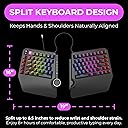
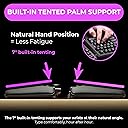
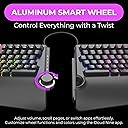
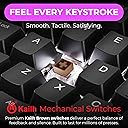
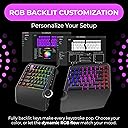
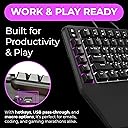
The ErgoTKL is a premium ergonomic tenkeyless mechanical keyboard featuring a split design that separates up to 6.5 inches to minimize wrist and shoulder pain. It includes a built-in 7ยฐ tented palm support for natural hand positioning, Kailh Brown tactile mechanical switches for a satisfying typing experience, and a durable aluminum smart wheel for volume and app control. Fully customizable per-key RGB lighting and programmable hotkeys enhance both productivity and aesthetics. Adjustable tilt options make it ideal for use with sitting or standing desks, ensuring comfort during extended typing sessions.


| ASIN | B09G5L6Z53 |
| Additional Features | Backlit, Ergonomic, Hotkeys and Media Keys, Volume Roller |
| Antenna Location | Everyday Use |
| Best Sellers Rank | #1,187 in Computer Keyboards |
| Brand | Cloud Nine |
| Built-In Media | USB Cable |
| Button Quantity | 87 |
| Color | Kailh Brown (tactile) |
| Compatible Devices | PC |
| Compatible Operating System Family | Windows |
| Connectivity Technology | USB |
| Customer Reviews | 4.1 out of 5 stars 206 Reviews |
| Enclosure Material | Leather |
| Generation | 1 |
| Global Trade Identification Number | 00850023434074 |
| Hand Orientation | Ambidextrous |
| Item Dimensions L x W x H | 19"L x 16"W x 2"H |
| Keyboard Backlighting Color Support | RGB |
| Keyboard Description | Ergonomic |
| Keyboard Layout | QWERTY |
| Manufacturer | Cloud Nine |
| Mechanical Keyboard Switch Model | KAILH BOX |
| Mfr Part Number | C959-US-BROWN |
| Minimum Required Operating System Version | Windows 10 |
| Model Number | C959-US-BROWN |
| Number of Keys | 19 |
| Number of Sections | 2 |
| Power Source | Corded Electric |
| Recommended Uses For Product | Everyday Use |
| Series Number | 959 |
| Special Feature | Backlit, Ergonomic, Hotkeys and Media Keys , Volume Roller |
| Style Name | Contemporary |
| Switch Type | KAILHยฎ BOX |
| Theme | ergonomic keyboard |
| UPC | 850023434074 |
| Unit Count | 1.0 Count |
| Warranty Description | 2 Year |
| Water Resistance Level | Not Water Resistant |
M**Y
Day 1 Impressions - Everything I hoped it would be.
Ok, so I'm only going on a few hours of typing on this beast, but I am extremely happy with it, how it was packaged, how it sounds/feels and the speed/accuracy. For reference, I am a professional writer and hit about 10k words a day - so I do A LOT of typing and don't 'settle' on keyboards. I'm coming into this having been a long-time Logitech Wave devotee, then a Microsoft Sculpt owner, followed by a brief stint with a SteelSeries non-ergonomic keyboard. Though everyone's hands and posture are different, I would not trade this for ANY of the others. 1. Packaging - The only thing I've ever seen packaged better was my SecretLabs chair. Thick foam everywhere, both halves of the keyboard securely wrapped in anti-static bags, cords, keycap puller and extra keycaps sealed in zip baggies and in cutouts in the foam. If this arrives damaged, it wasn't the mailman... unless he backed over it - twice. 2. Set-up - attach a 8" cable between the two halves, plug the micro-usb end of another cord in the keyboard and the other end into a USB end of your computer. BINGO... that's all you NEED to do... of course, you can go download the drivers and software (all of which triggers Windows Defender since these folks saved some cash on buying the license from Microsoft but doesn't hurt your system (that I know of)). I really don't think the average Joe needs to download the software as this baby is plug and play and has TONS of cool color effects that can be cycled with a press of a button on the keyboard. Everything, including the wheel and the Copy/Paste/Select/Cut keys worked without the drivers. 3. Keys - ONLY downside is when you really get humming on this thing and misstroke a key, there is a bit of a metallic 'ring' sound... not a big deal... just struck me as funny as if they keyboard is sayin', "JEEZ... slow down there killer!" I opted for the brown keys... if you are a light fingered typist, they are pretty close to silent with a NICE little tactile bump when the key actuates... very little though... if you are going over 80 wpm, there's no way you'll feel it and the air will be filled with the clacky-clack-clack of the keys bottoming out (which takes a VERY satisfying amount of pressure - not too much, not too little - the springs are set PERFECT). The wrist pad is nice (not shockingly amazing but nice) and the adjustable height is perfect and VERY stable. 4 - RGB lighting - I won't ruin this one for ya... it is PER key, customizable (thru the software), but you REALLY don't need to mess with customizing, there are some AMAZING set-ups pre-configured and they are simple. 5 - The WHEEL - probably more of a gimmick than anything... it does feel nice, it nicely made, has tactile bumps as you twist it (like the wheel on your mouse) so it doesn't just spin willy-nilly. I'm sure there are people out there that are program switching fiends, but if you have multiple monitors, this'll probably just be used for volume control and muting. 6 - Overall - I considered buying the ZSA Moonlander for $365, then decided I'd try this first... I dunno... maybe the Moonlander IS better with its fancy-schmancy key setup... but... again, only a day into this one... I think I made a great choice going with this keyboard. Yes, this is relatively expensive... but, the quality and ease of operation justifies the price. If keys fly off, it catches fire and chases my dog down the hall while typing REDRUM over and over, I'll update this review.
J**J
Great Ergonomic Keyboard for Work/Play
Great keyboard. First day using it I was convinced i'd made a terrible purchase, by day 3 I was convinced I loved it. Decided on this while searching for a mechanical keyboard that was split, ergonomic, and had a media/volume knob. I use this keyboard for work (code) and play. I am dealing with RSI in both my wrists and wear wrist braces most days. This keyboard significantly reduced my strain so I rarely wear the left wrist brace. I still wear one on my right as it is my mouse hand. (Recommended a vertical mouse for fellow RSI/carpal tunnel people. I use the Logitech Lift) I do really miss having a tenkey, but the tenting and angling of the keyboard make it worth it to adapt. I've added a standalone tenkey device to my desk that I keep out of the way until I need it. I don't really make use of the macro keys on the left but i'm sure others will. Keyboard does need 3rd party software, kind of disappointing but I guess it's pretty standard. It's not Razer Synapse, at least. It seems pretty lightweight, I've had no issues with it. Havent had to touch it since first setup. Keyboard has typical RBG lighting capabilities, I just leave it on a default pattern. Ergonomics are great, the extended 'lip' at the bottom of the keyboard looks a little odd but it's there for your wrists to rest on. I keep it tented at half tent (there's 2 feet on each half that have a half tent or full tent length, no inbetweens) My left wrist in particular is doing way better. The angle of the keyboard is much more comfortable for extended use of WASD or MMO layouts. It was Wow classic killing my wrist that made me decide to jump on the ergonomic/split boat, and it's much more comfortable now. Only cons: Normal keyboards feel weird now USB cable connecting the 2 halves seems proprietary and may be very hard to replace, I have not checked if it is sold standalone. I think the keyboard will not function properly without their specific cable.
N**E
Very comfortable keyboard, some build quality issues with switches and housing
The keyboard is pretty good, very comfortable and ergonomic. However there is this very annoying spring reverb with the switches (I chose the brown switches). Almost every key I press I am getting a spring reverb sound, its not even subtle it can get pretty annoying even my friends can hear it over my mic when I type. Besides that reverb sound the keyboard is great, the scroll wheel is a nice touch ads additional functionality to the keyboard. I would either go for the cherry reds or blue's, I might just have a defective unit, others seem pretty satisfied with the product. Also the price is not too bad for proper split mechanical keyboard, usually split keyboards go for around $300
E**T
Great, until it wasn't.
Up until about a month ago, I would have left this a five-star review, but now I'm typing from my brand new ProtoArc keyboard, instead. I used the Cloud Nine Ergo keyboard for almost three years, but recently the vinyl of the palm rest pads began to flake. When I first noticed it, I looked for replacement pads. (Parts wear out, and I was more than happy to pay ten or twenty bucks to extend the life of the keyboard.) However, none could be found. I emailed customer support at Cloud Nine. In a few days I received a reply: The replacement pads were out of stock. No real info except that they will "probably" be in stock in November. The longer that went by, the more having little flakes of vinyl cling to my palms after a writing session bothered me. The black flakes were getting all over my floor and desk. So I bought a new keyboard. (I may look in November to see if they actually re-stock the replacements, if I remember that after four months of waiting.) Up until the issue arose, I was very happy with the keyboard, and used it constantly. I liked the chunky keys that gave a medium tactile feedback and "clack" without being overly obnoxious. The product worked well, and for three years I thought the price I paid ($170) was fair, though certainly not a "bargain." I ended up going with a wireless, ergo design replacement that is less than half the cost, and includes a separate wireless number pad, but is not as versatile as the Cloud Nine model.
A**R
Great Keyboard
This keyboard presents itself as a well architected device with a great deal of engineering attention to detail. For example, they seem to have figured out the right amount of ergonomics such that placing my hands on the keys with my palms on the rest pads felt very comfortable. This was the fourth split keyboard in my recent search and the clear winner. I have never used a split key pad so there is a short learning curve. The bottom-line is that while I type slower I make fewer mistakes so my typing speed has actually increased! I love the ability to program the keys and change their color. I use a KVM which uses double scroll lock as a trigger to switch monitor, keyboard and mouse to another computer. Originally that required the Fn key as the key was labelled Print Scr / ScrLk. By flipping those keys I no longer need the Fn key. If you are a gamer you would probably use Print Scr more and not flip the keys. I also flipped Pause Break / Insert. I never use Pause Break but occasionally use Insert. I love the built-in Copy, Paste, Cut, Select all keys but changed the Select all to Undo. (P.S. Programming required a direct USB-Computer connection - would not program through the KVM.) The color coding is a wonderful aesthetic touch. I was not enamored of all the built in color schemes they offered which wave and oscillate so I created a static color scheme. Letters are light blue, numbers are purple, ctrl keys are red, etc. This of-course makes very little difference to the typing experience but it's like your house color - it makes no difference to your house's functionality but it's a nice personal touch. I have the brown keys and many people have commented on how loud they are. No question they are louder than membrane/rubber keys which have been my primary experience for years. (The red keys are much quieter but don't offer the same tactile feedback.) In the grand scheme of things people talking in the next cubicle or an overhead A/C unit contribute more to overall noise pollution. The pinging some people have mentioned is subtle - did not even notice until I started listening for it. If you are in a conference call or on the phone people will hear you typing. But even membrane keyboards are not stealthy - I muted myself on calls when using my old Logitech membrane keyboard. Someone mentioned this is clone of the Kinesis Pro - not really. I ordered and received the Kinesis Pro upon which I saw their warning that it was not to be attached to a KVM so I could not even try it out. The other split keyboard option is the Goldtouch which I did not order but it does not have the custom Copy, Cut, Paste buttons which I am enamored with. The software application and the firmware are not signed as several people have mentioned so be prepared for the warnings but I just carried on. They both installed. The keyboard works out of the box so if you do not need to program the keys it is not necessary to install.
J**H
Very comfortable to use and thoughtful features, remove wrist rest pad for gaming
I was using a Massdrop CTRL keyboard before this, decided to buy the C959 ErgoTKL on a whim after watching a LTT video on their Short Circuit channel. I liked the idea of an ergonomic keyboard and the price wasn't too out there compared to my CTRL, especially considering the ergonomic and split designs usually make a product cost more. Directly compared to my CTRL it is a very comfortable typing experience with very minimal changes in my typing behavior, my biggest gripe however is how hollow it sounds because I feel like I can hear every spring. It is not just me who thinks so, being on an audio call the person on the other end is acutely aware of my keyboard change just by the sound and it does bother them a bit too. As for gaming I had initial discomfort with this keyboard due to the pre-applied wrist rest, it would get in the way of my thumbs pressing the space bar. Once I removed the pad (attached by velcro, soft side on the keyboard) I had no further issues with it after that. I enjoy the concept of the wheel in the center but other than the volume function I don't use it but luckily it doesn't get in the way either. The macro keys on the side are a nice addition too but I'm not used to using macros and honestly just made me miss the esc key in games more often.
S**M
Good idea, plenty of kinks
The Cloud Nine ErgoTKL has, on paper, a lot of good ideas going for it. I would have really liked to love it, however, I encountered a plethora of kinks in the actual implementation of that idea, that I went for a return/refund. The keyboard's backlight has a strong pink/purple hue when set to white. Support told me that this could be due to the Cherry Brown mechanical switches, but even the dial in the middle has that pink/purple hue, so that can't be the issue here. The keyboard has two sets of feet to tilt it backwards. One by 4 degrees, one by 7 degrees. The set for 4 degrees is so unstable, that the feet fold in on the slightest pull towards the user. The keyboard has an extensive "ping" (the high-pitched metallic resonance sound, probably from the switch springs). I assume that the keyboard is plate mounted (as opposed to gasket mounted), and the metallic underbody is hollow, which magnifies the problem. My recommendation would be for the next iteration of this board to switch to a gasket mount and add dampening material. The software to configure the keyboard does not look all too pretty, and is not the most pleasant or intuitive to use. On top of that, it is not available for Mac. There are a few further smaller kinks. Not all keys are reassignable, most notably the Fn key. The knob is also not freely programmable, and only supports four preconfigured modes that can't be changed. The knob modes also don't all work on Mac. The backlight doesn't stay turned off when turned off; every time the PC starts (or comes out of hibernation), the backlight turns back on. When tilted to 7 degrees, there is a bit of a wobble. Lastly, it would be great if this keyboard was more customizable. The switches are soldered, and I would like to see hotswappable ones. It's also not particularly easy to find alternative keycaps, since the space bars have an odd size. Most split layouts like Alice have 2.25u and 2.75u space bars, this one has a different size that I have not seen in custom keycap sets. For all the aforementioned kinks and areas of improvement, the keyboard seems significantly overpriced. I have now settled for a Feker Alice 80, which is significantly cheaper and has solved most of the issues mentioned in this review. I really hope the Cloud Nine team will take this review to heart and iterate on their product. The ideas behind the ErgoTKL are great, and I see a huge potential.
F**E
Works well with linux
I dual boot Win 11 and Ubuntu and wanted a mechanical keyboard that works well for both. This one is excellent with only minor flaws. First, most of its functions can be changed directly from the keyboard, such as picking a pre-programmed light pattern, its speed, brightness, and the wheel function. Better, it remembers settings between boots, so once you get it the way you like it, you don't have to fiddle with it again. Many of its light patterns are way too distracting for me, so I'm glad that once I set something more subdued, it stays that way. The wheel's four functions are preset and can only be changed via windows software. However, you select from the four via the keyboard itself. It can be configured as volume control, an application switcher, vertical or horizontal scroll, back light brightness, or zoom. You can also control back light animation speed with Fn+wheel. Only zoom didn't really work for me in Ubuntu, because it sends Ctrl-Up/Ctrl-Down sequences, which the apps I used don't expect. The booklet that comes with it says you can record macros directly on the keyboard, but it appears broken in the version of firmware I have (the latest at the time I write this) . The "macro" light never lights to indicate it is recording. The windows software does work to set the macros, and once set, they work in Linux. The other thing you have to use the software for is to set individual key colors or to change the ring light color around the wheel. See the photo for an example customization. Again, this persists across boots, so it works in Linux. But, if you change away from individual key colors to a preset, you have to go back to the software to restore them. This keyboard also has a great feel. I opted for the "brown" switches, and while louder than I expected, they have good tactile feedback and are much quieter than the "blue" ones that my separate 10 keypad has. I also like that the front of the keyboard has soft wrist padding and can be raised to two different heights. The higher one gives me the least wrist strain.
Trustpilot
3 days ago
2 days ago