Buy anything from 5,000+ international stores. One checkout price. No surprise fees. Join 2M+ shoppers on Desertcart.
Desertcart purchases this item on your behalf and handles shipping, customs, and support to Thailand.
🎶 Make every entrance unforgettable with custom sound greetings!
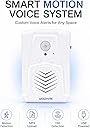
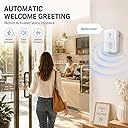
The Waytronic Replaceable Voice PIR Motion Sensor Doorbell is a versatile audio player that triggers custom MP3 or WAV sound files when motion is detected within 13ft. Powered by either 3 AAA batteries or USB, it offers flexible installation options for indoor use such as retail stores, homes, or festive events. With easy USB file updates and adjustable volume, it transforms any doorway into a personalized welcome or alert system.


| ASIN | B07DJ6CX9V |
| Antenna Location | Walkway, Sidewalk, Driveway, Garage |
| Battery Average Life | 6 Months |
| Battery Description | aaa dry battery |
| Best Sellers Rank | #53,683 in Home Improvement ( See Top 100 in Home Improvement ) #97 in Motion Detectors |
| Brand | Waytronic |
| Built-In Media | USB cable |
| Colour | White |
| Customer Reviews | 4.0 out of 5 stars 1,307 Reviews |
| Frequency | 320 MHz |
| Item Weight | 68 g |
| Manufacturer | Waytronic |
| Maximum Range | 4 metres |
| Mfr Part Number | Microsound V22 |
| Model Number | WT-M12 |
| Mounting Type | Door, window mounting |
| Number of Batteries | 3 AAA batteries required. |
| Power Source | Battery Powered |
| UPC | 795042337275 |
S**D
Enkel att använda
Lätt att använda, fyller mitt behov
W**W
Werkt goed
Werkt prima. Zelf geluid er opzetten is makkelijk te doen
E**O
Excelente producto
Excelente producto. Se le pueden meter sonidos en MP3 y en evento de halloween da muchísimo juego al tener una muy buena detección de movimiento incluso con humo en el espacio, además de ponerse en sitios poco visibles.
N**A
Suena muy bien
Tiene poco espacio sin embargo, es perfecto para lo que lo usaré, el sensor funciona y los fos niveles dd volumen suenan muy bien !
J**0
Fantastic and very easy to set up and use
This thing is pretty great, and honestly way easier than you would think 1. Plug this into your computer/tablet It should show up as some kind of storage device. It has about 0.5 gigs which isn't a lot, but for an audio file, it's plenty. 2. Select the audio file you want to add to the device and drag and drop it into the device If for whatever reason the new file is too large, you can delete the pre-existing files by simply selecting them and deleting them. I did this from the start to make things simpler. The instructions that come with the device don't really make it clear how to select just one audio recording. To make things simple, I just have one recording on the device. 3. After you have the audio file you want on the device, and have safely unpaired/unmounted from your computer/tablet, install the device where you want it. It comes with some plastic mounting hardware, but I used a command strip because it's more apartment friendly. 4. Enjoy! In my video the device plays the opening to the haunted mansion ride. It has a switch on the side for volume and power. All the way to the top is high volume, the middle is low volume, and the bottom is off. It's that simple! Hope this helps 😁
Trustpilot
1 month ago
3 weeks ago