Buy anything from 5,000+ international stores. One checkout price. No surprise fees. Join 2M+ shoppers on Desertcart.
Desertcart purchases this item on your behalf and handles shipping, customs, and support to Thailand.
⌨️ Elevate your workflow & game in ergonomic style — pain-free productivity starts here!
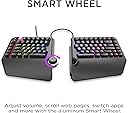
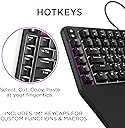
The Cloud Nine ErgoTKL is a premium ergonomic mechanical keyboard featuring a split design with up to 6.5 inches separation, built-in 7° tented palm support, and Cherry MX Blue switches for a tactile, clicky typing experience. Its aluminum smart wheel offers versatile control, while fully customizable RGB backlighting enhances aesthetics. Designed for professionals and gamers alike, it supports adjustable tilt angles for use with standing desks, promoting comfort and reducing strain during extended typing sessions.
| ASIN | B09G5KZXFK |
| Antenna Location | Office |
| Best Sellers Rank | #1,701,661 in Electronics ( See Top 100 in Electronics ) #2,434 in Keyboards |
| Box Contents | USB Cable |
| Brand | Cloud Nine |
| Brand Name | Cloud Nine |
| Button Quantity | 87 |
| Colour | Kailh White (clicky) |
| Compatible Devices | PC |
| Connectivity Technology | USB |
| Country of Origin | China |
| Customer Reviews | 4.2 out of 5 stars 338 Reviews |
| Enclosure Material | Plastic |
| Generation | 1st Generation |
| Global Trade Identification Number | 00850023434098 |
| Hand Orientation | Ambidextrous |
| Item Dimensions L x W x H | 40.9L x 25.1W x 5.3H Centimeters |
| Item Type Name | keyboard |
| Item Weight Unit of Measure | 4 Pounds |
| Keyboard Backlighting Color Support | RGB |
| Keyboard Description | Ergonomic, Tenkeyless, Mechanical, Backlit |
| Keyboard Layout | QWERTY |
| Manufacturer | Cloud Nine |
| Manufacturer Part Number | ERGOTKL-BL |
| Mechanical Keyboard Switch Model | Cherry MX Blue |
| Model Name | ErgoTKL |
| Model Number | C959-US-WHITE |
| Number of Keys | 91 |
| Number of Sections | 6 |
| Power Source | USB |
| Product Features | Backlit, Ergonomic |
| Recommended Uses For Product | Office |
| Series Number | 59 |
| Special Feature | Backlit, Ergonomic |
| Style Name | Modern |
| Switch Type | Clicky |
| Theme | Gaming |
| UPC | 850023434098 |
| Unit Count | 1.0 Count |
| Water Resistance Level | Water Resistant |
C**E
La base requirio un ajuste
Ningun problema con el funcionamiemto pero desde que llego tambaleaba al escribir, al parecer una de las gomas es mas chica lo cual me parece inaceptable en un teclado de esta categoria
M**Y
Day 1 Impressions - Everything I hoped it would be.
Ok, so I'm only going on a few hours of typing on this beast, but I am extremely happy with it, how it was packaged, how it sounds/feels and the speed/accuracy. For reference, I am a professional writer and hit about 10k words a day - so I do A LOT of typing and don't 'settle' on keyboards. I'm coming into this having been a long-time Logitech Wave devotee, then a Microsoft Sculpt owner, followed by a brief stint with a SteelSeries non-ergonomic keyboard. Though everyone's hands and posture are different, I would not trade this for ANY of the others. 1. Packaging - The only thing I've ever seen packaged better was my SecretLabs chair. Thick foam everywhere, both halves of the keyboard securely wrapped in anti-static bags, cords, keycap puller and extra keycaps sealed in zip baggies and in cutouts in the foam. If this arrives damaged, it wasn't the mailman... unless he backed over it - twice. 2. Set-up - attach a 8" cable between the two halves, plug the micro-usb end of another cord in the keyboard and the other end into a USB end of your computer. BINGO... that's all you NEED to do... of course, you can go download the drivers and software (all of which triggers Windows Defender since these folks saved some cash on buying the license from Microsoft but doesn't hurt your system (that I know of)). I really don't think the average Joe needs to download the software as this baby is plug and play and has TONS of cool color effects that can be cycled with a press of a button on the keyboard. Everything, including the wheel and the Copy/Paste/Select/Cut keys worked without the drivers. 3. Keys - ONLY downside is when you really get humming on this thing and misstroke a key, there is a bit of a metallic 'ring' sound... not a big deal... just struck me as funny as if they keyboard is sayin', "JEEZ... slow down there killer!" I opted for the brown keys... if you are a light fingered typist, they are pretty close to silent with a NICE little tactile bump when the key actuates... very little though... if you are going over 80 wpm, there's no way you'll feel it and the air will be filled with the clacky-clack-clack of the keys bottoming out (which takes a VERY satisfying amount of pressure - not too much, not too little - the springs are set PERFECT). The wrist pad is nice (not shockingly amazing but nice) and the adjustable height is perfect and VERY stable. 4 - RGB lighting - I won't ruin this one for ya... it is PER key, customizable (thru the software), but you REALLY don't need to mess with customizing, there are some AMAZING set-ups pre-configured and they are simple. 5 - The WHEEL - probably more of a gimmick than anything... it does feel nice, it nicely made, has tactile bumps as you twist it (like the wheel on your mouse) so it doesn't just spin willy-nilly. I'm sure there are people out there that are program switching fiends, but if you have multiple monitors, this'll probably just be used for volume control and muting. 6 - Overall - I considered buying the ZSA Moonlander for $365, then decided I'd try this first... I dunno... maybe the Moonlander IS better with its fancy-schmancy key setup... but... again, only a day into this one... I think I made a great choice going with this keyboard. Yes, this is relatively expensive... but, the quality and ease of operation justifies the price. If keys fly off, it catches fire and chases my dog down the hall while typing REDRUM over and over, I'll update this review.
W**Z
El mejor teclado ergo que he usado hasta ahora
Al principio dude por que lei que no era compatible con mac.. y si, hay un problema por que el fabricante no tiene software para mac... pero si no te importa tener el teclado con la configuration by default... no te vas a arrepentir y tus muñecas te lo van a agradecer.. puedes a travez de mac modificar las keys para que tengas el mismo orden que un teclado mac... otra solución que propongo.. es que a travez de alguien con windows.. realices las modificaciones que necesitas, como iluminación, configuration de macros etc. Fuera de eso.. la mejor compra que he echo, me dedico al desarrollo de software y desde los primeros typings sientes la diferencia en tus muñecas. Adjunto una imagen del espacio es ideal para un mouse y tu celular, también cabe un magic trackpad sin problema. Una de las razones por la que lo adquirí este producto es porque la silla de mi oficina tiene reposa brazos pero no permite que se muevan mas que para atrás y adelante.. generándome dolor en los antebrazos pues van en otra dirección a mis brazos al utilizar un teclado tradicional.. pero ahora al poder separar el teclado y ademas utilizando el pad que incluye el teclado.. esos problemas se han acabado. Anteriormente utilice teclados como el Microsoft Sculpt Ergonomic y el Logitech ergo, pero este no tiene comparación por el confort de los materiales y la posibilidad de separar el teclado a la distancia que necesites. Date una oportunidad... tus muñecas te lo agradecerán.
D**E
Great product, received wrong product colour.
I’m been regularly searching an ergonomic keyboard with mechanical keys for years, and this one is also a good gaming keyboard, so I was heavenly happy to see this keyboard. But I was quite disappointed to receive the wrong key color. ERGONOMY: Split, forward inclination and no numpad – all boxes checked! The problem is that the keyboard is so thick that the full inclination doesn’t incline it back at all, it just makes it flat. This can be adjusted with a towel, but for the price and ergo advertisement it’s quite a letdown. FUNCTIONS: The keyboard has innate macro binding (up to 4) and I love it, especially for work. I use it for frequent characters that I otherwise have to type with ALT codes. Some key placements have to be used to (eg. the four travel buttons, aka Home End PageUp PageDown, are not all together, they are peculiarly split by the Delete button; that can be fixed with software and key replacement, but this innate placement is weird). The color schemes are well designed too, and the central wheel multifunction is actually quite useful for common uses. WRONG KEY COLOR RECEIVED: And as the product is not advertised with switchable switches, I understand the switches are soldered. At the time of writing (and buying), the product title says "MX Cherry Blue", the description says "Cherry Blue", the color choice says "Blue", the specs also say "Blue", but I received Kailh White keys. As the shipping took a few weeks and Kailh White keys are <similar to Cherry Blue, I don’t want to return it and wait again twice the time; I chose to keep it. I still enjoy the Kailh White keys, but I’m still a bit disappointed for the mistake. If it’s a stock issue, I would have prefered if the vendor first contacted me about the replacement. That mistake apart, the keyboard itself is definitely a five stars. I also hope that more fully ergonomic keyboards with this whole set of ergo features will appear on the market.
S**M
non-working key between z and c, now almost useless
Good keyboard aside from vital flaw. Can't see a way to get in touch with seller
Trustpilot
2 weeks ago
1 week ago