🌍 Stay connected, secure, and unstoppable—wherever your journey takes you!
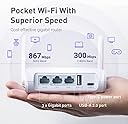
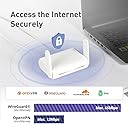
The GL-SFT1200 (Opal) is a portable AC1200 dual-band WiFi router delivering up to 1167 Mbps combined speed. Weighing just 145g, it’s designed for travelers needing secure, fast internet with built-in OpenVPN and WireGuard support. Featuring gigabit LAN/WAN ports and a public WiFi repeater mode, it ensures seamless, private connectivity on planes, hotels, or abroad.


| ASIN | B09N72FMH5 |
| Antenna Location | Gaming |
| Antenna Type | Fixed |
| Best Sellers Rank | 1,112 in Computers & Accessories ( See Top 100 in Computers & Accessories ) 4 in Routers |
| Box Contents | Ethernet Cable, Power Adapter (EU+UK Plug), Router (with 2 years warranty), User Manual |
| Brand Name | GL.iNet |
| Colour | White |
| Compatible Devices | Laptop, Personal Computer, Smartphone, Tablet |
| Connectivity Technology | USB |
| Control Method | App |
| Controller Type | App Control |
| Country of Origin | China |
| Coverage | Limited to connected network range |
| Customer Reviews | 4.4 out of 5 stars 6,526 Reviews |
| Data Transfer Rate | 1200 Megabits Per Second |
| Frequency | 5 GHz |
| Frequency Band Class | Dual-Band |
| Has Internet Connectivity | Yes |
| Has Security Updates | Yes |
| Is Electric | Yes |
| Is Modem Compatible | Yes |
| Item Dimensions L x W x H | 11.8L x 8.5W x 3H centimetres |
| Item Weight | 0.3 Kilograms |
| Item height | 8.5 centimetres |
| LAN Port Bandwidth | [1000] [Mbps] |
| Manufacturer | GL Technologies |
| Maximum Upstream Data Transfer Rate | 867 Megabits Per Second |
| Model Name | GL-SFT1200 |
| Model Number | SFT1200 |
| Number of Antennas | 2 |
| Number of Ports | 3 |
| Operating System | OpenWrt |
| Other Special Features of the Product | Access Point Mode, Internet Security |
| RAM Memory Installed | 128 MB |
| Router Firewall Security Level | True |
| Router Network Type | dual-band, IPv6 |
| Security Protocol | OpenVPN, WireGuard, WPA2-PSK, WPA3 |
| Unit Count | 1.0 Count |
| Voltage | 5 Volts |
| Wireless Compability | 802.11a, 802.11ac, 802.11b, 802.11g, 802.11n |
M**R
Fast, Compact and Easy To Configure with Great Tech Support - The Perfect Router
If you've not used GL-iNet routers you are missing out. I needed a value for money travel router with 5GHz Wifi that would connect to my 5G HotSpot (via WIFI 5GHz), provide easy VPN access via WireGuard to my home network, have gigabit ethernet ports and be powered by USB C. This router fulfilled all of those requirements :-) The initial setup is super easy. Power up the device, connect to it either by WIFI or one of the Gigabit ethernet ports and put the router IP into your browser. From there you have an extremely user friendly interface with all the options you could ever need. Just to summarise these, you can connect to another Wifi source for your internet, you can plug in an ethernet source or you can even tether from a USB source (whether your phone or a USB stick). Once connected to the internet you can configure your VPN. Here you have the choice of OpenVPN or WireGuard. As my home router has a WireGuard VPN server built in, I used that and immediately I was connected. The other nice touch with regards to this router and the VPN connection is the switch on the side of the unit. You can configure this for several options, one being VPN on or off - what a smart idea!!! You can of course configure the onboard firewall as well, opening ports, DMZ etc etc. For such a small device it's heavily loaded with relevant functionality. Due to the complexity of my home network I did run into an issue where I was routing the internet connection through to the VPN, but my local network resources were not reachable. I reached out to the GL-iNet support team and they responded very quickly with great support. After changing the routing mode of the VPN (to Customize Routing Rules) I was able to apply customised routing rules specifically for my home VLAN, and as a bonus, was also able to push internet traffic out locally from the connected WIFI source instead of going via my home network :-) The support I received was first class, and the engineer even went as far as giving me the reason why I needed to use the customised routing. This was due to an IP range clash I had somewhere along the way. If the router detects this it won't push traffic automatically down the VPN tunnel, to prevent potential IP clash issues. However, you can override this easily and this is what I ended up doing. It now works flawlessly. A Huge thanks again to GL-iNet support, it really was a pleasure communicating with you. I can honestly recommend these devices and this company, what a great end user experience !!
D**U
Excellent VPN server/client pocket rocket
I would describe this device as a “pocket rocket.” Despite its small size, it offers an impressive range of functionalities at a very reasonable price. The router is highly portable, making it perfect for travel, while also capable of serving as a full-featured VPN server at home. Design & Portability: The router is compact and fits comfortably in the hand, making it easy to carry when traveling. Its low power consumption means it can be powered via a power bank, laptop USB port, or standard phone charger, adding to its convenience on the go. Wifi 6 gives excellent wifi signal strength offering both 5 & 2.4 options. VPN Capabilities: This router supports both OpenVPN and WireGuard VPN, allowing for secure connections from anywhere. One of the standout features is that it does not require a static IP to run a VPN server. The router detects your IP automatically and integrates seamlessly with the cloud services it provides, simplifying setup. Client configurations are easy to download and configure on multiple devices. Use Case & Performance: I use two of these routers: • At home, as a WireGuard VPN server. • While traveling, as a client connecting to my home VPN server. When abroad, I simply connect the portable router to the hotel or public Wi-Fi network, and it automatically secures all my devices through the VPN. This setup provides a hassle-free, secure Internet experience on the go. Remote Management & Interface: The router’s interface is intuitive and straightforward, offering a wide range of features. You can access and modify the router remotely from anywhere in the world, allowing for easy management of VPN settings and other configurations. Support & Resources: The support page is comprehensive, providing all the information needed to maximize the router’s capabilities. I found it extremely helpful for both setup and troubleshooting. Conclusion: For the price, this router is exceptional. It’s perfect for travelers who want a portable, secure VPN solution or for anyone needing a local VPN server at home. I am very satisfied with my purchase and highly recommend it.
G**A
Most suited for outside and v. good inside if you are on a budget.
small and light little device. Setup is pretty easy. you have choices, 1. repeater (connect to you existing wifi), 2. Ethernet connect to you router (mine changed to modem), 3. tethering (connect to a hotspot) and 4. which can be use dwith a mdoem dongle and a sim. My main router is vergin media HUB 5 with 350Mbps. I switcged my HUB 5 to modem and connected the little guy to it via the wan port you can use the 2.5Gbps port (the red one, which i am doing). You can only use one port on the HUB as wan (Internet). 1. Lan port, I get the full speed and a little more. 2. at 2.4Ghz (set the band width to 40) and I get 150 Mbps. 3. at 5Ghz I get 250 Mbps. Bandwidth set to 80 I am about 10 metres away. (you might have to adjsust the antenna for your locations. direct them one of them towards you.) setting up the VPN servers is a breeze. If you have a dybamic IP address form you ISP (i.e not permanent, most are dynamic) then you need to set a switch for DDNS, you will be advised to do that, ortherwise vpn wont work as it can resolved your IP address. You can choose openvpn or wireguard. Wireguard is newer and faster. Then export the configuration file from the menu to your dvice. Download the client for your device, import the configuration file, and connect to the server. thats it (you need to do this for each device that you want it to use VPN). I testd this configurations from insiode the otudoors and works perfectly fine. You will lose some speed of course, thats normal. I haven't tested the other configurations. I bought this for the otudoor. I liked so much that I bought its big brother the AX1800 (on sale on their website, cheaper than amazon by £20. Just for the VPN servers, saving monthly subscriptions. One more thing, you need to open up port 1194 (you will advised so by the this router) I think on your modem/router. The receiver should be the IP address of the little guy. Also open it on the little guy. In repeater mode, the 5Ghz can poly use bandiwth 40. Loss of some speed. 2.Ghz is great. I you find that it is slower than expected, then check the wifi channel. Experiemnt by changing it. I resolved an issue where 5HZ default channel which was conflicting with my neighbour's. After changing it I got about 280 Mbps. Not bad for this little device. Well Recommended.
J**K
Great little device with excellent features, but not ideal for Tailscale!
The Opal is a neat, well-built device that works perfectly fine for its intended use. Setup is straightforward, it can be powered via USB-C, and it offers multiple ways to get online. The concept and design are excellent, making it ideal for general travel and networking. I really liked its features, but my main goal was to run Tailscale, and that didn’t work reliably. Since the device runs on MIPS, Tailscale isn’t natively supported and had to be installed via CLI. This caused repeated crashes, login issues, and problems reaching my exit node - ultimately leaving me without internet. For my use case, this was a dealbreaker, so I returned it and swapped to the Beryl AX, which natively supports Tailscale. Overall, the Opal is a solid choice as a general-purpose router. If you plan to use WireGuard or OpenVPN, it works great. But if native Tailscale support is essential for your workflow, it’s not ideal. That said, if I needed a compact, versatile travel router again, I wouldn’t hesitate to buy the Opal.
R**O
Excellent bang for buck, great for Oculus Quest 2 AirLink
I have a WiFi router in my bedroom, as it's quite far from the main router and I have ethernet access wired up to my bedroom. I was previously using an old TP Link WR902AC travel router for this purpose which worked well, but the 10/100 ethernet port was starting to be a bottleneck, especially for wireless VR on my Oculus Quest 2 via AirLink. The Opal proved to be a great upgrade on a budget. The officially licensed D-Link dongle costs more than double the Opal, yet I feel the Opal is a far more versatile device. I get speeds of about 450Mb/s on the wireless AC 5GHz channel, which is more than enough to support the Quest 2's max throughput of 200Mb/s. The connection is strong and solid, with no discernable lag or dropped frames when playing long sessions of VR Chat. Setup of the device was a breeze. You can plug and play, and it will just operate as a router, but switching it to access point mode and changing settings like my SSID and passwords was very easy from the web based interface. You can install applets as the device supports ddWRT so it's got a lot of potential if you wish to tinker. The hardware seems to be on point too, with a very small footprint and unimposing yet cute design, a futuristic lightbar for device status across the front, and being well decked out with three gigabit Ethernet ports around the rear, USB 2.0 access, and a manual switch for enabling the VPN. Plus as a travel router, this device is easy to pack up and bring with me which I did do occasionally with the old TP Link device. All in all for under £45 you really can't go wrong, it's a cracking little device with a very well rounded feature set, and for my intended use of being an Quest 2 AirLink compatible wireless point, it fulfills that task with aplomb.
M**Y
Fully recommend as a travel router.
I use this item as a travel router, and it is great, the WiFi repeater and RJ45 WAN options make it so easy to protect all my devices on the go. Also helps when abroad and only have one SIM with data, now all my devices can use that SIM which can save me money, the web interface is very intuitive and easy to setup, the switch on the side makes it easy to turn on and off the VPN. My only issue is the switch does not have two options, I would have work VPN when on the left and home VPN when on the right, but it's easy to login and make the change when required. Recommend this unit or maybe a newer, faster version. The speed is fine for my needs while away.
S**H
Excellent and compact portable router
Easy to setup and serves its purpose. I bought it to have more control over things whenever I go abroad, etc., and it's been great so far! It's quite compact, therefore resulting in it being quite portable. The functionalities/features it offers at such a cheap price point is amazing.
J**B
Good at what it does but does spit out its dummy
It’s very good at the basics. But some tech it just won’t play ball with. iPad and phones were fine but one or two others were just left hanging. Shame as it was very promising. On the stuff that connected the speeds were great and the signal was shockingly strong. But for what I needed it was not good enough. I’d love to give it 4 or even 5 but I really needed it to allow all my tech to connect I tried many different ways but it just wouldn’t. Shame as what did connect was rapid
Trustpilot
1 month ago
3 weeks ago