


🌍 Stay connected, secure, and ahead—wherever your journey takes you!
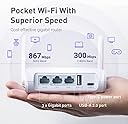
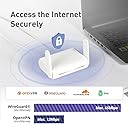
The GL.iNet GL-SFT1200 (Opal) is a portable AC1200 dual-band travel router featuring up to 1167 Mbps wireless speed, full gigabit Ethernet ports, and pre-installed OpenVPN & WireGuard for robust security. Its lightweight, compact design with retractable antennas makes it ideal for professionals on the move, delivering reliable, secure internet access across home, business, RV, or cruise settings.




| ASIN | B09N72FMH5 |
| Antenna Location | Business, Gaming |
| Antenna Type | Retractable |
| Best Sellers Rank | #51 in Computers & Accessories ( See Top 100 in Computers & Accessories ) #6 in Computer Routers |
| Brand | GL.iNet |
| Built-In Media | Ethernet Cable, GL-SFT1200 (Opal) router with 2-year warranty, Power Adapter (US Plug), User Manual |
| Color | White |
| Compatible Devices | Gaming Console, Personal Computer, Security Camera, Smartphone, Tablet |
| Connectivity Protocol | Ethernet, Wi-Fi |
| Connectivity Technology | Ethernet, USB, Wi-Fi |
| Control Method | Touch |
| Controller Type | App Control |
| Coverage | Improved with Extended Antennas |
| Customer Reviews | 4.3 out of 5 stars 7,620 Reviews |
| Data Transfer Rate | 1200 Megabits Per Second |
| Frequency | 5 GHz |
| Frequency Band Class | Dual-Band |
| Has Internet Connectivity | Yes |
| Has Security Updates | Yes |
| Is Electric | Yes |
| Is Modem Compatible | Yes |
| Item Dimensions L x W x H | 4.65"L x 3.35"W x 1.18"H |
| Item Weight | 0.3 Kilograms |
| LAN Port Bandwidth | 10/100/1000 megabits_per_second |
| Manufacturer | GL.iNET |
| Maximum Upstream Data Transfer Rate | 540 Megabits Per Second |
| Mfr Part Number | GL-SFT1200 |
| Model Name | GL-SFT1200 |
| Model Number | SFT1200 |
| Number of Antennas | 2 |
| Number of Ports | 3 |
| Operating System | OpenWrt |
| Other Special Features of the Product | Access Point Mode, Internet Security |
| RAM Memory Installed | 128 MB |
| Router Firewall Security Level | High |
| Router Network Type | wired |
| Security Protocol | OpenVPN, WireGuard, WPA2-PSK, WPA3 |
| Special Feature | Access Point Mode, Internet Security |
| Unit Count | 1 Count |
| Voltage | 5 Volts |
| Warranty Description | 2 Years |
| Wi-Fi Generation | Wi-Fi 5 |
| Wireless Communication Standard | 802.11a, 802.11ac, 802.11b, 802.11g, 802.11n |
| Wireless Compability | 802.11a, 802.11ac, 802.11b, 802.11g, 802.11n |
C**S
Great travel router.
Quick set up, works fantastic, either with ethernet or wifi as the base. Small, compact, and easy to set up. Added all my devices at home and didnt have to connect with hotel wifi for each.
L**S
Great Router
This little guy works great. ATT screwed up my WiFi and I got this router to add/extend my WiFi to the shop. It is mounted on a pole in the yard at the end of 100 ft. Cat6 cable in a waterproof box. Ran 120V power and the Cat6 in a buried conduit. I now have Wifi for my cameras again and in shop WiFi for my laptop. Speed is good and the cameras are working again.
J**E
Works very well in "Repeater mode".
The router performance is about the same as the Tenda AC1200 AC8 it replaced. It does that with MUCH smaller antenna and only two of them compared with 4 antennae of the AC8. Prepare for very small fonts in the start up instructions! I did have an issue and needed to go online to the site for clarification. Possibly due to language differences there was confusion as to which password to enter into the router once it rebooted. Either the new router password or the host password. That was resolved and the router has run smoothly since 12/11/24. It was setup in our house but it will be transferred to an office environment shortly where its host and password will again be changed before it settles into service at that location. Based on its performance we ordered three more. This router was approved for use by our national organization. We also bought the carry cases for them as Amazon offered a case designed for this router. We do need a case to protect the router when not in use. If you use "WISP" mode to connect to the host wirelessly this router does not have one. Its equivalent mode is "Repeater" and it works the same as WISP as it connects to the host and on to the Internet in our case. We have not used the router in any other mode, however we expect that it will meet our expectations. There are two LAN and one WAN port along with a 2.0 USB port. With its small size we may use a switch for allowing access to other devices. A four port switch device is very light and won't interfere with portability this router affords. The color blends in very well with our office surroundings. The AC8 was only offered in black or white colors and with 4 large antennae it did not blend in very well. Packing it for travel or storage was very annoying. This Opal router works well and has side benefits. The antennae design worked well in a TP-Link access point we used several years ago. The Internet speed test we ran did not differ very much from the AC8 design so we expect about the same performance from this smaller unit as compared to the larger Tenda AC8 design. I also bought one for our house. A nice touch was the power supply and cord. Both match the unit color and the plug has a unique design. The cord is a flat design that FOLDS very nice within itself. I am NOT going to purchase round cords any longer. When one coils (folds) this cord just follow the contours that you see when you first look at the unit in the box. You can then fold it back into the same size. I took a photo of it so I could refold it correctly and it DID! A nice small package without using an elastic. Its funny how the little things add up to a nice design. The Gli folks have a nice design throughout the product. Even the box design is very well done. BTW the route unit takes up about 1/2 the box and the cord and power supply take up the other half. The router is in a soft sleeve and one will realize it is only 1/2 of the box size. The plug of the power cord will need a 10 second assembly. It seems to be a universal plug that allows the unit to adapt to US, EU and other electrical systems. The contacts assembly are separate from the remainder of the cord assembly. The instructions indicate how to connect the contacts to assemble it to the cord unit by aligning the contact unit with the cord unit and then clicking the two into place with a slight twist of the wrist. Sounds complicated BUT it is like aligning an aspirin bottle top with the bottle edge and slightly twisting the top on. The U.S. model has a standard U.S. plug contacts. The units going to the EU probably have the EU type contact assembly. Slick! We do not need speed greater than the AC1200 standard right now. However, if we need more speed or more features the GLi company will be the first place we will look. GLi put a lot of thought into their design and it makes me confident that their electronics are designed with the same care and detail.
J**D
Capable travel or back up router,....
I picked up the GL.iNet GL-SFT1200 Opal for a fairly specific application — building a local network to connect several IP cameras and a video switcher, with the goal of accessing all backend menus from a single device on the network. It handles that job without complaint. Configuration was straightforward with some AI-assisted setup, and once dialed in, performance has been solid. Responsiveness is fast, routing is reliable, and the menu system is genuinely approachable — basic data entry skills and a fundamental understanding of IP addressing is all you really need to get up and running. As a general-purpose home router it also holds its own, with dual-band AC1200 handling everyday browsing on 2.4GHz and more bandwidth-intensive tasks on the 5GHz band simultaneously, providing consistent coverage throughout the house. One legitimate gripe: the ethernet ports have no individual indicator lights. For most home users this is a minor inconvenience, but for anyone using this in a production or technical environment — where quickly confirming which terminals are live and communicating matters — it's a real oversight that shouldn't have been left off. Overall a versatile, capable little router that punches well above its size and price. Recommended, with that one caveat noted.
P**K
Mighty Router for a Tiny Price
The GL.iNet Opal is a gem like it's namesake says. Bang for your buck, this is one of the best value in routers that exists. That said, it is an older router with limitations. Know before you buy: Look, this is NOT a power router with huge throughput for OpenVPN, WireGuard, or your favorite commercial VPN. It will work just great if you need to do normal day-to-day work, but if you're trying to move large files or backhaul multiple video streams via VPN, there are limits to its throughput. The reason is simple: VPNs use a lot of CPU and memory for the overhead of encryption. At this price-point you're not getting a huge processor or a lot of memory. If you need a lot of VPN throughput, then look at GL.iNet's higher-end travel routers for the same form factor and the throughput performance you are looking for. For everyone else, this is the travel router you want. It is an OpenWRT router (though not capable of the newest builds) and will support all of the features you would expect on a router 2-4x the price. Very easy to setup and administer to share an internet connection through tethering to your cell phone or sharing a public WiFi. This device is also easily setup as a VPN server behind your typical NAT primary router by port forwarding. Range is good for the travel form-factor and power consumption. It doesn't hold a candle to the range of my primary router at home, but it still covers the entirety of our 6,000sf home, just at lower signal & throughput a the furthest distances.
S**I
Its running Openwrt out of the box!
If you like Openwrt and are looking for a travel router in this price range get this one!! I've been using and loving Openwrt on my home's wifi routers for years now and this thing is running Openwrt out of the box. Its got a nice web admin interface but you can install Luci if you want. It even has an advanced option in it's web interface where you can point and click to install Luci and all the other hundreds of Openwrt packages. I just took it on a cruise and it worked fantastic. If you are a geeky Linux dude like me, 1000% this is the one to get and even if you aren't it's web interface is very simple and easy to use while at the same time having all the normal features you'd want without Luci or any extra Openwrt packages. You can even ssh into it. The only negative I will say is a default configuration item which is easily changed... by default it monitors if your internet connection is up by pinging google and cisco and a couple other sites almost continously. Its super simple to turn off or change the frequency of pings though. The funny thing is the GL-SFT1200 isnt a supported device on the actual Openwrt website, I think because the actual Openwrt site doesnt have acess to the network drivers this is using. Its sort of using a proprietary Openwrt in a way. I mean it IS Openwrt but its using network drivers the actual Openwrt site doesnt have access too.
S**U
So far, very good and easy to set up for tethering
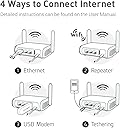
So far, just by following the video instructions for tethering iPhone's internet (using iphone's hotspot) everything went very satisfactorily. I was able to set up my Wyze pan cam in my office , at work, where I usually have an enterprise wifi connection (that doesnt allow any private wireless cameras to their wifi network). By using my iPhone's hotspot I could use this router to broadcast a wifi signal that my wifi camera could detect. I used the browser from my iphone 11, to keep things easy. If you log into the Admin portal (gateway) while using a computer, the user interface might look different and can complicate things for those who are not used to working with computers. I made sure I turned off the 5Ghz bandwidth because my wifi camera only connects to 2.4Ghz. Then I followed the steps from the video shown on here (on amazon), where pictures show the features of the router. Then I renamed the SSID of router to make it less obvious on the network from work. I also changed the password for the SSID to something else because by default the password is "goodlife", and anyone could use your wifi if they see your default SSID (GL - ....) and google the manufacturer's default password for that device. In case you wanna use it (as I did) to connect your security wifi camera on your iphone in your office , or even in your car, while using your phone's hotspot, you can follow the instructions from the video of this router from amazon. You'll have to connect your iphone to the router at some point , according to the instructional video (I used the USB port too) , and then put your Wyze pan camera in set up mode, follow the steps for setting up your camera, and you're connected. I noticed that the connection might not be stable based on how good your Hotspot connection is in that area. That causes my router to show a "growing blue light " on the router as if it would keep try to get internet from the iphone. My LTE data in my office is bad because the building affects my cell signal. But Im glad because I can still record with my security camera even after i disconnect from the camera to leave home for the day. The camera keeps recording after that on its 256GB microSD card. And I can review the recordings next day on my phone's Wyze app, when I connect to the router. So, the point is that this router helped me achieve what other pocket routers like TPLink, could not. The easy user interface for tethering made the difference, plus the instructional video. I gotta say that this router still requires a basic willingness to learn how to use a computer or an iphone, because even the concept of "tethering" could be too difficult to people if they 're not used to spending some time with experimenting with technology. Shalom!
M**K
5ghz wifi stability fix!
Significant update for 5ghz wifi instability at the end of the review.... The following was earlier in the year.. I'm a little skeptical a out the 5ghz radio. My current setup is in my RV with this used as an access point to my wired router with Starlink. I have the wifi 2.5 and 5ghz seperated because of some older devices that wont connect to the combined setup. I've noticed throughout the day if i do a speedtest to fiber test servers I get speeds of less than 60 mbps while on the 5ghz. I will then toggle to the 2.4 ghz and back to the 5ghz and the speedtests are now where they should be at 260 mbps+. I've found myself having to do this multiple times throughout the day doing speed tests. I have both radios on max power and have adjusted the 5ghz frequency all over the operating spectrum with the same results. Don't know what to make of it. Other than that, the router seems to be capable of great stuff Update... Replacement ordered. 2.4ghz and 5ghz both throttle down to 20-30 mbs download after awhile. Could be 5 minutes or 2 hours Both have to be toggled or disconnected and reconnected to regain full capable download speeds. I have adjusted and locked each frequency on specific channels. Tried disabling and re enabling certain bands. Changing power supply cords. Swaped the cat 6 cables from wan to lan and back again. Used different cables. Firmware downgrades and upgrades. I have tested every changable option in the Luci advanced settings for the wifi. Absolutely nothing fixed this issue. Im hoping this was just a dud router Next update: New router recieved and setup. Problem persists in access point mode. Seems that 5g speeds kick down to 30mbps or less after awhile of connection. Only correction to this is to toggle to the 2.4ghz ssid and then toggle back to the 5ghz ssid. Simply turning wifi off and back on, without toggling out if the 5ghz, does nothing to correct the issue. My Roku device has been experiencing the same results. In my opinion, that makes this device a complete dud. Don't know its a hardware or firmware issue. Both Opal devices showed this problem. Months later..... Determined to figure out what was really going on, i found that my old Samsung s10+ did fine on 5ghz wifi for days. So i was set on the notion that possibly my pos Motorola edge 2023+ i use all the time was having the issue. Tried reseting the phone's network settings to no avail. Looking back into the opal's advanced settings (luci), I navigated to network:wireless: (radio 1:master "your ssid 5ghz". Scroll to the bottom for Interface Configuration. Select Advance settings tab underneath. At the bottom is an option to check "Disassociate On Low Acknowledgement". Mine was checked, so I unchecked it and it seams that this is the fix! My Motorola nows stays stable with the 5g wifi giving me full bandwidth without interruption. According to Google.... ""Disassociate On Low Acknowledgement" is a wireless setting in routers (common in OpenWrt, DD-WRT) that forces an access point (AP) to drop clients if they fail to acknowledge packets, often due to weak signals or inactivity. Disabling this feature often resolves random Wi-Fi disconnections, authentication errors, or sluggish throughput on mobile devices." Hoping this may help someone. I upgraded the stars from 1 to 4.
R**O
Eccellente router
Eccellente e facile da usare. Unica pecca la potenza del WiFi, ma ha risolto i miei problemi.
N**V
Money well spent
I am quite pleased with the product. Compact enough size for travel. Works great with almost any type of usb power source. Easy to set up, with a lot of features. The VPN functionality is especially straightforward.
4**4
Compact, Powerful, and Perfect for Router-Level VPN
If you’re looking for a portable router that packs a serious punch, the GL-iNet travel router is hard to beat. I personally use it to provide router-level VPN across all devices in my home, including smart TVs and other networked devices, and it works flawlessly. Setup is quick and straightforward. Power it on, connect via Wi-Fi or Ethernet, and enter the router’s IP in your browser. The admin panel is extremely intuitive, making it easy to configure VPN settings, connect to networks, manage devices, or adjust firewall and port options. Even complex routing setups are simple to manage thanks to the clear interface and helpful documentation. The router supports both OpenVPN and WireGuard, but from my experience its real strength is getting full network-level VPN without having to configure individual devices. The physical VPN switch on the side is a clever feature, letting you toggle the VPN on or off instantly. And if I need to travel, it’s incredibly convenient—compact and foldable enough to carry in a bag. I can take it abroad and set it up in hotels or other networks to create my own secure Wi-Fi, piggybacking off the existing router or Ethernet connections. This makes accessing a safe VPN on all my devices easy, even when away from home. Overall, this is a small, portable router that delivers full-featured, router-level VPN at home, with an incredibly user-friendly admin panel, strong Wi-Fi, and excellent support. For the price, it’s hard to find a better option. Highly recommended.
U**N
🎉👍
Klockren liten router som passar fint i husbilen!
A**H
Good buy.
Good product Delivery is good Item is good and doing what is expected
Trustpilot
2 weeks ago
3 days ago