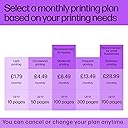
🖨️ Print smarter, live better — your all-in-one creative powerhouse!
The HP ENVY Inspire 7920e is a versatile all-in-one wireless inkjet printer designed for busy professionals and families. It delivers crisp, high-resolution color prints at up to 15 pages per minute, featuring a 35-page automatic document feeder and automatic duplex printing. With HP+ smart printing, mobile app control, and 3 months of free Instant Ink, it offers seamless connectivity, cost savings, and eco-conscious efficiency—all wrapped in a sleek white design.
| ASIN | B09LZ7BY9P |
| Additional Printer Functions | All In One |
| B&W Pages per Minute | 15 |
| Best Sellers Rank | 31,570 in Computers & Accessories ( See Top 100 in Computers & Accessories ) 99 in All-In-One Printers |
| Box Contents | Power Cable, Ink Cartridges |
| Brand | HP |
| Brand Name | HP |
| Color Depth | 16700000 colors |
| Color Pages per Minute | 10 |
| Colour | White |
| Compatible Devices | Smartphones |
| Connectivity technology | USB, Wi-Fi |
| Control Method | Touch |
| Controller Type | Android, iOS |
| Customer Reviews | 4.1 out of 5 stars 607 Reviews |
| Display Type | LCD |
| Dual-sided printing | Yes |
| Duplex | Automatic |
| Hardware Interface | USB |
| Ink Colour | Colour |
| Item Dimensions D x W x H | 38D x 46W x 23H centimetres |
| Item Type Name | Multifunction Printer |
| Item Weight | 8120 Grams |
| Manufacturer | HP |
| Maximum Copy Resolution Black and White | 4800 x 1200 dpi |
| Maximum Copy Resolution Color | 1200 x 1200 dpi |
| Maximum Copy Speed Black and White | 15 ppm |
| Maximum Print Resolution Black and White | 4800 dots_per_inch |
| Maximum Sheet Capacity | 125 |
| Maximum Supported Paper Size | A4 |
| Maximum print Resolution Color | 4800 x 1200 Dots Per Inch |
| Model Name | 7920e |
| Model Number | 242Q0B |
| Model Series | Envy Inspire |
| Model name | 7920e |
| Network Connectivity Technology | USB, Wi-Fi |
| Number of Trays | 1 |
| Other Special Features of the Product | Auto-Duplex |
| Paper Size | 210 millimeters |
| Power Consumption Size | 4.9 Watts |
| Print media | Card stock |
| Printer Output Type | Colour |
| Printer Type | Inkjet |
| Printing technology | Inkjet |
| Product Warranty | Up to 2 years HP Warranty. 24-hour, 7 days a week Web support; Business hour phone support within warranty period. Two years consist of: (1) one year standard HP warranty; (2) one year extra HP warranty through HP+ activation at setup [11] |
| Resolution | 4800 x 1200 |
| Scanner Type | Photo, Sheetfed |
| Special feature | Auto-Duplex |
| Specific Uses For Product | General Purpose |
| Total USB Ports | 1 |
| UPC | 195697743986 |
| Unit Count | 1.0 count |
| Warranty Type | Extended Warranty |
| Wattage | 14 watts |
A**W
Easy to setup - great quality
Very easy to setup and came with a 6 month trial of HP Instant Ink (700 pages/month). Once the printer is setup, the final configuration via the app was seamless and I can print from all devices without issue. AirPrint from iOS devices worked first time. Printing from Mac, PC and Chromebooks also had no issue. Has a separate tray for smaller photo paper and seamless printing from the app or direct via AirPrint from iOS worked flawlessly. Was able to enable scan to computer easily via the web interface and works perfectly to scan to PDF or JPEG. Copies are excellent quality either from flatbed or automatic feeder. If you don’t want instant ink and limits on pages per month, simply don’t subscribe and buy the 303 cartridges separately. Easy. You can track usage easily on the HP website. Print quality is good, noise level is as expected. Hope it lasts as long as my old HP printer which went for 13 years! My only very slight negative is that the slide out to hold printed copies (so they don’t fall on my the floor) does feel a bit flimsy, but it does the job. Good value for money.
B**N
Great little printer
Great little printer, not the fastest on the block but a very good home printer clean crisp results with no bleed either on plain or photo paper copy attachment is good, scanning is on the quick side of average photo print is very good quality with colours matching screen from computer and phone. Set-up was a bit clunky on my MAC but got it done eventually the H P smart app looks good and was a help setting up the printer, have been using instant ink for a few years now with no complaints and replacing my old printer with this one was easy with no loss of the free ink that came with it, only hassle I had was for the extra two months with Amazon, as the supplied code was being reported as no longer valid but after calling Amazon who told me to call HP it was sorted and I got the full compliment of ink so all good so far and am very pleased with this printer.
D**K
Very good
So far so good. Easy to set up and install. The only issue I have so far is that it cannot scan multiple pages to one jpg or other format. Just one page per file. Also, I have to scan and the print to pdf, to get a scan in pdf format. That was also the case with my previous HP Printer.
G**S
10 months old and useless
It’s been pretty ropey from when I bought it. The document feeder is extremely temperamental, the paper tray is very iffy, and suffers from the usual hp problems. It set up easily enough although every month seems to be breath holding waiting to receive the HP instant ink delivery, it’s never actually failed, but now, only 10 months after I bought it, it’s failed. The new (?) hp cartridges won’t connect to the printer and no combination of old and new cartridges will fix this. The customer support is next to useless, I seem to know more about the printer than they do and they’ve failed to resolve the issue. The printer is dead, useless and is being replaced, a shame really as I have had a few HP machines and have been quite loyal. But enough is enough. I will be in the skip by the weekend, and only 10 months old. Scandalous, really.
E**R
I wish the previous printers I've had were as easy to set up and use.
Easy to set up, it almost does it unassisted, I have had a few printers of this make over the years and this one was easy to set up, usually I get exasperated and have to have a break or three when setting up it's predecessors, not so this time, from opening the box to being finished plus the instant ink set up took less than half an hour, it can do lots of clever things that I 'm slowly working out how to do these, which is great as I am not overly tech minded, so it I can do it easily anyone can.
S**3
I didnt know they could improve on perfection
Ive always struggled with printers. I have scarring memories of using canon printers as a kid and the CLUNK CLUNK EEEEEERGGHHH sound it would tell me it couldnt connect and then the endless installation cd-roms!! The horror. This all changed when years ago i got a HP Envy 4500 and it worked like a dream. Connected to the various laptops, computers and phones ive had, with no problems. So i was heart broken when it began to break down this year and then finally stopped working and had to turn it off at the plug. And then i found the newer model, this one! And its even better than my last one. May have shed a little tear lol. Its a lot bigger than the last one, but oooo its gooood! Its got a bigger screen which is also a touchscreen. I love the printer ink by post service that they do too. But the biggest thing for me, has been the integrated photo printer, which is sooooo easy to use. And it prints photos beautifully! I love it and im so pleased
D**R
Another great HP product
Another great HP printer, always reliable and sturdy. Has some very good features which makes it easy to print out more different designs. I like the remote printing from anywhere and the security features. Would always recommend HP
R**L
Beware if you are using eero
Nice looking printer and a previous fan of HP products *but* HP want you to do everything through their HP Smart app and that is not easily compatible with an eero network. When you try to complete the set-up you'll most likely get a wrong error message with code EBS00P0004 displays in the HP Smart app. This issue occurs when two or more devices are connected to the same mobile router using Wi-Fi. The privacy separator feature of the mobile router prevents devices from communicating with each other. Because of this, the computer or mobile device cannot communicate with the printer. This is because eero think that the HP protocols are not secure. There are lots of people facing this problem on the HP support pages (and NO answers provided by HP). Virtual Assistant from HP was also a large part of my life I could have used to actually hand copy out everything I wanted to print. You will still be able to print and scan but won't get full functionality from the app and enrolling on HP Instant ink etc will be difficult. There are some complicated work arounds online and if you area tech whizz you'll probably find it easy - but if like me you wanted a plug & play then the heartache probably isn't worth it if you have eero.
Trustpilot
5 days ago
1 month ago