![Whitestone Dome Glass Screen Protector for Samsung Galaxy S22 Ultra, Full Tempered Glass Shield with Liquid Dispersion Tech [Easy to Install Kit] Smart Phone Screen Guard - Two Pack](https://m.media-amazon.com/images/I/71l6BjRVbLL._AC_SL3840_.jpg)
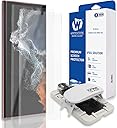


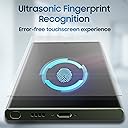


🛡️ Elevate your screen game—protection so seamless, you’ll forget it’s even there!
The Whitestone Dome Glass Screen Protector for Samsung Galaxy S22 Ultra offers premium edge-to-edge tempered glass protection with a cutting-edge liquid dispersion installation kit. Featuring a 98.76% anti-reflective coating, smudge-resistant surface, and shatter-proof durability, it ensures crystal-clear visuals and reliable defense against drops and scratches. Designed for easy, bubble-free application, this two-pack keeps your phone looking flawless while maintaining full touch sensitivity and fingerprint scanner compatibility.


| ASIN | B09QFT1CVN |
| Best Sellers Rank | #118,731 in Cell Phones & Accessories ( See Top 100 in Cell Phones & Accessories ) #8,160 in Cell Phone Screen Protectors |
| Brand | DOME GLASS |
| Brand Name | DOME GLASS |
| Clarity | 0.99 |
| Color | Transperancy |
| Compatible Cellular Phone Models | Samsung Galaxy S22 Ultra |
| Compatible Devices | Samsung Galaxy S22 Ultra |
| Compatible Phone Models | Samsung Galaxy S22 Ultra |
| Customer Package Type | FFP |
| Customer Reviews | 3.7 out of 5 stars 4,917 Reviews |
| Finish Type | Glossy |
| Included Components | AR screenprotector with Jig |
| Item Dimensions L x W | 6.27"L x 2.92"W |
| Item Hardness | 9H |
| Item Weight | 0.1 Pounds |
| Manufacturer | Dome Glass |
| Material | Tempered Glass |
| Model Name | Whitestone Dome Glass Screen Protector |
| Model Number | 1 |
| Number of Items | 2 |
| Part Number | 1 |
| Product Dimensions | 6.27"L x 2.92"W |
| Screen Size | 6.8 Inches |
| Screen Surface Description | Glossy |
| Special Features | Scratch Resistant |
| Unit Count | 1 Count |
| Warranty Description | No Warranty |
| Water Resistance Level | Water Resistant |
G**C
Best for WQHD+ Display
1st, I tried [2 Pack] ArmorSuit MilitaryShield Screen Protector Designed for Samsung Galaxy S22 Ultra 6.8" Case Friendly Anti-Bubble HD Clear Film Could never get the protector on the phone without dust particles. Also, the display image wasn't HD clear in my opinion and I had to use a hair dryer to get the edges to stay. 2nd, I tried [2+2 Pack] Galaxy S22 Ultra Screen Protector, 9H Tempered Glass, Ultrasonic Fingerprint Support, 3D Curved, HD Clear Scratch Resistant for Samsung Galaxy S22 Ultra 5G Glass Screen Protector. I was able to install dust free. I hated the circle for the finger print scanner. The edges of the screen became almost unusable. Typing (with Touch Sensitivity ON) the letter "P" and opening the Edge Panel...UGH Lint from my pockets would collect along the sides of the protector. Who knew I had that much lint in my pockets!! The image quality wasn't great...I could see ripples in the reflections. 3rd, I tried Screen Protector for Samsung Galaxy S22 Ultra 5G [Not Glass], 3 Pack HD Flexible TPU Film with 3 Pack Tempered Glass Camera Lens Protector, Support Fingerprint Unlock, Case Friendly. A pain to install...but, I was able to install dust free. The edges over the curve would not stay down. I am guessing taking the phone in and out of my pocket started lifting the edges. It is all over once it starts lifting. Image quality was better than the other 2 screen protectors. 4th, I now have [2PACK] Whitestone Dome Glass Screen Protector for Samsung Galaxy S22 Ultra, Full Tempered Glass Shield with Liquid Dispersion Tech [Easy to Install Kit] Smart Phone Screen Guard. Best image quality by far (10 out of 10) of the 4 protectors. I was able to install dust free. It is a bit messier having to deal with the glue, but the end result is worth it. Best part is it is good to go after curing the glue with the UV light. It took me about 15 mins start to finish. I don't understand the 3.6 rating. I watched a couple of different YouTube videos and was good to go. I can type the letter "P" and open the Edge Panel with ease again!!
C**Y
Great screen protector
This was my first time using a Whitestone scrren protector so I watched a few videos on the application process since it was more involved than the typical screen protectors I used. While the application process was more involved, it allowed for a really good application of the screen protector which was dust and bubble free, no one can tell I even have a screen protector on. The feel is good, it actually does not feel like I have a screen protector on and everything glides so well across it. The touch sensitivity is still very responsive, but I was having minor issues with the fingerprint reader. However, once I enabled the increase touch sensitivity, it made the fingerprint reader respond better. I still have to place my whole fingerprint on the sensor for a quick second for it to unlock (where as before it was a little more lenient without the screen protector). The protector is not edge to edge on the screen as you can see from my pictures but this is okay with me since it allows for my cases to fit without causing pressure on the screen protector making it lift. Overall I think this is great. Update on the fingerprint reader: I listened to some other people who suggested adding the same fingerprint multiple times (ie having your right thumb registered 3 times by scanning it 3 different times) and it increases responsiveness tremendously so try that too if you have having any problems with the fingerprint reader. Update 2/18/23 I broke the first screen protector in a few months of having it but my phone was perfectly fine underneath. I replaced it immediately with the 2nd one that comes included in the pack and that 2nd one held up for a long while, almost the whole year even with me being really clumsy. Recently, I broke the 2nd one but I had a back-up set which I used to replace it. I am pretty rough with my phone and I am glad I had these screen protectors to protect it. Each time I broke one my phone was fine underneath and it was straight forward to remove and replace. The screen protector never once started lifting or peeling either which I appreciate.
R**K
Fingerprint reader works 1 out of 10 times
6 Month Review: Whitestone Dome Glass Screen Protector for Samsung Galaxy S22 Ultra My original review is as stands but now I just want to add a durability rating. 1 out of 10. Save your money for all the reasons I listed in my original review and one more... durability. I've owned a lot of cell phones over the years and I've never had one last only six months. Mine is cracked thru in several places and the top right corner is busted up. A one inch long splinter from that corner stabbed into my index finger when I reached into my pocket yesterday....hurt like hell. I guess you could argue that it did its job and protected my phone. I've owned a lot of phones over the years - dating back to buying my first one in 1994 and the first iPhone in 2007. I always had a screen protector on them but I've never once had one not last at least a year. My wife has the same screen protector on her phone and she's way gentler than I am and she wants her screen replaced also. Original Review: First off, I'd like to say the screen looks gorgeous. Seems to be made of durable material that would do a great job of protecting the screen. I have the feeling that the glue that binds the protector to the glass isn't coming off. I was very satisfied on how the screen looked after completing installation. Now comes the bad part. The install can be deceivingly trickier than it looks on Youtube. I found a great video on how to do the install step by step. Laid everything out in front of me just as the video did. I even did this right in front of my computer so I could pause it as I went through. Miss one step.......and you're probably SOL (Sh_t Outta Luck) as I was the first time. Everything was going well enough during the install until I got to the point where you put the protector on. You're suppose to drop the protector onto the tab that holds the protector just above the phone screen, pull the tab out so the screen drops onto the phone screen and push on the bottom of the fixture until the glue gets to a pre-marked spot in the middle of the phone then release the bottom and watch the glue spread evenly.....voila easy as that I guess (just make sure you're on level surface which mine was). Now here's what I did. I put the protector underneath the tab and dropped it right onto the screen and then pressed onto the bottom of the fixture. Don't do that........make sure you drop it onto the tab and not directly onto the screen. Not good - the glue didn't evenly spread throughout the screen. The video was good and the guy explaining everything was good too. Just don't miss any step - and I mean any! 2nd time was the charm and when I got done I felt like I had found my new go to screen for every phone I get in the future. Until............read on. The fingerprint reader doesn't work well. Yes I deleted my old fingerprint from the phone and redid the biometrics process of putting them back in with the screen protector on. Which that in itself was difficult because the phone wouldn't read my fingerprint. I will say it's not the phone because before the screen protector was on there the fingerprint reader worked flawlessly.....and when I mean flawlessly - it was the best fingerprint I've ever had. It'll only effectively work if I lick my thumb and then try it 3-4 times. Seriously - who the hell is going to that? Here's a little breakdown on a scale of 1 to 10 (10 being best) of what I think of this product. Looks= 10 Glue= 10 Clarity of screen= 10 Ease of installation= 2 Fingerprint reader= 1 Value for money= 1 Overall rating= 3 Conclusion: If you don't really care about the fingerprint reader then this is a great screen to have on your phone. Clearly I do place a high value on my fingerprint reader by my review. The other thing to note is I paid $39.99 (Amazon) for this and that seems very pricey to not having everything working as it should.
G**A
I have a better opinion now
UPDATED REVIEW: I had a bad experience applying the first screen protector, but I decided to give it a go with the one remaining screen protector in the box. I didn’t find the removal of the previously applied protector to be difficult. It cracked in multiple places as I removed it, but it pretty much came off in one piece. It pulled the residual epoxy off with it so there wasn’t any residual epoxy. Watch the video on the process. It is one of the product pictures. Watch it in its entirety. Then start the video again and keep pausing it and replaying so that you know what is happening next. The huge hurdle is when you open the epoxy tube and it runs out onto the screen in a little puddle. Be prepared, your work surface must be ABSOLUTELY LEVEL. If the little puddle starts moving in the wrong direction because of an uneven work surface, you need to manually hold that jig level. It helps to have some narrow pieces of paper or card stock available that you can place under the jig as needed to keep it level. BIGGEST POINT: Do not turn on the curing light until you are completely satisfied with the appearance of the screen. If there are any areas where the expoxy is not dispersed, you need to fix it ASAP. The curing light will make existing bubbles permanent bubbles. Even with all that work, I had one little area at one end that hadn’t dispersed and it had a bubble. I would press down to get rid of it but it would re-appear when I let go. Not quite enough expoxy. So I kept my finger on the bubble and put the curing light on while my finger was still pressing the bubble. After the first curing, the bubble did not re-appear when I removed finger pressure. The anxiety level involved in doing this is extremely high. I am a wreck. PREVIOUS REVIEW So, I dropped and cracked my previous phone and I just got the replacement. I decided that I was a changed woman and I would protect my phone thoroughly, even if it was a $70 screen protector. I watched the 14 minute instruction video in its entirety. Then for the installation, I would pause the video and make I was doing everything properly. Well the liquid adhesive was a ridiculously tiny amount. Now my screen looks like a battle ground. I have multiple areas with no adhesive at all and some with adhesive. I will give them credit that the fingerprint sensor does work with this product The curvy part of the screen protector is too shallow and just lifts and cracks. The package was very impressive with a jig and various lights, tapes, bells and whistles to make you think you have a great product. It is all crap. I wish I could return it. Stay away.
N**.
GREAT creen protector!
My screen protector served its purpose. My screen is still in EXCELLENT condition after one year because of this product. NOTE: the images I've attached were taken after I removed the protector from my device. Installation of this particular screen protector is quite the process. Removal of the protector is messy and potentially dangerous! The glass protector really stuck to the screen which is a great thing. However when it comes to removing it, I had to use special pry tools to gently lift away the glass. When doing so it cracked all over and created glass dust and small shards that flung up to face level and all over my work area. Now, when installing the screen, DO SO ON A LEVEL SURFACE!! I did not, and, the top left corner of the glass did not properly adhere during the curing process. That ultimately led to the left side to chip and break away much sooner than it would have been good for. User error = sooner screen replacement. The fingerprint scanner is slightly affected by the screen but not by much! Just re-register your prints again after installation. It also helps to wipe your screen down with an alcohol wipe every once in a while to remove grease and other residue. Another thing that helps is to turn on screen sensitivity in your phones settings. This screen protector is compatible with the Otterbox Commuter Series.
M**.
It's ok. I'd advise only getting it for a flat screen.
The product is advertised as an easy installation, however I found it quite complicated. They give you 2 screen protectors but 3 of almost everything else, so you realistically have 2 chances to get it right, with a 3rd of everything for whatever reason. I looked up a video because the instruction slip was not very helpful; it was much more complicated than the instructions implied, but it wasn't bad if you had someone showing you how to do it. As far as my 2 tries, the first one was horrible, the adhesive never made it through the whole screen and it left big air bubbles in the center. After about 15 min, I tried the 2nd one after cleaning up everything, it turned out better but I noticed some downsides to the screen protector: -I did have bubbles again but they were like 5 TINY TINY bubbles right below the front camera. - after going through all the steps, the protector and adhesive still struggles to grab on to the curved screen. This is probably dude to the frame used to apply the protector, it's made for a flat screen on a curved phone. - the curved portion of the protector is already peeling but the flat part is so adhered it just leaves the edges with what looks like air bubbles but it's just not adhered. - the adhesive and/or the protector glow from light on the screen, making the edges of the curved screen brighter and are quite distracting. - dust seems to be very prevalent on the phone after installing it. I don't know if the glue on the curved part that didn't adhere to the glass is just falling off and looking like a dust residue or if there's just a ton of dust attracted to the thing. If I had to guess, it's probably a problem with the curved screen again. The bottom line is that this protector tries to cover the curved part of the screen but fails. All the main problems with it are due to the curve. I don't think the frame used to apply the protector is meant for a curved screen, and I really would advise to get a flat screen protector that ends right where the curve is about to start. This one is ok, it gets the job done. However, if it peels or breaks, I won't get another one. The curved edges were not good for the protector and are quite unnecessary if you're going to be using a case anyway. I personally wouldn't recommend this screen protector, but if you got it, it would be ok. Not great, not bad, just ok.
M**O
Best screen protector on the market.
If you decide to buy a different screen protector other than this one, you're settling for 2nd best. I've purchased many different screen protectors (and many different phones, a new one almost yearly), and nothing is as clear, well-fitting, and as protective as this one offers. Yes, it cost a bit more, but it's well worth the extra cost. After installing several of these on different phones, I do suggest you watch the Installation video a few times if it's your first time installing a Whitestown Dome screen protector. So I just read some reviews of this product. One claimed it's rough, which is not true. It's smooth to the touch, I assure you. Another claimed it comes up on the edge; that's improper installation if this did happen. As I said before, make sure you watch the installation video "for your phone" on the Whitestown site, it will have a link in the instructions, and it's on YouTube. The key here is to have patience and allow the liquid to spread fully; it's like 120 seconds. Once the lens is dropped; you need to enable it to spread; if not, it will not reach the edges. And then, you need to make sure you use the ultraviolet as instructed (it doesn't hurt to hit it a few extra times with the light). Another claims bubbles, another person who didn't follow the instructions properly and again because I assure you when done correctly it's perfectly clear. Another said fingerprint doesn't read, not true. I never had any issues with my fingerprint reader, and more than likely, the user didn't scan their finger at multiple angles as their phone instructions say too. I'm going to add a picture of an S22 Ultra; you can see it's a perfect screen protector that you can't even tell it has a protector on it. Yes, this protector costs more, and yes, it takes a bit longer to install when done correctly, they give you video instructions on the site; this is the perfect screen protector.
B**E
If you're looking for an overcomplicated process for a solved problem, here you go.
I too got this based on many youtube reviews and a friend's recommendation. Admittedly, I should have done more research on what kind of product this is. Screen protectors are not something I spend a lot of time thinking about. They go on your phone, they look fine provided you don't get a garbage one, and then you go about your business. From my perspective, this is a pretty solved problem. Even random 3rd party glass screen protectors I have purchased since, like, 2016 have been satisfactory for about a third of the price of this one. My Lg V10, S9+, note 10+ all had cheaper screen protectors that worked pretty well. The just worked. I've seen people say "You don't even see this screen protector on your phone." They're right, you don't, but I haven't seen the 15 dollar glass ones on my screen either. Must have been using some pretty bad screen protectors before this one. I'm at the point in my life where I don't really want to spend an hour or two on research and applying a screen protector. The included kit comes with three glue tubes, two screen protectors, a jig, a UV light, and several other small devices used to help you orient your device or absorb excess glue. Oh, yeah, this thing is really messy. There will be glue on your device, countertop etc. My first application didn't go well, but it was entirely my fault. I didn't understand the piece about inserting the screen protector on top of the plastic tab so you can orient the glue. I tried to salvage it but it was futile. Second installation the black holding device for the glue broke. I'm pretty good with delicate stuff and I never applied that much pressure onto it. So I try to hold it in place best I can. I double, triple, quadruple check that there is no dust anywhere. There is not. Glue mostly goes to where it needs to. No irregularities or dust on the phone. I cure it as instructed and wait. Afterwards I see some dust bubbles that I couldn't live with. On a normal screen protector, I could take a piece of scotch tape and gently lift up the corner, get the dust, and reapply with no-one the wiser. Naturally, that's not an option here because for some reason it needs to be done with glue that you need to cure. Again, seems like a solution in search of a problem that doesn't exist, or at least hasn't for me. I try to gently solve the problem, but no dice. Worse yet, the corners begin to get worse. I call it a wash and try again with my third, final tube and my broken black vice for the glue tube after a lengthy clean up. Everything goes as expected, but I end up with some very small bubbles on the right side. I decide that it's good enough because I have no more attempts remaining - that was the last of my glue. Small imperfection aside, the screen protector is fine. Looks about as good as the stock note 10+ screen protector, that random 3rd party glass one on my V10, etc. FYI - I never had any issues with the fingerprint scanner. It continued to work just fine. Two days later, the case begins developing spider web like marks. Soon later, it cracks on the corners. At this point I peel it off realizing I wasted all this time on this. Hope I can help someone save their time. Glass screen protectors were solved years ago. Not sure what sort of advantage this product provides. Maybe I got a dud. I followed the included instructions to a T on my second and third installation. The juice is not worth the squeeze.
F**N
Calidad aunque algo complejo de instalar
El protector de pantalla al tacto y a la vista queda impecable, siempre que te tomes tu tiempo para que no quede ni una mota de polvo, manejes todo con sumo cuidado, teniendo paciencia y siguiendo todos los pasos a la perfección. Hay muchas opiniones negativas pero estoy seguro de que ninguno de ellos lo ha instalado correctamente. En mi caso lo conseguí instalar al primer intento de los dos que tienes (trae lo necesario para instalarlo 2 veces), pero recomiendo no subestimar el paso de hacerlo en una superficie que esté perfectamente nivelada, ya que casi se me va todo el pegamento por un lado antes de dejar caer el protector. En el video de explicación detallan todos los pasos a realizar. Si queda un pequeño residuo alrededor se puede quitar despues de curado sin mucho problema, aunque siempre con cuidado. En cuanto a la resistencia, ya en la primeras horas, no se cómo, tiene un pequeño piquetazo en uno de los laterales, pero puede que ya haya tenido un golpe, aunque sea leve, o yo haya presionado demasiado al limpiar alrededor y no me haya dado cuenta. EDIT: al limpiar los restos de pegamento me dejé unos restos de mas en uno de los laterales, el cual intenté quitar una vez curado del todo con la lampara UV, y entonces removí parte del pegamento debajo de la pantalla, dejando ese hueco y así rompiéndose. El sensor ultrasónico funciona perfectamente, aunque se recomienda volver a registrar la huella después de instalarlo para que vaya fluido. La sensibilidad de la pantalla no la he tenido que aumentar tal y como indican, al menos por ahora. Estoy bastante seguro de que es el mejor protector de pantalla para el S22 Ultra que hay en el mercado. Esta marca ya tiene un historial con este tipo de protectores bastante amplio. Un móvil así no se merece menos (el tacto de los protectores de plástico yo no lo puedo consentir a este nivel). Al cabo de bastantes meses decidí cambiarlo ya que del uso perdió la capa oleofóbica y estaba lleno de huellas, además de tener varios arañazos, y salió entera de un pieza teniendo cuidado y despegando con calma. No dejo ni un resto. Después realicé de nuevo un 3º cambio al darle un golpe y provocar una pequeña fractura. Esta vez si que tenia algún que otro golpe más y se partió en varios segmentos, pero gracias al pegamiento y a retirarlo de varios lados a la vez salió de nuevo sin demasiado problema. Muy recomendable, merece la pena 👍🏼
J**.
Średnie spasowanie, problemy z czytnikiem odcisku palce, kruchliwe.
W pudełku znajdują się dwa szkła oraz zestaw do aplikacji. Instrukcja nie jest pełna, polecam obejrzeć filmiki w internecie. Aplikacja była przyjemna, gdyby nie dwa problemy. Wydaje się że kleju w tubce jest "na styk" - jeżeli nie wycentrujemy kropli kleju idealnie w oznaczonym miejscu to z jednej strony ekranu klej wycieknie a z drugiej może nie wypełnić odpowiednio ekranu. Drugi problem to zbyt duży luz ramki centrującej ekran - szkło ma w niej możliwość ruchu około milimetra w lewo albo prawo. Po aplikacji szybki jest to totalnie nie widoczne i nie sprawa problemu za wyjątkiem sytuacji gdy korzystamy z ekranu krawędziowego - jeżeli ekran przesunie się zbytnio w lewo przy aplikacji, to krawędź szkła będzie wyraźnie wyczuwalna pod palcem. Są niestety dwa problemy które w moich oczach absolutnie dyskwalifikują ten produkt: 1) Czytnik linii papilarnych działa tylko przy pełni Księżyca i odpowiednim ułożeniu planet. Po aplikacji pierwszego szkła kilkukrotnie kalibrowałem czytnik linii i zwiększyłem czułość ekranu dotykowego, bez żadnego efektu. Czytnik linii działa jedynie przy mocnym dociśnięciu palca do ekranu, oraz pod warunkiem że będziemy mieli szczęście porównywalne z trafieniem 6 w totka - koszmar. Myśląc że popełniłem błąd przy instalacji ekranu zdecydowałem się zdjąć szybkę i nałożyć drugą - efekt ten sam. 2) Szkło pękło samoistnie. Po kilku dniach od nałożeniu szybki zauważyłem że w poprzek ekranu pojawiło się pęknięcie. Przyjrzałem się szybce z każdej strony aby znaleźć punkt w którym mogło zostać one uderzone albo zarysowane - nic takiego nie znalazłem, idealnie gładka powierzchnia bez żadnej rysy, za to z wielkim pęknięciem.
F**E
Hard to apply properly but worth the effort
I spent a fair bit of time looking at reviews before settling on these and was almost put off by the fear of getting adhesive in places where it could do harm. In the end I went for it and I'm glad I did. There are plenty of YouTube videos on how to apply them and you really should spend time watching and rewatching because you don't want to get it wrong. Important points I found which you don't really get from any of the videos or reviews I've seen are to make sure the phone is level before applying the adhesive and make sure you do this in as clean an atmosphere as you can. I cannot believe how many times I had to keep dabbing the dust remover onto the screen to pick up a stray hair or speck which was not there. Literally right up to the moment before dropping the adhesive and putting the screen on. You need to keep it close to hand and a close eye on the screen right up until that moment. Second is keeping the screen level, I mean absolutely level, or that bubble of liquid adhesive starts to drift to the edge and you really don't want that. I recommend having some bits of card to hand to wedge under an edge or two to get everything settled before quickly pulling the protective film off the back of the screen and locating it into the jug. Then drop it on and put the supplied weight on then watch carefully to make sure the adhesive gets to all edges of the screen. I managed to forget the bit where you tilt the jig back to get the adhesive in the centre of the weight and I watched the video at least 3 times. In the end it all worked out fine with little spill out of the edges though I was suprised to find some adhesive under the tape on the button side! It's good tape, I don't know how I managed it but I think a small crease must have let some in. No harm done, it wiped off easily and all works perfectly. I was put off similar systems by the weight they supply to put on the finger print scanning area which leaves a visible circle of different adhesive thickness under the screen. There are absolutely no unevenness, bubbles, flaws, hairs or dust spots under my screen. This is the only protective screen I've had which I've managed to apply without some annoying bubble or speck under it. It really is amazing and the fingerprint reader works perfectly without having to re-scan. I have an Otterbox Defender case and really, you can't tell there's a protective screen on at all, screen on or off. It looks like the original screen, no waves, no distortion and the colours are as brilliant as they were before. It really is that good.
J**N
Best Glass Option For S22 Ultra
If you don't have patients, and live in a dusty filthy environment, this screen protector is not for you. For everyone else, watch the YouTube installation video several times. This is a great product! Install on a level service, and try not to be in a room with moving air. First screen I installed, ended up with one tiny hair in the middle of the screen, second application was perfect. Looks great, feels great. Works with my otterbox, punkcase, and UAG pathfinder series. Only issue, (even after turning up the screen sensitivity), the thumb print reader sometimes takes more than once to unlock phone. I have rescanned my fingers, and I can say with confidence it works about 90% of the time. I do recommend enabling face unlock in conjunction with thumb print, just to unlock the phone faster. If the thumb print is a deal breaker for you, you might want to consider options. But if it doesn't bother you, and you are capable of following simple instructions, I'd say it's worth it. Just make sure to watch the YouTube installation several times, or even have it going while you are installing. Make sure your table is level when you release the glue, otherwise you will make a mess. If for some reason your not level, the tray is designed to tip towards you, (it's not a flaw), gently tip the tray and watch the glue will go where you want it. The glue is kind of oily, and found the included alcohol wipes were sufficient. If your wipes run dry, you can always re-wet the wipes with isopropyl rubbing alcohol, it is the only thing that will break down the glue for cleanup. Make sure you use the included precut tape and cover all your open phone ports as well. For added assistance, you can use a can of compressed air to help get rid of any dust particles before dropping glass on your device. Not required, but it helped me get the protector installed flawlessly. Good luck. Just watch the video, and try not to delay getting glass on your device once you release the glue onto your screen. If you're able to get the screen on properly, you will see what I mean when I say, this is a great product!
レ**を
フィット感抜群
2枚も入っていて、お得ですねドコモショップでは売り切れで手に入りませんでした。 貼り付けは良くマニュアルやユーチューブを参考にして何度もシミュレーションしてやれば大丈夫 デスクは水平になっていないと大変かもしれません。水平のデスクで作業しましょう 貼り付け後にシリコンのような液体が付くので付属のマスキングはしっかりとしましょう 液下後に傾け指定位置に液を移動させプロテクターを乗せた時にズレてしまっても大丈夫 よくフロントカメラの位置をセンターになるように確認してずらし、位置が決まったらUVライトで固着させていきます。 固着しないまでは比較的自由に動かせますし、ゴミや埃の侵入もありません。 唯一、指紋認証がしずらくなりますが、厚みがあるので仕方ない事なのでしょうね それ以外は上手く作業ができればお勧めの製品です。 次回のスマホのカバーも絶対にこれを使います。
Trustpilot
2 months ago
3 days ago