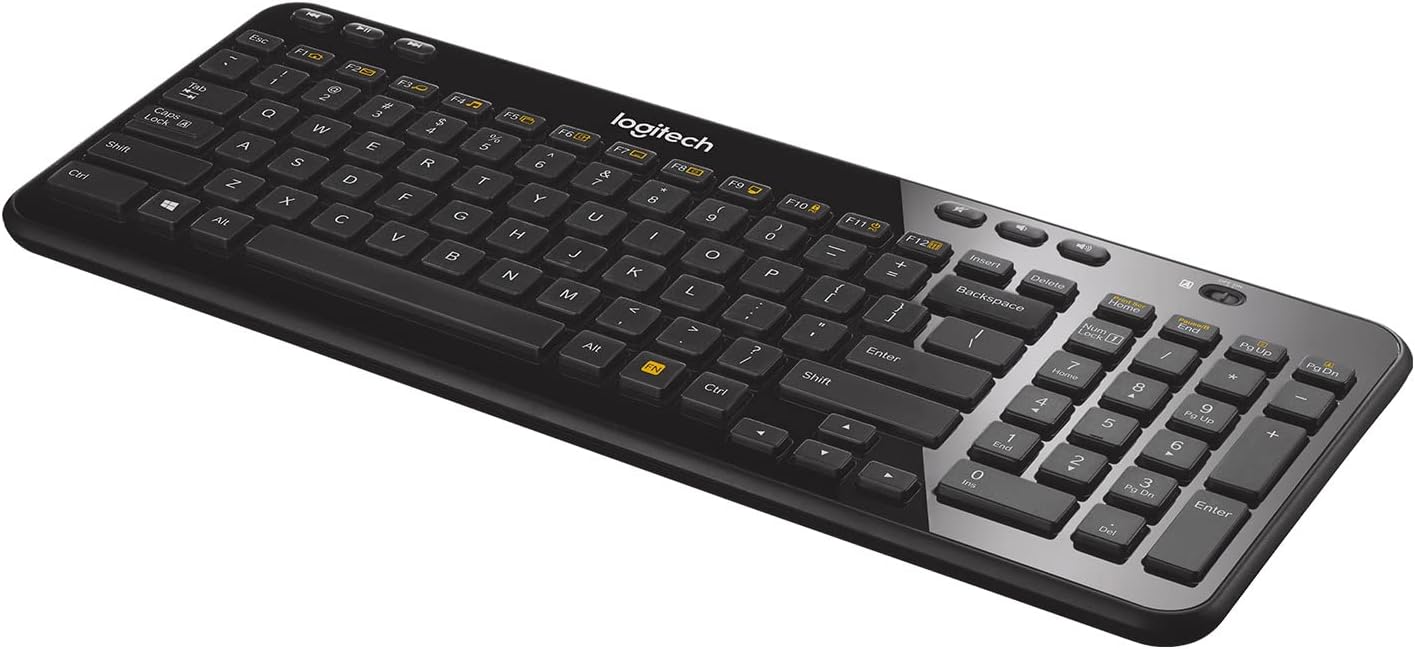
⌨️ Compact power, wired freedom — type smarter, not harder!
The Logitech K360 Wireless Keyboard delivers a compact, full-function typing experience with a 20% smaller footprint, 3-year battery life, and secure 128-bit AES encrypted wireless connectivity. Featuring 12 programmable hotkeys and compatibility with both Windows and Mac systems, it’s designed for professionals who demand efficiency and style in a clutter-free workspace.


| ASIN | B007PJ4PN2 |
| Additional Features | 12 programmable F-keys, Framed keys and modern design with height-adjustable tilt legs, Space-saving layout |
| Antenna Location | Personal |
| Best Sellers Rank | #1,475 in Computer Keyboards |
| Brand | Logitech |
| Built-In Media | USB Cable |
| Button Quantity | 104 |
| Color | Black |
| Compatible Devices | Desktop and laptop computers with available USB port that support external keyboards and run Windows 10, 11 or later Compatible Devices Desktop and laptop computers with available USB port that support external keyboards and run Windows 10, 11 or later See more |
| Connectivity Technology | Logitech Unifying protocol (2.4 GHz) |
| Customer Reviews | 4.4 out of 5 stars 8,753 Reviews |
| Enclosure Material | Acrylonitrile Butadiene Styrene |
| External Testing Certification | Não aplicável |
| Global Trade Identification Number | 00088020616562, 00097855085368, 10097855085365 |
| Hand Orientation | Ambidextrous |
| Item Dimensions L x W x H | 14.96"L x 6.14"W x 0.98"H |
| Item Type Name | Keyboard |
| Item Weight | 480 Grams |
| Keyboard Backlighting Color Support | Single Color |
| Keyboard Description | The Logitech K360 Wireless Keyboard is a compact, glossy black, wireless keyboard with programmable hotkeys, a no-lag connection, and 128-bit AES encryption. |
| Keyboard Layout | QWERTY |
| Language | English |
| Manufacturer | Logitech |
| Model Name | K360 Wireless Keyboard |
| Model Number | 920-004088 |
| Number of Batteries Required | 2 |
| Number of Keys | 104 |
| Number of Sections | 1 |
| Power Source | Battery Powered |
| Recommended Uses For Product | Personal |
| Series Number | 920004088 |
| Special Feature | 12 programmable F-keys, Framed keys and modern design with height-adjustable tilt legs, Space-saving layout Special Feature 12 programmable F-keys, Framed keys and modern design with height-adjustable tilt legs, Space-saving layout See more |
| Style Name | Without Mouse |
| Switch Type | Membrane |
| Theme | computer accessories |
| UPC | 617407426977 887594248502 172302696790 088020616562 665392051414 803982778918 804067406283 168141472688 151903014288 611101340751 132017926315 745449838950 097855085368 |
| Unit Count | 1.0 Count |
| Warranty Description | 3-year limited hardware warranty |
M**T
A Perfect Size -- Compact With Everything I Need
I have purchased this Logitech wireless keyboard (K360) several times for my Windows desktop. It is perfect, compact, easy to use, and has all of the keys and features I need. I work in the tech field and especially love, and use every single day, multiple times a day to take screenshots, the gold function (FN) key with black letters by pressing it, then the Print Scr (Home) key. That combination takes a screenshot of whatever is visible on the page. Then I paste it (Ctrl-V) into one of my two image editors and crop it to my needs. I have tried many keyboard types, and not every style has that the FN key/feature. Since I can't live without it, I don't waste my time or money buying other models. Also, many other keyboard types and styles are either too large or have a curved bottom edge for "wrist support" that is uncomfortable, or they have too many other features I don't need and will never use. For that reason, I have worn out this particular model (Logitech K360) more than once by using it so often that portions of the white letters for capital N and capital M are not fully visible. Two other benefits of this keyboard are that it has an On/Off slider button you can turn off to save battery power, or as a convenience when traveling and packing it in a suitcase or shoulder bag. Another feature I appreciate is the Windows key (bottom left) between Ctrl and Alt. Every night, I put my computer to sleep (Start - Sleep), and in the morning, I press the Windows key to wake it up to enter my password. I highly recommend this product and will continue using it until it is no longer compatible with Windows.
A**E
Another Solid Performer from Logitech! (...and some help with Unifying receiver setup.)
As a data systems analyst, I use a laptop at work for a solid 8-10 hours a day. My laptop doesn't have a dedicated numeric keypad, so I was relegated to using the wired USB keyboard that came with the setup. My laptop is usually latched into the dock when at my desk, and I have an additional 22" monitor attached. One of the problems I encountered with my stock setup was the wire on the keyboard kept getting in the way and moving my keyboard out of the way when I had to review paper documentation was a real pain. I have several full-sized wireless Logitech keyboards (the Wave being my favorite!), but they are too bulky for my particular application and workspace limitations. I saw this keyboard while shopping on Amazon and thought I would give it a try. I liked the fact that it has a small form-factor for a keyboard with a numeric keypad and it also utilizes Logitech's Unifying receiver so I could use my Logitech M510 mouse with this keyboard and only take up one USB port on my PC. I am used to full sized keys on a standard keyboard so I wasn't too sure about how well I could type with the "chicklet" keys on this keyboard. I must say that this is a GREAT keyboard and it hasn't slowed me down one bit while typing. I have owned this keyboard for almost a year now without any problems and, like I said before, in using it for 8-10 hours a day, 5 and 6 days a week, I have only changed the batteries in it one time. I would offer a bit of advice for those who don't have administrator rights to your work computer and want to use multiple Logitech devices on a single Unifying receiver. The keyboard will come already synced with it's own Unifying receiver, so you can use it right out of the box. But, like I mentioned earlier, I also have a wireless Logitech mouse that had it's own Unifying receiver, but I was unable to pair them to one receiver on my PC at work since I don't have admin rights. What I did to overcome this obstacle was to bring my devices home with me one day and pair them to one Unifying receiver on my PC at home using Logitech's Unifying software. I then took them to work the next day and plugged in the single Unifying receiver and was up and running instantly with both keyboard and mouse on one receiver. So, if you're looking for a compact full-sized keyboard for your PC, look no further and get this one. I'm certainly glad I did!
D**N
Ideal keyboard on many levels, for both PC and Mac
I work from home and this is my primary keyboard. I am a minimalist, so I don't like cords and I don't like "stuff" on my desk. This is perfect for me. I was first drawn to the small size. I can shift the keyboard anywhere on my desk or hold it in my lap if I wanted. It leaves plenty of room for my mouse to roam. I was skeptical about the feel and the battery life. I use Mac and PC laptops as well as a PC desktop. I have always been most comfortable on a full size PC keyboard - the key spacing, the feel, the general ergonomics. Laptops always feel cramped and some of the keys are often in the "wrong" location compared to a desktop keyboard. That is the one downside of this keyboard. A couple of common keys are moved to save space - namely the page up and page down, which I use heavily to switch browser windows or Excel sheets. Everything else is decent as far as location. I was really afraid of how the keys would feel coming from full size desktop keyboards. If I had it my way, they would bring back the mechanical click keyboards from the 80's and 90's PC's. This actually feels pretty good. It is a solid click and feel when buttons are depressed, great feedback. These don't feel anything like laptops with the mushy key strokes. This feels solid. I've had it for months, and I always leave it on. It is smart enough not to drain the battery when not actually being typed on. It may be a small inconvenience to some to simply switch it on and off, but the convenience of not thinking about it is great. In this way, it functions like a wired keyboard without the unsightly cords. I always prefer corded peripherals because I hate thinking about charging devices. We all have enough rechargeable products to think about. With this, it's not an issue at all. I have no problem charging or replacing the batteries once or twice a year when I use this device for most of the day, every day. Aside from feel and battery life, this has a couple more things going for it. It looks real nice with the piano black color. It's small and the back is adjustable. I leave it flat for my preference, but maybe not for everyone. Also, the media keys are quite helpful. It's clumsy to click through to volume on the screen. This is much more intuitive. A lot like a laptop in that respect. Speaking of which, the function keys are useful as well. I haven't messed around too much with the programming as I don't need the function keys too much, but I do use some of them. This is easily used on both PC and Mac. This is a natural PC keyboard, but you can customize for a Mac when you first pair it. I didn't do any customization and use it just fine with the Mac. I use both OS's pretty heavily and use the same desktop setup (monitor, mouse, keyboard, etc.) on both of them pretty seamlessly. Finally, this is a great value. I was willing to spend much more on a keyboard because I spend so much time and make my living on the computer. I wasn't convinced I would like this but gave it a try because it was only about $23. For that price, I expected it to be low quality and disposable, and I would simply try another if it didn't work out. Looks like I found what I was looking for and will be keeping it for a while.
K**S
Good keyboard for the price
I decided to get a new keyboard for mobile usage, and I saw the K360. The low price and full keypad made me go ahead and purchase it. Upon receiving and taking out the keyboard, I quickly tapped the keys, just to check the sound and feel. I quite like it, as I am used to laptop keyboards. If you are coming from mechanical keyboards, this will probably feel uncomfortable to you for a period of time, at least until you grow accustomed to it. A slight con is the fact that flipping the keyboard will cause the keys to audibly shake around. Small detail, though it really has no impact. After a few days of usage, I've noticed that the glossy finish gets dirty quite easily. A quite wipe down quickly fixes this, so no worries. Set- up is EXTREMELY easy, just take the USB port, plug it into the computer, wait a minute or two, and the drivers will have finished auto-installing. No need to go download software from the Logitech website or anything. Media keys also work well, and I've noticed no issues with them, even with programs that aren't just Windows, such as VLC, MPC, foobar, etc. All in all, I'd rate this keyboard very highly, and if you are in the market to get a cheap wireless keyboard I recommend the K360 to you. Quick Summary: Pros: + Cheap + Long Battery Life + Full keypad Cons: - Keys shake when laptop is flipped upside down - Glossy surface dirties easily
W**?
Death to the unifying receiver! But other than that it's a great keyboard.
The key spacing is a bit wide. Not a turn off... it will actually probably (no scientific backing, just what I think..) improve typing accuracy for most people in the long run and I know most people need that kind of help (no offense. I can probably do over 100 WPM with generally good grammar, but most people can't...). I also like the media keys and that, unlike many other cheap bluetooth keyboards, the F1-F12 keys REQUIRE you to press the FN key to access their alternative functions. Which this is priced very competitively to said keyboards. One competing product is the more expensive AmazonBasics keyboard. Said keyboard automatically assumes you want to use the alternative functions of the F1-F12 keys by default. A bit silly if you ask me, but then again it is technically made for Mac users. I'm using it (and now this keyboard) on my Surface Pro and my desktop computer (which, thanks to what the Z87 MPower motherboard comes with, has bluetooth connectivity built in). TL;DR: Overall the keyboard works just fine. The only annoying thing, the little "unifying receiver..." Basically if you want to use a Logitech mouse with the receiver that comes with this, you NEED software that this doesn't come with (that I saw...). Re-pairing something with this is not plug and play. So for instance in order to use my M505 mouse with this, I needed to download the Unifying software from Logitech (thankfully only about 4 megs), and then turn my mouse off and on. Overall not a hard process but I REALLY wish this would be made more clear somewhere on the product page. They just claim that you can use it like this and then give you a list of compatible devices. Maybe I just skipped over that section, but it's not really clear that you need anything beyond what Windows installs this as. Furthermore, I don't think this can be used with android devices. At least not easily. Pretty big con if you want to use this with all of your devices. I have a little micro usb to USB port cable somewhere. Long story short I almost returned this because I though the unifying thing was plug and play, but then decided to read up on it a bit more and found out that it was not. Afterwards, all is well (except, I suppose, my very probable lament that this likely will not work with my non-stock android device through USB). Edit: Actually, I was very pleasantly surprised. The Unifying USB receiver actually does work with my Android smartphone! I simply hooked in my MicroUSB to USB host adapter and then connected the receiver. Both the keyboard and mouse worked just fine. Now this is still a bit of an inconvenience because I need to carry around a little adapter with me, but still... I suppose this Unifying receiver does have some advantages in that it can also be used in the BIOS whereas bluetooth cannot. I'm bumping up my rating to 5 stars.
B**B
I like it so much, I bought two spares
Pros: - Very nice tactile keys, but not as loud as the typical full size KB keys. - One of the smallest footprint full size keyboards around(not too small and not too big), but still having the numeric keys. - Unify receiver to work with other Logitech unify supported items, such as a mouse, one receiver for both mouse and keyboard. - On/Off switch, good for saving a little battery life. But for me, it's great that I can turn it off when I need to clean it with a baby wipe, other than that, I never turn mine off. - Driver supports custom programmable features. - Low cost for such nice wireless keyboard. Cons: - The glossy black face (top) of the keyboard tends to look dirty quickly and scuffs a bit easily. Obviously Logitech designed it that way for looks. But, it's definitely not a big deal at all. So, it's a VERY minute con. Conclusion: The keys are overall a little smaller than your typical full size KB keys, but not so small that it'd make it difficult to type quickly, just the right size and spaced apart correctly IMO, I got used to it within a week or two! I like it so much that I even bought 2 extra as spares. I LOVE it, it's one of the best small footprint full size keyboards that I have ever owned. >> UPDATE 4/27/2014 Killed my first KB with a drink, so I pulled out the third "new" one to use, the on/off switch was defective, would not switch to on or off, kinda stuck in the middle, switch would not move much and is somewhat pushed into the housing slightly abnormally, the whole switch feels loose. Shipping the third defective one back to Amazon and they are in the process of shipping a new replacement. Currently using the second "new" unit. Will be ordering another one very soon, cause I always like to have at least 2 spares. >> UPDATE 6/6/2014 Had to request a replacement with Amazon for a defective spare KB. The order was submitted on 6/6/2014, around 7:45AM. The Amazon customer service personnel said "this is a new one on him, it said est delivery is 6/6/2014", we kinda joked about it that I'll get it on that same date. By late afternoon, HOLY MOLY, it was delivered. WOW, that's fast!
A**R
Cheap feel, clunky/loud key action
After only using it a day or two, I ended up returning the Logitech K360 and buying an Apple bluetooth keyboard that is a million times better. I bought the Logitech K360 keyboard after I had been through THREE replacements (free from Logitech over a period of about two years) because I bought their solar K750 and they kept failing. There are two reasons I went ahead and bought another Logitech, despite my terrible experience with the K750: 1. since I also have a Logitech mouse and unifying receiver I like the seamlessness of that setup and also it keeps one more USB port free; 2. Logitech did take care of me for the most part when the solar keyboards kept failing, replacing it more than once at no cost to me, although the final replacement was more of a hassle than it should have been. But right out of the box, I am immediately disappointed with the K360 keyboard. It has a very cheap feel (though granted also a very cheap price). From the photos and reviews stating that it has "flat keys" I was expecting similar key feel and action to the K750. This is not even close. The K360 is LOUD and awkward and requires a lot more force to hit the keys compared to the Logitech solar keyboard I've gotten used to, and it's unfortunately a lot easier to accidentally hit multiple keys at once while typing. It's so different that I am making many typos per sentence right now while writing this review, and I have to keep going back and fixing them! The other problem, though this is minor, is that Logitech doesn't make this model for Mac, so of course I'm having to make adjustments of my use of keyboard shortcuts and function keys. Though this is something I can easily get used to, and I would not complain about it if the keyboard was otherwise good. On the plus side, this keyboard was a snap to link to the unifying receiver. I wish Logitech made a wireless version of the K750 that is battery operated instead of solar b/c it would be a really nice keyboard if it weren't for the solar battery failing every 8 months or so. After these most recent experiences with Logitech, I'm just giving up on them and will spend more to get products that work better.
C**D
Best keyboard in this price range.
This is the 3rd K360 Wireless Keyboard I have purchased. Myself and my wife love this form factor. It included the number keys but keeps a size similar to a keyboard without the number keys. The chiclet style keys are reminiscent of the MacBook keyboard. It is not an exact replica but for a keyboard meant to be used with Windows it is pretty close. These keyboards work on Windows and Mac but the key layout is for Windows. The battery life on this is impeccable. I can only remember changing the batteries on these once in the last 3 years. That is a lot of battery life for a daily driver keyboard. We use these keyboards for at least 8 hours 5 days a week. Connecting the keyboard is so easy even a cave man can do it. All you have to do is download and run the unifying software from Logitech and then turn the keyboard off and then on. The software takes care of the rest. On this latest purchase, the software didn't detect the keyboard but it was working any way. The unifying receiver allows you to use another mouse with the same receiver. This is great for cube dwellers in corporate environments. You can attach the small receiver to your notebook and carry your mouse with you. Then when you get back to your desk your keyboard will work with no fuss. The keyboard comes packaged nicely. It is very simple to open and requires no tools other than removing the sticker that keeps the box closed. Included in the box are the keyboard, nano receiver, and the batteries. If you are looking for an inexpensive, work horse keyboard then look no further. This is the one you want.
Trustpilot
1 month ago
1 month ago