🔒 Secure Your Space, Anytime, Anywhere!
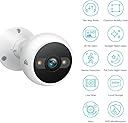
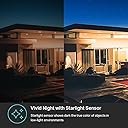
The Kasa Smart2K QHD Security Camera is an advanced outdoor surveillance solution featuring 4MP HD video, IP65 weatherproofing, and a starlight sensor for exceptional night vision up to 98 feet. With AI-driven motion detection, two-way audio, and compatibility with Alexa and Google Home, this camera ensures your home is monitored and protected around the clock.


| Night Vision | Starlight |
| Night Vision Range | 98 Feet |
| Video Capture Format | MP4 |
| Number of Channels | 2 |
| Connectivity Protocol | Wi-Fi |
| Wireless Technology | Wi-Fi |
| Connectivity Technology | Wired |
| Unit Count | 1.0 Count |
| Item Dimensions | 4.97 x 2.77 x 2.77 inches |
| Material Type | Ceramic |
| Water Resistance Level | Waterproof |
| Alert Type | Motion Only |
| Waterproof Rating | IP65 |
| Control Method | Voice |
| Room Type | Office, Garage, Hallway |
| Effective Still Resolution | 4 MP |
| Color | White |
| Additional Features | Local Recording, HD Resolution, Night Vision, Image Sensor |
| Indoor Outdoor Usage | Outdoor |
| Compatible Devices | Laptop, Desktop, Tablet, Smartphone |
| Controller Type | Google Assistant, Amazon Alexa, Android |
| Mounting Type | Wall Mount |
| Wattage | 6 watts |
| Are Batteries Required | No |
| Power Source | Corded Electric |
| Effective Video Resolution | 4 MP |
| Video Capture Resolution | 4MP, 1440P,1080P |
| Zoom | Digital Zoom |
| Focus Type | Auto Focus |
R**N
Excellent Camera! Too much incorrect information in reviews, and question section.
I have a slew of the Kasa smart outlets and they’re excellent. Cheap and just work. I watched these cameras for a long time before trying a couple. I’m glad I did. I got them on a good sale, around 42$ each. My buddy who is a professional security camera installer is blown away at their picture for a camera at 1/4 of his pro cam cost. Picture quality: The night vision is incredible. That’s usually where the picture quality lacks. Picture is crisp and clean when night vision is on. What is even more impressive is the cameras ability to use what light it can pickup at night and keep color and clarity. I have a streetlight that is in my neighbors yard and I don’t use night vision on 2 of my cameras because it can use the available light very well. I will say, I run these on 1080 as I don’t see any real difference at 2k. But just remember, it depends on the screen you’re viewing it on. For me, 1080 is plenty. Spot light: It’s pretty good. Not “impressive” but impressive for something that is running on 5V USB. Siren: Yup, it makes noise. You can even set it to initiate all sirens on your network at once. Siren and Alert settings. YES you can turn both off when motion is sensed. I don’t know what people are doing where they can’t turn that off. Motion sensing: Pretty slick, you can set a irregular squares to areas of interest you want notifications. For example. One cam captures the street, but I only want my walkway. So I set that section to only alert if movement is noticed in that area. Even nicer, you can set up to 4 different sections. Noise sensing/notification: Far too sensitive even on the lowest setting. A good gust of wind will set it off. This is nitpicking, but wanted to address it. All my noise sensing is turned off. 2 way communication. It’s OK. Not great. You can hear the people through the camera OK, but the speaker to them is not that great, but again. 42-50$ it’s very good. I will say, it’s possible that when you’re talking through the camera you mouth is far away from the mic on your phone because you’re also watching the video feed. Install is straight forward. Mount anywhere 110v is within the 10’ reach of the cord. I bought a 50’ USB extension cable to power one of these cameras where 110v is not nearby and it’s flawless. Can probably power sufficiently with even longer USB extension. Micro SD card storage: It’s ridiculous that TP-Link hasn’t accurately answered this question. At 1080, the 24/7 recording is approx 12gb a day. So a 256gb card formats at 219gb. Which translates to 18 days of 24/7 recording. The takeaway, at 1080 it takes 12gb a day. Different picture quality will increase or decrease the storage requirement. Saving from SD card. Again. I don’t know where the issue is. When a notification is received the on screen prompts shows you if it was a person or movement. Touch one off them and the software jumps to that event and starts playing. On the screen you’re watching there’s a “RED RECORD BUTTON” touch that, and it starts to record that selection of video to your phone. You can record anything, not just an event. But the event notification just helps locate the times something happens. Easy. No problem. Stop whining! For those that can’t figure that out, if you need to pull the SD card for insurance or police, you have a legit reason! You won’t be pulling the card daily. Ending thoughts. If you’re interesting in an inexpensive but high quality camera, look no further.
T**M
Excellent indoor/outdoor camera system! Kasa Cameras are outstanding!
We absolutely love our Kasa Cameras! We have four of these so that we can monitor our dog in our home (laundry room where his feeder is) and in our fenced back yard. We purchased micro SD cards for each of the cameras so that we can go back and see what has transpired when we aren't home. Set up was easy, the picture quality is excellent and the night vision is great! Highly recommended!
K**R
Nothing to complain about
Not sure why there are complaints on these cameras..... You can subscribe to the Kasa cloud service or put a micro sd card into the camera as all of the models I've purchased, since way back in 2022-2023, have sd card slots in them. The cameras I purchased have all worked perfectly a described with great imaging both night and day! I even have one outdoor camera that spent an entire year exposed to direct sunlight from sunrise to sundown and it still works perfectly fine. The app is good, not perfect, but functionally good and does what I need it to do. There are plenty of options in the settings to set the cameras to function as you need them to. If you don't have an outlet nearby a location where you would like to install your camera, purchase some cat 5 or cat 6 ethernet cable and usb to ethernet connectors and you can power the camera just fine. A guy put out a video on YouTube showing the ethernet line carries the same voltage at a long distance as the power cord on the camera. I have one camera connected to 75 feet of ethernet cable and it has been powering it for over 2 years now without issue. These are great, functional, inexpensive cameras that are a perfect fit for any household or business. My vet uses them in their facility as well. You honestly can't go wrong with these cameras for the cost to benefit savings you get.
S**R
No subscriptions, but the plug sucks!
I refuse to pay monthly fees to store my personal video (I am a techie and know how stuff gets hacked) and selected this camera. The camera overall is a great value. The app is intuitive and easy to setup. I purchased the Eufy camera and returned it for this one, and for my use it is superior. There are many reviews that give in depth pro/con of the app and user interface, but I saw none with the two pet peeves I have with this camera. First, the plug which is not waterproof- what were they thinking? This is an exterior camera and I went to plug it into my exterior 'in use' outlet (it has a cover that allows you to have a plug plugged in all the time and has a spot the electrical cord to be protected). Well, this plug is to 'deep' in order for the cover to protect it. So what are you suppose to use? I ended up having to return 2 of the 3 cameras because I couldn't install them because the plugs would be exposed to the elements. Second, I updated my router. Though the wifi name didn't change, I still had to take the camera down to reset it - no ability to update the wifi in the app. Besides those two issues, this is a solid camera and I would recommend it especially for those of us out there who refuse to pay monthly subscription services for stuff that we already own.
J**H
Honest Opinion
Great little exterior home security camera! They have clear images and decent night vision and possible illumination features. There are exclusion options and motion notifications that can be turned on and off. There is an microphone built in so that you can listen in as well as as speaker so that you can speak from the camera. Install is really easy! The unit is USB powered with included adaptor. It should be noted that the power wire does not go through the mounting bracket, so having the appearance of a wireless camera is not possible unless you drill and separate hole for the power cord. Three simple screws with drywall anchors is all you need to get this camera installed. This unit is NOT battery powered nor does it have a battery backup. This product uses the Kasa app and is very easy to setup. Connection to you home wifi is easy and straightforward. You can add an aftermarket micro SD card to expand the recording time. One of my favorite features about this camera is that I can have it running with 24/7 recording even if there is no motion detected. Getting onto the Kasa app to view the recording is very easy to navigate, and live view is even easier. Overall, I would highly recommend this product for anyone that is needing an easy, non-subscription based, home camera system. I have many of these cameras both inside and outside my home. They are the best for winning arguments with your kids about "who ate dad's last piece of pie?", come to find out... it was mom.
C**Y
Best Quality
Best quality cameras I've owned. The phone app works without issue and reliably.
S**A
DON’T BUY!!!
I bought 2. Then 2 more. Super easy to set up and install. Great resolution. So impressed I bought 2 more for 2 areas where a camera was nice but not absolutely necessary. Now have 6. If they made a solar powered version I’d put one on the top of my shed and capture the whole back yard. UPDATE: Now that these have been up for about a week I am more familiar. You either have 24/7 recording or no recording at all. There is a clip saved when triggered so there is no search for the specific event. Due to the 24/7 recording the memory card will get full and there is no loop recording. You have to reformat the card. There is a button to do so but you have to remember to check available/used memory. Because Kasa does not have a solar powered version I purchased a Tapo branded camera. Tapo and Kasa are both Tp-Link products. The Tapo app encompasses both brands but Kasa does not. The Tapo solar version has 24/7 "recording" but it sleeps when no motion to preserve battery charge. It "wakes up" to record motion. To see a live view you open the camera and it does take a bit for it to wake up for you to see live. It does loop recording and provides a quick view of triggering events so there is no searching. Because the Tapo goes to sleep and it isn't instant live view when you open up the camera I prefer the Kasa... for the powered WiFi cameras. Both are still recommended. LATEST UPDATE DO NOT BUY! They repeatedly go offline. I have spent hours trying to get them to reset and reconnect. Even though my WiFi shows to be at full strength at the site of the cameras I keep getting a message that WiFi is unstable or there is no internet connection. I’m presently looking for an alternative and expect the 6 I wasted money and an enormous amount of time to end up in the trash. These things are crap… and that’s being extremely nice.
J**J
Details & Tips to 2k Hook up
11.21.22~ Was going out of town for a few weeks & wanted cameras. Our interior Victure, which I love, aged out. No longer app compatible. The Kasa nursery cam is still holding strong, although Dual Band transfer was a challenge. Picked up a this Kasa exterior & Eufy with the same features. How did I decide on those 2? Wanted SD card compatible, Dual Band, Free Monitoring with decent app. Bc if you don't know, the App is as important as the camera so check App reviews. Kasa is TP Link & already knew their app was good. Well, good-ish but I've has Arlo & theirs' is way worse. (300 bucks I'll never see again) Plus this was 50 bucks. Another point I was looking for. Done with high end & bad CS. After 2 weeks away, where I couldn't reset if it failed, Kasa won. Eufy app repeatedly stopped. Details on this 2k 4Mp~ * App gives live & playback * App allows you to snap a pic or video in playback mode * Picture is Clear as Daylight at Noon. Even on Zoom & through a window. Yes, you can zoom but there is No Pan. When it's set, it's set. * Perched on a shelf 6' off ground had 8' wide viewing angle * Clearly hear incoming noises with no lag. Outgoing speaking delays a second or so * The flash/spotlight is Bright. Pretty sure a Police Flashlight was the prototype * 'AI' hit/miss. Trees in the wind come up as 'Person Detected'. Birds flying around are correctly identified 'Motion'. * No Middle ground on Notifications. Either your phone blows up or Turn it off. The 2k Connection~ This is The Biggest deal breaker on most cameras. You Must Have wifi hook up without 5k option You can check it now on phone or computer. **If you see your wifi name With And Without 5k next to it, this will work. If not, you have 2 Options. *Invest in a more expensive 5k camera(s) or, **Purchase a dual band router like Netgear that gives you 2k option. Comcast "upgrade" blocked 2k on their rented router. My owned one does not. *** 4 Steps to Hook up*** > Download Kasa App not TP Link. > Must connect to your wifi name without 5k next to it. > Connect camera through app. > Once you can see your place through app, you can reconnect to 5k. Your 2k connection will remain connected. At least mine did from 400 mi away. That's it. It's that easy. And It works. If you want Pan, Tilt, Zoom~ Kasa nursey cam also works well with app. No SD card option. Even though it's the same app, playback is in 'Activity' icon vs same screen tap. If anything changes I'll try to update but as of Nov 2022, I'm a fan of Kasa.
Trustpilot
5 days ago
2 weeks ago