Buy anything from 5,000+ international stores. One checkout price. No surprise fees. Join 2M+ shoppers on Desertcart.
Desertcart purchases this item on your behalf and handles shipping, customs, and support to Thailand.
⚡ Label like a pro, stand out like a boss.
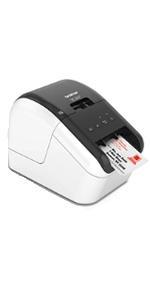
The Brother QL-800 is a high-speed thermal label printer delivering 93 labels per minute at 300 dpi resolution. Featuring innovative dual-color printing in black and red, it supports seamless USB connectivity with Windows and Mac via Plug & Label technology, enabling direct printing from Microsoft Office apps without extra software. Its built-in auto-cutter and compatibility with continuous-length tapes up to 3 feet make it ideal for professional shipping, organizational, and branding labels. Backed by a 2-year warranty, it’s the ultimate productivity tool for small businesses aiming to streamline labeling with precision and style.


| ASIN | B01N49R9KP |
| Additional Printer Functions | Print Only |
| B&W Pages per Minute | 40 ppm |
| Best Sellers Rank | #14,253 in Office Products ( See Top 100 in Office Products ) #50 in Desktop Label Printers |
| Brand | Brother |
| Built-In Media | Brother QL800 Label Printer, P-touch editor software and driver, AC power cable, USB cable, DK1201 and DK2251 starter rolls |
| Color | Black/White |
| Color Depth | 2 bpp |
| Compatible Devices | PC |
| Connectivity Technology | USB |
| Control Method | App |
| Controller Type | Android |
| Customer Reviews | 4.3 out of 5 stars 2,154 Reviews |
| Dual-sided printing | Yes |
| Duplex | auto |
| Hardware Interface | USB |
| Ink Color | Multicolored |
| Item Dimensions D x W x H | 4.9"D x 8.4"W x 5.6"H |
| Item Type Name | Color Laser Printer |
| Item Weight | 2.5 Pounds |
| Manufacturer | Brother Printer |
| Maximum Copy Resolution Black and White | 300 dpi |
| Maximum Copy Speed Black and White | 93 ppm |
| Maximum Media Size | Roll - 2.44" |
| Maximum Print Resolution Black and White | 300 dpi |
| Maximum Sheet Capacity | 800 |
| Model Name | Brother QL800 |
| Model Number | QL800 |
| Model Series | QL |
| Number of Trays | 2 |
| Other Special Features of the Product | Print amazing Black/Red labels using DK-2251 |
| Output sheet capacity | 100 |
| Paper Size | 2.4-inch wide Inches |
| Print media | Labels |
| Printer Connectivity Type | USB |
| Printer Output Type | Monochrome, Black and Red |
| Printer Type | Thermal |
| Printing Technology | Thermal |
| Processor Count | 1 |
| Resolution | 300 x 300 |
| Scanner Type | Sheetfed |
| Special Feature | Print amazing Black/Red labels using DK-2251 |
| Specific Uses For Product | Name Badges, Food Labels, Paper Label, Office Labels, Warehouse Labels |
| Total USB 2.0 Ports | 1 |
| Total Usb Ports | 1 |
| UPC | 012502647454 012502646327 |
| Unit Count | 1.0 Count |
| Warranty Description | 2 Years Manufacturer's Labor + Parts Warranty |
| Warranty Type | limited warranty |
| Wattage | 50 watts |
A**Y
Good printer, but frustrating software issues
The printer itself is good—fast, reliable hardware, and the print quality is solid. Setup is straightforward, and the Plug & Label feature is a nice idea. However, the software is buggy and frustrating to use. Every time I try to print a label, I get an error saying “cannot print – Black/Red on white paper installed, change it to monochrome media.” Even when everything is set correctly. I contacted support, but they weren’t able to resolve the issue, which makes it even more disappointing. Overall, the hardware is great, but the software seriously holds it back.
L**E
Great Diversity Labeler
Wonderful product I enjoy it. I love the diversity of this product however, I think brother should work on maybe condensing and simplifying their instruction manual a little bit, especially for us older people.
A**E
Excellent Label Printer Uses Quality Labels
The Brother QL-800 is versatile because of its software and diversity of labels available. I'm pleased with the quality of the labels, which have better longevity than the Dymo labels I'd previously used. My only disappointment after considerable use is the Brother QL-800 lacks an automated bar code addition for postal address labels, which my previous Dymo printer had.
T**H
Fast & Clear Printing – Perfect for Office Use
The Brother QL-800 is an excellent label printer with outstanding print quality. Text comes out sharp and professional, and the printing speed is impressively fast—perfect for handling large volumes of labels. Setup was easy, and it’s very user-friendly. I especially like the option to print in both black and red, which makes labels stand out more. Overall, this printer has greatly improved my workflow and is highly recommended for business or office use.
W**H
Trashing a new Brother QL-800 and and QL-81-OWC label printers-going back to Dymo
I bought two new Brother label printers – a QL‑810Wc and a QL‑800 – expecting an upgrade from my old Dymo. Instead, both have been extremely frustrating to use. The hardware might be fine, but the software is a problem. For weeks, I kept trying to work with these printers, assuming I’d eventually figure out the software. I’ve spent far too long wrestling with P‑touch Editor and the Brother drivers just to print a simple label. The software is confusing, inconsistent, and full of hidden or greyed‑out options. Orientation, label sizes, and text layout never behave in a straightforward way. What should be a simple 5‑minute setup turned into repeated trial‑and‑error sessions that went nowhere. Because I kept thinking I’d solve it, my Amazon return windows recently closed, but I am not wasting another minute on these products. I am literally trashing both units and all the labels I bought for them and going back to a Dymo labeler that just works. If you value your time and need a label printer that’s actually usable, I strongly recommend avoiding the Brother QL‑810Wc and QL‑800.
M**S
Brother QL-800 — Great Printer, Software Could Be Better
The Brother QL-800 label printer has been working very well with our POS system, which actually recommends this brand and includes built-in label templates. Because of that integration, printing price tags and labels for the business is fast, consistent, and reliable. The printer hardware itself is excellent. It’s fast, prints clean labels, and has been dependable and compatible in daily use. Once set up through the POS, it does exactly what it’s supposed to do. My main issue was the Brother software when I initially tried using the printer directly with my computer. The software that needs to be downloaded is not very intuitive, and designing custom price tags or labels wasn’t as easy as it should be. The software could definitely benefit from updates and a more user-friendly interface. Another limitation is that I did not purchase the Wi-Fi version, so labels can only be printed when I’m physically at the business. That’s something buyers should consider if remote printing is important. Overall, this is a great label printer, especially when paired with a POS system. The hardware is solid, but the standalone software experience and lack of Wi-Fi (on this model) hold it back slightly.
J**N
The Label Printer That Actually Works
I picked this up because my handwriting looks like a doctor having a bad day, and it has honestly transformed how I handle shipping, organizing, and anything that needs a label. The renewed unit arrived in great shape with no signs of prior wear. Performance is the real story here. It blazes through labels at up to 93 per minute, and the 300 dpi output is crisp and clean every time. The auto-cutter works perfectly, so there is no tearing labels off by hand. Setup on Windows is painless thanks to the Plug and Label feature, and the P-touch Editor software gives you plenty of customization options. It also integrates directly with Word, Excel, and Outlook, which is a nice bonus. One thing buyers should know going in: this is USB only, no WiFi or Bluetooth. That is fine for a desk setup but worth knowing if you were hoping to print from a phone or tablet. Also, the Brother DK label rolls use a cartridge system that auto-identifies size, which is convenient but makes the rolls pricier than generic competitors. For a renewed unit at a fraction of the new price, the value is outstanding. The build quality feels solid, the print quality matches a new unit, and it just works. If you need a fast, professional label printer and can live with a USB cable, this is the one to get.
P**T
Best product for print labels
This printer is very easy to use. I’m like
I**S
Fit for purpose
Works well
G**T
QL800
Der QL800 hat meinen alten QL500 nach etwa 4 Jahren abgelöst. Ich hatte auch schon vorher LabelPrinter von Zebra in Einsatz. Das Preis / Leistungsverhältnis ist hier aber Super und die Langlebigkeit des Vorgängermodels hat alle Erwartungen und Erfahrungen übertroffen. Bei dem QL800 erkennt man die Verbesserung des Gerätes selber direkt. Wobei die Druckgeschwindigkeit sich nur minimal verbessert hat, dafür aber ist aber das Handling und die Druckqualität merkbar gestiegen.
実**ん
思い切って買ってよかった
簡単に使えました。 宛名書きから開放されて楽になりました! 書き間違い・読み間違えが減るので、荷主(自分)だけでなく、配達の人や、送付先にもメリットが有ると思っています。 発送業務以外でも、分類ラベルなどにも使えるので、小規模な業務においては必需品レベルなんじゃないかと思います。 日本語フォントも自由に選択でき、商用フォントもキレイに印刷できます。 (よくあるゴシックだけでなく、ヒラギノ丸ゴや筑紫明朝Aなどを使えば宛名のニュアンスを差別化できるので、簡易的なブランディングにも役立ちます。) 想像よりもコンパクトで場所を取らず、しっかりしている印象なので、好きなところに適当に設置できてしまいます。 付属ケーブルが長いのもナイスです。 印刷スピードなどにも不満は感じません。
J**H
Product is good
1 st time it was working then stoped. 2 times i purchased in UAE but not working. When power connected smell and sound came.
C**S
Buen producto
Buen funcionamiento y fácil de instalar
Trustpilot
1 month ago
2 weeks ago