Desertcart purchases this item on your behalf and handles shipping, customs, and support to Thailand.
โจ Elevate your workspace with the Magic Trackpad โ where precision meets wireless freedom!
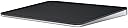
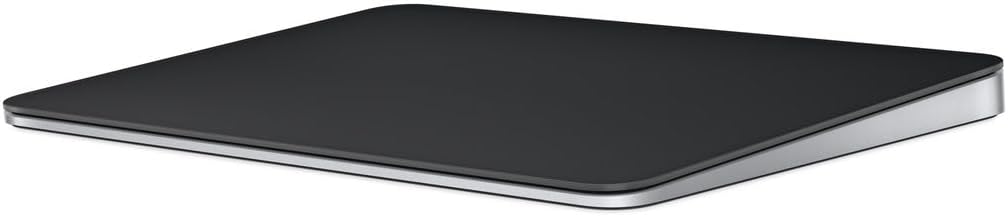
Appleโs Magic Trackpad is a premium wireless, rechargeable input device featuring Force Touch technology and a large multi-touch glass surface. Compatible with Mac and iPad, it offers seamless Bluetooth connectivity and up to a month of battery life per charge, designed to enhance productivity and ergonomic comfort for professionals.
| Brand | Apple |
| Color | Black |
| Compatible Devices | Mac mini (M1, 2020), Mac mini (2018), Mac Pro (2023), Mac Pro (2019), Studio Display (2026), Studio Display XDR, Apple Vision Pro (M5), Apple Vision Pro (M2), MacBook Air (Retina, 13_inch, 2020), MacBook Pro (14-inch, M5 Pro or M5 Max), MacBook Pro (16-inch, M5 Pro or M5 Max), MacBook Pro (14-inch, M5), MacBook Pro (14_inch, 2024), MacBook Pro (16_inch, 2024), MacBook Pro (14_inch, 2023), MacBook Neo, MacBook Air (13-inch, M5), MacBook Air (15-inch, M5), MacBook Air (13_inch, M4), MacBook Air (15_inch, M4), MacBook Air (13-inch, M3), MacBook Air (15-inch, M3), MacBook Air (15-inch, M2), MacBook Air (13-inch, M2), MacBook Air (M1), MacBook Pro (16_inch, 2023), MacBook Pro (13_inch, M2, 2022), MacBook Pro (14_inch, 2021), MacBook Pro (16-inch, 2021), MacBook Pro (16-inch, 2019), MacBook Pro (13-inch, M1, 2020), MacBook Pro (13-inch, 2020), iMac (24_inch, M4, 2024), iMac (24-inch, M3, 2023), iMac (24-inch, M1, 2021), iMac (Retina 4K, 21.5_inch, 2019), iMac (Retina 5K, 27-inch, 2019โ2020), iMac Pro (2017), Mac Studio (2025), Mac Studio (2023), Mac Studio (2022), Mac mini (2024), Mac mini (2023), iPad (A16), iPad (10th generation), iPad (9th generation), iPad (8th generation), iPad (7th generation), iPad (6th generation), iPad (5th generation), iPad mini (A17 Pro), iPad mini (6th generation), iPad mini (5th generation), iPad mini 4, iPad Pro 12.9-inch (1st generation), iPad Pro 11-inch (M5), iPad Pro 11-inch (M4), iPad Pro 11-inch (4th generation), iPad Pro 11-inch (3rd generation), iPad Pro 11-inch (2nd generation), iPad Pro 11-inch (1st generation), iPad Pro 10.5-inch, iPad Pro 13-inch (M5), iPad Pro 13-inch (M4), iPad Pro 12.9-inch (6th generation), iPad Pro 12.9-inch (5th generation), iPad Pro 12.9-inch (4th generation), iPad Pro 12.9-inch (3rd generation), iPad Pro 12.9-inch (2nd generation), iPad Pro 9.7-inch, iPad Air 13-inch (M4), iPad Air 11-inch (M4), iPad Air 13-inch (M3), iPad Air 11-inch (M3), iPad Air 13-inch (M2), iPad Air 11-inch (M2), iPad Air (5th generation), iPad Air (4th generation), iPad Air (3rd generation), iPad Air 2 Compatible Devices Mac mini (M1, 2020), Mac mini (2018), Mac Pro (2023), Mac Pro (2019), Studio Display (2026), Studio Display XDR, Apple Vision Pro (M5), Apple Vision Pro (M2), MacBook Air (Retina, 13_inch, 2020), MacBook Pro (14-inch, M5 Pro or M5 Max), MacBook Pro (16-inch, M5 Pro or M5 Max), MacBook Pro (14-inch, M5), MacBook Pro (14_inch, 2024), MacBook Pro (16_inch, 2024), MacBook Pro (14_inch, 2023), MacBook Neo, MacBook Air (13-inch, M5), MacBook Air (15-inch, M5), MacBook Air (13_inch, M4), MacBook Air (15_inch, M4), MacBook Air (13-inch, M3), MacBook Air (15-inch, M3), MacBook Air (15-inch, M2), MacBook Air (13-inch, M2), MacBook Air (M1), MacBook Pro (16_inch, 2023), MacBook Pro (13_inch, M2, 2022), MacBook Pro (14_inch, 2021), MacBook Pro (16-inch, 2021), MacBook Pro (16-inch, 2019), MacBook Pro (13-inch, M1, 2020), MacBook Pro (13-inch, 2020), iMac (24_inch, M4, 2024), iMac (24-inch, M3, 2023), iMac (24-inch, M1, 2021), iMac (Retina 4K, 21.5_inch, 2019), iMac (Retina 5K, 27-inch, 2019โ2020), iMac Pro (2017), Mac Studio (2025), Mac Studio (2023), Mac Studio (2022), Mac mini (2024), Mac mini (2023), iPad (A16), iPad (10th generation), iPad (9th generation), iPad (8th generation), iPad (7th generation), iPad (6th generation), iPad (5th generation), iPad mini (A17 Pro), iPad mini (6th generation), iPad mini (5th generation), iPad mini 4, iPad Pro 12.9-inch (1st generation), iPad Pro 11-inch (M5), iPad Pro 11-inch (M4), iPad Pro 11-inch (4th generation), iPad Pro 11-inch (3rd generation), iPad Pro 11-inch (2nd generation), iPad Pro 11-inch (1st generation), iPad Pro 10.5-inch, iPad Pro 13-inch (M5), iPad Pro 13-inch (M4), iPad Pro 12.9-inch (6th generation), iPad Pro 12.9-inch (5th generation), iPad Pro 12.9-inch (4th generation), iPad Pro 12.9-inch (3rd generation), iPad Pro 12.9-inch (2nd generation), iPad Pro 9.7-inch, iPad Air 13-inch (M4), iPad Air 11-inch (M4), iPad Air 13-inch (M3), iPad Air 11-inch (M3), iPad Air 13-inch (M2), iPad Air 11-inch (M2), iPad Air (5th generation), iPad Air (4th generation), iPad Air (3rd generation), iPad Air 2 See more |
| Connectivity Technology | Bluetooth |
| Special Feature | Lightweight, Portable, Rechargeable, Touchpad, Wireless |
T**M
Premium Trackpad That Just Works - Classic Apple Quality
This Magic Trackpad is great - like any other Apple product, it just works seamlessly. The Multi-Touch gestures and Force Touch technology are incredibly responsive and intuitive, making navigation feel natural and effortless. The large glass surface provides plenty of room for gestures, and scrolling and swiping feel smooth and precise. It pairs automatically with my Mac without any setup hassle, and the battery life easily lasts a month or more between charges. The build quality is premium with noticeable weight to it, giving it a solid, high-end feel on the desk. The black finish looks sleek and modern. While it's expensive compared to other trackpads on the market, you're paying for that Apple ecosystem integration, reliability, and refined user experience. It connect easy to any mac or apple product you have and there is no lag between the device and your machine. If you're already invested in Apple products and prefer trackpad navigation over a mouse, this delivers the polished experience you'd expect from Apple.
E**Y
Smooth, precise, and a pleasure to use
The Apple Magic Trackpad is one of those accessories thatโs hard to live without once you start using it. The large glass surface is incredibly smooth, and Multi-Touch gestures make navigating macOS feel fast and effortless. The tracking is extremely accurate, and scrolling, zooming, and switching between apps are all fluid and responsive. Pairing with my Mac was quick, and the built-in rechargeable battery lasts a long time between charges. The white finish looks clean and premium, although it benefits from an occasional wipe to keep it looking its best. If you spend a lot of time working on a Mac, whether for productivity, creative work, or everyday use, this is a worthwhile upgrade that enhances the overall experience. Highly recommended.
H**H
A Must-Have for Mac Users
If you own a Mac, the Apple Magic Trackpad truly feels like a natural extension of your system. The multi-touch surface is incredibly responsive, and the gestures are smooth and intuitive โ making navigation, switching between apps, and managing multitasking an absolute breeze. I primarily use mine while working from home, and itโs been a game-changer for productivity. The wireless connection is flawless, the battery life is excellent, and it charges quickly with the included USB-C to Lightning cable. I also love the larger surface area compared to a MacBookโs built-in trackpad โ it gives me plenty of space without feeling bulky. The black finish looks modern and professional, and pairs nicely with other Apple accessories. Itโs also much more ergonomic for long work sessions than using a traditional mouse, especially if youโre already used to Mac gestures. Itโs not cheap, but worth every dollar for the quality, design, and integration with macOS. If youโre a Mac user โ especially someone working remotely or doing creative work โ this is an upgrade that genuinely improves the experience.
L**Y
Incredible addition to the office set up
I love this trackpad. Normally I would use a regular mouse for my every day work, but using the gestures makes it super simple, easy and enjoyable. Apple always makes clean looking products and this one is a must have for me personally.
V**A
Smooth Trackpad!
I bought the Apple Magic Trackpad back in April, so Iโve been using it for several months now. The main reason I purchased it was because Iโm used to having a numeric keypad next to my keyboard. I do a lot of budgeting and work with spreadsheets, and I knew it would be uncomfortable constantly reaching up to my MacBook to use the built-in trackpad. I also connect my MacBook to additional monitors, so having a separate trackpad on my desk makes it much more convenient to use my laptop as a desktop setup. I use it quite a bit, and so far, it has worked great. Itโs very smooth and responsive, and it works seamlessly with my Mac. The battery life is also excellent, so I rarely have to think about charging it. I havenโt experienced any issues with it, and Iโm very happy with my purchase. If you prefer having a trackpad alongside your keyboard, especially if you use your MacBook with external monitors, I definitely recommend it.
R**4
3 for value, 5 for function.
A bigger trackpad that sits on your desk rather than in your Mac. I wish my MX Ergo X had three device switching rather than just two, it if did I wouldn't have gotten this. It's expensive but the multitouch stuff in MacOS is pretty cool. I'm 4 starring it because I think it's overpriced for what you get but the MacOS functionality is without fault or defect, if I could to break the scores out it would be 3 for value and 5 for function. I've plugged it into a Windows machine and it works but I have the MX Ergo X for those two so I can't say how well it works.
J**S
Ditch the MOUSE! None of your other APPLE devices use that.
I purchased an Apple Mac several years ago when they came with a decent size monitor! It came with Apple's MAGIC MOUSE the exact same kind of drive that came with my original Mac many many years ago. I couldn't believe this! My iPad doesn't have a mouse, my iPhone doesn't have a mouse, and my MacBook Pro doesn't have a mouse - they all use the same two finger / one finger slide slide and tap surface that make it so easy to go somewhere and open things. So I bought this Apple Magic Trackpad from Amazon that has the exact same multi-surface touch and tap system that all my other Apple devices use. It perfectly matches the Apple Keyboard that came with my Mac and recharges just like the keyboard and original mouse the computer came with. it is made by APPLE so it is perfectly compatible with the MAC and requires no download to operate perfectly. GET THIS and throw the mouse away!
W**.
Very easy to use pointing device.
Like most Apple products, it just works. Connecting to my computer by Bluetooth was very easy. I use it every day, and I typically have to charge it (as simple as plugging into a USB-C port on my computer) only every 4 or 5 days. It''s very easy to use, and all the typical Apple hand gestures you would use on an iPad or on a trackpad built into a MacBook Pro (for example) work here.
M**H
โญโญโญโญโญ (5/5) โ The Best Trackpad Experience โ Apple Nails It Again!
The Apple Magic Trackpad is hands down the best trackpad Iโve ever used! If you love fluid navigation, multi-touch gestures, and seamless macOS integration, this is an absolute must-have. โ Why I Love It: โ๏ธ Ultra-Smooth & Responsive โ The glass surface feels incredibly premium, and every swipe, scroll, and zoom feels effortless. The haptic feedback is so precise that I forget itโs not a physical click! โ๏ธ Seamless macOS Integration โ Multi-touch gestures like Mission Control, Exposรฉ, and app switching are super intuitive and fast. Perfect for anyone who wants an efficient workflow. โ๏ธ Large Surface Area โ The edge-to-edge glass makes gestures way more comfortable than using a MacBookโs built-in trackpad. โ๏ธ Instant Connectivity โ Pairs instantly via Bluetooth, and I never experience lag or disconnections. โ๏ธ Long Battery Life โ A single charge lasts over a month, which is incredibly convenient. โ๏ธ Minimalist & Elegant Design โ The low-profile, sleek white design looks great on any desk setup. โ ๏ธ Any Downsides? Honestly, I have zero complaints. The price is premium, but so is the experience. If youโre someone who values a high-end trackpad experience, this is worth every penny. ๐ฏ Final Verdict: If youโre an Apple user who loves gestures, precision, and fluid navigation, the Magic Trackpad is simply the best in its class. The combination of high-end design, excellent responsiveness, and long battery life makes it a perfect tool for both productivity and creative work. ๐ก Would I Buy It Again? Absolutely! A game-changer for macOS users. ๐๐
K**.
Wider, Sleeker, and Just Better!
I've used Magic Trackpads for years. I can say, the upgrades are fantastic!! The contact surface is 20% to 25% larger. The biggest Pro is the removal of batteries. Rechargeable is brilliant! Removing the batteries also greatly lowers the profile. Makes wrist fatigue less of an issue. The auto-on/off is great. I don't need to turn the Trackpad off. Once I wake my computer in the morning, there is roughly a 1-2 second lag and then the mouse responds. The black is very sleek as well.
V**I
Amazing Trackpad
Although I have a MacBook which has it's own trackpad, but I still felt like buying this trackpad. I feel more comfortable using it. It is on expensive side. You can buy Logitech's high end mouse is same price point, but you know when you are in an apple eco-system, apple products are more convenient.
V**V
"My god this is expensive why am I buying this..."
Well, after having it for a year, it's expensive but it's high quality, as good as I expected. And though I wasn't sure about this (versus a mouse), I like trackpads and a bluetooth trackpad is actually really, really nice. The size feels nice. Battery life continues to be very long, barely ever have to charge it. I like that when I use it away from my computer (other side of the room, watching stuff or whatever) it's a lot more convenient than trying to use a mouse on a couch cushion or trying to find a flattish surface to track on. Can't find anything to complain about.
M**E
Almost compatible
Bought this Apple Trackpad... for use in Linux. Thanks to the Linux kernel developers, support was added for the USB-C variant device in November 2024. All multitouch gestures work on GNOME 49, in both wired and wireless modes. However, the battery will only report 2 or 3 percent, when it has been plugged in overnight. This is not a problem as the battery appears to last a while, but means that you may erroneously get a "low battery" warning when using this device on Linux.
Trustpilot
2 weeks ago
2 weeks ago