Buy anything from 5,000+ international stores. One checkout price. No surprise fees. Join 2M+ shoppers on Desertcart.
Desertcart purchases this item on your behalf and handles shipping, customs, and support to Thailand.
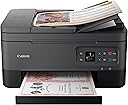
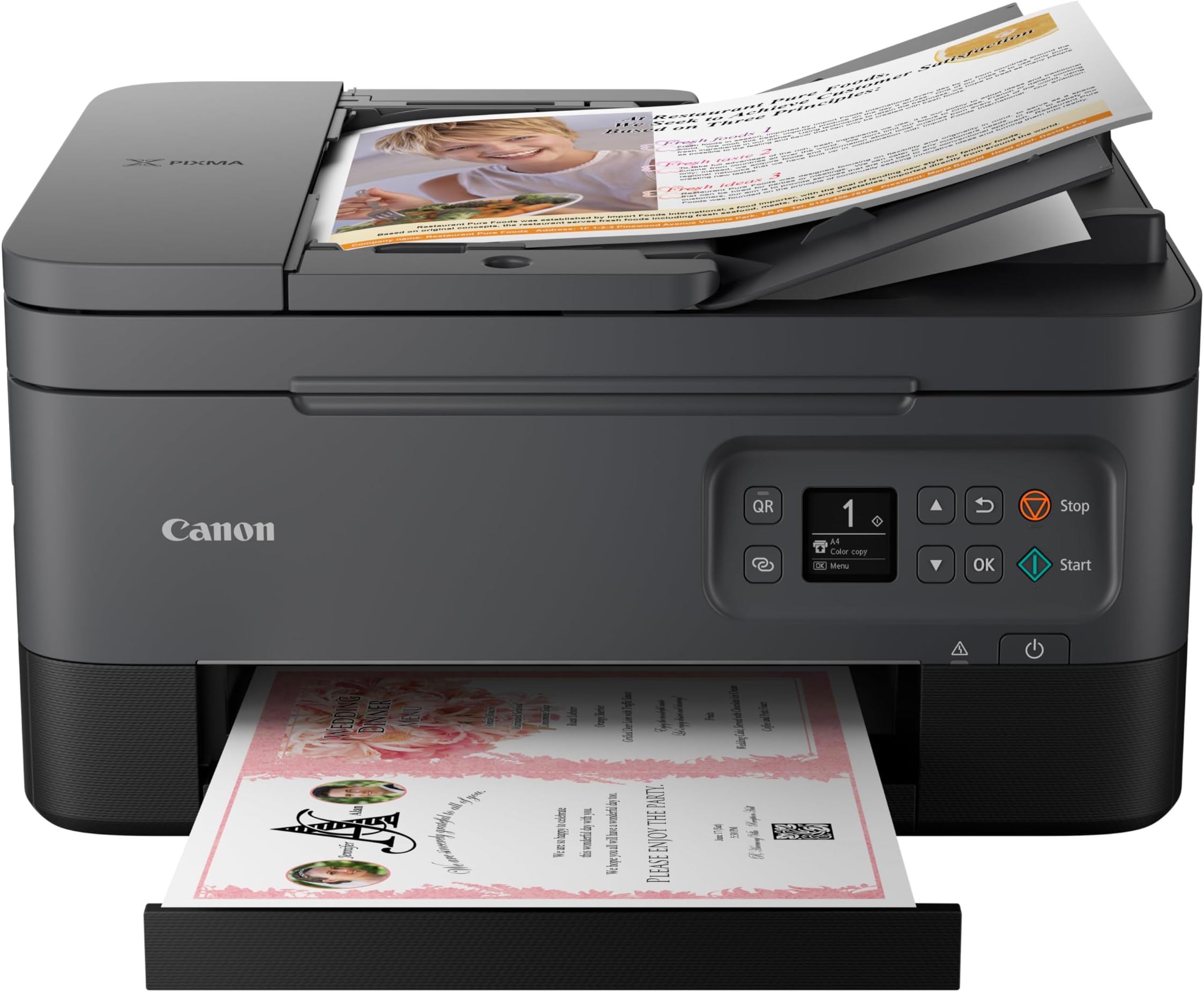
🖨️ Elevate your workspace with Canon PIXMA TR7020a — where smart meets sleek printing!
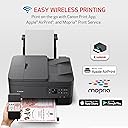
The Canon PIXMA TR7020a is a versatile all-in-one wireless inkjet printer designed for home and small office use. It delivers high-quality prints at 4800 x 1200 dpi, supports automatic duplex printing, and features a 35-sheet Auto Document Feeder for efficient multi-page scanning and copying. Connectivity options include Wi-Fi, Bluetooth 4.0 LE, and USB, enabling seamless mobile and desktop printing. Its compact footprint and compatibility with Canon’s ink subscription service make it a smart, space-saving solution for professionals seeking reliable, vibrant printing with minimal hassle.

| ASIN | B09TGB62D8 |
| Additional Printer Functions | Copy, Scan |
| B&W Pages per Minute | 13 |
| Best Sellers Rank | #27,173 in Office Products ( See Top 100 in Office Products ) #40 in Ink Tank Printers |
| Brand | Canon |
| Built-In Media | PIXMA TR7020, Documentation, Set of Standard Ink Cartridges, Power Cord |
| Color | Black |
| Color Depth | 16, 8 Bits |
| Color Pages per Minute | 6.8 ppm |
| Compatible Devices | PC, Smartphones |
| Connectivity Technology | wireless |
| Control Method | App |
| Controller Type | Android |
| Customer Reviews | 3.9 out of 5 stars 3,390 Reviews |
| Display Type | OLED |
| Dual-sided printing | Yes |
| Duplex | Automatic |
| EU Spare Part Availability Duration | 1 Years |
| Hardware Interface | USB |
| Ink Color | Color |
| Item Dimensions D x W x H | 15.9"D x 14.4"W x 8.2"H |
| Item Type Name | Inkjet Printer |
| Item Weight | 18.1 Pounds |
| Manufacturer | Canon |
| Maximum Copy Resolution Black and White | 600 dpi |
| Maximum Copy Resolution Color | 1200 x 2400 dpi |
| Maximum Copy Speed Black and White | 11.8 ppm |
| Maximum Media Size | 8.5 x 14 inch |
| Maximum Print Resolution Black and White | 1200 dpi |
| Maximum Sheet Capacity | 200 |
| Maximum print Resolution Color | 4800 x 1200 dpi |
| Model Name | PIXMA TR7020a |
| Model Number | 4460C052 |
| Model Series | PIXMA |
| Number of Trays | 2 |
| Other Special Features of the Product | Auto Document Feeder, Display Screen, Network-Ready |
| Output sheet capacity | 200 |
| Paper Size | 8.5 x 11, 8.5 x 14 |
| Print media | Glossy photo paper |
| Printer Connectivity Type | wireless |
| Printer Output Type | Color |
| Printer Type | Inkjet |
| Printing Technology | Inkjet |
| Processor Count | 1 |
| Resolution | 4800 x 1200 |
| Scanner Type | Flatbed and Auto Document Feeder |
| Series Number | 52 |
| Special Feature | Auto Document Feeder , Display Screen, Network-Ready |
| Specific Uses For Product | home office |
| Total Usb Ports | 1 |
| UPC | 013803348255 |
| Unit Count | 1.0 Count |
| Warranty Description | 1 year |
| Warranty Type | limited warranty |
O**V
Whoohoo - unlike HP - this printer WORKS!
This is the 3rd printer in the past 2 weeks I've purchased. The first two were HP. The first HP had a broken scanner. The replacement HP seemed like a nice printer, but the HP Smart app was beyond frustrating. I had used HP printers for years, then recently tried Epson because I liked the ink-tank idea. In comparison to HP & Epson - this Canon meets my needs MUCH BETTER. I will never buy another HP - the invasive HP Smart app with all of it's requirements to be signed into your 'account', and be connected to the internet is bad enough. But the app simply doesn't work, all it does is spin and spin and spin......trying to scan a couple of sheets of paper with HP can take an hour. Epson print heads clog, so if you want to print, you may have to clean the heads twice, and then print the document a couple of times before it's acceptable quality, a waste of paper and time. This Canon printer is so REFRESHING! It quietly and without fuss does exactly what it's supposed to do! Setup was a total breeze, in a few minutes I had the printer drivers and the utility app installed on 2 laptops and a smartphone. The utility app is simple to use, and has the functionality I needed. The print quality looks good. I've not tried the photo printing options yet, but that is a low priority with me. Overall I am thrilled with this new printer!
M**D
Exceptional home/office all-in-one — versatile, high-quality and smart
I recently bought this printer and can confidently say it delivers everything I was hoping for (and more). From setup to daily use, it’s been outstanding. Why it impressed me: Setup was fast and hassle-free. The compact footprint keeps it from dominating my workspace. Print quality is excellent for the money, giving crisp black text and vibrant color photos. It includes duplex printing and an Auto Document Feeder (ADF) for multitasking: great for scanning/copying multi-page documents. Mobile and wireless options are well catered for — WiFi, mobile printing apps, AirPrint/Mopria support, which makes printing from phones/tablets seamless. Where it really stands out: In a mixed home + office environment, I had tasks ranging from photo prints, scanned contracts, daily document prints and it handled them all smoothly — no hiccups, consistent quality, and good speed. A few small things to note (but not deal-breakers): It’s not the fastest printer on the market, so if you’re printing huge batches constantly you might see slower times than a dedicated office machine. It’s still an inkjet, so ongoing ink cost will matter depending on your volume. If you require ultra high speed for heavy office work, there may be faster options — but for most home/SMB uses this is more than enough. Bottom line: If you’re looking for a reliable all-in-one printer that offers great print quality, useful features like an ADF and duplex printing, and modern connectivity — this a fantastic choice. I highly recommend it.
C**K
Works Fine When It Is Recognized - AND READ DISCLAIMER
It works fine when it is recognized, but that in there lies the problem. Nearly every time I want to use it with my computer, it says it is offline. I can print from my phone just fine because it is obviously not offline, and I can use the scan function just fine, but printing, nope. At first I tried restarting my computer, which worked but is obnoxious when you are in the midst of work and have a bunch of things open, but then I realized that I can go to the printer settings, and print a test page. That kicks off the original item to be printed and also prints a test page. This is both a waste of time and money (ink and paper). The first time I printed an image, it was muted to all heck. I was like no way this is the way. So I Googled the issue. Now I can't remember how I fixed it, and I am sure I will have to Google it again the next time I want to print an image and actually see the colors. When it does print without issue, the quality is good. It is loud, which I didn't think would bug me because I don't print that often, but it is kind of annoying. Nothing I can't manage though. The scan function takes awhile, but so did my old printer, and this one has a document feeder that my old one did not, and that has been WONDERFUL. The paper tray doesn't pop out automatically, a feature my old printer had, and I miss that because where I have the printer, I don't like to keep the tray out because I fear it will get broken by my wonderful daughter who pays no attention to her surroundings. The software doesn't have Canon in the name, which makes it hard to find if you don't remember that it is IJ blah blah blah. It also looks like it is straight out of the 90s, and just has mediocre functionality. You do need an app to print from your phone. There is a Canon app, but I think the Mopria Print app is the one you want (Android). Basically do not get this printer if you don't have some level of technical acumen or if you don't have admin rights to your computer, and be prepared for having to do some research when things don't go as expected. DISCLAIMER: If you are buying this to use with a work computer to which you do not have administrative rights to create new users, DO NOT get it. This printer requires not just an admin user to install the software but a LOCAL admin user. So calling IT won't get the job done unless they believe you that it needs a local admin user and are willing to create one.
A**L
Cheap multi-function printer, decent print quality but not fast; hoping it lasts
Greatly debated between this lower cost inkjet and the similarly rated Canon MF656Cdw which was nearly 4x the price but a color laserjet. I bought the TR7020a inkjet because it was the highest rated printer with a document feeder for less than $100. Generic ink cartridges are fairly affordable and my wife got tired of our black & white laser printer (which had really cheap toner) which was getting flaky on print quality (she never liked giving up color). Pluses: + two paper feed systems so you can set up for different printing types (letter, photo paper, envelopes, etc). + good print quality- even small text is crisp and clear. + only two ink cartridges (black and multicolor). + duplex printing works well. + does have an auto document feeder, scanning was acceptable quality but had some issues (see below). + Canon U-scan utility has a pdf editor (only works with Canon scanner generated .pdf's but it does make it easy to compile multipage .pdf's without Adobe pro). + fairly compact, although the output tray sticks out a lot. + has USB port and wifi network which both work ok. + bright light sweeps across the front of the printer to let you know it's doing something (would be annoying if the printer was right next to your face). Negatives: - pretty slow printing, probably the slowest printer I've owned in a long time - if you only print small amounts like us you may be able to live with this. If you need to print regularly fast, this is probably not the printer for you. - really slow scanning (see video which is scanning one page at 200dpi resolution directly through a USB cable and the Canon software). - scanner jams/skips pages regularly. I had two distorted pages, 5 missed pages, and 3 jams while trying to scan an 18 page document (which required multiple tries - the included Canon Uscan PDF editor software made it fairly simple to construct a complete document from partial scan successes.). - cheap feed and output trays despite a hefty 18lb printer. - front paper tray only holds 100 sheets. - screen is tiny, and navigating is slow - good luck entering a wifi password with just a few buttons (worked eventually) and no useful touchscreen. - ink cartridges are 'starter' standard capacity (200 sheets?), printer says to order more ink immediately. - XL ink cartridges are claimed ~400sheets, will see how that goes. - includes a really short USB cord, will probably need a longer USB to USB-A cord if the back of your computer is not right next to the printer. - no network port connection (can only network via direct wifi, connect to a wifi router, or USB port). We only use a printer intermittently and have had trouble in the past with inkjets clogging (don't think the much cheaper-per-page ink tank printers would work for us) - I'm hoping inkjets have improved in the last few years and we print more regularly with this one. If I had to use the document feeder regularly I would probably return it, but I only scan multi-page documents a few times a year and they are usually pretty short. Based upon the above, I'm rating this printer 4 stars. It would be a 3 star printer if not for the really cheap price (decent features to price ratio). If it holds up and doesn't chew through ink too fast I will be happy with this purchase. If it doesn't hold up, I will probably give up on inkjets for awhile and try the color laserjet.
K**W
Quality matters
Easy to setup, has several features my previous copier didn't have, took extra time to receive, but I chose ground that was free. Looks very nice on your desk. I use it for personal and business.
J**Y
Love it!
I had a previous printer that suddenly stopped taking the paper no matter what I did it just wouldn’t reach down to take the paper in so I had to replace it. I am so glad I did have to replace it because this printer is heads above my previous one even when it was working at its best! Setting it up with my iPhone was a little tricky but I was able to do it with extra steps that they give you if the auto set up doesn’t work. I haven’t set it up with my Mac air yet but I’m sure it will be a breeze. it’s also nice that there is a place in the back of the printer to put photo paper. You don’t have to use the back feeder except for photo paper. The front of the printer has a tray that easily moves out for you to place paper in it and then the catch tray that retrieves what you printed pulls out right above the paper tray. It has a multi page feeder on top for wanting to copy multiple pages, as well as two sided printing and one single page printing if you just lift the top and place the image on the glass. putting the ink in as much easier than my old printer where I had to reach inside the guts. With this printer you just lift the top and you can easily access the printer cartridges. It does come with one color and one black-and-white cartridge but I’m kind of guessing that they’re probably not as full as when you buy a brand new cartridge by itself. But I don’t print very often just the occasional label every now and then so I think I’m going to be fine. I do recommend this printer but not if you have older operating systems only if you have modern ones. I wasn’t able to get it to work with my iMac which is from early 2000. But I have the latest update for the iPhone and I’m using an iPhone 12 Pro Max and I can print from there. PS: the image I am attaching is a full letter size printout of a picture that was about 5 x 6 and printed on regular letter paper, not glossy photo paper. It’s a little on the soft side but when you see it in person, it’s good enough to put in a frame and hang on the wall. PPS: I didn’t rate tech-support because I am thinking they mean over the phone tech-support and not just the how-to for setting it up that you can get online. Since I haven’t used one-on-one tech-support, I decided not to rate that. But as far as what’s given to me online, it was very easy to understand and simple to set up.
A**R
Quality printer with easy setup
Last spring my trusty Canon printer finally died, so I made the mistake of replacing it with another brand printer that was less expensive. Big mistake! That printer was problematic from the get go and finally reached the point where it wasn't worth the trouble. I have had my TR 7020a for a few days, and, so far, am very happy. It was well packaged with a "Getting Started" brochure which gave setup instructions and also a Canon URL for setup, which was straight forward with no hitches. After setup the Canon URL takes you to instructions to connect to a computer/smartphone. The printer is wireless capable as well as USB, and the USB connectivity was one of the reasons I purchased this printer, having read many reviews on wireless printers indicating a lot of difficulty with the connection to a computer. But for me, it couldn't have been easier. I run a Windows 8.1 HP desktop with AT&T wireless modem and router. Using the Canon URL to connect, I was up and running in about five minutes and have had no issues since. It couldn't have been simpler to connect the printer wirelessly. So far it prints and scans flawlessly. I don't need the fax and can't comment on it. One really nice feature is the rear paper feeder for photo printing. That way you don't have to change paper in the main cassette, and the printer automatically detects when the rear feeder is extended. The print quality is excellent, especially the color, which is somewhat surprising since there is only one color tank and one black and white. In my opinion using the Canon photo paper makes a difference. I have had a lot of success with Canon printers; wish I had purchased this one originally.
P**E
Huge disappointment, worst printer I owned
Major issues are: - Extremely slow to start printing (keeps moving the head and making noises for 30-60 seconds before it actually starts printing, every time) - Wifi constantly disconnects, sometimes during print or scan jobs, failing the whole thing - Even though the description is littered with terms like "auto feeder" and "auto duplex", it fails to mention that only printing is duplex, but not the document feeder (no duplex scanning). I've owned many printers all the way from the old school dot matrix printers to color laser (small business versions). I'm well aware that deskjets are slower than laser printers, but this deskjet is on another level when it comes to how slow it is. Whatever it is doing before each print job, it takes forever before it even starts printing (cleaning the head? who knows?) With the factory default settings, it goes into sleep mode after a few minutes (I think it was 5 min) but the kicker is, sleep mode disconnects the wifi so you can't send it a print job without physically pushing its buttons to wake it first. I changed that setting to disable sleep mode, but wifi keeps disconnecting constantly. More than half the time I try to print, it's offline (when wifi is on and connected, there is a little light that lights up on the left side). When it's offline but not sleeping, you can't get it to connect it easily. I did not find a menu option to get it to reconnect. I have to turn it off and then turn it back on (which takes quite some time). And the best part, wifi keeps disconnecting in the middle of jobs, failing them so you need to go through the reboot cycle and restart the whole process. I got this without much research because it was on a crazy sale and I had to decide fast. I don't print or scan a whole lot so I needed something cheap that would get the job done. Honestly even though I don't use it a whole lot, this printer is such a huge headache that I'm about ready to throw it in the trash.
M**N
Missing cable and missing ink cartridge
Box arrived without a cable and without an ink catridge.
M**S
Excelente producto
Cumplió mis expectativas muy bonita y llegó rápido
L**Z
Cuidada
Cumple su función llego en tiempo pero trajo poquita tinta pero por el precio estuvo bien
D**O
Mucho gasto
No cumple la calidad y el gasto en cartuchos es muy elevado
Trustpilot
2 weeks ago
3 weeks ago