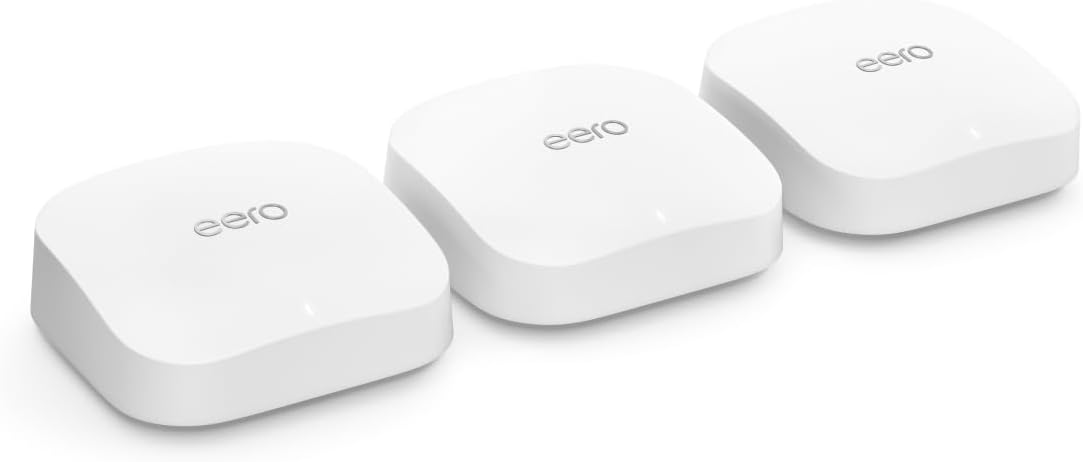
Amazon eero Pro 6E mesh wifi system - Supports internet plans up to 2.5 Gbps, Coverage up to 6,000 sq. ft., Connect 100+ devices, 3-pack
Product ID: 430532138
⚡2.3 Gbps max speed
📶6,000 sq. ft. coverage
🔗Connects 100+ devices
Desertcart purchases this item on your behalf and handles shipping, customs, and support to Thailand.
🚀 Elevate your home network to pro-level speed and coverage — don’t get left buffering!
The Amazon eero Pro 6E mesh Wi-Fi system delivers tri-band Wi-Fi 6E technology supporting speeds up to 2.3 Gbps and coverage up to 6,000 sq. ft. Designed for modern smart homes, it connects over 100 devices seamlessly with patented TrueMesh technology to reduce dead spots. Easy app-based setup and management make it ideal for professionals demanding reliable, high-speed internet across large spaces.
| Wifi coverage | Covers up to 6,000 sq. ft. |
| Type | Router (connects to modem as primary router) |
| Supported speeds | Supports network speeds up to 2.3 Gbps — including wired speeds of up to a gigabit and wireless speeds of up to 1.6 Gbps. Ideal for gigabit+ internet plans (up to 2.5 Gbps using the 2.5Gb Ethernet port). |
| Wi-Fi connectivity | Wi-Fi 6E tri-band concurrent 2:2:2 (802.11ax); compatible with older Wi-Fi standards |
| Wired connectivity | One auto-sensing 2.5 gigabit Ethernet port and one auto-sensing 1 gigabit Ethernet port |
| Speed Rating | AX5400 |
| Smart Home Connectivity | Works with Alexa, Amazon Frustration Free Setup, 802.15.4 radio (Zigbee, Thread), Bluetooth Low Energy 5.0 |
| Electrical Rating | 100-240V AC, 50-60 Hz |
| Processor, memory and storage | 1 GHz dual-core processor, 1024MB RAM, 4GB flash storage |
| Network Security and Services | Profiles, WPA3 (eero Labs feature), WPA2, TLS v1.2+, VPN passthrough, IPv6, NAT, UPnP, port forwarding, DHCP, static IP, and cloud connectivity. |
| Required for setup | Supported iOS or Android device and internet service (with cable or DSL modem, if required). See requirements. |
| Temperature Rating | Operating: 32˚F-104˚F (0˚C-40˚C) Storage: -13˚F-140˚F (-25˚C-60˚C) Operating humidity: 0%-90%, non-condensing Operating altitude: <3000m |
| Dimensions | 5.6 in x 5.4 in x 2.0 in (142mm x 138mm x 51mm) Actual size and weight may vary by manufacturing process. |
| Warranty and Support | 1-year limited warranty. Free customer support is available 7 days a week. Learn more about warranty and support. |
| Software Security Updates | This device receives guaranteed software security updates until at least five years after the device is last available for purchase as a new unit on our websites. Learn more about these software security updates. |
| Subscription | 30-day eero Plus trial is limit one per new eero customer account. Additional terms apply, see the eero Plus Terms of Service for more details. eero Internet Backup performance will vary and you are responsible for data charges with backup connection providers. Learn more about eero Internet Backup requirements, performance, and compatibility here. |
| Legal Disclaimer | Some features require linking your Amazon account, and downloading the Alexa application or using a compatible Alexa device. Internet connection speeds and availability depend on your internet service provider; if your internet service provider does not provide you with the maximum supported speed, you will not experience that maximum speed. Maximum network speeds, if applicable, reflect combined supported speeds across wired and wireless clients. Maximum wireless signal rates are derived from IEEE 802.11 standard. Specifications assume wired Ethernet connection; your experienced speed may vary when connected to an eero device that is configured as a wireless extender. Coverage estimates are based on normal use conditions. Actual range and performance can vary, and maximum supported speeds may not be available to all customers, due to factors such as local regulations (including power limits), network configuration, interference, connected devices, device usage, building materials, and obstructions. Specifications are based on use of a Wi-Fi 6 or later generation client device that supports 160 MHz. For more information about eero performance, visit support.eero.com. Combining eero Pro 6E devices with older generation eero devices on the same network may result in reduced performance across the network. *“Wired speeds, without the wires” assumes a benchmark of 1 Gbps wired port speed, and use of either i) 6 GHz on mesh backhaul and use of a client device that supports 160 MHz, and/or ii) a Wi-Fi 6E or later generation client device that supports 160 MHz. |
Trustpilot
1 month ago
1 week ago