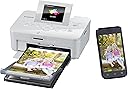
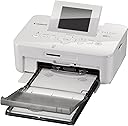
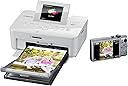
📸 Print your story anywhere, anytime—because memories deserve to be vivid and wireless.
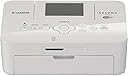
The Canon SELPHY CP910 is a compact, portable dye sublimation photo printer designed for professionals and enthusiasts who demand lab-quality 4x6 borderless prints. Featuring wireless AirPrint and Wi-Fi connectivity, it supports direct printing from smartphones, tablets, and cameras without drivers. Its unique access point mode enables printing without a network, making it ideal for on-the-go use. Lightweight and efficient, it produces vibrant, durable photos quickly and cost-effectively, perfect for personal use or professional photo booths.
| ASIN | B00HK8V4PK |
| Additional Printer Functions | Print Only |
| B&W Pages per Minute | 1 |
| Best Sellers Rank | #481,953 in Office Products ( See Top 100 in Office Products ) #1,392 in Photo Quality Paper |
| Brand | Canon |
| Color | White |
| Color Depth | 8 bpp |
| Color Pages per Minute | 1 |
| Compatible Cartridge | Canon-branded cartridges specifically designed for the Canon SELPHY CP910 printer |
| Compatible Devices | Camera, Smartphones |
| Connectivity Technology | Wi-Fi |
| Control Method | Touch |
| Controller Type | iOS |
| Customer Reviews | 4.2 out of 5 stars 1,522 Reviews |
| Display Type | LCD |
| Duplex | Simplex |
| Global Trade Identification Number | 00013803225020, 04960999984650 |
| Hardware Interface | USB |
| Ink Color | Black |
| Item Weight | 1.8 pounds |
| Manufacturer | Canon USA Inc. |
| Maximum Copy Resolution Black and White | 10000 |
| Maximum Copy Resolution Color | 10000 dpi |
| Maximum Media Size | 4 x 6 inch |
| Maximum Print Resolution Black and White | 10000 dpi |
| Maximum Sheet Capacity | 54 |
| Maximum print Resolution Color | 10000 |
| Model Name | CP910 |
| Model Number | CP910 WH |
| Model Series | SELPHY |
| Number of Trays | 1 |
| Other Special Features of the Product | Compact Photo Printer |
| Output sheet capacity | 54 |
| Paper Size | 4 inch x 6 inches |
| Print media | Labels, Paper (plain) |
| Printer Connectivity Type | Wi-Fi |
| Printer Output Type | Color |
| Printer Type | Dye Sublimation |
| Printing Technology | Dye Sublimation |
| Resolution | 10000 |
| Scanner Type | document |
| Series Number | 9 |
| Special Feature | Compact Photo Printer |
| Specific Uses For Product | personal |
| Total USB 2.0 Ports | 2 |
| Total Usb Ports | 2 |
| UPC | 013803225020 |
| Unit Count | 1 Count |
| Warranty Description | 1 year limited |
| Warranty Type | limited warranty |
S**N
Good for snapshots and printing your favorite photos that live on your phone
This is an affordable printer for snapshots that would otherwise live on your phone forever. The printer itself comes with 5 sheets of 4x6 paper and a trial sized ink ribbon. This trial stuff prints out exactly 5 photos, just like it says it will. The ink and paper packs that you can buy separately print out exactly the amount of photos stated. For example, I purchased the Canon KP-108IN Color Ink Paper Set, which includes enough paper and ink for 108 prints. There are 3 ink ribbons included, so they each print 36 prints. Each time I print out 36, I am prompted to change the ink ribbon. It's that simple. There is a free app you can download from the App Store, for iPhone users. I assume there is something similar for people with Android phones. You can print other sizes besides 4x6. If you have some odd shaped photos, or maybe some other common aspect ratios like 5x7 or 8x10, just select the "border" option within the Canon Print app on your phone. It will shrink it down, but it will stay in proportion to the original photo. I like selecting the border option on all my photos, even those with the 4x6 aspect ratio, because I know the entire photo will be there and won't be clipped off a little. You can also print multiple photos on one sheet, although I have not tried that myself. I would imagine the photos would be scaled down extremely tiny to fit on the 4x6 sheets. Higher resolution photos, say from a DSLR, tend to print out much nicer than your standard cell phone camera photo on the Selphy.Because the prints are small, most photos will turn out acceptably sharp. There have been a few times where I'll try to print something and the app on my phone will simply crash and I'll be taken back to my home screen (I have an iPhone 6 Plus). Usually this happens when I try to print a very large file, normally resulting from a print that I have scanned in very high resolution. I just scale back the size of the file and keep trying until it prints. Kind of annoying, but I guess the app can handle only so much data. Even with the few app crashes I have experienced, for $99 bucks it's a good value, IMO. The prints are not pro lab quality, but what do you expect for this price? All the prints I have made on this thing have been pleasing to the eye. Some of my photos come out a little drab, and if there is a person in the photo with dark hair, the hair will print out as an dark blob, void of details. But I don't really care, since I am using this for snapshots. If you don't nitpick and take the print for what it is, then it's the perfect gadget for liberating your photos from your phone and showing them to the world. Best of all, this thing is extremely easy to use. It's a no-brainer. I have read the complaints about people running out of ink before they run out of paper, but so far I have not had that problem.
P**1
So small! Quick print! A lot of potential
First off I have to say I'm SUPER impressed with prime 1-day shipping avail for this product (plus paper packs)! I ordered maybe 9am and it was delivered by 5pm . I watched a few you tube videos on using/review before I went ahead and ordered. Set up was just as simple i didn't even bother reading the guide (usually it just makes it more confusing). I was printing within minutes of unboxing!! For its small size, the print was fast and fun to see the layer of yellow-mengenta-pink then the clear coating. The lcd is not touch navigation though so it's awkward because all my devices use touch even my big printer. Minor detail though. Though having to browse through the images on an SD card gets aggravating using this > old school method. Connecting to my iPhone 6 was easy... but connecting my computer gave me a little road block ---i was not clear on what's the access point was. Nothing that a quick google search didn't come up with the answer: search "selphy access point manual" (PS using a macbook air, no CD slot). Once I found the manual it was easy from there. I think the photo I print from my computer is absolutely BETTER than the one i print from direct from the SD card. I printed from my phone too and it was great as well. I'm loving the CONVENIENCE of printing what i want! I love sending postcard during my trip. I use to make sure to get some photos printed on-site and then make postcards out of it but finding photo printer in a foreign country is not always easy. So this little gem will be so awesome for the personalized postcard route. Love the crafting possibility! <3 I gave it a 4 star (because I expected crisp vivid photo) but i've changed that! I understand the compact size has its limit, its portability is awesome spec, and the pictures are very very good! Can't ask for better quality at such convenience. Have fun with it!
S**S
Portable and Easy to Use - Also Way Too Much Fun!
I recently purchased a Canon SELPHY CP910 Portable Wireless Printer from Amazon at a great price. I had heard pros and cons about this product vs the Epson Charm. Cons: Not a true 4 x 6, somewhat smaller due to the perforation lines at either end of the photo Colors seem a bit subdued (softer?) than a professional printer Cost a little more than professional printing at Costco or Walgreens, etc Pros: Convenience, Convenience, Convenience! Easy to set up, even for someone tech-challenged (like me) Easy to use Prints wirelessly from phone, tablet, computer; prints from some memory cards; prints via USB cable Lightweight small size You have the ability to customize your color - I played around with it some more and got a sharper picture and truer colors by changing some defaults. I actually printed the same image 5 different ways and wrote the settings on the back of each one so I could compare and know what I liked best. You are also able to print sepia and black and white although I have not tried that yet. You can print multiple images on one 4 x 6 platform using the software on the printer I bought this to use with my Project Life Pocket Scrapbooking. It is great when you decide you need a particular photo NOW...and through the use of various apps, i.e. Project Life, PicFrame etc, you can print small collages on a 4 x 6 piece of photo paper. I am truly amazed how easy this is to use right out of the box and with Amazon's good price, it's an affordable luxury. Note: you get enough toner and paper to print 5 photos with the printer - BE SURE TO BUY A REFILL PACK AT THE SAME TIME YOU BUY YOUR SELPHY
A**Y
Review for... FIVE YEARS LATER
I just wanted to get onto amazon and say how amazing this little printer is. I bought myself one in 2015, loved it so i gifted it to others, and I've been using it on/off for the past five years. I absolutely love how simple and usable it is - the photos print insantly, are easy to edit with the Selphy app, and the ink is dried when it comes out. My favorite usage has been printing out photos to mail to my friend in the army - it's perfect for decorating walls with your instagram photos, inspirational collections, and for grandparents too! Would buy again 10/10. **also, since the beginning I've followed someone else's advice where you need to remove the ink cartridge before turning the power ON or OFF. that makes each cartridge last a full set of paper and not go to waste.
A**S
Great little printer, you get much more use of this than the more expensive alternative instant printers...
I've been considering a "mobile printer" for a while, after deciding that getting a small printer that printed photos from my phone was more practical than buying an instant film camera (i.e. instax cameras or fujifilm's versions etc). I also looked around trying to find examples of printed images from other mobile printers such as the Polaroid Zip and the Fujifilm Instax printer. I ruled out Fujifilm's because they only print on credit-card sized paper, which then has a border, making your actual image even smaller. I actually originally ordered the Polaroid Zip, finding it's print quality better than Fujifilms, and also the option to print borderless. However, within 10 minutes I was regretting it, cancelled the order, and headed right back to the SELPHY on amazon. Can I carry it around and print from it directly from anywhere I am, without it plugged in? No. But everything else the other printers offered, it still can do, and will MUCH better print quality. 1. If I want a "smaller" picture, I can do that. I can even print a square picture WITH borders, snip off the top border, and there it is - a polaroid-esque print. I can print collages of multiple photos. I can print photos with borders around them to print them smaller if I'd like. I can print borderless to a 4x6 paper. This printer does it all, and for what? For LESS. Much less than it's "competitors" that though they may be more instant, do not produce great prints. And the cost per print is far, far less. Even more so if you print multiple images on one sheet. It's crazy to me how much cheaper this was, and it was a big reason besides all that I mentioned for why I cancelled my previous Polaroid Zip order, and opted for the SELPHY. My only gripe is one that many have mentioned - the fact that it does indeed have a "bleed" that goes over the perforated edges. I guess what I don't really understand is why those edges are there. Besides that they cut off a significant (3-5mm) of your printed image, they also leave the edge not so clean. But that all isn't as much of an issue to give it a lower rating, as I'm likely going to print with borders anyway. Though be aware that Canon's printing app is miserably clunky. I'll be looking into alternate apps to print to this wifi capable printer.
A**V
Great little printer for whatever you may need 4x6's for.
The Canon Selphy CP910 is a great little printer. It improves upon the CP900 by adding an "access point" functionality that was missing from the older model. We use this printer mainly as a photo booth printer for our photography business and it performs great. Pros: - Build quality is great. It is a nice tight little package that doesn't have much on it that can break off. - The finished 4x6 print has a very nice polished and substantial feel. - Break off tabs on the top and bottom of the prints work great an leave no rough edges. - The print quality is really really good. Way better than any inkjet and better than most local one hour labs. - The fact that it is a dye sublimation printer is great. Just wait for the print to be done and it is good to go. No ink to wait for. - Print time is great and fast. (Unless you have a line of people waiting then it seems long time, but it isn't.) :) - Love that the paper and color cartridges are sold together. you don't run out of one without running out or close to out of the other. Cons: - The only issue I had was with the power cord if it is draped wrong it will put lines on the print because the printer moves the print in and out of the front and back of the printer. (If you make sure this is off to the side you won't have a problem.) - I tried finding the dust cover that is mentioned in the manual but was not able to find it. It would be nice if it was an option or included in the item. All in all a very good printer and very budget friendly compared to other Dye Sublimation printers. The added functionality of the access point means you can take along traveling without having to worry if you will have a router as long as you have a computer/phone/tablet and the printer. Although you can also connect it with a usb cable.
K**A
Door stop
UPDATE 8/14/15: I have barely used this thing over the course of a year and a half, and the CP910 just refuses to print. It complains about paper size even when using a brand new pack of Canon branded paper and a new cartridge. This issue is consistent between my iPhone and my Mac. I have contacted Canon support via email and hope they'll offer some insight. I've dropped my rating based on how I feel about the product at this moment. If Canon makes things right, I'll adjust my review accordingly. **Original Review** We are a new media firm creating content for education and corporate clients. We also provide technology workshops for educators wanting to learn how to incorporate Apple technology into their classrooms. Photography weighs heavily in our workflow, so our standards for photographic prints are probably higher than most. When you invest time and resources into a calibrated, color-corrected imaging workflow, you tend to be picky about the output of your work. Given that background, we're not thrilled with the output quality of this printer. Even drug-store and big-box store prints look far better than what this printer can produce. Granted, we haven't done much with this printer, but we are familiar enough with available options to pass judgement on this Canon. I would not remotely consider using this for client work. However, for kid projects, this is a compelling purchase. And, this is what I consider the sweet spot for a printer such as the CP910 - occasional photo prints for casual projects. When our kids have school projects requiring photos of the family and such, this is the perfect answer. No ink to dry out. No need to switch paper in the main printer, etc… We purchased this printer to include in our educator professional development workshops. As an AirPrint capable printer, this is a great, compact solution to demonstrate in schools that have deployed iPads. On a per-print basis, a standard inkjet printer would be more cost effective. So, we're mainly using this to demonstrate AirPrint in our workshops. Perhaps it's unfair, but I docked a point for the lack of prints I can make right out of the box. Sure, I wouldn't knock a regular printer for not including a ream of paper, but this one does require specialized supplies. Would have been nice if I could have gotten at least 20 prints out of this thing to decide if I wanted to throw more money at supplies. I also dropped a star for print quality. Again, maybe my standards are too high, but I'm hoping this review is helpful for anyone considering the product. If it's any consolation, we're ordering the ink/paper pack - despite it's shortcomings, we're keeping the CP910. Pros: 1) AirPrint - really the only reason we bought this! 2) No ink to dry out 3) Small 4) Easy to set up 5) Convenient for the scenarios described above Cons: 1) Print quality 2) limited print sizes 3) Didn't come with a battery (like an older model we had) 4) Only a handful of prints included (i.e. the photo card stock and "ink").
J**N
Know what you are getting before you purchase....
I purchased this printer to print pictures at home for scrapbooking after reading several positive reviews. It is a neat idea - and I like the convenience of it; however, the quality of the prints is not that great, it's not even good really. It was easy to download the app to my phone and print pictures; however, the app does not allow for any edits. If your picture is the wrong size - you can't change it - and thus it will print either cropped off or zoomed in too much. You can only print horizontal pictures. The photos come out slightly blurry - as I said - the quality is just not that great and I cannot use the pictures for Project Life scrapbooking as intended. Having said all that, we are going to keep the printer because we have already used it on three separate occasions to print pictures for our kids school projects/posters (where the quality just doesn't really matter and if the formatting/size prints out goofy we can just select another picture to print and try again). All in all - definitely disappointed in this printer and probably would not buy again. - Jen
P**T
Excellent quality prints and great cost per print
Pros: very compact, excellent print quality, durable prints Cons: mobile app is junk I picked up the Selphy 910 on sale and couldn't be happier. The prints are nothing short of phenomenal in terms of colour reproduction and details and don't fade like inkjet prints. I have calibrated displays and it's a 100% match without using a dedicated printer profile. Even black & white looks fantastic! I mostly use it to get an idea of what a bigger print would look like in natural light and then order prints at my regular lab if I want a large one. It's also quite fast and super easy to use, which is great when I just want to give away a print. The cost per print is very low and, being a dye sub printer, there's never any issue of clogged print heads and wasting ink in cleaning cycles. The wifi setup was painless and the driver makes it dead easy to get a very good quality print. The mobile app is junk, it looks like Canon hasn't updated it in years - which is a shame. The app either crashes on the latest version of Android (Marshmallow 6.0.1) or gives a fatal error when sending the file to print. No big deal but it's irritating. I wish I could get the same technology to print 8x10 at home!
D**Z
Excelente producto
Tengo un año que la adquirí a través de Amazón y puedo recomendarla ampliamente. Una impresora fácil de usar, con excelente calidad y que se puede utilizar desde una pc, laptop o smartphone. Si lo que requieren es imprimir sus fotos a todo color en tamaño postal, esta seguramente será su impresora.
A**す
動作確認をしっかりして欲しい
使用2日目にインクシートを認識しなくなった。2日使ったので返品しないがゴミと化しました「泣」
A**N
Great prints every time and no ink hassles... I recommend it!
This 4 by 6 inch photo printer works consistently without having to worry about the ink head being dry or running out of one colour of ink in the middle of a picture (dye-sublimation technology). The prints are very good and with some minor tuning such as increasing the color temperature and contrast I've found the photos are outstanding and durable. The Selphy prints glossy borderless by default but there is an option for borders and it can also print matte, glossy, or satin finish on the same photo paper! It's cool to watch the pictures transform as they go in and out of the printer with each colour added. Note that the pictures come out of the back and front during the processing so the footprint is larger than the tiny printer itself. Also, it's important to keep it clean and in a dust free area. I have it connected on my wireless network which means I have to manually shut it on/off for each use (to save energy and keep it cool)... If USB connected it auto-starts/sleeps. No problems with the drivers or software on Windows 8.1. However, I use free Picasa photo editor to crop and adjust pictures before printing to the Selphy. My only regret is how much time and money I wasted with various inkjet printers before finding the Selphy.
P**8
Es perfecta para fotografias
Esta impresora es muy recomendada, es totalmente compacta e imprime fotografías con mucha calidad. es fácil de configurar a la red LAN o conectar directamente a otros dispositivos de forma directa sin cableado.
Trustpilot
2 months ago
3 weeks ago