Buy anything from 5,000+ international stores. One checkout price. No surprise fees. Join 2M+ shoppers on Desertcart.
Desertcart purchases this item on your behalf and handles shipping, customs, and support to Thailand.
🚀 Elevate your workflow with the sleek scanner that works as hard as you do!
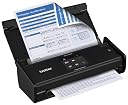
The Brother ADS-1000W is a compact, wireless-enabled desktop scanner designed for busy professionals. It offers fast duplex scanning at 16 pages per minute, supports a variety of media including long documents and ID cards, and features an intuitive TouchPanel for one-touch scanning to multiple destinations. Bundled with powerful document and receipt management software, it integrates seamlessly with Windows, Mac, and Linux systems, making it the perfect space-saving solution for efficient digital document management.
| Asin | B00EKW6JGI |
| Best Sellers Rank | #277,424 in Office Products (See Top 100 in Office Products) #340 in Document Scanners |
| Brand | Brother |
| Color Depth | 24 bits |
| Connection Type | Wi-Fi |
| Customer Reviews | 3.8 3.8 out of 5 stars (625) 3.8 out of 5 stars |
| Global Trade Identification Number | 00014445221364 |
| Greyscale Depth | 8 bits |
| Item Weight | 3.3 Pounds |
| Light Source Type | LED |
| Manufacturer | Brother Printer |
| Media Type | Business Card, ID Card, Paper, Photo, Receipt |
| Minimum System Requirements | Windows XP |
| Model Name | Touch |
| Optical Sensor Technology | CIS |
| Resolution | 1200 |
| Scanner Type | Document |
| Unit Count | 1.0 Count |
| Upc | 014445221364 012502635949 069060132267 |
| Warranty Description | 1-year limited warranty |
| Wattage | 14 watts |
User
Great inexpensive scanner
I love this scanner so much that I have one in my office and home. I am computer challenged but found this little scanner very easy to set up and use. I use it for scanning invoices, reports, checks, and photo ids. It does a great job. The software that it comes with also offers ways to crop and adjust the scan. It recommends only loading around 5 pages at a time to prevent jamming but I have loaded more without problems. If it jams it is easy to fix and not a big deal to scan again. If you are wanting to scan huge files, you may want a machine capable of holding a large amount of paper so that you don't have to sit and keep feeding it. Overall a basic wonderful scanner.
User
Thorough Review: Speed, features, wireless, and size.
Scans super fast, ADF(automatic document feeder) works great, paper should be straight without crumbled edges to ensure good feed scans. Stand-alone product can scan directly to USB drive(not provided) or a running computer. This model does not scan to email or ftp as a stand-alone...to scan to email or ftp you'll need to use the provided software on your computer to do so. (this is important to know as I thought differently when I purchased, but still rated 5 stars based on it's other options).To setup the item, I used a wireless laptop with a usb connected for preliminary setup. The software found the unit, found the wireless SSID name, and applied my settings to the device. From my Windows 7 desktop and Windows 8 laptops it found the device rather easily as well (once it was connected to the wireless network). For example (Windows 7) You just go to "Start" ->"control panel" -> "View devices and printers" -> "add a device" -> "find the ADS-1000W" and add it. Then use the software in the package or your own favorite software to scan and create PDF's, JPGs etc.Speed: When scanning black and white images over the wireless the sheets feed through super quick and it gets transmitted to the computer or usb stick(not provided) very quick too... Business speed ready in my opinion. As for full hi-resolution color, it scans a bit slower(but still fast compared to others) but it transmits over the wireless a little too slow due to the size of the PDF or JPG it's transmitting over your wireless network. If you're scanning 2 or 3 hi-res images the time to transmit it to your computer via wireless is tolerable, but if you plan on scanning 10 to 15 hi-res images/documents to one PDF, plugging in the direct USB connection might be your best bet. (I didn't try the 10 to 15 hi-res documents to test out the speed, I'm only estimating based on the 2 hi-res color documents time to transmit over wirreless to my PC.)I've personally tested this device on Windows 7 Pro and Windows 8 Standard and used 1 gig USB drive for direct scanning in stand-alone mode. (stand-alone mode meaning no computer necessary)ONE MORE GREAT FEATURE: when scanning to a LOCAL USB drive in stand-alone mode, the scanner scans both sides of the document at once which SAVES huge amounts of time on duplex documents. The unit is perfect desktop size. The paper feeder has hinges which allows it to fold down and close up to a small rectangular box (great for travel or just desk space savings) which automatically tells the device to go in standby mode. Also, when you unfold the paper feeder, it has two extra supports that extend the paper feeder another 6 inches beyond what the stock picture shows which gives the paper more support when you have a larger stack of 8.5 x 11. This extension allows for better paper support to keep the papers straight while being fed into the machine. This model DOES not have a LCD digital display (another model above this I think does, but it's not necessary), It has a smooth touch pad like a laptop that has 6 static icons that light up for different functions (like scan directly to usb, start scan, scan to pc1,scan to pc2, stop scan, usb is connected).Sheet feeder holds 20 sheets I think the specs say so if you scan a large number of documents then you might want to look at the 50 sheet feeder option on another Brother model. For small contracts and home documents it works perfect. They also include a clear "wrapping sheet" that is used to scan different sized items such a receipts. This clear sheet keeps small receipts from getting jammed. I also noticed on the back it has a place to scan cards like licenses, business cards etc. I haven't tried that option yet though.Overall great product with business like speed, great options, great quality in a small compact unit.
User
False advertising on scanning to shared folders, horrible software
The Amazon listing says, "You can also scan to a shared folder, email server, or FTP, to save, distribute, and share information."After pulling my hair out for hours trying to figure out how to get it to scan to a shared folder, I found this in the manual: "Scan to Network allows you to scan documents directly to a shared folder." However, it also says "ADS-1500W/ADS-1600W only".I purchased this scanner for the purpose of scanning to my network storage device, and apparently it was false advertising that it is capable of doing so.It is difficult to overstate how bad the software is that comes with the scanner. Even though I'm running Windows 8.1, it looks like it was designed for Windows 95. It also feels like it was designed for Windows 95, in that it is a horrible flashback to the era before programmers started trying to make their software easy to use for regular people.When I initially set up the scanner, I plugged it in via USB. Even though most of the time I'd want to use it at home on WiFi, I thought that sometimes I might want to take it out with me to scan with it directly attached to my computer. After getting it working on USB, I then tried to get it working on my WiFi.Once everything ist installed, to get started, you launch a program called Brother Utilities. This program is bizarrely pointless, as it seems to only exist so you can click a link in it to launch ControlCenter4, the actual software.Once you open ControlCenter4, you're greeted with 3 tabs: Scan, Device Settings, and Support. When you enter Device Settings, you have three options, Remote Setup (which brings up a settings page), Scan to PC Settings (which brings up the exact same settings page, only highlighting a different setting), and Device Scan Settings (which brings up some more settings related to scanning on a different page). In addition, on the top of the window, there is also a Configuration button, which also brings up other options.In order to set it up on WiFi, you need to click an additional button titled Scan to Net Settings, but if you initially set it up in the installer using USB, this is just not present, with nothing to indicate what the problem is. After hours of pulling out my hair, I finally discovered this issue and uninstalled and reinstalled in WiFi mode to get the WiFi working.At first, it couldn't find my WiFi network. It turns out that even though it supports 802.11n, it only supports it on the older 2.4GHz band, so I had to go into my router and change my entire network from the better performing newer 5GHz band so that my scanner would work.Now, the WiFi works now to scan to the specific computer I installed the software on, but it no longer works over USB plugged into my computer. Guess you can't have your cake and eat it too. And it still doesn't scan to a shared folder like it says it does in the product description, it can only send the document to the computer with the software installed on it.Another point that wasn't clear to my from the description is that the scanner has no OCR capabilities on its own. It can just be set up to send the scan to OCR software you install on your computer. This means that any scans made with USB keys plugged directly into the scanner will not have OCR.
User
A fine scanner for the money
This is an excellent scanner, and does quality scans very quickly. It can be used with Ubuntu Linux as well as Windows. The page feeder works, but you have to be fairly careful how you stack the papers in the tray. Pages need to be fairly straight and stacked in one at a time. The only problem I had is that it's somewhat tricky to get the paper to feed through straight - documents scan successfully, but can end up feeding through tilted, which shows up in the final image. That's why I gave it 4 stars instead of 5. I have never tried more than eight pages at once, that appears close to the maximum you would want to place in the feeder tray. I use it in greyscaIe, low resolution mode to scan financial documents, but when I tested color and medium resolution the quality was fine. I didn't try high resolution but suspect it works well too. It also folds up to a very small footprint.
User
Great investment
I splurged and bought this for my class this year as I am tired of having too many papers everywhere. It has already paid off. I purchased it last August in 2018. It scans both sides of the paper in color. You can scan receipts and photos too. It allows you to customize the file name and location and has a continuous scan feature so you can scan multiple batches into one file. It also automatically detects blank sides of pages and eliminates them from the file if you want. There are a lot of customizable options. It just notified me of a software update, so the manufacturer is keeping it up to date. It also has a wireless scanning feature. It isn't too big and doesn't take too much space.
User
The Good: The set up of this scanner is easy
The Good: The set up of this scanner is easy. This scanner is wonderful for single sheet (one or two sided) scans. If you scan documents using the onscreen option it is very easy to change things such as destinations of the scans or one sided or two sided scans. The scans are very clear and will reprint nicely if needed. The on screen and on device options are easy to use (read the directions).The Bad: If you regularly make multiple page scans this scanner is not for you unless you have plenty of time to feed the sheets one at a time. Even if you stack the sheets as the directions say it will normally pull two or more sheets at once. This will sometimes cause an error/jam. It is easy to fix but is a waste of time. You can feed the sheets one at a time and use the "continue" feature to create one document and then "finish" when done. This is a time consuming process though. The paper guides do not work very well for sheets that have been folded. You will need to hold the sheet down slightly during the scan to keep it from jumping over the side of the paper guides. If not, the document scan will be crooked.Overall: If you will be scanning one page documents or receipts occasionally this scanner is great. If you will be scanning multiple items of different sizes throughout the day this is not for you. Overall I am satisfied with the scanner but had I known what I know now I would not have gotten for my needs. This is the first Brother product that I have not been completely satisfied with.
User
Great for single page scanning, multiple not so much
I've been using a Doxie handheld scanner for years and while it is much quicker than a flatbed, I got frustrated with the time it takes to scan large piles of documents and decided it was time to upgrade. I did my homework and had some idea what I was getting into with this device but figured I'd give it a try to help me work through the backlog of documents I had hoarded before going paperless. I purchased it primarily for the ADF.I've been using this scanner for about 6 months now and It has certainly saved me time but at this point I wish I had waited and spent another couple hundred on the higher quality models. I can't say much about the OCR as I don't use it, I found a way to push scans to the Doxie software which handles OCR perfectly IMO and is much easier to use. I tried the Brother software when I first got it and did not care for it at all. Initial setup wasn't bad but the UI leaves much to be desired. I am a programmer though and have doubts that a normal user would have the same feelings. The only good things I can say about this scanner is that it scans both sides of the paper quickly and it's compact.My biggest gripe with this scanner, as others have mentioned, is the jamming. It does not handle multiple documents well unless all of the documents are pretty much completely uniform. For example, I had a pile of 30+ pages of legal documents that had been stored meticulously and it scanned them all without a problem. But when I put in just a couple of random papers, it jams on the 2nd document probably 30% of the time. When it jams it usually slightly shreds the side of the paper. So unless the documents you are scanning are going in the trash post scanning, I would avoid this model like the plague.Also when it jams, you have to dismiss a pop-up on the PC with the installed software in addition to removing the paper from the scanner and pressing the button to clear it. I run the software on a server that I don't normally access so this was a huge issue for me and I ended up writing a program to watch for these software popups and dismiss them automatically.To avoid the jamming problems with this scanner, I normally just stick in a page at a time when I'm passing by it. It's less work than using the Doxie (as I don't have to babysit it and guide the paper myself) but it falls very short of expectations. Overall, it wasn't a horrible purchase for myself once I worked around the issues as it's saved me time which was the goal but more than likely I'll be upgrading and attempting to sell this model. I would certainly not recommend it if multiple page scanning is the goal, save your money and get something worth it.Update - January 2019I am now the proud owner of a Fujitsu, all traces of the Brother have been removed from my household.The software that is used by the Fujitsu is far superior and I'm using it as intended.No more shredded paper, no parts to replace.I couldn't be happier with my decision to part ways with this scanner.
User
Great little compact scanner
UPDATE June 12, 2017: (Wireless works perfectly with my LAPTOP computer). I currently use this for so many types of scanning. It can easily do double-sided scanning, in color OR black and white. I have scanned many things, such as medical summaries, receipts (because most fade away...) business cards, charitable receipts, pharmacy receipts, user manuals. I have even put plastic cards (I've done my medical cards) through the slot in the back and they scan BOTH sides perfectly, which makes it great to be able to have it on hand when I need a quick access to it in my office. The only thing that I STILL can't get it to do it to be able to use it wirelessly. I have set up the wi-fi on it, but due to the amount of electronics that we use these days, I think I would have hoped I could have set it somewhere else rather than on my desk. However, after a few weeks of use, I am THANKFUL that it is sitting on my desk! I just plug it into my computer tower to use with my pc. I think this is a pretty good little scanner!
User
Brother: My dependable brand for all my office machines
Works beautifully and made my life so much simpler and easier. Very easy to follow all instructions in using it. Extremely pleased with my purchase. I also have a 5-in-one, MFC Brother Laser Printer that I bought 6-7 years ago. I love Brother products for their quality and dependability. I am 70 years old!.
User
Excelente
Muito bom
User
Cumple su trabajo muy bien.
Excelente digitalizador, muy rapido y con buena calidad, las opciones para tarjetas y papel de multiples tamaños son muy utiles para la oficina y cualquier tipo de documento.
User
great product
Scanned about 300 pages so far. Not even one paper jam (an average of 10 pages per scan in the automatic paper feeder)Fast scanning even with wireless.doesn't take any space once folded.Easy to setup.So far so good.Only one thing missing as a portable device is being able to pair it with more than one access point without redoing the setting everytime.
User
Does what it should. Great small device to backup and file important documents.
Very practical machine to keep electronic versions and backups of important documents. Sometimes, it's hard to scan that were previously folded with perfect alignment. I like that it doesn't take much place on the desk while folded.Two things keep me from giving a perfect five stars: 1) A receiving tray for scanned documents would be nice. Once scanned, documents can become tangled or fall off the table. Something could be done about this in the design, I think. 2) The software provided with the scanner is far from being perfect. One thing that I really dislike (amongst other that I won't list unless I'm asked) is the fact that documents scanned wirelessly just drop in a folder on the computer with out prompting the software window. In particular, this means you have to go back and rename every file scanned wirelessly in Windows Explorer. It would be so nice if the formating window would pop up and give me the same options as when I prompt the scan directly from the computer.
Trustpilot
2 months ago
2 weeks ago