❄️ Stay cool, perform cooler — Arctic Silver 5 keeps your rig chill and winning.
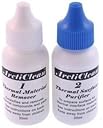
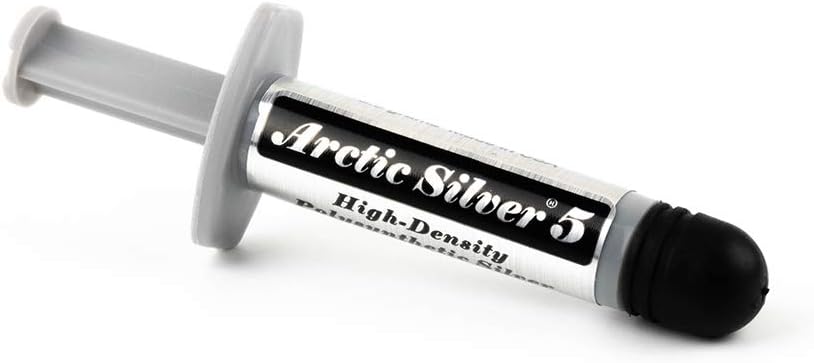
Arctic Silver 5 Thermal Compound is a high-density silver and ceramic blend engineered for superior heat transfer between CPUs/GPUs and heatsinks. Paired with the ArctiClean 60ml two-step cleaning kit, it ensures optimal surface prep by removing old thermal material and preventing corrosion. Trusted by tech enthusiasts, it delivers up to 20°C temperature reductions, enhancing system stability and quiet operation for demanding workloads.
| ASIN | B002DILLMS |
| Best Sellers Rank | #473 in Silicon Grease |
| Brand | Arctic Silver |
| Brand Name | Arctic Silver |
| Customer Reviews | 4.7 out of 5 stars 1,711 Reviews |
| Item Form | Liquid |
| Item Volume | 60 Milliliters |
| Item Weight | 0.02 Pounds |
| Manufacturer | Arctic Silver 5 |
| Model Number | ARTICOMBO |
| Part Number | ARTICOMBO |
| UPC | 897337010853 845055011935 617689108035 |
| Unit Count | 1 Count |
| Volume | 60 Milliliters |
O**I
Excellent Results
This was my first time applying thermal paste to my processor. I have had an HP laptop for about three years. The fan became clogged and was overworking after about a year. So I took the laptop almost entirely apart to get to the fan, which you have to do with HP laptops. That was not fun, but I got to the fan. I had to disconnect the whole thing, including the contact area between the copper and the processor. I recall seeing some green paste on the surface, and thinking it had something to do with heat conduction, but I didn't know anything about thermal pastes at the time. So after cleaning the dust out of the fan, I simply screwed the thing back in place. The noise level was reduced and the fan didn't work as hard, but it was far from the performance the computer had shown when it was new. The fan still spun very fast at times of even moderate load. I performed the same cleaning process on three other occasions. Recently, I ordered the Arctic Silver 5 and cleaning kit, watched some videos on how to apply the paste, read some on the topic, and did it. After some research, I realized why my laptop's cooling system hadn't been performing well, even though the fan was clean. I should stress the importance of cleaning the surface of the processor and the copper cap. I spent most of the time simply making sure the surfaces were absolutely clean. Then I applied a thin and short line in the center, which I felt was best because my processor has two physical cores placed next to each other, and screwed the thing back in place. Before doing his, under max load (In-place large FFT torture test on Prime95), the core temperature (CoreTemp) used to go up to a little over a 100, which is almost the point of no return. The room temperature was moderate (about 23-28). After applying the Arctic Silver, however, the temperature never went above 82 under the same test and conditions. That's about a 20 degree difference. I was very pleased, and still am, that such a cheap remedy caused such a leap in performance. I wish I had the knowledge earlier to realize that I needed to do this. Before applying the Arctic paste, the older stock paste was not working properly because the contact point had been exposed many times and the paste had dried and deformed (the paste formed a tree or scatter plot pattern, and was all over the place). My laptop fan used to work very hard when playing even 720p HD videos. With 1080p on the other hand, the fan would go absolutely crazy, the computer would slow down, and the video would get jerky. Nowadays, my computer can easily handle 1080p videos, and the fan increases its spin speed only moderately. I can feel that it is comfortably handling the task (as far as thermal performance goes). For normal usage, I rarely hear the fan anymore, if at all, which used to happen all the time before. Overall, a great product. I definitely recommend this. But watch some videos, read, and know what you are doing.
D**.
Instant Success!!!
I've been having a problem lately with my gpu in my two year old laptop registering temperatures of 75+ *C in an extended screen configuration. It's been gradually getting worse until a week ago it started to get to the point when I could no longer watch 1080p youtube videos in even a single 1080p screen configuration because I would get temps of 100+ *C ultimately resulting in my laptop shutting down. I've been wondering why my laptop has been steadily running warmer and warmer with it sitting on a cooling pad and all the dust bunnies cleaned from the internal cooling fan, so I finally concluded that with the air coming out of my laptop not being that warm compared to the temps reported, it had to be a heatsink issue (I also noticed that my gpu would have temperature fluctuations of 10 *C that would occur within 5 seconds of only meager use. Fluctuations that large within 5 seconds are not at all normal which also tipped me off). After always hearing that this is the best thermal compound to get, I went for it. When I got it, I proceeded to take out the heatsink and fan assembly from my laptop, and cleaned it up along with my gpu and cpu chips. I put on the thermal paste, then put everything back together, and booted up. What do you know, now I'm running on AVERAGE 30 *C COOLER, while having a much quieter operation with temps at 60 *C or below in situations where the temps would have risen past 100 *C. My only wish is that I could make a comparison of this compound's capability to before I started having problems to see it's effectiveness compared to the stock thermal solution when it was running in top shape one to two years ago. Unfortunately I can't make such a conclusion, but I can conclude that it at least works better than a heatsink that's been unseated in a jarring portable environmen =P (duh). This is the perfect solution to mysterious heat dissipation issues when obvious solutions such as cleaning out the fan have been exhausted. I give it an A+ One thing to note: This kit doesn't have any directions so you'll have to skip along to the arctic silver website, and print out the directions before you get started if your a newbie like me. Regardless, it's pretty easy to apply, and rather difficult to screw up with (unless you make a huge mess by using too much of the stuff).
T**S
Worked Well for Me
It did exactly what I needed it to do. The first solution is supposed to clean the old thermal compound out and it did a decent job. I did have to do the process 3 times to get everything off, but it was a think blob that was on there and I didn't expect to get it on the first try. The second solution is supposed to prep the area for the application of the new thermal compound. I guess it worked well but I really have no way to tell since it didn't seem to make a difference to the already clean surface. The application of the arctic 5 thermal compound was pretty easy and didn't make any mess that I could see. I've only ever done this once before years ago, so I'm not sure if there was any overrun onto the motherboard, but I was pretty careful not to apply to much. This stuff was also pretty thick so I'm not really worried it would drip even if it did. The results of the new compound were not immediately discernible. My computer had been running around 55-60 C at idle and was getting to 70 C during SC2. After the application I was still running around 60 C at startup initially, but the temps started to fall after about 30 mins of computer use. After a few days I am running 45-50 C at idle and I never get higher than about 60 C during SC2. There is supposed to be a 200 hour break in period so hopefully the idle temps drop to around 40 C. I'm running a AMD 6400 at 3.2 Ghz with a GeForce 9600 that is about 2.5 years old. Prior to this my computer had been randomly shutting down during SC2. I haven't had any issues since and am glad I was able to solve my heat issues with a cheap and easy solution.
T**T
This is the stuff to use!
I think the biggest factor people rate this on is price, but that will depend on who you brought it from and when, etc. The product itself is awesome and works really well. It's the only brand I buy anymore as I've used it for years and years on laptops and desktops and it works great! Some tips for using thermal compound on your CPU/GPU. -When using the cleaner, make sure to get all old thermal paste off. I used a little lint-less microfiber cloth. You don't want any lint on your CPU! -Less is more! DO NOT over-use this paste or it will actually be less effective or even have opposite effect. I put on about a pea-sized drop/maybe a tiny bit less right in the center of your chip. When you press the CPU against it, it will spread to a very nice thin layer that will cover the majority of the chip in a circular shape. DO NOT OVER USE!! If you use any paste and notice heat issues afterward, consider reapplying the paste with less the next time. If you put on too much paste, your temps will significantly increase and could damage your board, etc. -If you plan to overclock, it's good practice to run at stock temps with this for a few days at the very least to make sure your temps are stable and the paste settles in. No need to rush it! Some folks suggest re-pasting your CPU after a year or two to keep it nice and optimal, but it will really depend on your situation. I've had a laptop that needed the GPU re-pasted every year to prevent overheating (no overclock even), where as my desktop I've pasted it once in 3 years with no change in temps. Just some background on my current implementation of this paste - I am running a Intel Core i5 2500K with Cooler Master Hyper 212 EVO fan overclocked from 3.3Ghz to 4.3Ghz with 55-60C under 100% load. If you overclock, make sure to do some research into what your CPU can handle with your cooling solution as they are all different, just like people in the world!
A**E
Fixed my XBOX360!
I bought this product so I could fix the dreaded red ring of death (RROD) on my XBOX 360. I read up on the issue and the core problem was the connection between the heatsinks and the processor and GPU. All the guides called for removal of the old thermal compound and the addition of the new compound, and this kit seemed to be the best value (and could be shipped via Prime). The ArctiClean solution worked well at getting the old compound off - though it took some elbow grease and a ton of q-tips. But what do you expect from a five year old system. I've heard that rubbing alcohol does a similarly decent job at removing the gunk, but it seems like the ArctiClean gets it completely clean and sterile. I wouldn't buy it just for that, but it was nice to have it as well. The actual Arctic Silver was easy to put on and there was plenty of left - I may use some on my laptop to bring down my heat levels on my CPU. The greatest thing was that right after I applied the paste and reattached the heatsinks with the new and correct bolts, it worked perfectly! Green light immediately, though I still did the overheating that many guides recommended. Its only been a few weeks but still holding up fine, and I've heard Arctic Silver will hold up a long time. So if you're thinking of attempting a RROD fix, then this stuff certainly will work and I'd recommend it for regular old CPU work too. Good luck UPDATE: I took apart my laptop (Lenovo T61) last week to try and fix the elevated temperature levels I was experiencing (from 65 degrees Celsius up to low 90s, which is nearly the cutoff). After removing the heatsink and fan, I could tell that the old thermal paste was not cutting it anymore - it seemed dry and it was covering the CPU in a dot matrix pattern. I removed the old grease and applied a thin layer of Arctic Silver, after cleaning and prepping the area with the ArctiClean. It now runs at a much more reasonable temperature (40-50 degrees) and only gets up to mid-60s when under heavy stress and with poor ventilation. So it certainly works well! I'd recommend using it on any old laptops with heat issues, along with a thorough cleaning of the air intakes/exhausts and the fan mechanism. Some reviewers have noted that the ArctiClean is just a repackaged version of something you could get much cheaper at a drugstore. That may be true, but I don't think that takes away from the convenience of ordering one item for the entire process - and the size of the bottles make it easy to handle and dispense. Of course if you already own the solvents/cleaners, then it would make sense to just purchase the Arctic Silver. But I still think that the package is a good value.
D**.
Just fantastic!
I bought this Arctic Silver 5 kit back in 2010, and several processor upgrades later and I am JUST running out of the thermal compound! In this kit you will receive 3.5g of Arctic's highly-praised Silver 5 compound - a thermal compound that has consistently shown superior quality and performance over many other pastes! I'm sure I sound like a shill, but once you see your temperatures drop several degrees on first application, then continue to drop a couple more over time, you will be convinced. ------------------- Some Technical Specifications: - Thermal Conductance: 350,000W/m2 °C (0.001 inch layer) - Avg. Particle Size: 0.49 microns <0.000020 inch - Temperature Limits: Peak: -50°C to >180°C Long-Term: -50°C to 130°C - Performance: 3-12 degrees centigrade lower CPU full load core temperatures than standard thermal compounds - Coverage Area: The 3.5-gram tube contains enough compound to cover at least 15 to 25 small CPU cores, or 6 to 10 large CPU cores, or 2 to 5 heat plates. At a layer 0.003" thick, the 3.5-gram tube will cover approximately 16 square inches. ------------------ As a side note, the cleaning liquids are excellent for ALL uses - I have used them not only to clean processors but tons of other electronic items and even some precision machine parts. I would recommend only using a small amount of the thermal paste - there is some to debate as to the best method of application - I have tried both putting a dab in the middle and allowing the CPU cooler to spread it, as well as spreading it myself with a razor blade. I can honestly say that I didn't really see a difference either way, the key is to make sure you have a THIN and EVEN covering without excess or barren spots. A much overlooked element of PC building, I highly recommend you keep some on hand for processors, video cards and motherboard heatsinks, reapplying every two years or so! Highly recommended!
M**E
Worth every penney, this kit includes cleaning material if replacement thermal compound or upgrading a cooler
Very easy to apply. I've done builds before but most of them used chips that didnt need a huge heatsink. IE, 386DX, AMD K-5's etc. Even the later builds I usually stock to the stock AMD fans which had that 'tape' stuff on it. Now for the actual review. This kit comes with three items. First off is ArcticClean #1. This is an emulsifier that cleans off any residue, grease, fingerprints etc. on your chips surface. Any leftover residue from a past heatsink or finger grease from someone admiring a new eight core AMD etc. will act as an insulator between your heat sink and CPU chip. Think of soap for your chip. You'll notice it shines brighter once used on even a new chip. Its very easy to use, just squeeze a few drops onto the surface of your chip. You can tip it around a little to make sure the entire surface gets covered. It spreads out pretty nicely on its own though. Coffee filters (lint free) are perfect for cleaning up the residue. They are also common and cheap enough so that you can use a few on your clean up and not miss them. I'd use a different filter or at least section of the filter each time you clean your chip. I use the #1 cleaner twice after removing the stock AMD fan on my FX8350. Once you have daubed off all the emulsified junk you will want to use the ArcticClean #2. I believe this is likely just purified water or something along those lines. Just like after a shower you want to rinse the soap off. That is what the second bottle is used for. Just as before squeeze out a few drops. Even more than before you may want to do two applications of the #2. This will insure any of the cleaner doesn't get left behind when you apply new thermal compound. For the last part the contact surface of the 212 EVO looked rough. I didn't touch it or anything as I didn't want fingerprints, cat hairs etc on it. The cooler comes with a small piece of plastic tape over the contact area. I applied a drop of ArcticSilver 5 and worked it around with the angled edge of a plastic credit card (which I had cleaned just for this purpose). I then scraped off the excess and ran a lint free lens cloth (as an amateur photographer I have lots of these around and they are cheap) over the surface to leave a fine glaze of As5. This is recommended to fill in any little scratches & valleys & such. I was surprised how little was left behind so it must mean the surface of the cooler is smoother than it looks. After attaching the 212 EVO I was surprised how cool things ran! The chip stayed a LOT cooler off the bat (around 20°F). The instructions say that after a hundred hours and several hot cold thermal cycles that it will perform its job even better. I'm happy already!
M**D
It works, and works very well
I have a couple of laptops that needed some attention in the thermal paste area, so I bought this kit to fix one and install a new heat sink/fan combo in the other. The instructions on the bottle are OK, but I strongly recommend going to the online site for Arctic Silver to get the complete set of instructions. Among other things, the site gives you the correct way to apply the thermal paste based on the type of CPU you have -- no guessing or "one size fits all" application patterns. The fixer upper laptop ultimately didn't get fixed, but not because the Arctic Silver wasn't doing its job. It turned out that the motherboard had a separate and unrelated issue, but before it died again, the laptop showed that my application of Arctic Silver was keeping the CPU temps well within the normal range for my CPU, and this was after just a quarter hour of use. Arctic Silver says on their website that temps will decrease even more over the 200 hour break in period (assuming normal on and off use). The ArcticClean 1 and 2 included in this kit worked very well. The guy who previously put thermal paste on this laptop apparently belonged to the "if some is good, more is better" school of thought, because some of the old paste had been squeezed out of the heat sink/CPU join and onto the surrounding area. It was a mess to clean up -- but the ArcticClean 1 did indeed clean it up. And as I said earlier, the CPU temps were well within range, so I have to believe that the cleaner (#1) and the purifier (#2) did their jobs well in prepping the surfaces. I still have plenty of material left to install the new heat sink and fan on my new motherboard in laptop #2, so this is proving to be an economical purchase as well. After this experience, I'm sold on Arctic Silver. Now if my extended battery supplier ever delivers on his advertisement....
M**!
Fantastic quality, one of the best and most stable on the market.
I have used this stuff for years and it walks all over the stock stuff given with any hardware purchase. I am no boffin but my CPU and GPU tend to run 5 degrees cooler without load and they don't raise to far whilst stressed. The fans also throttle around 1200-1600 instead of the 3000 I was getting before application. This stuff is great, the remover, purifier and paste all compliment each other and a little patience gets a good job done. If the little review helps please plus one, also further more in depth reading can be done via other websites.
V**A
super
exellente pate themique Arctic Silver 5 , avec base argent. Le top GPU et CPU.
D**O
Ottimo prodotto
Premetto che è la prima volta che uso questo prodotto e sono rimasto veramente soddisfatto, pulisce a fondo e bene tutta la superficie del processore. prodotto consigliato. spedizione amazon sempre puntuale.
R**O
Sobran los limpiadores
Creo que sólo la pasta Artic es necesaria, ya que en mi caso con un trapo húmedo quite la pasta antigua. El tamaño de la pasta es como el tamaño de un Dedo meñique.
G**S
Great product
I had previously messed up when applying thermal paste to my GPU and CPU, and the thermal paste had spread all over the place. Using pure alcohol to clean it somehow made it worse. The cleaners in this bundle, especially the first one, made a huge difference. The thermal paste disolves 30-60 seconds after dropping the liquid, and then you can wipe it off using a linen-free cloth or a coffee filter. I do not know too much about the different kinds of thermal pastes or compounds, nor I'm into overclocking or anything like that, but this compound worked great for me. After cleaning my laptop's fan, cleaning up the mess of the previous thermal paste and applying this one, my laptop went from extreme overheating, loud fan spinning noise and occasional shutdowns, to a very cool temperature (8 years intel dual core dell laptop, temp is 39-45 idling, 55-60 with heavy processor use).
Trustpilot
2 weeks ago
3 weeks ago