Buy anything from 5,000+ international stores. One checkout price. No surprise fees. Join 2M+ shoppers on Desertcart.
Desertcart purchases this item on your behalf and handles shipping, customs, and support to Thailand.
🚀 Tiny NAS, Massive Potential — Own the smallest powerhouse in your network!
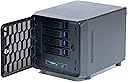
The KCMconmey 4 + 1 Bay DIY NAS Case is a compact, alloy steel enclosure designed for Mini ITX motherboards, supporting flexible PSU options and a single-slot PCI-e card. It features four external hot-swap 3.5" bays plus one internal 2.5" bay, dual front USB 3.0 ports, and an 80mm replaceable chassis fan. Ideal for professionals seeking a space-saving, customizable private cloud storage solution with efficient airflow and easy data access.


| ASIN | B09WQC44B3 |
| Best Sellers Rank | #695 in Computer Cases |
| Brand | KCMconmey |
| Compatible Devices | CPU |
| Customer Reviews | 4.0 out of 5 stars 88 Reviews |
| Enclosure Material | Alloy Steel |
| Is Assembly Required | Yes |
| Item Dimensions D x W x H | 10.63"D x 7.87"W x 7.68"H |
| Item Weight | 3.18 Kilograms |
| Manufacturer | KCMconmey |
| Material | Alloy Steel |
| Mounting Type | Rack Mount |
| Product Dimensions | 10.63"D x 7.87"W x 7.68"H |
| Size | 4 + 1 Bay |
| Warranty Description | 1 year manufacturer |
| Weight Capacity | Maximum weight: 14.3 Pounds |
O**.
Interesting Build Small NAS
The case is small and the video build is misleading. I used a 1155 itx MB and i5-3470 cpu with a Thermalight AX90 cpu cooler (35mm). However, the MB cannot be installed without removing the HDD tray. To remove the HDD tray the front cover needs to be removed (4 screws and 4 tabs). Then remove 4 screws from the back and 4 screws from front and the HDD tray can be slid out the front exposing the MB mounts. There is about 1mm gap from top of cpu cooler and bottom of HDD tray when reinstalled. If noise is an issue, replace the 80mm fan with quieter fan. As mentioned in other reviews, there is little airflow, but temps seem ok at stock settings. Other than a challenging build, the case is great. Have fun with it.
D**N
Smallest mITX NAS Case
This is as far as I could find, the absolute smallest mITX NAS case with 4 external 3.5” hot swap bays currently available to buy anywhere. It does have some drawbacks and difficulty building but if you really need a tiny custom NAS over something like a QNAP/Synology then this is the best you will find assuming can’t use something bigger. Building in this case is not easy and was very difficult due to the size so new PC builders should not start with this case in my opinion. A simple but massive improvement to this case design as others have mentioned would be if the drive caddy could be removed by screws as it is currently riveted in. This would make the motherboard install way easier. Even with a CPU cooler that is within spec for height, it still did not want to go in without a fight, I had to bend the case slightly to get it in. Once it is in though, it does have clearance, but cause of that drive caddy actually does not fit natively. Another improvement would be if they cut another air hole in the front panel and added mounts for a second 40 mm fan on the opposite of the one it already supports. This would help add a little bit more airflow and there is room for it, so why not? Lots of cables need to be plugged in prior to installing the board as again the drive caddy is in the way. For my board, this required plugging all of the PSU cables to the board and the front panel connectors ahead of time. The SATA cables needed to be plugged into the rear of the drive caddy first and not the board side as plugging into the back of the drive caddy was quite difficult for how tight it is with that sharp turn. Also be aware that the included SATA cables are shorter than standard which is good for the case since it does not have a lot of room for cable management but depending on where the SATA ports are on your board there could be a length issue, mine just barely reached. I replaced the rear fan with a Noctua one as it’s a lot better than the stock fan however for me at least, I highly recommend removing the rear fan regardless to make the SATA connections easier. You can still squeeze the fan by the cables afterwards. Regarding temperatures as others mentioned the cooling is not amazing here even with my replacement rear fan. One thing that helped for me was setting a custom fan curve and using the PCH as my temp target instead of the CPU as in my case the CPU will likely be a lower temperature than the PCH on average. One last thing since it only supports Flex ATX PSUs, there are a lot of issues with those having very loud fans. If you can handle the steep price, the SilverStone Technology FX600 is the most efficient Flex ATX PSU on the market and if you truly use this system as a NAS, you will never hear it as your load will never be high enough for the PSU fan to need to ramp up. Full load my system is under 100 watts. System Specs: CPU: AMD Ryzen 5 R5 Pro 5650GE CPU Cooler: Noctua NH-L9a-AM4 Ram: 2 x 16 GB DDR4 2400 ECC SSD: Samsung 960 Pro 1 TB with EKWB EK-M.2 NVMe Heatsink, Black SSD: 2 x 128 GB M.2 SATA SSDs in a 2 Port M.2 SSD to PCI-e x1 adapter B HDD: 4 x 12 TB HGST WD Ultrastar DC HC520 Case: KCMconmey 4 + 1 Bay DIY NAS Case PSU: SilverStone Technology FX600
T**E
Great little case
Paired this with an ASRock J4125B-ITX motherboard and a 4x port sata card for a NAS build. The stock cooling fan definitely makes it sound like a server, but it has good airflow. Plenty of room inside for routing cables and has an interior mount for a 2.5" drive in addition to the four bays. The feet on mine felt a little cheap and were loose. The case is pretty attractive with the front mesh showing status LEDs for the motherboard and four drive bays. The LEDs are fairly bright if the room is dark, but shouldn't pose an issue if trying to sleep in the same room as the case fan noise will probably keep you up.
J**E
Quality is very poor
There was zero quality control on my case. The back I/O shield area was severely bent before the case was packed because the box it arrived within looked undamaged. Also, one of the SATA board standoffs was missing, and whatever numbskull who put this together just went ahead and screwed in the cage anyways, thus warping the board so no HDD / SDD could plugin to SATA or power on the bottom most slot of the hot swap front of the case. I confirmed this by taking the case apart completely. Amazon is going to make it right, but maybe think twice before buying a cheap case. Do not buy this thing with a large flex PSU, it won’t fit. Highly recommend 150w modular so you can unplug anything not used. I went with a 500 w non modular and ended up with a ton of unused cables that were difficult to tuck away on this thing. If I did this again, I would just buy a different case or maybe a bigger case, like a Noctua. This wasn’t worth the size and there are like zero itx boards with the built in USB 3.0 header, so you end up buying a USB 2.0 mother board header splitter and an adapter from 2.0 header to the 3.0 header (USB A physical type, not C). There are way too many screws in this case. It should be more modular / able to be built without a screwdriver, because with the amount of space you have to build you aren’t going to be doing much past swapping bigger hard drives out potentially. I give 2 stars because if it was actually delivered to me in a non-damaged state it would have been decent. Update: Three stars because they actually sent me a non-defective case. The updated case only has USB 3.0 on the front of the case, which is nice, but no ITX board supports it so I had to buy a USB 2.0 header to 3.0 header adapter, and now my splitter for the USB 2.0 header is useless that I bought to accommodate their prior version case that had USB 2.0 and 3.0 ports on the front. So beware there are TWO revisions of the case, at the very least, and that dictates the USB header adapter one needs to buy. Oh also I recommend getting a Noctua NF-A4x20 PWM fan kit which comes with a splitter so you can use the one four pin case fan header on your ITX motherboard (basically zero ITX boards have more than one case fan header). The case gets HOT without the airflow and four HDDs. Other small nitpicks: The LED headers for the NICs - basically zero mother boards with this feature that have four NICs. The LED for the HDD activity is so dim in comparison to the green CPU activity LED that you can't really see the HDD activity blue LED. maybe use a less cheap blue led or use LEDS that aren't blindingly bright! I'd just get rid of the NIC front case LEDs cause nobody is going to connect those, and make the front USB ports just 2.0 because if you go look on the market there aren't any ITX boards with the 3.0 header on the board.
S**.
A nightmare to put together, you will most likely need to buy SATA cables.
This seems to have had little effort given to designing how you get the parts into the system. While I was building this I had lots of issues. 1. The Fpanel connector seems to have a lot of junk in it I had to zip tie off to keep it out of the way, not sure what motherboard they think is going in here but they have 3 NIC LED and an alarm that has no place on the motherboard I have. 2. The crossmember that holds the hard drives is extremely close to the motherboard causing several issues, for one you must have an extremely low profile cooler (AXP90-X36 in this case) and even with that, one of the intended cable paths for the SATA is blocked by your heatsink, the motherboard (Gigabit A520I AC) dictates where the heatsink ends up obviously, but I think this would be a problem on any motherboard of this form factor. 3. Speaking of the crossmember you will likely have to disconnect it and remove the fan from the back while assembling so that you can get the motherboard to fit under it. you have to remove the fan or you can't separate the case enough to get it out of the way, I assume maybe there is a way to take it completely out but it was enough to just disconnect it from the back. You'll also need the board fully assembled and most of the connections made before you mount it. 4. the included SATA cables are simply too small to be practical unless you have sata ports exactly in the right spot. Since I couldn't use the bottom cable path (blocked by heatsink) sending it out the side quickly demonstrated it was far too small to even get close to the front of the case let alone be able to actually connect them since my sata ports are directly under the center of the crossmember. So order some longer cables if you are going to get this. 5. Because of how everything is designed I had to plug in most of the connectors before I even mounted the motherboard which is not ideal, but I could not connect the power supply before the motherboard was mounted, and I also could not mount the power supply before the case was back together. So basically it resulted in a trial and error where I had to figure out the proper order to reassemble it which ended up being: Remove ram>Wire FPanel, USB 3.0, PC Speaker, 4x SATA cables (sold separate)>reinstall ram>Unscrew crossmember from the back of the case>Remove fan from case>slide motherboard in and attach to mount points>reattach crossmember at back>reinstall fan after routing and connecting SATA cables to the control board and plug it into the case fan header>mount the power supply>connect 8 pin, cut 24 pin zip tie and reshape to right angle to fit under crossmember and connect it>connect 4 pin power (Molex) to control board>install video card>reinstall outer housing. after everything was together I noticed that the video card HDMI port is too close to the edge of the hole the case has. so it's difficult to connect a cable. The case fan included is louder than I would have liked but when I get the HDDs into the unit that will probably be the loudest part so it's fine. All things considered this could use a little work to make the user experience better. As it stands if I want to upgrade or clean I have to basically take the entire case apart.
S**O
Cheap and sufficient
There are a few quirks to this little gem. The SFX power supply needs the small rear support bracket that is included, and it is not easy to install. You need to attach to the power supply first, then the face plate of the power supple (without the screw that goes next to the cord) then attache everything to the case - putting in the last faceplate screw afterward as that screw head interferes with the case if installed first. the included SATA cables are very stiff for the extreme bends they require. length is also a possible issue depending on your board's SATA port locations. There is enough clearance at the top of the case for 2 additional 2.5" sata drives. double sided tape or YOLO will be required. the drive bays accept 3.5" or 2.5" drives. the tray are not Dell or SuperMicro quality, but get the job done. I did have one get stuck, but a little manual persuasion convinced it to comply. the clamshell cover conforms and matches to the chassis reasonable well. There is no hearding cats trying to get all the locking tabs to engage at the same time. temperatures are very manageable - especially for the single fan in the chassis. This fan is not silent, but not overwhelming and removes a decent amount of heat. It does not have great airflow though. The faceplate lock is a joke for security, but holds decent enough for casual deterrent. Overall, the size, layout, and features of this case make it my new go to case for small NAS builds - which I do quite often.
M**E
Good case for ITX NAS build
I really like this ITX form factor NAS case. I use my NAS for NAS things, so I chose a low power motherboard.. and that's a good thing. There is very little room for a CPU cooler in there. The metal it's made from is quite thin, but for the price I can't complain. Everything fits well, and the drive trays are sturdy enough. They give you mounting screws, and you will need to use them or the drive trays won't slide in. I did replace the case fan, the one it came with isn't PWM speed controlled, and it's pretty loud. Airflow is fine, everything maintains safe temps even under load. As with any small case you will need to manage your cables well, but I had no trouble fitting everything in. The mounting solution for the power supply is quite flimsy, but once everything is in place it's sturdy enough to do the job. Would definitely buy again. My setup: Odroid H4 + with the ITX motherboard adapter, ThermalRight 80mm thin fan, Apevia 300 watt supply, 4 WD Red Plus drives.
T**D
Item arrived defective (one drive bay creating drive errors), overheating design issue.
After almost 2 years of using and testing this device, I have finally decided to trash this case and spend more money on something much better. My case arrived defective (but I didn't realize it until after my return window was over) and my top tray has a connector problem creating a large amount of drive errors. After moving drives, cables, trays, I was able to finally learn it was the backplane. Nothing I can do about that but I hope the seller reads this and is willing to send me a replacement backplane. The second issue is cooling. The case has few vents and no place to mount a fan to keep these drives cool. My drives average about 50c which is way too hot. Thought about replacing the only rear fan but without case vent holes I didn't see the point. The front grate is also very limiting.
D**R
Great compact case
It would be even better if it was 10% larger with better wire management. I wouldn't go higher than 6TB HDD, as there's not much airflow. I'd like 8, 10, 12, 16 disk versions as well please. A version with a standard ATX power would be nice too :-)
R**O
top gelaufen
top gelaufen
A**ー
NASケースとしてだけではなくMINI-ITX用PCケースとしてもコンパクト
別にNAS用のケースを欲しかったのではなくMINI-ITX用のPCケースでHDDが4本収納できるコンパクトなケースを探していたところ本商品をたまたま出くわした。値段が少々高いとは思ったものの即決で注文。到着は予定日よりも2日遅くて多少やきもきした。 大きさは他社のMINI-ITX用PCケースより一回り小さく狙い通りだった。ただしその分マザーボードやCPUファン、電源の搭載や配線ケーブルの取り回しには一苦労した。何度も改造をしたい方には不向き。
D**Y
Very small size hardware RAID NAS
Lots of modding to get everything to fit but in the end it's a very quiet raid10 NAS using an old micro Alienware I had lying around (All fans replaced with Noctuas). There is only 1 cpu fan that actually fits in this case and since I didn't buy that one I decided to bend the frame of the case to get the motherboard in and lucky enough it had no issues closing the case when bent back. There is also no airflow into the case so I had to drill a hole for a 40x10 noctua as well as another hole for the light up Alienware head on the front (see pics).
A**ー
安いNASケース
小さく安いNASケースです。3.5インチ×4、2.5インチ×1入ります。 電源がFlexATXなのがネックですがその分小さく作れます。他の方のレビューにもありますが金具を切らないと電源を固定できない場合があります。 CPUクーラーもかなり背が低いのが必要になりますのでご注意。
Trustpilot
1 week ago
3 days ago