Buy anything from 5,000+ international stores. One checkout price. No surprise fees. Join 2M+ shoppers on Desertcart.
Desertcart purchases this item on your behalf and handles shipping, customs, and support to Thailand.
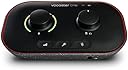
🎧 Own your sound, own the room — podcast like a pro with Vocaster One!
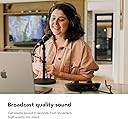
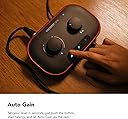
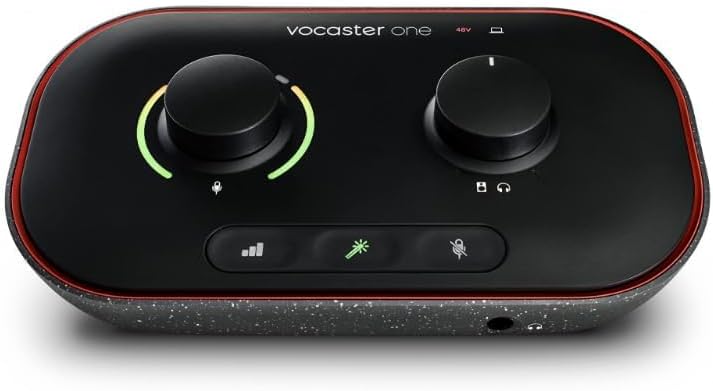
The Focusrite Vocaster One is a compact, USB-powered podcasting interface designed for solo creators seeking broadcast-quality audio with minimal setup. Featuring over 70dB gain, Auto Gain for instant level adjustment, voice-enhancing presets, and seamless phone connectivity, it empowers podcasters to produce professional-grade content effortlessly. Lightweight and compatible with Windows and macOS, it’s the ultimate tool to elevate your podcasting game.


| ASIN | B09ZGS2B2M |
| Audio Input | XLR |
| Brand | Focusrite |
| Brand Name | Focusrite |
| Compatible Devices | Personal Computer, Laptop |
| Compatible devices | Personal Computer, Laptop |
| Connectivity Technology | USB |
| Connectivity technology | USB |
| Customer Reviews | 4.4 out of 5 stars 472 Reviews |
| Frequency Response | 20 KHz |
| Frequency response | 20 KHz |
| Global Trade Identification Number | 00815301001386 |
| Item Dimensions D x W x H | 11.3D x 19.5W x 5.1H centimetres |
| Item Type Name | Audio Interface |
| Item Weight | 1.58 Pounds |
| Manufacturer | Focusrite |
| Manufacturer Part Number | MOAC0001 |
| Maximum Sample Rate | 48 KHz |
| Model Number | AMS-VOCASTER-ONE |
| Number of Channels | 1 |
| Number of channels | 1 |
| Operating System | Windows |
| Product Warranty | 3 year warranty. |
| Supported Software | Hindenburg, Acast, Vocaster Hub |
| Supported software | Hindenburg, Acast, Vocaster Hub |
| UPC | 815301001386 |
P**Y
Amazing!!!
I'll keep this short & sweet - do not hesitate to buy this if you want a simple, effective, quality way to record your vocals into your laptop. Quick set-up (with the software download), great software included. I work as a both a music artist and a hypnotherapist so recording my voice is really important. I use this for recording online hypnotherapy sessions and it's fantastic. I really like having the physical buttons and controls on the desk next to my laptop. All of this for such a great price. Don't bother researching it for hours on end - just grab one of these.
M**T
Fantastic for content creators and using for game voice chat
I love the focusrite range, but I felt the need for a mute button along with slightly more gain The vocaster one is great, extremely simple setup process, and works perfectly with my sure SM7B The audio itself is very good, I'm using the beyerdynamic dt 770 pro and while listening to music I use the volume wheel at around 50-60%, so it is efficient with these headphones and offers enough power. The onboard buttons have a tactile touch and when you mute the mic, it shows red clearly indicating no audio sound, again, top work from focusrite on the design. Highly recommended.
A**H
Love this
Very simple to set up, materials feel high quality. As far as pricing goes, this was insane value for money compared to similar alternatives. Ideal for podcasting or other vocal actions whereas similar devices are more so targetted for music enjoyers. Beautiful design (was a major reason I chose this), plenty of functions that I find helpful. And something I don't see mentioned much elsewhere, the Aux port is compatible with PS5 (at least for audio. I need to buy a new 4 pole TRRS cable to test microphone compatibility, but see no reason why it won't work).
S**Y
Podcasting Interface for Recording as a Solo Creator
As a solo creator and aspiring podcaster, I recently invested in the Focusrite Vocaster One podcasting interface, and I must say, it has significantly enhanced my recording experience. This all-in-one solution offers an impressive array of features tailored specifically for solo podcasters, making it a valuable addition to my setup. The audio quality produced by the Focusrite Vocaster One is outstanding. The built-in high-quality preamp delivers clear and crisp sound, minimizing background noise and ensuring that my voice comes through with utmost clarity. This feature alone sets it apart from entry-level podcasting setups, giving my podcast a professional edge. he built-in processing tools are game-changers for solo podcasters. The one-knob de-esser and compressor help enhance the vocal quality, reducing sibilance and leveling out my voice's dynamics. It saves me time during post-production, resulting in a more polished and professional-sounding podcast. the Focusrite Vocaster One is an excellent podcasting interface tailored specifically for solo creators. Its outstanding audio quality, ease of use, versatility, and on-board processing tools make it a powerful tool for aspiring podcasters like myself. If you are a solo creator seeking a professional and user-friendly podcasting solution, the Vocaster One comes highly recommended.
A**I
good stuff
superb product work perfectly well
E**X
Fabulous for streaming if you just have one mike.
Really good. Just what I needed - just for one microphone for gaming/streaming.
A**S
Straightforward but powerful
I managed to find this at a great price and it's now replaced the bigger audio interface on my desk as my daily tool for voice recording and video conferencing. It's really convenient to have the hardware gain, mute and volume controls so accessible and the built-in effects add a nice broadcast-style resonance to my voice. The auto gain function is invaluable, though it takes a little while to settle on a level so you need to remember to do this before joining an online call (note to self). For anything sophisticated I'd switch back to my bigger interface but for daily use this is exactly what I needed and does a great job for me.
G**D
Bad software, don't buy it
Do not buy this. If you are going to buy it, you need to know that a known feature of the Focusrite software is to make you sound very quiet. There's a fix somewhere on Reddit if you Google long enough, but the easy solution is not to install the software. In my case I learned this after, instead, turning the gain up so that the people I was recording with could hear me. In the resulting recording my gain was of course too high and I was often inaudible. It took a week and some judicious re-recording to fix it. I sent mine back.
M**É
Excelente Solução para Podcast Solo
Excelente solução para Pidcasters pequenos,a qualidade da gravação é excelente, funcionalidade também além de vir com um software traz acesso a DAW Hindenburg. O Material e construção são excelentes,atingi uma qualidade excepcional no meu Podcast com ele.
N**E
Einsteigerfreundlich, für Stimmaufnahmen und Podcasts
Mit dem Focusrite Vocaster One liefert der Hersteller ein hervorragendes Audio-Interface ab, das sich klar an Einsteiger und all diejenigen richtet, die alleine beispielsweise Podcasts oder Videos aufzeichnen wollen. Das Gerät selbst ist sehr einfach in der Handhabung und schnell einsatzbereit. Vorteil im Vergleich zu vielen anderen Lösungen in diesem Preisbereich sind die berührungsempfindlichen Tasten, mit denen man das Gerät schnell stummschalten und aus- oder einschalten kann. Gerade letzteres bieten nur wenige Interfaces in diesem Preissegment. Das Vocaster One richtet sich an all diejenigen, die schnell und einfach loslegen wollen, ohne sich zu sehr in die Materie hineinzufuchsen. Einfach anschließen, Mikrofon verbinden und los geht es. Aktuelle Firmware-Updates haben die Anpassungsmöglichkeiten in der Software Vocaster Hub zudem stark verbessert. Hier kann man in einem virtuellen Mischpult verschiedene Kanäle wie Mikrofon, Loopback oder Bluetooth feinjustieren. Positiv hervorzuheben ist zudem der PreAmp (Verstärker), der mit 70 dB sogar anspruchsvolle Mikrofone befeuert. Hinzu kommen praktische Funktionen wie Auto-Gain, mit dem das Interface die perfekte Lautstärke ermittelt (mit genügend Spielraum für laute Geräusche) und die verschiedenen Klang-Presets, mit denen sich die Ausgabe an die eigene Stimme anpassen lässt. Wer nicht viel herumprobieren, sondern schnell und einfach loslegen möchte. Ist mit dem Focusrite Vocaster One sehr gut bedient. Für blutige Anfänger gibt es bei der Einrichtung zudem etliche Tutorial-Videos, die sämtliche Optionen im Detail erklären. Klanglich gibt es zudem ebenfalls nichts zu beanstanden - mit 24 Bit / 48 kHz bietet das Interface zwar nicht ganz so viel, wie manch ein Konkurrent, für Stimmaufzeichnungen ist das aber mehr als ausreichend. Gerade zum mittlerweile reduzierten Preis ist das Gerät nicht nur für Neulinge im Bereich Podcasting oder Streaming eine absolute Empfehlung. Wer jedoch Musikinstrumente aufzeichnen will, sollte sich mangels Anschlüssen aber besser anderweitig umschauen.
A**E
Muy buena interfaz pero ojo con el cable
La interfaz funciona como debe, la tengo con un at2020 y 0 problemas, los diales se sienten bien, esta bien construida y se escucha bien tanto la entrada como la salida con los audífonos solo ojo con el cable qué trae, es de muy mala calidad y la pc no detectaba la interfaz con este, consideren comprar uno de una marca confiable para usarlo
M**️
Buena calidad de audio, sencilla de usar y con funciones útiles para podcasting
La Focusrite Vocaster One es una interfaz muy bien pensada para creadores de contenido, podcasters y streamers. La estoy usando con un micrófono dinámico y el resultado es excelente: audio claro, limpio y con buen nivel de ganancia, sin necesidad de preamps externos como pasaba con otros interfaces más antiguos. Tiene algunas funciones muy útiles como: • Auto Gain, que ajusta automáticamente los niveles según tu voz. • Botón de mute físico, muy práctico durante grabaciones o directos. • Loopback integrado, perfecto para mezclar audio del sistema sin software adicional. Además, el software de control es muy intuitivo y, al igual que otros productos de Focusrite, la construcción es sólida y profesional.
R**O
Semplicemente meravigiosa!
Questa piccola interfacci audio è qualcosa di semplicemente fantastico! Per prima cosa i materiali di costruzione: il corpo è in plastica riciclata il che è veramente ottimo per l'ambiente, inoltre possiede diverse entrare: * ingresso per microfono con attacco XLR * Pulsante phantom 48v * ingressi per monitor esterni (L+R channels) * ingresso jack 4,5 mm per audio fotocamera * ingresso jack 4,5 mm per collegare una sorgente sonora esterna (smartphone, lettore mp3, etc) * tasto accensione/spegnimento L'interfaccia possiede due comodi controlli rotanti, molto gradevoli al tatto, uno per regolare l'amplificazione del microfono e l'altro per controllare il volume (monitor esterni e/o cuffie). Infine ci sono 3 tasti di funzione A sinistra c'è il tasto "auto gain", una volta premuto basterà parlare normalmente nel microfono per 10 secondi e l'interfaccia regolerà automaticamente i livelli di uscita del microfono Al centro il tasto "Enhance" che ci permette di dare un boost significativo alla nostra voce A destra il tasto "Mute" che silenzia il microfono L'interfaccia è plug & play, per cui una volta inserita viene automaticamente riconosciuta dal sistema operativo, tuttavia se usate Windows vi consiglio anche di installare i driver audio (non strettamente necessari, ma utili alla fine della sincronizzazione interfaccia/PC) L'interfaccia è corredata anche di alcuni software, ma io ne uso solo uno, quello di Focusrite con il quale controllo l'interfaccia direttamente dal computer senza toccarla, una vera comodità! Consiglio vivamente a tutti di registrare la propria interfaccia sul sito di Focusrite sia per la garanzia e sia per l'assistenza. Il rapporto qualità/prezzo è imbattibile e vale ogni singolo centesimo che ho speso, non sono mai stato cosi contento, pensate che ho sostituito la mia Focusrite Scarlet I2I 2nd generation per la Monocaster One. ATTENZIONE Questa interfaccia serve SOLO per creare podcasting oppure, per produrre video, o registrazioni vocali di fascia alta, oppure per riprodurre audio/video non è possibile collegare strumenti musicali o altro, per quello avete bisogno di un altro dispositivo, una scheda audio separata, come la seconda interfacci audio che uso per le registrazioni musicali (sempre Focusrite) Altamente consigliata per: * Podcasting * Streaming * Videoconferenze (si integra perfettamente con Zoom, Google meet, e altri software) * Registrazioni audio * Web radio 5 stelle sono poche, ne merita molte di più.
Trustpilot
2 weeks ago
2 weeks ago