🎥 Project Your World: Where Entertainment Meets Portability!
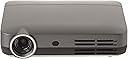
The Optoma IntelliGO-S1 is a cutting-edge mobile projector featuring Android 4.4 and an Aptoide app store with over 700k apps. With 720p HD resolution, 500 lumens brightness, and a remarkable 15,000:1 contrast ratio, it delivers vibrant visuals. Weighing just 1lb, this portable projector is perfect for streaming movies and TV shows, and supports playback from USB or micro SD. Connectivity options include Wi-Fi, Bluetooth, and Ethernet, making it a versatile choice for both personal and professional use.


| Brand Name | Optoma |
| Item Weight | 1 pounds |
| Product Dimensions | 6.2 x 4.72 x 1.22 inches |
| Item model number | IntelliGO-S1 |
| Is Discontinued By Manufacturer | Yes |
| Color Name | Gunmetal Gray |
| Special Features | Aptoide App Store - Featuring over 700k apps including Netflix, Hulu, Spotify, Pandora, Amazon Music, Amazon Shopping, Instagram, Facebook, Twitter, Flixster, Kodi (and more), I/O and Storage: 8GB Memory, HDMI, AV Port, Wi-Fi, Bluetooth, USB 2.0, USB 3.0, Micro SD Card slot, Ethernet, and a Touch Control Panel for easy access to common controls |
| Item display height | 5 inches |
L**R
Amazing product!
As usual Optoma makes an amazing product, and this tiny thing is no different. It's very bright set to a 100", you can watch it with ambient light in the room with no problem. I've been using it every day for about 4 months now and it is amazing. Once I'm done traveling I will be putting this in my movie room to replace the 42" TV I have in there.The things I love about it is it's brightness and picture quality, the bluetooth sound, the android OS and apps, auto keystone, all the port options it has, how tiny it is, and that it's LED with a long lasting life. The minuses; the sound isn't good quality at all, highly recommend a bluetooth headset or speaker system. Also, I plugged in one of my movie drives to the system and it worked fine, but the 2nd drive I plugged into it didn't work. I don't know if it's a different format or not, and haven't had time to mess with it enough but one of my drives works fine, and the other doesn't.Overall I highly recommend this product. There is a lot of crap in the way of mini projectors out on the market so be very careful what you purchase. I have a few friends that purchased other off brand cheaper mini projectors and they are very dull. This is a few hundred more but well worth the money!
B**E
Great hardware, mediocre software
I wanted to write a quick review of the Intelligo-S1, as other reviews were mostly non-existent at the time of this writing. I took a leap of faith and for the most part, it paid off. Overall, this is a great projector for the money. I don’t have a lot of experience with projectors in this price category, but I’m pretty happy with what I’ve seen so far. The images are certainly softer than those of 1080p projector, but still satisfying.Its lack of support for exFAT is a head scratcher. If you plan on watching ripped movies off a USB drive, you’ll have to use NTFS (or be shackled by the 2G file size limit of FAT32). If you use a Mac to transfer your rips to a USB drive, this will be a real pain, as OS/X does not natively support NTFSPros:Amazingly bright considering it’s low wattage. I don’t doubt that its lumen output is at least close to its claimed 500 ANSI lumens. It produces a usable (albeit washed out) image in even moderate ambient lightRich and colorful imageBoth the projector and the remote seem to be of high qualityDecent contrast, although blacks fall short of higher end projectorsNo noticeable screen door effectComes with Kodi app pre-installedBuilt-in audio is usable in a pinchThe fan noise is almost inaudibleCons:No exFAT support on microSD or USB drives. Only FAT, FAT32 and NTFS.Doesn’t support HD Audio codecs like DTS-HDIf you’re sensitive to DLP rainbows, you’ll see them with this projector. (when you dart you eyes around, etc.)Can’t download content with the Netflix app for offline viewing.Low level blacks are crushedUPDATE 8/8/17:I started playing around with the calibration controls of this projector. It provides settings for adjusting brightness, contract, saturation, hue, etc, as well as color temperature (red, green, blue, but lacks gain and bias controls enabling you to properly set gray scale). You can invoke the settings while playing back a test pattern, but the settings "pages" are full screen and completely obscure the video image behind them. In the other words, you have make an adjustment, hit the back button on the remote a couple of times to see the result. Rinse and repeat. This makes fine adjustments a bear.UPDATE 8/8/17 (2):Finished calibrating the projector using a Colormunki Display, HCFR software and AVS HD 709 patterns (using the built-in media player). Not having gain and bias controls makes setting the gray scale more challenging, but I ended up with a decent result by adjusting the red, green, blue controls to dial in 70% gray. My low level blacks and high level whites are off by quite a bit, but my mid-tones tracked fairly well. Admittedly, I'm not an expert at calibrating projectors.One thing of note is this projector crushes low level blacks (below an APL of 19). Increasing the brightness (even to 100%) doesn't seem to make any difference. Maybe this is only a problem with the built-in media player (?) Not a huge deal, but it is noticeable in video content if you're looking for it. Overall, I'm happy with my purchase and would recommend this projector.8/8/17 (3)Got a notification of software update and applied it. It basically reset the projector back to factory defaults, blowing away all of my settings (calibration, wifi, etc.) and my installed apps.8/28/17I'm really enjoying this projector and have overcome two of its previous shortcomings. The first relates to it not handling all video/audio formats. This was simply solved by installing and using VLC from the app store, as VLC will play back practically anything.The second relates to not being able to playback downloaded content from Netflix while offline. Although you can't download and store Netflix content to the projector itself, you can download it to your iPhone and then mirror from it to the projector. The Intelligo-S1 includes two features to enable this. The projector can be turned into a WIFI hotspot (in Settings->WIFI) and it comes with an application called UShare pre-installed that supports AirPlay. Getting this to work can be tricky though, but by following these steps (thru trial and error) I was able to get it work:- Power on the projector and turn on the WIFI hotspot (UShare should launch by itself - you shouldn't need to invoke it by clicking on it)- Turn off WIFI on your iPhone- Launch Netflix and start playing a previously downloaded movie or show- Pause the Netflix player- Turn on WIFI on your iPhone and connect to the projector's hotspot- Swipe up from the bottom of the iPhone's screen and turn on AirPlay Mirroring (you should see UShare as a device in the list)- Resume the Netflix playerAll these steps might not be necessary, but I had issues with Netflix complaining about network errors if I connected to the projector's hotspot before starting the initial playback.
G**N
Overall good product with some small caveats
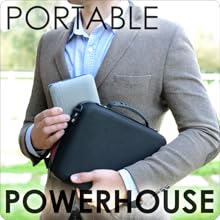
10 January 2017 - Projector arrived today, packaged very well. It comes with a EVA protective case which protects the projector and all other accessories... it’s well made.The accessories are of standard quality, nothing that will blow you away but also not cheap looking at all.The projector itself is a sturdy little unit, solid feel and a well finished product. Ports all lign up well (this is not normally the case with cheaply manufactured alternatives).Image quality is also good, not outstanding but acceptable for such a small unit. I’m pretty sure anybody will be more pleased than disappointed. (I’m a difficult person to please and I’m pretty happy with picture)... it does however not focus properly at the edges of the screen, it’s only slight but if you really look closely, you will notice it. (It the top edge is properly in focus, the opposite bottom corner is slightly out when projected onto a flat screen with very little keystone needed).Android Operating system is ok at best (im an Apple person).YouTube app doesn’t work well at all - I would almost say it’s unusable. The YouTube app on my Nvidia shield, which is also android, is light years better.Netflix works but also gives an error that google play services are needed, however it does still play titles.Airplay feature (for Apple stuff) - the image part of this works surprisingly well BUT the audio is out of sync, both when using the internal speaker on the projector and a Bluetooth speaker. (It should also be noted that there is an audio delay when using a Bluetooth speaker while playing back any content - I also tried multiple Bluetooth speakers and all had delays). I tried playing content from my photo library and also streaming / casting across from the YouTube app on my iPhone and both had audio delay / sync issues.The included remote is ok, it has basic functionality but you will need an wireless air mouse / keyboard for a nice user experience. (I used my Minix A2 lite air mouse with usb dongle and that works very well). You will however need the original remote to power and and off the projector if you are lazy like me and don’t like getting up... haha. Maybe there are other remotes that have a power button that will work.The projector poweres up and is usable within about 20 seconds. It also powers down within a few seconds... very quick.I will give an update after a few more days of using the projector
Trustpilot
1 month ago
1 week ago