🌡️ Stay cool, save green, and never come home to a cold surprise!
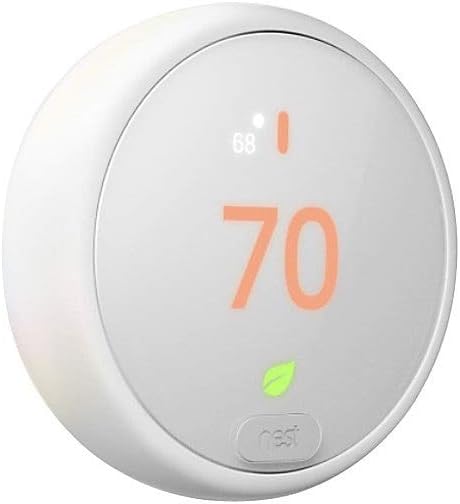
The Nest T4000ES E Hubless Smart Thermostat is a sleek, programmable thermostat that learns your temperature preferences and optimizes energy use. With Wi-Fi connectivity, it offers remote control via the Nest app and voice commands through Alexa and Google Assistant. Featuring HVAC system alerts, energy-saving Eco Temperatures, and compatibility with most heating and cooling systems, it installs easily and helps reduce your carbon footprint while enhancing home comfort.


| ASIN | B074NBTCY7 |
| Additional Features | Auto-Scheduling, Programmable |
| Backlight | Yes |
| Best Sellers Rank | #18,933 in Tools & Home Improvement ( See Top 100 in Tools & Home Improvement ) #30 in Home Programmable Thermostats |
| Brand | |
| Brand Name | |
| Color | White |
| Connectivity Protocol | Bluetooth, Wi-Fi |
| Connectivity Technology | Wi-Fi |
| Control Method | Voice |
| Control Type | App Control, Voice Control |
| Controller Type | Amazon Alexa, Google Assistant, Insteon, Nexia, nest |
| Customer Reviews | 4.1 out of 5 stars 4,542 Reviews |
| Display Type | Digital |
| Finish Types | Unfinished |
| Global Trade Identification Number | 00813917020593 |
| Included Components | Display, Base, Optional trim plate, Mounting screws and labels, Installation Guide, Pro installation card |
| Item Type Name | Nest Automated Climate Thermostat, white (T4000ES)hermo |
| Item Weight | 0.44 Pounds |
| Manufacturer | |
| Material Type | Plastic |
| Model Name | Nest Thermostat E |
| Model Number | T4000ES |
| Mounting Type | Wall Mount |
| Number of Batteries | 2 AAA batteries required. (included) |
| Power Source | Battery Powered |
| Product Style | Thermostat Only |
| Shape | Round |
| Special Feature | Auto-Scheduling , Programmable |
| Specific Uses For Product | Heat Pump |
| Temperature Control Type | smart/remote |
| UPC | 813917020593 843342166207 |
| Unit Count | 1.0 Count |
H**L
Very easy to set up.
The thermostat was very easy to install and set up. It went to a different language at first and I had to change it back to my language. Besides that it works great with the app and with Alexa. I would recommend it highly.
D**E
Very useful at the right price.
I waited awhile before I reviewed the E so I could get to know it a bit and I'll still need more time because this thermostat is not a one trick pony. It also is not a techno geek toy. The average person with a standard heat/cool system can have this thermostat functional in less than an hour. If you can accomplish that then you're set to have the E pay for itself within the first year. If you have to hire someone it'll take longer but at least you'll have the satisfaction of knowing you will have reduced your carbon footprint from the moment you turned it on. I've had set back thermostats for years which were a nightmare to program that I always eventually just abandoned and used manually. This one is self programming so whatever savings are to be had are gotten almost immediately and it'll thrive on weird schedules that no set back t-stat could begin to manage. The only downside is that Alexa and E don't play well but I put that on Alexa. I can ask Alexa what the temperature is in the hallway (the location of the E) and she'll tell me exactly but I have not found the right combination of words that will result in making a change. The more words Alexa has to hear the more likely you are to say them in a way she won't understand and won't act on. That problem will correct itself in the future with or without Amazon's help and if I'm too lazy to get off my butt I can still do it by phone at 40 feet or four thousand miles. It's very functional and just a little bit geeky. I expect the E to be far more popular than it's big brother. I consider this a blue collar thermostat. Hard working and not pretentious. 9-22-17 update I've gotten two responses to my 'command' complaint. There are examples of phrases that do work but I found on my own a simpler way. When I told Alexa to "Set hallway to 72 degrees" she complied and responded "AC set to 72" so I used that as a command and it worked so now I just say "Set AC to **". Obviously that won't work if you have multiple thermostats but I don't expect the E to be put in homes big enough to require more than one heat/cool unit. The support literature is extensive so it takes a lot of interaction to expose it all. I only found the command examples because I was told they were there so I refused to quit until I found them. Edit 2021: I added a star. Absolutely flawless after 3 years.
K**A
Costly thermostat!
Purchased this for a work apartment. We have a different model in our home and it works perfectly. Installed this one with no issues but couldn’t get it to connect to my phone. Then when the first cold snap happened I kept having issues where the thermostat wouldn’t control the heat properly. I left to go on vacation and the heat was on 67 but the thermostat would not shut off and was stuck on 90° for days! Had professionals come out twice and they told me it was the thermostat itself was bad. Cost me $225 service call PLUS my power usage was $25 a day!!!! Normally around $2 a day.
M**D
Great product, one small glitch that was quickly corrected
I think the iterations of the original Nest thermostat say "LOOK AT ME!, I'm cool" (and it is) It has a very distinctive look. I'm more of a minimalist person and like things that don't draw a lot of attention to themselves. The frosted bezel lens, ring and face plate work perfectly for me. I don't feel the plastic ring does look cheap. It looks subtle. I would have liked to have done away with the mounting plate, however to due to the way the previous thermostat was mounted and the control wires were run through the wall, it was a necessity. It also reduces smudges on the wall from adjusting things at the thermostat, if not using the app. Check to make sure the E provides the connectivity and functions you need. Connectivity was not an issue for our system and the fact it didn't show the outside weather was not a deterrent in our case. (Outside temp IS shown on the app.) I like the frosted face that becomes active when you approach the thermostat. It automatically adjusts its brightness depending on the amount of ambient light. The one glitch we experienced was I couldn't figure out why the thermostat wasn't adjusting the temps per the schedule set up. My location was inputed properly. I chatted with the amazing folks at Nest and the next morning the times were right. I believe the issue was their data base had us in Central time (which we are about a 10 minute drive from) and Eastern. Now everything works like a charm. The old thermostat had contacts that clicked every time it started the system, the Nest E is completely silent. May not seem like a big point, but for a very light sleeper, it makes a difference. It linked up nicely with our other Nest products (Nest Protect) and I like the fact that should smoke or carbon monoxide be detected, the E will proactively control the HVAC system so the situation is not exacerbated. Smart. Couldn't be more pleased with the Nest E. The app is intuitive and easy to set up schedules, or let it figure out the optimum schedule for you.
J**N
Excellent, esp for heat pumps, but NEEDS HOLD! Best feature documentation ever.
I'd give it 5 stars except for the fact that IT NEEDS A HOLD FEATURE! Every non-cloud-based scheduling thermometer I've had over 30 years has had a HOLD setting, which keeps the set temperature until you put it back to AUTOMATIC. None of the Nest thermometers has this feature, nor do the Honeywell cloud-based thermometers (which I had in a previous home and liked a lot.) I prefer setting the schedule myself to using the learn mode, because we just had too many exceptions and it got confused. But if you're a habitual person, and if you're the type to remember to set the temp the way you want it every day for a week or two, the learn function could be great. Furthermore, you can set it in learn mode, and then later adjust the learned schedule to what you want and turn off learning. I like that I can monitor and control remotely. I love the fact that I can change the temperature after I've left for a vacation and forgot to set it to away mode. (It has a feature to detect this automatically, but that doesn't work for us for reasons unrelated to the Nest.) One of my favorite features is for a finished attic, where we have a separate heat-pump HVAC. During the day it's a hobby/projects room, never used at night. Normally, heat pumps with auxiliary or emergency heat, you do NOT want to put them on a schedule (for example, lower the temp a lot on winter nights, bring it up to 65 during the day) because when the thermostat calls for heat in the morning, it'll use the expensive auxiliary heat to warm up as soon as possible. The Nest has three modes: fast as possible (max comfort), heat-pump-only (max savings), and a "balanced" mode that's between these extremes. I use the max-savings mode for the attic, which is perfect. I also have the "anticipate" feature turned on, so that if it takes 3 hours to get the room up to temp by 10 AM, it'll start at 7AM (and it figures that out.) So, I save a lot of energy/money. The Nest has the most thorough documentation of the features, better than I've ever seen for such a sophisticated device. It has LOTs of features and many of them are perplexing. The Nest website has excellent descriptions of each feature, not only explaining why you'd want to use it, but tips on how it works so you can really understand -- yet doing this in layman's terms. That's a really hard thing to do well, and I've never seen it done better. The hardest part of installation was that I didn't know exactly what type of heat system I had. For simple/normal HVAC systems with just one type of heat, one type of cooling, and just 4 wires (common, heat, cool, fan), installation is a breeze and the app walks you through it. Anyone who's just a bit handy can do it. If you have a more complex system, your normal HVAC guy can either do it, or answer the questions about what the wires are (that you need when there are special ones like the B/O wire, which can be used for different purposes.) You DO want to know whether you have a common, and if you don't, it's probably best to hire a pro if you're not a do-it-yourself type. I've put in 4 of these, and only on one did I have any doubts. I have both the normal Nest, and this unit which is the E lower cost version. There is one feature it doesn't have that I don't recall and don't need. The display is fuzzy compared with the normal Nest, but that doesn't bother me. I prefer the lower cost of these units. It integrates well with Google Home. It can work with an additional wireless temperature sensor, which is handy when the thermostat isn't where you want the temperature to be. Unfortunately, you can't ask Google what the temperature of the sensor is, just the thermostat. Maybe they'll add that before long.
S**O
No C required for this installation.
I installed an E thermostat. My old thermostat was two wire. Red and white. No C or common wire. The new thermostat controls a Taco zone valve through a Taco 6 zone control. No C was required. Simply make up the R & W 24 volt thermostat wires. Easy. Then follow Nest App directions.
A**R
Great with a mini scare
My house had only red and white thermostat wires (no C-wire). This device works great and does exactly what I want it to do. The only issue i had is probably because this is an older generation (gen 3) and the battery was drained- probably from sitting on a shelf for a while. As a result, the device would not power up through house wiring. I thought the device was defective. I found on Reddit that others had similar problems. The solution was to charge the battery of the thermostat with a USB plug-in charger (USB-Micro on the back of the puck). Once I let it charge for about 30 minutes to an hour, I was able to connect the thermostat and it stayed charged with the house wiring. There are no lights on the device to say it is charging, but when it is fully charged you get a message to attach the puck to the base.
P**P
Excellent, but BEWARE 4-WIRE INSTALLATIONS. C-Wire HIGHLY RECOMMENDED.
This is my SECOND Nest. My last one died after a year, and I think it's important you know WHY it failed, and WHY I'm buying it again. Nest states that it supports both 4 and 5-wire setups. This is TECHNICALLY true. But there are some important THINGS TO KNOW ABOUT IN 4-WIRE SETUPS that MAY end up with you killing your Nest in 6-18 months time. COMPARED TO COMPETITORS: -The Nest requires MORE POWER. This is the basis for it's higher rate of failure, compared to Ecobee and Honeywell. As a result, it relies on RUNNING your heat or A/C to charge. If you run your HVAC more efficiently, you will gradually be draining and kill your Nest. SYMPTOMS OF FAILURE: -HVAC pulses on and off every 30 seconds -R wire appears "dead" (assuming the wire and HVAC controller aren't bad) -HVAC runs when turned off TO BE CLEAR, this is NOT JUST A BATTERY ISSUE. If you wait until it fails, you WILL NOT be able to fix it. The solution can only be had BEFORE you kill it. You will need to add a source of constant power, which you can do 1 of 2 ways: 1) Connect the C-wire to your HVAC unit (if it supports it) 2) Buy a "C Wire Adapter". Connect it to C and R(H) In my setup, there was no C-wire connected to my HVAC controller. I left it DISCONNECTED. There WAS an R-wire connected. I left it CONNECTED.
Trustpilot
1 week ago
4 days ago