

Desertcart purchases this item on your behalf and handles shipping, customs, and support to Thailand.
🚀 Elevate your laptop’s wireless game with lightning-fast WiFi 6E & Bluetooth 5.3 — because buffering is so last decade!
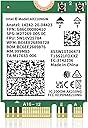
The SYONCON M.2 WiFi Intel AX210 NGW Card is a cutting-edge wireless network module featuring tri-band WiFi 6E technology with speeds up to 5400Mbps and Bluetooth 5.3 for ultra-low latency connections. Designed for laptops with M.2 2230 slots, it supports Windows 10/11 and offers enhanced WPA3 security, making it an essential upgrade for professionals seeking top-tier wireless performance and future-ready connectivity.


| ASIN | B0B39631G1 |
| Best Sellers Rank | #24,789 in Computers ( See Top 100 in Computers ) #41 in Network Cards |
| Brand | SYONCON |
| Built-In Media | AX210 wifi 6E module, screw, screwdriver |
| Color | multicolor |
| Colour | multicolor |
| Compatible Devices | Laptop |
| Compatible Operating System Family | Windows |
| Compatible devices | Laptop |
| Customer Reviews | 4.7 out of 5 stars 1,381 Reviews |
| Data Link Protocol | Bluetooth |
| Data Transfer Rate | 2402 Megabits Per Second |
| Data link protocol | Bluetooth |
| Hardware Interface | Bluetooth 5 |
| Hardware interface | Bluetooth 5 |
| Item Dimensions L x W x H | 30L x 22W x 2H millimeters |
| Item Type Name | wifi cad |
| Item Weight | 20 Grams |
| Manufacturer | SYONCON |
| Mfr Part Number | AX210NWG |
| Minimum Required Operating System Version | Windows 10 |
| Model Number | AX210NWG |
| Number of Items | 1 |
| Product dimensions | 30L x 22W x 2H millimeters |
U**S
Latest M.2 WiFi chip in 2022 (Speed Upto 2402 Mbps)
This WiFi chip is for laptops and may work for desktops. Make sure your laptop's current card is m.2 and supports NGFF. Note: Needs 2x antenna mhf4 , but unfortunately some laptops have 1x antenna, so adding additional internal antenna is required. If the router supports WiFi 6/6E expect the link speed to jump to 2402 mbps. Range could have been better tho.
M**I
منتج كويس
منتج ركبته على لابتوبي وشغال كويس
P**S
Excellent produit
Très bonne qualité
A**R
Great card
Very fast, huge improvement to what came with my computer. Easy to install on most pc if you have basic skills ++ Intel cards have the best support for Linux
H**.
Great WiFi 6E Card w BT
Great card, replaced my existing card nicely. Came with instructions for driver downloads as well. *****
M**.
Great upgrade to 9260NGW Wi-fi card
Update: I bought a second one of these cards to upgrade a Beelink SER 5800H from Wi-Fi 6 (AX) to Wi-Fi 6E. Once again, reconnecting antenna leads was a 10 minute challenge. The second card works fine also. However, having 2 6E standalone PC's brought my own misunderstanding to light. I had assumed that if the two machines were close together, they would communicate with each other at something close to the theoretical 6E speed. The cards are advertised as having "5400Mpbs" speed. Sort of true. Maybe. Some call it marketing hype. The machines do link to each other at a link speed of 2700/2700Mpbs. 2700+2700 = 5400. But doing a test with OpenSpeedTest Server disclosed speeds in the 810 Mpbs up/down range. What I learned was that these cards are MIMO 2 x2 cards. MIMO stands for multiple input/multiple output. They have two antennas not the four required for 4 x 4 MIMO to go full speed. Not a problem...just a feature that limits the maximum theoretical speed of 866 Mpbs. Most clients will be 2 x 2 devices (there are fancy 4 x 4 MIMO devices that won't work in my small PC's for a LOT more money). So my misguided expectation was that my two 6E devices would connect to each other far faster than is possible with this technology. I learned something and it isn't an expensive lesson. ----- Original review which is unchanged: I bought this Wi-Fi card to upgrade my HP Elite Desk 705 G4 from Wi-Fi 5 (AC) to Wi-Fi 6E (AX) running Windows 11 Pro. I have a new 6E router and, given the price being right, felt it was a reasonable upgrade. The real challenge, and I have some experience with this, is reconnecting the antenna leads to the card. They must be pressed on "squarely" without too much force. I found that connecting them to the card before it is in the M2 socket worked best. I couldn't connect to Openspeed Test server on my PC. It was worked in the past to give benchmarks without involving my ISP but, perhaps because of settings on my new routers, it isn't working today. So the benchmarks below are from the HP PC to my ISP and don't reflect the full potential of the new card. When/if I resolve this, I will update this review. Will the card worked out of the box without installing a new driver, the PC didn't recognize the 6Ghz signal. Following the directions on the included instructions to download and install drivers directly from the Intel website solved that issue. Old Wi-Fi 5 card 5Ghz: down: 411 Mbps up: 11.2 Mbps New Wi-Fi 6E card 5Ghz: down: 477 Mbps up: 11.2 Mbps New Wi-Fi 6E card 6Ghz: down: 560 Mbps up: 11.6 Mbps My ISP speed through an ethernet connection is 580 Mbps down and 11.8 Mbps up Other's results will vary based on proximity to the router and architecture of the home but I'm pleased to the improvement available on both the 5Ghz and 6Ghz bands. Totally worth the investment. Pro: 1) Improved Wi-Fi bandwidth 2) WPA3 security Con: 1) Installing card connections a bit tricky 2) Had to download drivers from Intel website to enable 6Ghz band. I am very happy with my purchase.
Trustpilot
3 weeks ago
2 weeks ago