We remain fully operational. Our teams are working around the clock to ensure your deliveries continue safely.

DOWNLOAD THE APP


Copyright © 2025 Desertcart Holdings Limited
DOWNLOAD THE APP
Buy anything from 5,000+ international stores. One checkout price. No surprise fees. Join 2M+ shoppers on Desertcart.
Desertcart purchases this item on your behalf and handles shipping, customs, and support to Thailand.
🎧 Elevate your game audio—because every sound counts.
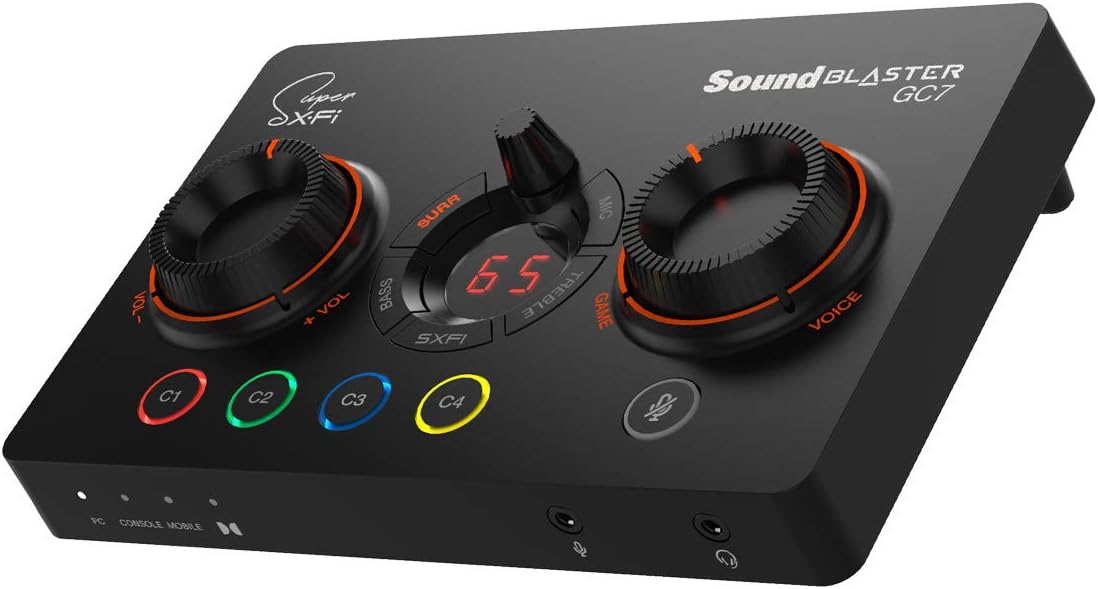
The Creative Sound Blaster GC7 is a next-gen USB gaming soundcard featuring a high-fidelity AKM4377 DAC with 24-bit/192kHz playback, 7.1 virtual surround sound, and dual DSPs including Super X-Fi for immersive audio holography. It offers 4 programmable macro buttons, an ergonomic one-handed control layout with a GameVoice Mix knob for balancing game and chat audio, and customizable RGB lighting. Designed for PC and PlayStation 5, it supports optical I/O and USB connectivity, delivering pro-grade sound clarity and precise positional audio to enhance competitive gaming and streaming experiences.


| ASIN | B08ZD59L8H |
| Audio Output Mode | Surround |
| Brand | Creative |
| Compatible Devices | Personal Computer |
| Customer Reviews | 4.1 out of 5 stars 765 Reviews |
| Hardware Connectivity | USB |
| Hardware Interface | USB |
| Hardware Platform | usb |
| Item Dimensions L x W x H | 6.81"L x 4.49"W x 1.85"H |
| Item Weight | 281 Grams |
| Manufacturer | CREATIVE |
| Maximum Sample Rate | 192 KHz |
| Mfr Part Number | 70SB185000000 |
| Model Name | gc7 |
| Model Number | SB1850 |
| Platform | PlayStation 5 |
| Signal-to-Noise Ratio | 120 dB |
| Surround Sound Channel Configuration | 7.1 |
| UPC | 054651194458 |
S**E
Way better than expected. And it's actually reliable.
I have used a lot of Creative products over the years including the original sound blaster Audigy from way back when. Their hardware is top-notch and you can get some great sound out of their products. But in most recent years the software side of their products has struggle hard. And that combination of great hardware and poor software is no good. This was my experience with the G8 external soundcard. Great sound and a plethora of options to customize your experience but the drivers and software were terrible resulting in intermittent disconnects from my PC. After some back and forth with attempted fixes and varying results I finally gave up and returned the device. As a replacement to the G8 I purchased the GC7 and I have to say this is what the Creative experience is suppose to be! There is still the great sound quality and a plethora of options to tune the experience to your liking AND it's software stable. No disconnects, it starts every time, and it sounds great! Furthermore, there is a dedicated power button on the back of the device, which the G8 didn't have. It's power via a USB-C to USB A cable and it has optical in/out which is my I/O of choice. Most laptops don't have optical anything and sound is most often limited to 3.5mm Jack's coming off an onboard sound chip with limited settings to tune your experience. This device fixes that.
J**G
Great hardware Mediocre software
The pros and cons of this device really depend on your use case. For me i just didnt want to buy a soundcard for my pc seeing ats this made much more sense for me. PROS:Sound quality is fantastic for gaming! A wide sound stage with great separation allows you to locate enemies in fps quicker and gets you a more immersive experience. It can drive the higher impedence headphones like the hd6xx with ease.A ton of settings like scout mode and sxfi sound pretty good but i just setup a couple sound profiles for rpg's and fps and that's enough for me. The mixamp dial is reaaaally convenient when you cant hear your squad mates or the game is too loud, 2 seconds and its perfect. I really love the way this thing works. 4 Programable macro buttons which can do anything from a certain command macro to opening up a program. Also has rgb on said macro buttons. The mic amp sounds fantastic and has a bunch of modes to improve the performance of most mics. Also has a voice changer if your into that. The software has a ton of customization options where you can literally spend hours fine tuning your setup and it works somewhat smoothly once you get it up and running. it also has bluetooth which i havent used but really should mess around with. Cons: Build quality is somewhat on the light side but the touchpoints like the dials and buttons feel solid enough where i wont have to worry about them falling apart. Software: the setup like you've probably seen in the other reviews of this item leaves a lot to be desired. You have to download 3 apps one on your phone and 2 on your pc while making 2 different accounts. Plus its somewhat buggy but i like the product and performance enough where ill only knock off half a star for this and nothing more. 4.5/5 Tldr: if you've been looking for an amp for gaming this one will do the trick and wont break the bank. Sure you can spend $1000's more but if we're being honest you probably wont notice the difference ingame.
J**A
Could have been perfect but it's not.
This review is for the Creative Sound Blaster GC7 . TL;DR │ Great hardware. Get it for the custom buttons and hard dials. Good software, for the most part⁽ⁿ¹⁾⁽ⁿ²⁾. I think the price is justifiable. Still no ambient background noise removal like RTX voice. SXFI is amazing but you have to have your headphones supported. CONTENTS: Intro │ What I Like │ What I Don't Like │ Outro │ Notes │ Package │ Verdict - - - My background: I've used a lot of Creative's DACs and AMPs. I've tried the Recon3D , E1 , E5 , X7 , G1 , even the X-Fi Go . I've also dealt with their speakers and headphones, with and without built-in DACs. Needless to say, I was a big Creative fan. Then, I stopped buying from them because of principle (I got a warranty issue with them). But, I figured I'd give them another try. Creative still knows how to take crappy sound and turn it into something great. Not only do they do it better than most, but they do it efficiently, without costing an arm and a leg. More about the sound quality in my closing statements below. This is a long review if you read the accompanying notes. WHAT I LIKE │ + │ + SXFI is unbelievable.⁽ⁿ⁰⁾ + Looks great in person. Doesn't look cheap. + Four customizable buttons with RGB. + Dedicated mic mute button. + NO capacitive buttons, all tactile. + Kickstand feet (fixed though). + USB-C. + HeadSET jack (TRRS). + Two useful giant dials. + Multipurpose middle dial. + Software speaker/headset switch button. + The switch is remappable to the 4 buttons. + The new CREATIVE Windows app.⁽ⁿ¹⁾ + App support for Dark Mode.⁽ⁿ¹⁾ WHAT I DON'T LIKE │ × │ × The garbage SXFI Apps (plural).⁽ⁿ²⁾ × Incomplete SXFI support for the main APP.⁽ⁿ²⁾ × SXFI headphone profile support.⁽ⁿ²⁾ × Middle dial functions are not ideal.⁽ⁿ³⁾ × Very tacky. RED in 2021.⁽ⁿ⁴⁾ × Not a fan of the Game/Voice label.⁽ⁿ⁴⁾ × No ambient background noise removal.⁽ⁿ⁵⁾ × The line in does not work properly for microphone.⁽ⁿ⁶⁾ × Front I/O ports create messy cabling.⁽ⁿ⁶⁾ × No sound volume mute button.⁽ⁿ⁷⁾ × No mute option for the customizable button.⁽ⁿ⁷⁾ × The keystroke function is sometimes buggy.⁽ⁿ⁷⁾ NITPICKS × I wish the buttons could handle macros natively. × Only up to 300 Ohm headphone support.⁽ⁿ⁸⁾ × The dials have hard min/max stops.⁽ⁿ⁹⁾ × Pull tab outer box (instructions inside).⁽ⁿ¹⁰⁾ × Not wireless headphone-friendly (no BT transmitter). × Mode selector is too close to the power button. At the end of the day, I'm gonna give Creative a pass here. As mentioned, the only concern I have about sound is the lack of ambient noise cancellation. For other things, Creative for me has been consistent in making great sound processing. This is their bread and butter, and they do it better than most multi-peripheral manufacturers. However, I reckon that the best upgrade you can make will still be your equipment, like a better microphone, and a set of speakers and/or headphones. Sound processing can only take you so far. I would avoid headsets because their microphones are usually an afterthought. "Gaming" headsets are notorious for having a crappy microphone. But, if you are one of those people who still prefer headsets, then this product is for you as this will certainly do your sound justice. That is of course provided, you have a wired headset as this does not have any wireless capability (the Bluetooth is only for set up). Really, any other Creative DACs will be amazing. As I mentioned, you'd get this for the hardware interface (and maybe SXFI if you're into that thing). Regarding SXFI, well...⁽ⁿ⁰⁾ - - - NOTES ⁽ⁿ⁰⁾This is unbelievable. Let me describe my experience... Me, wearing open-back headphones: "Let me turn on SXFI. Ooops, the audio output switched to my massive speakers. (removes my headphones)... HOLY SH... That was all in the headphones? What sorcery is this?!" ⁽ⁿ¹⁾Every single Creative device I've ever had have their own sandboxed app. I hated it. Right now, I have at least two apps from Creative on any given machine. The new app seems to be a direction towards a universal app for future products. It is clean. It supports dark mode. It's just called the "Creative App", and no more product-specific software. It's easy to use and intuitive. ⁽ⁿ²⁾But...for some asinine reason, I have to download their garbage SXFI Windows 10 app for SXFI (literally a 1.5-star app in the Windows store). On top of that, I ALSO have to download the mobile SXFI app to set up profiles. My setup was filled with frustration as the SXFI app cannot detect my device, WHILE the Creative app sees it just fine (Fix: I had to reboot). Also, SXFI headphone profile support is still lacking. No support for Sony's flagship XM series. Also does not support any Bowers and Wilkins headphones. ⁽ⁿ³⁾The creative apps almost always universally allow you to adjust 1. Surround, 2. Crystallizer, and 3. Bass (Boost). In the app, they call these settings "Acoustic Engine (AC)". The multipurpose button controls ONLY the surround for AC. The Bass in the dial does not control the Bass (Boost) in the AC, but rather, the bass on the "Equalizer" (same with the treble). I wish Creative just dedicated the buttons to their Acoustic Engine functions instead, as this set of controls (AC) are UNIQUE to Creative, and also for consistency. ⁽ⁿ⁴⁾It is 2021. Why are they still using red aesthetics to mark anything that has gaming in it? Either put in a muted color or just RGB it. This color theme is so 2010. This is why I didn't take a second look at the G5 and the G6. To be fair, it is not real RED, but more like a very fiery orange. Also, the labels for "Game" / "Voice" adds to tackiness. I wish they just labeled it more aptly like "Media"/"Chat" or "Speakers/Headset" or anything more generic. ⁽ⁿ⁵⁾For a company that specializes in audio hardware to still not have any sort of real ambient background noise removal is a real shame. In the age of remote work, this feature is seriously missing. ⁽ⁿ⁶⁾I was supposed to use the rear line-in connection for mic, because crowding the front I/O is very untidy. I find it weird that the only jack for a dedicated microphone is the one in front. My E5 was working just fine with the Line In/Mic combo. ⁽ⁿ⁷⁾Trying to set up a button as the mute button was almost impossible. The "Media Control" options only have "Play", "Next", and "Previous". I tried setting up a trigger with AutoHotKey, but did not work (e.g. ctr+alt+m). I assigned the same keystroke to my programmable mouse, the mouse works fine. I used the MOUSE button to assign it to the Creative app, and guess what? It worked, but the "KeyStroke" displays "Alt+ VolumeMute". If you look at your keyboard, there is no "VolumeMute" key. The software itself is buggy. Sometimes, the buttons just don't work until I open the app, and open the customize button window. ⁽ⁿ⁸⁾Their previous DACs support up to 600 Ohms. (E5, G5 , G6 , X3 ) ⁽ⁿ⁹⁾Not a fan of hard stops on min and max volume, because it quickly becomes out of sync when you change the volume via software, or via other hardware. Free turning dials (like the E5/G5/G6) would have been ideal. ⁽ⁿ¹⁰⁾This might be subjective, but a pull tab on a $170 piece of electronic is something I do not find appealing. I'd like to preserve the original box and not destroy it, for any reason. - - - PACKAGE │ ✓ ✗ │ ✓ Outer box wrap with instructions. ✓ Inner box. ✓ GC7 DAC. ✓ 1.5m/4.9ft Male to Male TRRS AUX cable. ✓ 1.8m/5.9ft USB-C to USB-A cable. ✓ 1.5m/4.9ft Optical Audio cable. ✓ Printed materials. ✗ NO garbage. - - - VERDICT: I recommend this product, but barely. ★★★★☆ | 4 stars out of 5. It is okay. I had more frustrations on the setup than I thought I would, but it is still a solid device once it is set up. NOTE: If the video is too small for you, it's because of Amazon restrictions. I posted the same video on YouTube. watch?v=FFfILmck12o This review is for the Creative Sound Blaster GC7 .
N**N
Great dac/amp, especially for gamers
I consider myself as a gamer and audiophile, While having a Focal Utopia speakers in my living room, I chose Audeze LCD-GX as my main gaming headset. I was looking for a solution that will allow me to switch between my casual desktop speakers and the headset, while giving a drive & quality boost to my Audeze as it's a shame to use such headphones with my onboard soundcard. So basically - the gc7 exceeded my expectations, it sounds great, gives you a proper control of the sound and even have 4 programmable buttons, by default one of them is switching between outputs which was awesome. + I was very impressed by the Scout Mode as it's giving an advantage (hearing steps and hints louder and giving the sound more 'dramatic' feel). + Bass, Treble, Mic, Surround effect controls on the fly + variety of inputs and outputs + Solid Creative software - Super SXFI sounds dull even with the ear scanning mobile software - A upper metal plate would bump up the design that feels somewhat 'plasticy'
B**N
Audio filters and gimmicks on an otherwise decent amp with chat mix
Soundblaster has, along with every other 7.1 surround gimmick known to man, proven that for most games it's unnecessary and a hindrance. All I wanted was a dac that could mix game and chat audio for PC. With this being the only option with a physical knob that could power 300ohm headphones. otherwise the senheiser epos would be a easy choice. now, with every gimmick turned off, it's "ok" A rough summary of what sxfi is (their big marketing point) This mode, take what would of been in-engine mixed binaural 360 audio for headphones, and converts that into 5 or 7 channels, where channels can both play the same audio que at different volumes offset by millisecond like a regular home theater setup would. The sound blaster dac then takes 7 channels, and converts it back into stereo with filters and reverb. It makes what would otherwise be a clean undistorted signal and gums it up. Now if someone is to your left you hear, 2-3 audio tracks combined with slight off timing so you get a high pitch harmonizing It exaggerated the effect so it now only comes out the left ear Oh and this affect is also applied to the voice output so now discord had reverb and filtering on it. (This literally can make it impossible to hear teammates call-outs as it is so muddy and bad) You can hear steps of the different 7 channels activating as you turn with a focal audio direction making it both distorted band inconsistent. Long story short, there's a sound engineer rolling in his bed at night knowing he put out such a bad product that will taint generations of users with bad audio design for years to come.
J**R
Good DAC, bad Linux support
This is a nice little DAC and I appreciate having a desktop device to control audio settings. The setup is simple and the result is great. That said, I dual boot WIndows and Linux but spend the VAST majority of my time in Linux. In Windows, you can download an app that allows you to save presets and use sound modes. The SXFI functionality works perfectly well. When in Linux, I can still use the EQ and volume controls and Linux (Nobara) recognizes the device properly and allows me to use surround/spatial audio output without SXFI. That said, a lot of the features like being able to set presets and use sound modes is done through the app and there is no app for Linux. I expect this to be the case most of the time, but Creative used to be a company that had a bit better Linux support than this. That said, if you are buying this for use on a Linux device, you can still find value in it but your feature set will be somewhat limited and you might look for something with better support or that is cheaper so you're not paying for features you can't use.
K**E
Great Audio - But Why a Mobile App?!
Pros: The sound is amazing. I upgraded from a SteelSeries GameDAC. When I first used the GamerDAC I was blown away by DTS. Now upgrading to GC7 I am blown away AGAIN. I use the Steel Series Arctis 5's, the power provided by the GC7 is unmatched compared to the GameDAC. I can control base, mids, and treble as needed. My Arctis 5s sound amazing now, more so than when combined with its own product the GameDAC. I have a unique setup as I used to be a YouTuber. On my main PC I game and talk on discord. So having the volume mixer between game and chat was a must for me. I can balance how loud a game is or how loud I want discord. I have a second PC I use to watch YT, netflix, etc.. while gaming. I route this audio via 3.5mm to the main PC. I am also able to control the audio using the Game/Chat mixer nob. This was another must for me. I can make my game louder or my entertainment louder, etc... Gaming wise the sounds are amazing, I can hear the fine nuances in ambient environments, NPC chat is clear, bass is strong and crisp. Discord audio is clearer than ever. I couldn't be happier. Cons I understand the innovation from Creative trying to use a picture of your face, and mapping of ears. But with all of the extreme data privacy and leaks I was super uncomfortable taking my picture to 'map' my features. I was a bit frustrated when I found that Steel Series are not even supported for this feature. Maybe I could have looked it up but its not a big issue. Just something I did not like. The initial setup is confusing because it asks you to download a mobile product for the desktop. I ended up uninstalling the mobile app, did a google search and found the mobile product to control the GC7. So unfortunately I cannot comment on the true value of sxfi. I have setup a lot of complex audio routing so setup was not an issue. It was more so the instructions coming out of the box. I don't want to use a mobile device to control or update a desktop app. It doesn't make sense to me. I have experience setting up multiple audio interfaces and routing audio to different sources.
A**D
overall does its job very well . sound quality is good and features are good connectivy is great
use it with gaming pc and work laptop via a basic usb docking device. overall its great sound effects for games, for music i put it on flat and it sound good . equlizer on board is very convenient. Main purpose was to avoid having to physically change the connection between the gaming pc and the work laptop, now all i ahve to do is plug in the dock to the laptop and everything works, it is connected to the usb dock and sometimes this causes the gc7 to turn off , that appears to be the dock fault but anyhow its easy to resolve by disconnecting dock from lapotp. Ovearll for the price i think this device is unbeatable .
Trustpilot
1 week ago
4 days ago