Buy anything from 5,000+ international stores. One checkout price. No surprise fees. Join 2M+ shoppers on Desertcart.
Desertcart purchases this item on your behalf and handles shipping, customs, and support to Thailand.
๐ท๏ธ Elevate your workspace with labels that mean business!
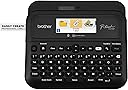
The Brother P-Touch PT-D610BTVP is a professional-grade label maker designed for busy retail, warehouse, and office environments. Featuring Bluetooth and USB connectivity, a vibrant full-color LCD preview screen, and high-resolution 300 dpi printing, it supports durable Brother TZe tapes up to 1 inch wide. With extensive font, frame, and symbol options plus the ability to store 90 labels, it streamlines asset tracking, inventory management, and product merchandising with unmatched ease and style.


| ASIN | B0B1KV3LSX |
| Additional Printer Functions | Print Only |
| B&W Pages per Minute | 20 |
| Best Sellers Rank | #2,311 in Office Products ( See Top 100 in Office Products ) #18 in Desktop Label Printers |
| Brand | Brother |
| Built-In Media | PTD610BTVP Label Maker |
| Color | White |
| Color Depth | 1 bpp |
| Compatible Devices | iOSยฎ or Android device via Bluetoothยฎ |
| Connectivity Technology | USB |
| Control Method | App |
| Controller Type | iOS |
| Customer Reviews | 4.7 out of 5 stars 334 Reviews |
| Display Type | LCD |
| Dual-sided printing | Yes |
| Duplex | simplex |
| Hardware Interface | USB |
| Initial Page Print Time | 30 seconds |
| Ink Color | Black |
| Item Dimensions D x W x H | 14.2"D x 14.2"W x 13.3"H |
| Item Type Name | Inkjet Printer |
| Item Weight | 6.64 Pounds |
| Manufacturer | Brother Printer |
| Maximum Copy Resolution Black and White | 300 dpi |
| Maximum Copy Speed Black and White | 20 ppm |
| Maximum Media Size | 24 x 18 |
| Maximum Print Resolution Black and White | 300 dpi |
| Maximum Sheet Capacity | 1 |
| Model Name | PTD610BTVP with Carry Case |
| Model Number | PTD610BTVP |
| Model Series | PTD610BTVP |
| Number of Trays | 1 |
| Other Special Features of the Product | Bluetooth Connectivity |
| Output sheet capacity | 1.0 |
| Paper Size | 24 x 18 Millimeters |
| Print media | Labels |
| Printer Connectivity Type | USB |
| Printer Output Type | Monochrome |
| Printer Type | Solid Ink |
| Printing Technology | Solid Ink |
| Resolution | 300 x 300 |
| Scanner Type | Sheetfed |
| Series Number | 610 |
| Specific Uses For Product | Professional/Business environments, Inventory management, Asset tracking, Identification purposes |
| Total Usb Ports | 1 |
| UPC | 012502669593 |
| Unit Count | 1.0 Count |
| Warranty Description | 2-year limited |
| Warranty Type | limited warranty |
C**R
A nice labeling machine
This unit has lots of features. I can control it from the unit itself, my cell phone or my PC. There are many different types of styles and formats to choose from and some of them you can use your own images. I use mine all the time from labeling my parts bins to marking pipes at work. The 2 sizes of tape available and multiple colors are nice to help mark things and keep them color coded. Whether you are writing labels for wires, envelops, spines of binders, file cabinets or any other thing you can imagine, this labeler will work just great. It runs off 6 AA batteries or the included power adapter. I am not sorry I bought this and would recommend this to anyone needing a labeler.
S**N
Easy to use and versatile label maker
Overall, I really like many aspects of this label maker. It is my first Brother label maker, but I've I had experience with other brands. The difference was that they all required a computer to use. I tested this label maker with the provided sample labels using different templates. I printed directly from the label maker, via Bluetooth with an Android phone, iPad, and a Windows computer. The mobile app is called iPrint&Label and the desktop software is called P-Touch Editor 6. Functionality between mobile and desktop was similar, but as you can imagine, the desktop app was more robust. The case that came with it was functional and there was space for the sample labels, the printer, and the ac plug. You can choose to use six double batteries (not included) instead if you need a more portable solution. Build quality for the label maker itself is solid. It is a matte plastic with a little bit of a sheen to it. I didn't notice any fingerprints on it. The keys felt good, but they have a little too much side to side movement for me. Hopefully it won't be an issue in the long run. The print quality was mostly good, a font did look a little jagged when printed depending on the template chosen. This only showed up on one label out 30. For me it wasn't a deal breaker and I'll do more testing to see if it comes up again. I use the label maker for my photography and video gear, but also use it for some additional items around the house. To peel off the label, turn it over and separate the two part split on the bottom. I did try readjusting the positioning of a label that I put on a case and it came up easily. To be fair, I did it within a short amount of time and not after a day or two. In terms of sound while printing, it is noticeable for sure, but I didn't find it to be excessive with regard to volume. I would definitely recommend this to people who like the flexibility of printing without a computer, even though the desktop app does work with Mac OS and Windows at the time of this review. It will definitely take time to work through all of the templates and maximize all of the available options.
J**A
Awesome Label Maker!
I love this printer! The labels come out clear and the lettering is smooth. The tape reels it takes are easy to change out. It will fit a few different size tapes too, meaning you can make labels of various sizes. It has numerous symbols / emojis built into the machine along with a full keyboard making label creation super simple. The phone app is also easy to use. The build quality is nice and the keyboard is easy to use. I hooked it up to my phone via Bluetooth easily and have had no issues with using that. I just finished using it to make labels for my coffee/cocoa/tea room toppings. They all came out great!
R**S
Rechargeable batteries and app interface - perfect combination
This is a solid label maker and the app is awesome. The ability to add shapes files (pics) to the labels from the app makes custom label making a breeze. The variety of label sizes and types adds to the functionality. The interface on the label maker itself without the app is a little disappointing. You can make basic labels but you are limited in what you can create. Iโve used the shrink wrap labels for my auto wiring and itโs awesome. It was a great help when reworking an engine harness. Labels are clear and crisp. I canโt speak for the sample label cartridges. I have no idea how big or small they are, but replacements are cheap from a bunch of suppliers. P-touch cartridges.
R**T
Huge upgrade from my old P-Touch with unreadable grayscale screen and no computer connections
This is a really nice label printer. Itโs got a great color screen, a wide variety of templates and infinite creativity for wide variety of custom labels in both content and tape size. There is a LOT in this printer and it can be a bit daunting to figure it all out. It takes 6 AA batteries and I use Lithium batteries. They are pricey batteries but they donโt leak and they last a long time. The AA batteries hold the settings when the AC cord is disconnected. This is unit is hefty and well made and I got it with the case which holds multiple tapes, the printer, AC cord and manual. I use this printer for audio cables, files and making electrical and plumbing connections. It connected to my iPhone Bluetooth in less than 5 minutes & to my Samsung Galaxy tablet Bluetooth in about 8 minutes. Both apple and android have the iPrint app. My Surface 3 laptop was the total opposite - a complete pain to connect vie Bluetooth. I think that fact is due exclusively to Windows 11 idiocy, not this printer. LONG story of hours of screwing around with Windows 11, a chat with Brother and then going old school. By โOld Schoolโ, I mean deleting all the printer drivers and Bluetooth data from my Surface. I found that you need to install the โiPrintโ app first, register the printer and THEN add the windows 11 printer driver from brother. That solved my issues. I will give Brother one kick in the shin for their annoying registration process. It asks for the unit serial number. I entered the 15 digit number 5 times - no go. WTF? I dug into the Brother fine print and saw that only the last 9 characters and numbers are required to register the machine for warranty purposes. Why? No idea, but that was really annoying and took a while to figure out. Other than those one off and one time screwy setup issues, this is a great printer! Hope this helps.
C**S
Ease of use
Printer works great with or without a computer. Using a Mac and had no issues with the software. The only downside to this printer the waist of tape before each label you print.
A**R
Awesome Label Maker - Worth the price.
This is a great label maker. With many options and with the ability to use all sizes of medium, it is proving to be and asset with many applications. Highly recommend!
D**E
Best label maker Iโve owned.
This is so easy to use and comes in a great organized case. No hassles, so many tape and character choices. Using it way more than our previous label makers!
J**Z
Muy buena etiquetadora
La calidad del producto es buena
N**A
Good for permanent tagging.
Expensive.. But nice if you need permanent tagging.
Trustpilot
2 days ago
3 weeks ago