We remain fully operational. Our teams are working around the clock to ensure your deliveries continue safely.

DOWNLOAD THE APP


Copyright © 2025 Desertcart Holdings Limited
DOWNLOAD THE APP
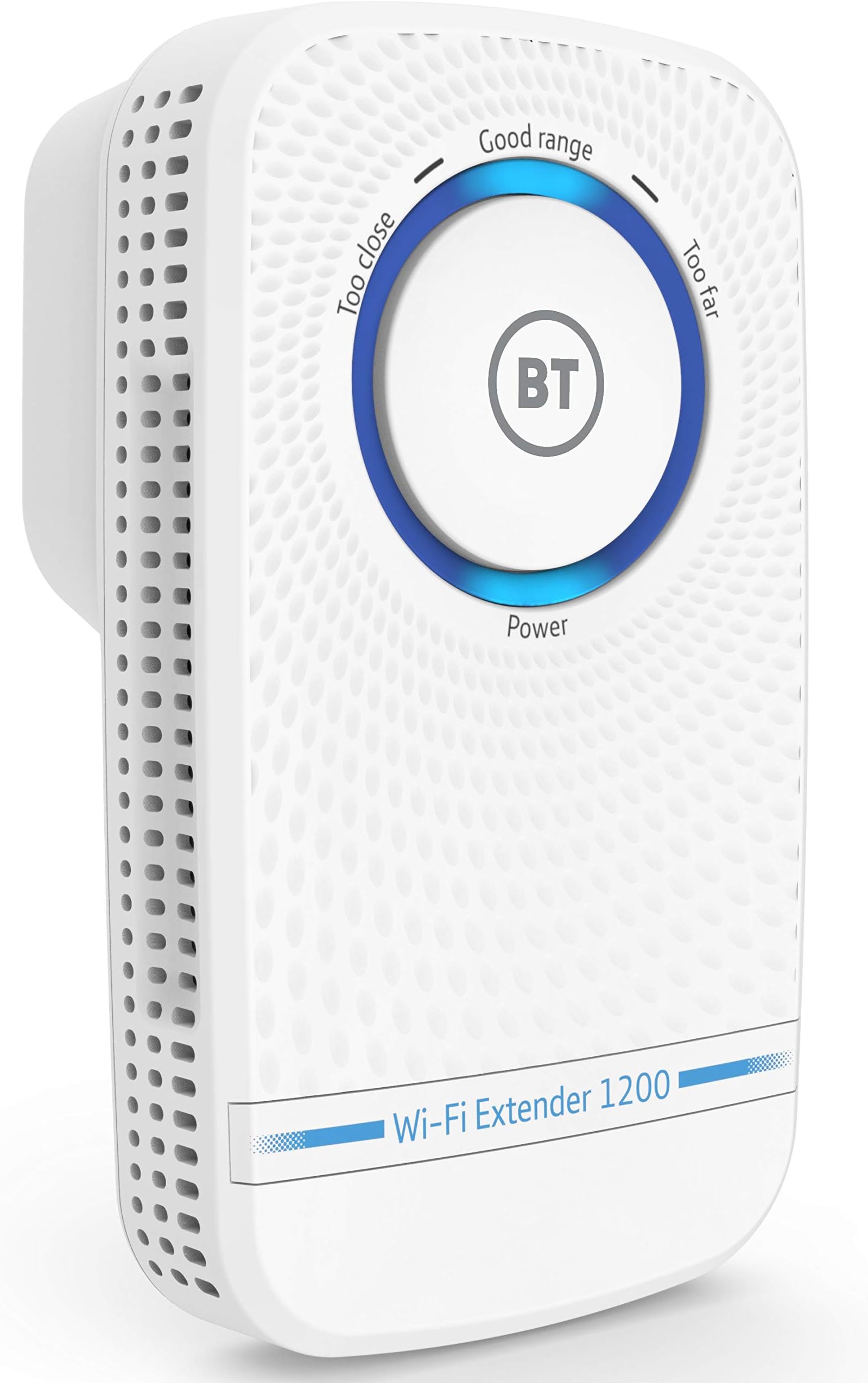



🚀 Boost Your Signal, Boost Your Life!
The BT 80462 Wi-Fi Extender 1200 leverages 11ac dual-band technology to deliver up to 1200 Mbps speed, extending your existing Wi-Fi network effortlessly. Compatible with all UK broadband providers, it offers simple WPS setup and selectable 2.4 GHz or 5 GHz bands, ensuring reliable HD streaming, gaming, and downloads while eliminating Wi-Fi dead zones in your home or office.


| ASIN | B00P7XV00O |
| Best Sellers Rank | 16,656 in Computers & Accessories ( See Top 100 in Computers & Accessories ) 106 in Network Repeaters |
| Box Contents | plug |
| Brand | BT |
| Brand Name | BT |
| Colour | White |
| Compatible Devices | Router |
| Connector Type | RJ45 |
| Customer Reviews | 4.0 out of 5 stars 3,043 Reviews |
| Data Transfer Rate | 1200 Megabits Per Second |
| Data transfer rate | 1200 Megabits Per Second |
| Frequency Band Class | Dual-Band |
| Frequency Bands Supported | 2.4 GHz, 5 GHz |
| Frequency band class | Dual-Band |
| Global Trade Identification Number | 05016351617052 |
| Item Weight | 6.31 Ounces |
| Manufacturer | BT |
| Product Warranty | 1 year |
| Special Features | Dual-Band Wi-Fi technology |
| Special feature | Dual-Band Wi-Fi technology |
| Wireless Compability | 802.11a, 802.11b, 802.11g, 802.11n |
| Wireless communication standard | 802.11a, 802.11b, 802.11g, 802.11n |
M**P
Garden office wifi fixed
I live in an old cottage with plenty of thick walls damping the wifi signal in certain parts of the house. Having an office at the end of the garden (about c. 25/30m away from the router), my BT Homehub 5 router can't quite get the signal there reliably due to restrictions on where I have to place it in the house and the number of walls in between. I wasn't sure that Powerline would work as the kitchen and office are on a separate ring and fuse box from the rest of the house. I read lots of reviews and considered several solutions before giving this a go. The Extender arrived the day after I ordered it. It literally took me 5 minutes to set up using the WPS button on my router and the clear instructions in the box. Instructions to set up without a WPS button on your router using your pc are equally clear and simple and would only add a few minutes to the setup procedure. My house has been extended by previous owners and some sockets are in unusual places. Suffice to say that each socket downstairs either didn't give me sufficient range extension from being too close to the router or the extender couldn't pick up the signal from the router sufficiently strongly. However, the extender works perfectly from one of the upstairs back bedrooms, which immediately sorted the line of sight issues. If you're having similar issues don't forget to try upstairs sockets as floors usually aren't as thick as the walls. I now have wifi in my garden office and all parts of the house and I can't notice the difference in speed between the signal there and in the house using the signal direct from the router. Having said that there are just two of us in the house so we don't have a houseful of users plugging into the same router or extender. One final thing, the first router I ordered developed a fault shortly after I started using it. Having talked it through with the BT helpdesk they asked a couple of questions then issued me with a fault reference number. I ordered a replacement from Amazon (and returned the original) , which arrived without quibble the following day and works perfectly. Hope this is helpful to others.
J**D
Very good, just make sure this will do what you want...
I needed to get a new wired point in the office on the other side of the house (it's a long story but I put a new graphics card in my desktop and had to take out the wireless card to make space). This unit takes the WiFi signal and boosts it around the house, but also has a CAT-5 connection so I could plug in an ethernet cable and create a new wired internet port. It was easy to set up, we have a BT router but I don't doubt it would be simple with any. I actually have it too close to the base router, so it says "Too close" on the extender to say it is not in an optimal location. That does not affect the ability to connect either wirelessly or via a wire to the unit however. One thing to note... This creates a second WiFi signal and does not simply extend the one that you have. This means that you end up with two visible and connectable signals. If you have a desktop with a wireless card, or a laptop that you always use in an office at one end of the house - no problem, you connect to the booster. If you want to connect an iPad, iPhone, mobile device or laptop you move around the house - it will not necessarily connect to the best signal, just the one it was last connected to. So in the kitchen may need to go into your device settings and choose the base router, when you go upstairs where the router signal is weak you would need to go back to settings and tell the device to connect to the extender. The device will not likely do this automatically. To allow it to connect to the best signal both the base router and the extender need to have the same name. As as far as I can tell (and I have tried) as you cannot change the name of the connection provided by the extender, you will always have this issue. Just be aware. For me this was a good solution and easy to set up. I can only recommend it, but make sure this does what you expect it to.
G**E
Best solution yet
I live in an old flat with very thick stone walls and as our router is at the very end of the flat, we've been having major issues supplying wifi throughout. After trying cheaper extenders and BT powerline (which didn't work because of our old dodgy wiring) we decided to try this. It's now been working very well for about a week - we've placed it at the 'Good' distance (it has a dial that gives feedback about your placing), and achieve speeds of around 30mbps when it's connected to the router using a 2.4ghz setting (the router provides a maximum of around 50mbps). It copes well with multiple devices using large amounts of bandwidth at the same time, for instance, it copes with three people watching netflix simultaneously. I found that both the cheaper extenders and the powerline created network conflicts, however this seams to be working fine. The only issue with it is that it does occasionally drop out, and we lose signal for about a minute before it restores itself - this doesn't happen frequently enough to be a major problem though. Overall, it's not perfect, but by far our best solution yet.
S**C
good but TP-LINK way better
Very easy to configure. Strange how i set it up and was fine on day one, day two i realised to make it faster i should setup the link over 5ghz only and it was blue just over 1/2 day. went to bed woke up showing red band. reset all ok, few hours later red. both times no wifi service was available through it. moved it another plug closer the router and total line of site. now showing blue bar bit too close and it ran at 800 Mhz. i live in a UK 1970s brick built house. nothing too posh, no metal stanchions but tried with 2 brick walls in the way. Now at the same time i lucky bought a TP-LINK RE450 AC1750 for someone else. more to do to set it up and it needed an update but night and day. always 1300mhz. always stable. so i am sorry to say this BT 11AC is going back.
S**X
At last, a wifi booster that actually works!
First thing to say is that I have this BT product connected to a BT HomeHub, but I see no reason why it can't work with other routers. This was my third and possibly final attempt to get a wifi booster working in my home. I had to return the previous two as my devices would either connect to them intermittently or not at all. On a whim I purchased this item as it was being offered on Amazon at a reduced price and I'm so glad I did! Setup was easy: plug it in somewhere close to the router and use the WPS feature on each device to link them. Then move the booster to where you wanted to locate it, to improve the wifi signal in the rest of your premises. I was unable to find anywhere that it considered to be the correct location: the display either said too close to the router or too far away. In the end, I settled for being too close and it's been absolutely fine. From then on, it's just a case of picking up the new SSID it broadcasts on your devices. There are two, the 5Ghz for faster speeds but shorter range or 2.4Ghz for slower speeds but greater range. All the devices that I've tried have been able to connect - and stay connected - with no problems; those that have the option are using the 5Ghz connection. There is a switch on the booster for choosing either 2.4Ghz or 5Ghz as the connection between the booster and the router. I've left it on 2.4Ghz as recommended in the setup instructions and haven't had any reason to change it. Doing so requires the setup process to be repeated. One thing to mention is that the instructions are easy to follow, printed in a readable size and actually make sense! I've had this booster for three days now and I held off reviewing it until I was sure it wasn't going to start dropping or refusing connections like the previous two did. So far, nothing has gone wrong. So if, like me, you've been tearing your hair out trying to find a wifi booster that actually works properly and reliably, definitely go for this one.
B**Y
Great ....but not that good
worked great for about a month , signal then started dropping out , reset ,all is good over the year ive had it it had to reset it about 12 times , ok thats not a lot , but in the middle of a large file ( work ) download 3 attempts taking 4 hours i was not happy , so ive launched it up the garden into a bucket of water , i would have followed it and beat it with a big stick ..but it was raining ...hard .... When it worked it was very very good , coverage to the top of the garden ( where it now resides in the bucket ) was very good , i could easilly use my mobile phone on my wifi at good speeds in my shed ....thats further than the bucket it lives in . i Bought on the strength of the other reviews and it was as good as they said ...but i cant be doing with having to keep resetting it every 3 /4 weeks
M**L
Just what I needed
This is such a good product , I purchased to enable me to get internet connection in my summer room in the garden. It took 5 mins to set up it’s just a breeze ( longest part was putting wireless key code into phone and TV to enable me to get internet on these devices. Fast tracked delivery what’s not to like For me it’s been a fantastic buy ….you make your own mind up
B**E
Amazing, a miracle for me.
My wi-fi needs to go through at least 3 thick walls before it gets to my bedroom. I tried the tplink things, worked for one of my problems but not my bedroom. No signal. Because you get 2 of these tplink things meant that the 2nd one just needed to go through one wall nope. bt jobby is 1 gadget. So I tried a usb dongle and added a usb extender to help my signal. Amazing speeds, but started to randomly disconnect, bad speeds, I tried two and thought there must be a solution for this?I even tried a £300 setup, no signal). In comes this simple BT Extender. Press WPS on your router press WPS on your extender, 2 minutes later done. I put this in the same place as the tplink 2nd extender plug in. Full signsl, acid test, is it carrying much data? Very good speeds, amazing really, always full signal super reliable which is the main thing!(no more buffering while watching netflix/youtube, maybe a couple of incidents I've had, but obviously forgettable. Get this whaterever situation you're in, it'll work(which is the best news I've had for a year) :)
Trustpilot
4 days ago
1 month ago