


🚀 Elevate your workspace — connect, power up, and conquer your day!
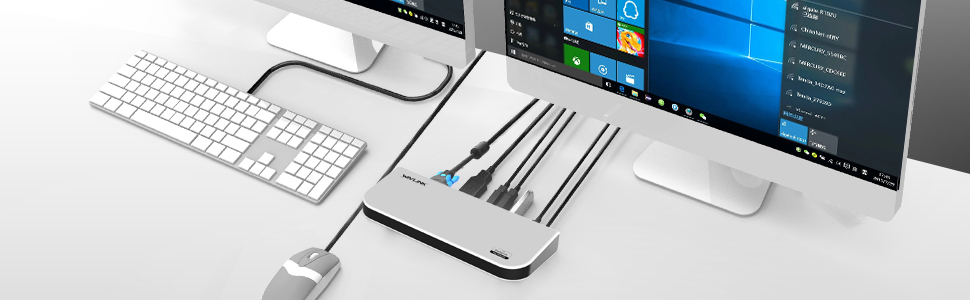
The Wavlink USB 3.0 Universal Docking Station is a versatile productivity powerhouse featuring dual video outputs (HDMI/DVI/VGA), six USB ports (2 USB 3.0 + 4 USB 2.0), a Gigabit Ethernet port, and audio jacks. Designed for seamless multi-device connectivity and high-resolution displays, it supports Windows and select Mac OS versions, with built-in surge protection and hot-swapping capabilities to keep your workflow smooth and secure.



| ASIN | B01IQVKOAA |
| Best Sellers Rank | 130,781 in Computers & Accessories ( See Top 100 in Computers & Accessories ) 995 in Docking Stations |
| Brand | WavLink |
| Brand Name | WavLink |
| Colour | UG39DK1-WI |
| Compatible Devices | Laptops, Smartphones, Keyboards, Mouse, Digital Cameras, Scanners |
| Compatible devices | Laptops, Smartphones, Keyboards, Mouse, Digital Cameras, Scanners |
| Customer Reviews | 4.4 out of 5 stars 346 Reviews |
| Hardware Interface | USB |
| Hardware interface | USB |
| Input Voltage | 12 Volts (DC) |
| Item Dimensions L x W x H | 34.5L x 15.2W x 6.1H centimetres |
| Item Weight | 630 Grams |
| Manufacturer | Wavlink |
| Manufacturer Part Number | UG39DK1 |
| Model Number | AMZWL-UG39DK1PX1 |
| Number of Items | 1 |
| Number of Ports | 6 |
| Product Warranty | 1 Year Limited Warranty |
| Product dimensions | 34.5L x 15.2W x 6.1H centimetres |
| Total HDMI Port | 2 |
| Total USB Ports | 6 |
| Total USB ports | 6 |
| Wattage | 45 watts |
P**E
What you need to expand a laptop connectivity
Bought to expand the connectivity of my laptop. As per product description, this docking station is able to add the following outputs: - 2 monitors outputs ( one via HDMI and another via VGA/DVI) and 2 USB 3 port , 4 USB 2 ports, 1 ethernet Accessories: It comes with a leafleft, with the essential instructions, a CD driver, a charger ( for UK socket), a DVI-VGA adapter and a USB cable. Installation: With Windows 10 (I have Windows 10 v. 18.03) the docking station is recognised immediately as soon as plugged in, so there is no need to install the drivers. Usage and Impression: Tried different monitor/tv configurations And in all the conditions this docking station was able to deliver optimum performance ( I was able to play both YouTube and movies through the connected screen) I haven't been able to test the gigabit Ethernet since my router is very far from my laptop and I don't have a ethernet cable) Worth mentioning that this docking station works also with USB 2.0 ports, even though in this case you will see decent performance only during web browsing but some dealy in the video reproduction ( probably due to both my CPU speed and USB2 bandwidth)
K**H
Quality Device & Easy To Use
Well this is something i was a bit unsure about as i have never owned/used one before but i have to say, i am extremely impressed! I thought i was going to struggle installing the device judging by a couple of the reviews that i read but it was not the case, i turned on the computer, connected the display link via usb, windows installed it for me and that was it...working!lol As you can see from the pictures (which aren't the best, sorry) i have connected a external HDD, a second monitor and connected to the internet via the LAN port on the device itself. Everything just worked! Main reason for purchase is it is being gifted to my bro who has a Microsoft surface book, they have next to no ports on it which he has found very frustrating! With this though, his problems will be solved when going away on work and having to connect to other peoples kit. Pros.. Everything just works, super simple, tidy box to store it when not in use and looks pretty slick. Cons.. Box it comes in is a bit bulky to use for travelling & the instruction slip included isn't the best but to be fair i could understand it but didn't even need to use it. I haven't tried this with a MAC so no idea how the install process would be, but i can confirm it is a breeze on Win 10....Plug & Play.
A**R
Laptop dock
Decided to get a laptop dock for home as have been using one at work. The parcel arrived on time from the seller and setting up was simplicity itself, connected it to my laptop, turned on the power and installation was plug and play. I've now got the monitor, printer, mouse, etc plugged into the docking station and when I want to use the laptop elsewhere, simply need to remove the supplied USB3 lead and I'm good to go. Also like the fast charging USB sockets, great for charging the phone. Definitely glad I made the purchase and would recommend it to anyone who wants to simplify the tangle of cables on their desks.
P**R
This gadget rocks
This item is fab as a single dock for all your connections, taking one USB port to run 6 usb items, your speakers, an ethernet connection and most importantly, two supplementary screens. Gone are the days when you want to run an extra screen as well as your laptop. These days we want two extra screens and this gadget allows you to have two extra screens each showing different output. Easy plug and play, it worked really well and it was the cheapest I could find. Really pleased with the purchase and the seller was both cooperative and efficient and the item literally arrived on Sunday after a Saturday evening order.
L**E
Ok
Connected laptop to 2 stand alone screens with ease however the rate of data transfer is slow, an example is that if I plug the USB dongle for my mouse into it the delay between movement of the mouse and the cursor is significant, so I have to plug it direct into laptop. But I suppose you get what you pay for
G**T
Must have for Dual Station Set-up!
I had no difficulty setting it up and it has been working perfectly (All plug and play on my Windows 10 laptop. I am able to leave this at home with peripherals and ethernet cable attached. Dual monitor and all peripherals come alive once and connect to my laptop. Easily hooked up my laptop, extra monitors, wireless keyboard and mouse, external hard drive, speaker, and printer. This docking station really helped simplify my desk by having all the cables connected to one device. Definitely worth the money to easily turn my laptop into a full-sized desktop in seconds!
A**R
Wrong adapter for uk electrics
Don’t know if it works or not. Ordered and it arrived with a power adapter not suitable for uk sockets, despite stating universal - (so we expected the iphone type plug that could fit either or) Amazon sorting return and I’m more eagle eyed on the hunt for another one with the correct power adapter.
D**N
Absolutely Brilliant!
Possibly one of my favourite purchases of all time! Makes setting back up at home so simple after I've been out and about with my laptop and no longer do I have a mass of cables all over my desk! I can now also use my laptop on my two 24" screens which is great, not had any issues so far even when combining it with a kvm so I can run my desktop off the same monitors. Usb devices all connect (and charge) fine and also running my speakers through it without issue. Definitely deserves a 5/5 review, very happy with the purchase!
N**N
Excelente diseño y estulo
Es un producto con mucho estilo y tecnología. Facil de conectar con un poco de investigación para elegir el driver adecuado para video, pero nada que lleve mas de 15 minutos de tiempo.
L**R
This DisplayLink driven dock works really great.
This unit has plenty of ports that are immediately added to my laptop soon as I plug it in. My Wavlink usb3 dock drives two standard 24" monitors in portrait orientation. 1080 x 1920. This allows me to have Outlook showing a long list of new email and a large preview pane. If I am editing a website, I'm able to see my changes displayed in very tall format while doing the edits on my 17" laptop monitor. And also another 24" monitor in regular landscape orientation standing just above my laptop for searches or other tasks. This dock also allows me to have my scanner, ethernet connection, an external storage USB drive and a high amperage charger by simply plugging in one usb3 plug into my laptop. Very convenient. Additionally, customer support has been great. I thought I had something wonky going on with the usb2 ports on the dock but customer support very satisfactorily resolved my problem... even after my warranty ran out.
F**E
Works great.
Works great. I can interchange my personal laptop and my work laptop easily. It handles my laptops, headset and monitor, etc., all my charging needs, and it’s not hige so it fits well in small spaces. No complaints whatsoever.
G**A
Marche bien avec MacBook Air M1 tant en duplication comme en extension d'écran.
Excellent produit qui marche très très bien avec MacBook air M1 pour étendre mon écran vers 2 monteurs externes ( oui j'ai bien dit ETENDRE), il faut bien télécharger la dernière version du logiciel Display link Manager sur leur page officielle ou grace au lien qui est fourni dans le manuel de démarrage rapide. J'ai cherché partout un HDMI splitter pour projeter mon écran et j'ai trouvé cette technologie tout à fait convenable en plus avec des ports USB additionnels pour brancher ce que je veux et un port RJ45. Cela vient avec 2 adaptateurs DVI vers HDMI, DVI vers VGA et pour connecter sur votre Mac un USBC vers USB. Recommandé 100% malgré son prix, mais l'investissement vaut le coup. Même si le MacBook air dit que mon peut projeter en extension un seul écran, avec cette techno vous pouvez en ajouter un autre. Ravi !!
A**H
Desperate measure
Get this only if you're desperate like I was as my laptop HDMI port stopped working. There is always some issue with the display and the monitor crashes into a colored screen every day once or twice.
Trustpilot
1 month ago
2 weeks ago