Buy anything from 5,000+ international stores. One checkout price. No surprise fees. Join 2M+ shoppers on Desertcart.
Desertcart purchases this item on your behalf and handles shipping, customs, and support to Thailand.
⌨️✨ Elevate your iPad game — work smarter, anywhere, anytime!
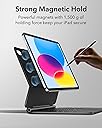
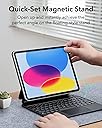
The ESR Rebound Magnetic Keyboard Case is a premium, magnetic detachable keyboard case designed exclusively for iPad 11th (A16, 2025) and 10th Gen models. Featuring a floating cantilever stand, 64-key scissor-switch keyboard with adjustable backlighting, and a multi-touch trackpad, it transforms your iPad into a versatile productivity powerhouse. With robust protection, seamless Bluetooth connectivity, and comprehensive customer support, it offers a high-end typing experience at a fraction of the cost of Apple’s Magic Keyboard.


| ASIN | B0BCVMWCW5 |
| Additional Features | Magnetic |
| Antenna Location | Office |
| Best Sellers Rank | #12 in Tablet Keyboard Cases |
| Brand | ESR |
| Built-In Media | Cantilever Stand |
| Button Quantity | 64 |
| Color | Black |
| Compatible Devices | iPad 11th(A16, 2025)/10th Gen |
| Compatible Operating System Family | iPadOS |
| Compatible Tablet Computer Models | Apple iPad (10th generation), Apple iPad 11th Generation |
| Connectivity Technology | Bluetooth |
| Customer Reviews | 4.2 4.2 out of 5 stars (5,553) |
| Enclosure Material | Acrylonitrile Butadiene Styrene |
| Generation | 10th Generation |
| Hand Orientation | Ambidextrous |
| Item Dimensions L x W x H | 10"L x 6.7"W x 0.51"H |
| Item Weight | 1840 Grams |
| Keyboard Backlighting Color Support | Single Color |
| Keyboard Description | Multi Functional |
| Keyboard Layout | QWERTY |
| Manufacturer | Electronic Silk Road Corp |
| Mfr Part Number | 4894240165324 |
| Minimum Required Operating System Version | iPadOS 16 |
| Model Name | Rebound Magnetic Keyboard Case |
| Model Number | ESR for iPad A16 11th/10th Gen |
| Number of Keys | 64 |
| Number of Sections | 1 |
| Power Source | Battery Powered |
| Style Name | US English |
| Switch Type | Chiclet |
| Theme | iPad Keyboard Case |
| Unit Count | 1.0 Count |
J**.
Definitely Worth the money.
Works great. No problem attaching or holding my MacBook Air. A3. Built nice. Keyboard is comfortable. Battery life is great. It offers reasonable protection. When I turn it on it connects fast and easy. Response time from keystroke to screen input is fabulous. I only have one suggestion and that is the placement of the power button. When the Pad is attached, it sits right on top of the power button. Not directly, but close enough for my big fat fingers to barely fit. Not a problem, designers may have already moved that in the latest version. Touch pad works great also. I guess it offers a level of protection, but I have not had the need for that. It does keep the pad clean. Weight is a little on the heavy side but not horrible. It’s a good Magic Keyboard.
A**R
Outstanding iPad keyboard - highly recommend
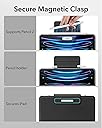
Way nicer and more premium than I expected. Honestly, a person could believe this is actually BETTER than Apple’s Magic Keyboad. Keyboard feel is extremely premium. Backlight is even and uniform, color changes are pretty cool. 3 levels of backlights, and it has function keys which the Magic Keyboard does not. The trackpad palm rejection works perfectly, and while this is a physical trackpad (not haptic) it has the same ‘click anywhere’ design of the trackpad on the Magic Keyboard. That’s awesome! The Bluetooth paired without a hitch too. Physically it looks and feels like Apple’s Magic Keyboard, with a matte and somewhat silky feel to the vinyl lining it, and unlike the Magic Keyboard, this ESR has a magnetic clasp to cover the Apple Pencil (nice!!) and the clasp magnetically goes out of the way when the case is open. The only tiny difference I can see is that this ESR keyboard hinge doesn’t rotate back as far as the Magic Keyboard does, so the iPad Screen doesn’t tilt back quite as far. I doubt this will be an issue for anyone.
M**W
Good but too early to tell
lighted keyboardReceived quickly today for iPad Air M3 (13). Was using an Apple Magic Keyboard for m1 iPad Pro that is 5 years old. Reason for purchase was to have the function keys, lighted keyboard, and a black cover that the new Apple Magic Keyboard for iPad Air does not have (Only in white with Apple) First impressions. 1. Keyboard keys feel good. 2. Nice to have a lighted keyboard 3. Battery status shows up in iPadOS Battery widget 4. Have seen complaints about weight. To me the weight is very similar to my m1magic keyboard I was using, did not do an official weight, but did not notice a major difference. 5. Also saw comments that note the magnets are weak, I did not see see this on the unit I received 6. Cost -at 1/3 the price of Apple’s unit I get al the features I was looking for, lighted keyboard, black color 7. Using Bluetooth for the connection vs, the 3 dots that apple uses, I have not noticed any lag in typing or moving the pointer 8. Love the Apple Pencil holder for when it is not charging Cons: 1. Lack of documentation: The QR code in the box went to a dead page on their site-Shame 2. If you dig around their site you find a page by process of elimination that is the product but no videos (Says videos are coming) or just very general FAQ, not specific to the product 3. Would like to be able to purchase a keyboard membrane to keep dirt out of the innards but have no clue what make to use. 4. When you close the keyboard the keyboard lights look like they remained on, so I ended up powering down the keyboard. Using the power button. Would like to know if it sleep eventually when the keyboard is closed or not. Unknowns: 1. Durability- have seen some reviews where they note the keys have fallen off after a year. I have no clue, but my Apple Keyboard from the M1 Pro is 5 years old with ) issues. 2. Battery Life. With the keyboard not pulling power from the iPad as the Magic Keyboard does, I am hoping I get a little more time out of the iPad. I also do not know how long the charge will hold on the keyboard Once again the price point is why I took a gamble on this. Out of the box it feels good and performs well. Lack of documentation on their website is a problem for a company like ESR which is being advertised so heavily on YouTube with tech people.
A**E
Everything I could’ve wanted!
Using my lovely little ESR keyboard/case combo to type up this review right now. Let’s jump right in! PROS: - Quality: the reason I spent this much money on a case/keyboard combo was for the quality. I wanted something that would last, look good, and feel good. This product checks all those boxes. I don’t think I could’ve found a better item unless I’d purchased from Apple directly. - Look: I purchased the white option and love how clean it looks. The exterior of the case is simply perfect. The magnetic closure looks sleek and isn’t bulky. Interior of the case looks soft and supple. The keyboard is beautiful and the backlight offers x3 light settings that time out after a few minutes spent untouched. - Feel: feels fantastic. The exterior of the case is smooth and matte without being slippery. The keyboard is what sold me - it 100% feels like a quality keyboard. The sound of the clicks are softly muted rather than that cheap clacky sound you get with other keyboards. The keyboard also has a pleasing texture and feels like it would be easy to clean. With my iPad inside and the case closed, it feels solid and has some weight to it, but this makes me believe in it’s durability. I’m confident if I dropped this case my iPad would be protected. One thing I noted is when the case is open and your iPad is in place, the indent that allows the iPad itself to tilt backwards is tight the first few times you move it - don’t be afraid to use a BIT of force to lean your iPad further back so it’s at a slightly more pleasing angle. - In Action: does the job and does it well. My iPad stays firmly in place without any slipping in the slightest. The keyboard is small, obviously, but it didn’t take long to adjust to the key spacing (as is the case with any keyboard). Yes, as other reviews have stated, the power button on the keyboard is slightly annoying in its placement, but I don’t mind it. It’s not like I’m clicking it on/off all the time. It’s a non-issue for me. CONS: - Backlit keyboard: I feel like some of the lights behind the keys are very slightly brighter than others. This is probably due to where the bulbs are placed behind the keys and not because any of the bulbs are faulty. For example, my ‘A’ key looks mildly brighter than my ‘L’ key. I seriously doubt most users would notice it. I didn’t until just now, and it’s not at all significant enough for me to want to return this case. - Mousepad: I feel like I have to press down a little harder on the mousepad to make a selection, vs the pressure I apply on my laptop. Not a significant issue. - Backspace button: slightly smaller than what I would’ve preferred, but again, not significant. WISHES: - Mousepad: I wish the mousepad had the tap-to-select option some laptops have, rather than actually having to press down to hear the click for it to select. This is because the mousepad doesn’t have the little left/right mouse buttons, it’s just a single square. So my mind doesn’t think to press down to select, because there’s no button! It would be nice to simply tap the mousepad and have that be enough to select. Overall I strongly recommend this keyboard.
K**S
The ESR keyboard for the iPad 10th Gen is a great addition for anyone looking to use their iPad for productivity. The keys have a good tactile feel, and the setup process is straightforward. The keyboard itself is sturdy and pairs seamlessly with the iPad, making it ideal for typing long documents or emails without sacrificing efficiency. One of the highlights is its versatility; it acts as both a protective case and a keyboard, so it provides all-around functionality. However, one downside is that it does add noticeable weight to the iPad. While this isn't a dealbreaker for those who prioritize durability and ease of typing, it’s something to keep in mind if you're used to the lightweight feel of the iPad on its own. Overall, it’s a fantastic accessory if you want the feel of a mini laptop but don’t mind a bit of extra weight.
I**Z
Odio que el teclado no tenga "Ñ" y que por eso su distribución requiera una curva de aprendizaje que puede quitarte mucho tiempo. En mi caso, no resolvió mis necesidades y recurrí a la vieja confiable: funda y teclado externo. Si tienes tiempo para aprender un teclado que no está en español, vas.
S**A
Very impressed with this device. For a fraction of the price of the Magic Keyboard, you can get this, it’s very close. One notable difference is that you cannot charge the iPad through the keyboard, which I completely understand. The build quality is insanely good, given its reasonable price. The backlight on the keyboard is SO useful. I don’t even use it for the typing keys, just to find various brackets I don’t use often. Shortcuts are easy and both the keyboard itself and the trackpad are recognised by my iPad without a problem. Pairing was incredibly easy, didn’t even need to do anything but select in on the device list. Extremely impressed, allowed me to elevate my productivity and stays true to what it promises. Magnets are powerful, the cantilever design does hold the iPad in the air and you can adjust the viewing angle, but not too much, keep that in mind. Exactly what the description and images show. Has a soft, premium silicone-like feel all around, the durability of which remains to be seen.
S**Y
No es una mala compra, y puedes hacer mucho peor por más dinero. Pero el cursor del trackpad flota alrededor de la pantalla como una mariposa borracha y la parte inferior del iPad sobresale sobre el teclado si la pantalla se inclina incluso ligeramente hacia arriba. Las partes del teclado que no están apretadas por la parte inferior del iPad tienen una gran sensación. El teclado/funda no está nada mal, pero probablemente puedas hacerlo mejor, incluso sin pagar el precio inflado de Apple por un Magic Keyboard.
G**K
Klawiatura kompatybilna z IPad Air M2. Świetnie działa, jedyny minus to brak wskaźnika poziomu baterii.
Trustpilot
2 weeks ago
3 weeks ago