

Buy anything from 5,000+ international stores. One checkout price. No surprise fees. Join 2M+ shoppers on Desertcart.
Desertcart purchases this item on your behalf and handles shipping, customs, and support to Thailand.
🚀 Upgrade your desktop’s USB game — faster, safer, smarter!
The Sinefine 4 Ports PCI-E to USB 3.0 Expansion Card boosts your desktop’s connectivity with 2 USB Type-A and 2 Type-C ports, delivering up to 5Gbps transfer speeds without needing extra power cables. Designed with robust power modules and voltage protection, it ensures stable, safe data transfers. Compatible with a wide range of PCIe slots and operating systems, this card is a plug-and-play solution for professionals demanding speed and reliability.


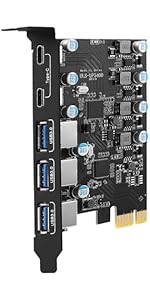

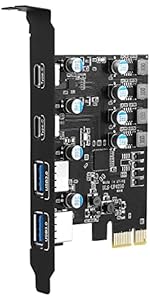


| ASIN | B0BDNLGNWP |
| Best Sellers Rank | #10 in Internal USB Port Cards |
| Brand | SINEFINE |
| Compatible Devices | Personal Computer |
| Customer Reviews | 4.4 out of 5 stars 327 Reviews |
| Hardware Interface | PCIE x 1, PCIE x 16, PCIE x 4, PCIE x 8 |
| Item Dimensions L x W x H | 4.6"L x 3.4"W x 0.7"H |
| Item Weight | 0.1 Kilograms |
| Manufacturer | SINEFINE |
| Mfr Part Number | 4210 |
| Model Number | UP4210 |
| Operating System | Linux, Mac OS, Windows 10 |
| Product Dimensions | 4.6"L x 3.4"W x 0.7"H |
| Style | Classic |
| Style Name | Classic |
| Unit Count | 1.0 Count |
| Warranty Description | 180 Days Manufacturer |
R**R
4-Port PCIe USB 3.0 Expansion Card (2 Type A & 2 Type C Ports)
It seemed like my backups were taking forever. My motherboard supports both USB2 and USB3. I thought that maybe my USB 3 ports were on the fritz or whatever so I purchased this unit. It's a good card but my backups are still taking longer than I'd like. I think I've narrowed it down to having too much data on my backup drive (a 500GB SATA III SSD with 170GB free space). I mean, if I have a totally bare drive then I can backup my workstation's C: drive in about 5-minutes. With all the data on the destination drive, however, it takes about 20-minutes to backup. It's not the expansion card's fault. That thing performs great but for some reason the connected devices are letting me down. The destination drive is inside a USB3 to SATA III enclosure. As the drive fills up, however, performance goes down. I can't explain it. On the bright side, it beats the heck out of old Hard Drive backups. Those were terrible. I'm using Windows 10's backup utility through Control Panel. It's the program labeled "Backup and Restore Windows 7". I'm doing a "System Image" Backup. Bottom line: It's a good card. I recommend it.
G**Y
All good good speed easy to install, but you will need a CD drive to install
Works well, easy install, you will need a cd drive with this
D**N
affordable and functional upgrade
So the story is that I'm running an AM4 motherboard that doesn't have any usb C connections. I got an external enclosure for an M.2 NVME driver for quick transfers as sata ssd's were just to slow. However the system had problems detecting the M.2 drive. I though it was a compatibility issue so I purchased another drive. The second one worked also had issues being detected. Through much effort I finally got the system to recognize the drive. Problem was that it would only work on one single specific usb 3 port (via a 3.0 to type C adapter that came with the enclosure). On any other port it would disconnect after 2 seconds and be non functional. Put it back on the port that previously recognized it and it just worked. Despite this one functioning port I figured that it was probably unreliable and would likely be an issue the next time I connect a different usb C device. So going on the assumption that the problem was related to the motherboards chipset not liking connecting to the nvme drive via externally I got this card. Installed it on a Windows 10 O.S. and it was instantly recognized, no need to bother with the CD cause honestly who has a disc drive anymore? Anyway I tested the external drive and it was instantly picked up and I was able to transfer several gig's worth of video files over onto my system. It also "does not" require additional power so don't have to worry about cable managing as none are needed. Overall worth every penny!
C**S
Simple & No Frills
This very small PCIe x1 card does exactly what it sets out to do: provide additional USB-C ports for a motherboard that may not have additional ports. I purchased it to power both my Quest 2 as well as a USB-C wireless phone charger. It works with 0 hassle - it is plug and play with no additional driver download required. It seems to be very durable, it is currently sitting right above a large graphics card and there has been no heat related issues. The ports are fast enough for VR data rates as well. A solid little unit that does what it needs to do.
C**.
Excelente a un buen precio
Me ha funcionado muy bien originalmente mi placa sólo traía un puerto C y con esta tarjeta PCI aumente dos puertos más la velocidad de transferencia es excelente
S**N
Typical low quality, re-sold crap
BUYER BEWARE: FALSE ADVERTISING This has a Renesas uPD720201 according to the reported PCIe info on my computer. This controller only supports up to PCIe 2.0. This limits the theoretical max bandwidth to 4.0 Gbps via the 1x interface, BELOW the maximum of a single USB 3.0 gen 1 device (5.0 Gbps). AKA: Plug in more than one device and you're not going to get much speed at all. Use all four ports and you'll be running at 1/5th the rated speed per device. Also power delivery didn't work. My device died quickly while plugged in. Turns out, the maximum by this controller is 7.5W (Which is the spec of USB BC 2.0, this is NOT any where close to modern quick charge protocols). Unless you want the cheapest thing, look elsewhere. It's very cheap but that's the only upside.
M**X
Sinefine USB 3 Controller
This USB card worked well at about 40-60 Mbs transfer rate, better than what I have.
W**S
Easy to install, usbs are fast enough that I can't tell the difference
No matter how many usbs any one of my computers has I never have enough. I've been trying a couple different remedies to the problem but this pcie board is probably my favorite so far. The usbs are fast, at least to the extent that I can't tell the difference between any of them ,which is good. Computer recognized card just fine. No problems!
W**Z
Buen producto
Es un buen producto, funciona muy bien, se instala muy fácil, y cumple con su función.
F**S
Llego como debe ser
Funciona bien para el precio
C**A
muy bueno relación precio calidad
Con windows 11 no me requirió ningun controlador, parece estar funcionando a la perfección con unas semanas de haberlo instalado.
I**Z
Tiene corto
Lo conecte a mi equipo pero al apagar el.pc se enciende solo, resultó ser que tiene un corto que provoca que se encienda mi equipo
M**A
Baja calidad en el producto
Deje conectado un USB de mi mouse, lo conecte la primera vez que lo instale y pasaron 2 meses, lo desconecto y se viene con todo y la parte azul del USB
Trustpilot
1 month ago
1 month ago