Buy anything from 5,000+ international stores. One checkout price. No surprise fees. Join 2M+ shoppers on Desertcart.
Desertcart purchases this item on your behalf and handles shipping, customs, and support to Thailand.
✍️ Metapen A11: The fast-charging, precision stylus your iPad’s been waiting for.
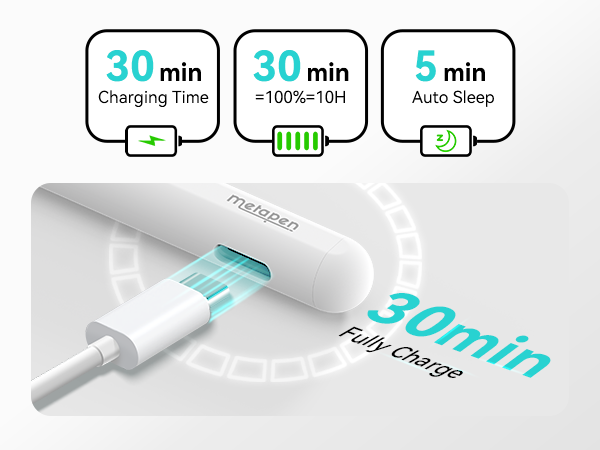
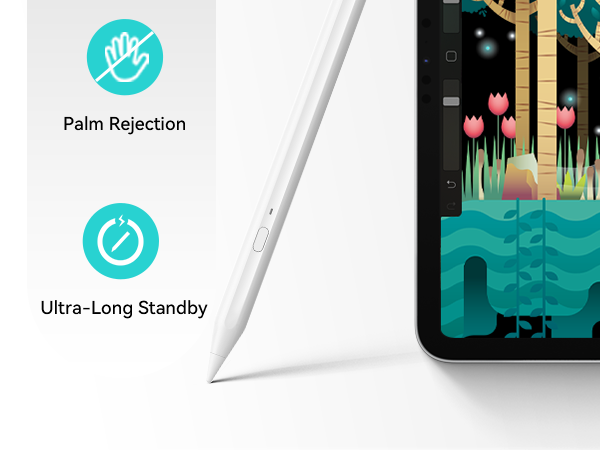
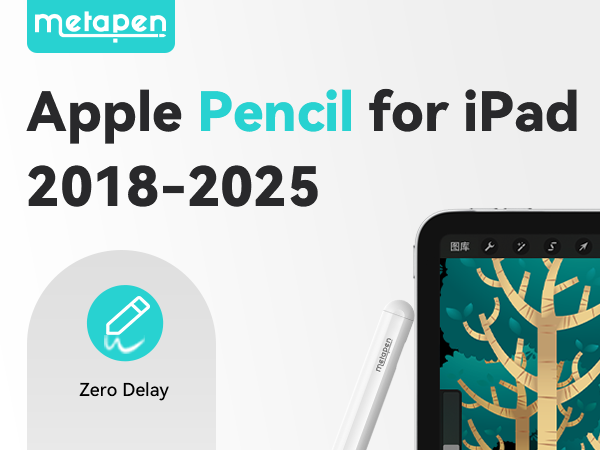
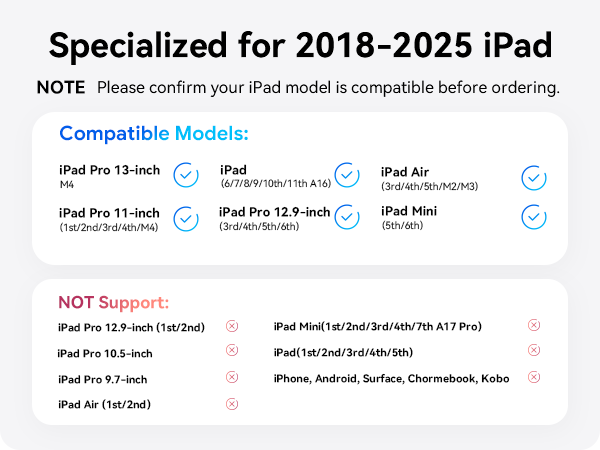
The Metapen A11 is a high-precision, Apple Pencil-compatible stylus designed for iPads from 2018 to 2026. Featuring 0.1mm pixel-level accuracy, a customizable side button via the Wellnote app, and double strong magnets for secure attachment, it offers up to 8 hours of use after a rapid 30-minute charge. With palm rejection technology and broad compatibility across iPad Pro, Air, and Mini models, it’s a budget-friendly, productivity-boosting tool backed by responsive customer support and a 12-month warranty.


| ASIN | B0BCWGC7GJ |
| Are Batteries Included | Yes |
| Are Batteries Required | Yes |
| Battery Average Life Standby | 365 days |
| Battery Description | Lithium-Ion Polymer |
| Best Sellers Rank | #659 in Video Games ( See Top 100 in Video Games ) #3 in Nintendo 3DS & 2DS Stylus Pens |
| Brand | metapen |
| Charging Time | 30 minutes |
| Color | Classic White |
| Compatible Devices | NEW! 2025 iPad 11th, iPad Air M3, 11-inch & 13-inch (M2), iPad Pro 11-inch (M4) , iPad Pro 13-inch (M4), iPad (6th, 7th, 8th, 9th and 10th 2022 Gen), iPad Air (3rd, 4th and 5th 2022 Gen), iPad Pro 12.9-inch (3rd, 4th, 5th and 6th 2022 Gen), iPad Pro 11-inch (1st, 2nd, 3rd and 4th 2022 Gen),iPad mini (5th and 6th Gen) |
| Compatible Tablet Computer Models | Apple iPad (6th generation), Apple iPad 11th Generation, Apple iPad Air (3rd generation), Apple iPad Pro 11-Inch (M4), Apple iPad Pro 13-Inch (M4), Apple iPad mini 5 |
| Customer Reviews | 4.3 out of 5 stars 6,162 Reviews |
| Enclosure Material | Plastic |
| Item Diameter | 0.95 Centimeters |
| Item Dimensions | 6.5 x 0.37 x 0.37 inches |
| Item Weight | 15 Grams |
| Manufacturer | metapen |
| Material | Plastic |
| Mfr Part Number | ME-APP412 |
| Minimum Required Operating System Version | iPadOS 14 |
| Model Number | ME-APP412 |
| Number of Batteries | 1 CR5 batteries required. (included) |
| UPC | 714532191586 |
| Unit Count | 1.0 Count |
| Warranty Description | 12-month warranty |
A**N
Great Value & Solid Customer Support
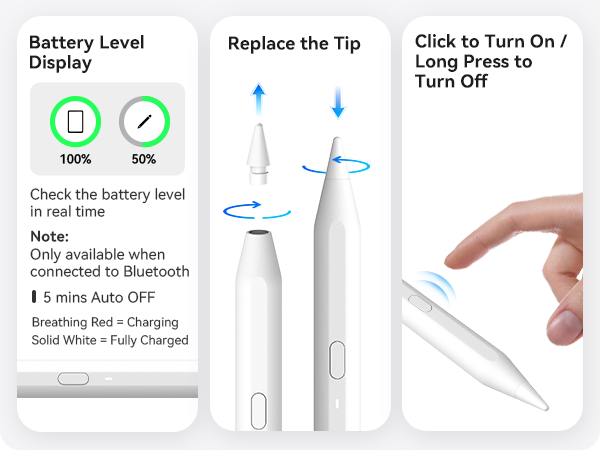
I purchased the A11 September, 2024 and have been using it primarily for note-taking and occasional doodles on the iPad 9th gen. Though it lacks pen pressure support, it was $17 USD at time of purchase compared to the $70 USD of the Apple USB-C. Functionally it does what I need, but if you're an artist, you'll want to look elsewhere for pressure capability. I did encounter an issue with the stylus, which is mentioned at the end. What you get: The box comes with the stylus, a 6" USB-C charging cable, 2 replacement hard plastic tips, 2 hard plastic USB-C port covers, and the typical manual/warranty information papers. Operation/Side Button: There's a single side button that's used to power the stylus on with one click and off by holding it for a few seconds. Though the button can also be set to other functions while on, it seems to require the installation of either the Metapen app or the Wellnotes app (both on the App Store), which not everyone may be interested in doing. Further, the speed in which the functions respond after the input click(s) are a bit delayed for my liking, so I generally just ignore the feature and use the iPad gesture controls instead. This stylus does have an internal magnet for attaching to the iPad, but my iPad has a case with no stylus holder, and the magnet is not strong enough to hold the stylus to the iPad through the case. As a result, I just stick the stylus to something metal on the edge of my desk or my computer case (which secures just fine), but if you're more mobile, then you may want to consider a case that has a place to put the stylus. Battery/Charging: Unfortunately, I have not been keeping close track of battery life and charge times, so I cannot give an accurate, metrics-backed representation of this category. The stylus has power when I need it, and keeps its charge while powered off when I don't use it. I do check the battery level after I finish using it for the session, and if it's low, I'll connect it to the included USB-C charging cable for around 30 minutes, and that generally leaves it at a high enough amount for the next few sessions (typically over an hour per session). Writing Experience: The design of the stylus is mostly round, with a single flat side, where the LED battery indicator and side button are positioned (seems like the indicator function has to be enabled in the Wellnotes app). It's comfortable enough for me to hold for longer periods of time, and for what it's worth, I personally have not encountered accidental presses of the side button no matter how I held the stylus. When writing notes, the only problem in quality is the readability of my handwriting; the stylus is fine. When doodling, I noticed that diagonal lines will have some semblance of line jitter/wobble, unless you use software stabilisation or draw the line quickly. This appears to be a problem with most digital styluses I've seen, outside of styluses from companies that specialise in digital drawing devices, such as Wacom, XPPen, Huion, etc. so it is expected. The wobble with this stylus is not terrible, and personally, it does not bother me, but it's something I will mention since it is somewhat noticeable. App: I use the Apple Notes app because I'm cheap. The stylus works with the app. Apparently Metapen has a Wellnotes app that appears to be a part of their troubleshooting steps, but also is a note-taking app. It looks like this app can change the function of the side button (albeit with limited options); tune the stylus with sensitivity gain settings and adjustments based on the kind of tip used (plastic, rubber, metal, etc.), hand position relative to iPad orientation, screen protector; change the auto-power off time; etc., but I have not played around with those settings much since the stylus works out of the box. I have not used Wellnotes for my note-taking either, so I can't really speak to how well it functions there. Issue/Customer Support: A timeline/TL;DR: My initial email was sent Saturday evening with Metapen's initial response including troubleshooting steps and video-of-issue request on Monday just past midnight (likely based overseas, though fine as the representative seemed more fluent in English than myself). My video was sent on Monday evening, with their follow-up conclusion just past midnight on Wednesday. The rest of the correspondence occurred Wednesday evening, with the order for replacement created then, and it arrived Thursday afternoon. 4-5 days for the resolution, mostly slower due to time zones. About 6-7 months in, the stylus started to cut out when writing. I sent the Metapen support email a message detailing the issue, and they got back to me in just under two days (I sent the first message on Saturday evening so it's understandable. Overall their responses took no more than a day during the weekdays, excepting a single other occasion where it took a bit more time). The support representative, Rosie, sent a list of troubleshooting steps, and, assuming the steps were unsuccessful in resolving the issue, requested a video of the problem for their technical support department. At the end of their response, they provided me the option of either a full refund or a replacement stylus (without having to send the broken one in), should the issue be unresolvable. I sent the video of the malfunction, and about 29 hours later the representative responded stating that it was probably a broken sensor and could not be fixed, so my options were the full refund or a replacement pen. I went with the replacement pen as it worked fine for the months I had it, and it was only $17. I provided my shipping address, and the replacement stylus arrived the next day. The replacement works just fine so I'm satisfied with how it turned out.
D**Y
Top-notch customer service
First the pen works great and at a fraction of the price compared to other products. This was a Christmas present for my children and it stopped working after a few months. Their customer service is fantastic. Very easy to work with and they replaced it at no charge after contacting them. I had a new pin in 48 hours. Superb customer service.
W**E
Precision, Comfort, and Performance — The Perfect Apple Pencil Alternative!
was honestly blown away by how smooth the Metapencil feels on my iPad A11. The precision is spot-on — no lag, skips, or pressure issues — and it writes just like a real pen on paper. The magnetic charging works flawlessly, and the battery life is impressive; I can go days without needing a recharge. It’s lightweight, comfortable to hold, and pairs instantly without any complicated setup. I use it daily for note-taking, drawing, and editing, and it’s every bit as responsive as the official Apple Pencil, if not better for the price. The palm rejection is excellent, and the tilt-sensitivity gives me great control when sketching. If you’re looking for an affordable, high-quality stylus that performs like the real deal, the Metapencil for iPad A11 is absolutely worth it. Highly recommend!
O**Y
Helps my carpal tunnel symptoms
I’m not an artist. I’m not interested in handwriting to text since I tried it in the palmpilot. I’m using it rather than my finger to navigate around the iPad. It works better for me than a capacitance pen. And when I use the pen it doesn’t aggravate my carpal tunnel symptoms left over from years of mousing. Using my finger is painful. Very easy to pair with Bluetooth. Not giving 5 stars because I haven’t tried to draw with it. It’s a good low end pencil. Doesn’t have the bells and whistles that the Apple Pencil has.
V**N
A great smart stylus
Better than an apple pencil in charging, connection, and use. Love being able to simply turn on the pen and know it will be connected and ready to go. I use this almost daily for sidecar functionality in my classroom and like it so much more than my work provided 1st gen apple pencil.
P**L
Works great connects with one button
I really like this, it is a great value for the usefulness. It connects easily to my iPad and the features all work fine. The charge lasts a long time. I use it mostly for photo annotations and it is a breeze. It is easy to hold and the pen settings are a snap.
S**R
A terrific Apple Pen substitute
A terrific pen for iPads at a fraction of the cost of The Apple Pencil. I'm not an artist. I have no need for subtlety. I do like taking notes, occasional doodling, and using it as a mouse. Unless you need everything generally Apple-branded (like buying a genuine Versace bag), this pen should cover your needs perfectly. It feels good, holds a charge forever...
M**T
Battery doesn’t last long. Have to recharge often
I was excited when I bought this product. It was a decent price and was a bit sad about the durability of the battery of the pens. The more I used it the more I saw that the battery was not lasting very long unfortunately. I used it mainly to draw on my iPad and it works just not very long. It is easy to use as it links to your device automatically.
B**.
Amazing
Works very well! The price is amazing
J**N
Prisvärd och bra penna
Bra penna! Lätt att parkoppla, bra batteritid och snabb laddning. Det enda den ”saknar” är att den inte har tryckkänsligheten men den infon visste jag om innan jag köpte den. Jag är jättenöjd med pennan
M**T
Works just great.
I've purchased several Metapen iPad pencils for myself and my nieces, who love using them for coloring. The stylus is highly accurate, with good battery life and a fast charge (10-15 min). It performs like the Apple Pencil, detecting angle and pressure for varied line thickness. However, it's slightly thicker than the genuine Apple Pencil, which may not fit in some iPad case slots—I learned this the hard way when forcing it in cracked mine. One unit failed to hold a charge, but the refund process was smooth, and my replacement works fine. Overall, a great alternative at a lower cost.
U**S
سيء
يخرب بعد فتره والشحن بخلص بسرعه مو زي اول ما جرّبته
C**N
Top Preis mit top Leistung
Ich bin sehr zufrieden, sogar echt begeistert. Ich schreibe mit dem Stift sehr viel und er funktioniert perfekt. Der Stift lässt sich per Bluetooth mit dem iPad verbinden und kann dann überall eingesetzt werden. Selbst in Mails kann man damit seine Emails schreiben, die dann in Druckbuchstaben übersetzt werden. Ich zeichne auch sehr gerne mit dem Stift, das funktioniert sehr gut. Optisch sieht der Stift sehr schlicht und gut aus, er liegt super in der Hand und auch das Gewicht passt. Für mich gerade der perfekte Begleiter und ein vollwertiger Ersatz zum Apple Pencil.
Trustpilot
2 weeks ago
5 days ago