Buy anything from 5,000+ international stores. One checkout price. No surprise fees. Join 2M+ shoppers on Desertcart.
Desertcart purchases this item on your behalf and handles shipping, customs, and support to Thailand.
๐๏ธ Digitize your legacy faster, sharper, and smarterโbecause your memories deserve the best.
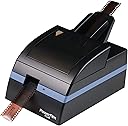
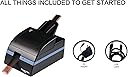
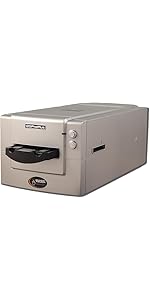
The Pacific Image PowerFilm Plus is a high-resolution 35mm film scanner designed for professional and enthusiast digitization of filmstrips. It supports automatic batch scanning of up to 60 frames, offers true RGB color accuracy at 24 megapixels, and scans 2.15 times faster than its predecessor. Compatible with a wide range of film types and both Mac and PC platforms, it features advanced software with automatic dust and scratch removal to streamline the digitization process.


| ASIN | B0BJPXD39Q |
| Best Sellers Rank | 289,011 in Computers & Accessories ( See Top 100 in Computers & Accessories ) 185 in Film Scanners |
| Brand | PACIFIC IMAGE ELECTRONICS |
| Brand Name | PACIFIC IMAGE ELECTRONICS |
| Color Depth | 24 bits |
| Connectivity technology | USB |
| Customer Reviews | 3.0 out of 5 stars 13 Reviews |
| Item Weight | 3.59 Kilograms |
| Item weight | 3.59 Kilograms |
| Manufacturer | Pacific Image Electronics |
| Media Type | Filmstrips |
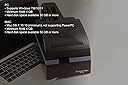
| Minimum System Requirements | Windows 7 |
| Model Name | PowerFilm Plus |
| Model name | PowerFilm Plus |
| Network Connectivity Technology | USB |
| Optical Sensor Technology | CMOS |
| Resolution | 7200 |
| Scanner Type | Film |
| Scanner type | Film |
| Standard Sheet Capacity | 10 |
| UPC | 649899001479 |
A**H
Works great when it does not jam
I had thousands of negatives to scan and there are pluses and unfortunately more negatives;-) When lucky I could load 6 or so strips and it would work and the quality was great. Unfortunately I think it is mostly software issues that screw it up as when loading a strip of 6 it worked most of the time ok. But most of my strips were 4 frames and it could not tell where one ended and the other started so when it got to the 6th frame it started backing the second strip backwards to finish the scan and it got screwed up. It also did not work on my Windows desktop but did work on my laptop. Here is the list I made for the company. Ruined 6 stips because of jams - goes up instead of out at the end. gets stuck on multiple strips When open cover and does not recognize closing cover - have to start completely over. Does not know if it does not feed Needs a catcher for the output Get rid of asking permission each time program opens. Goes into comatose mode - Scanning negative. Cancell does not work. Task manager to kill it and start over. Have to change sequence #. Sucks film back in - always a problem Just spit it out and make user to start the strip over. Don't over write user settings on upgrading software Expand the scanning frames from 6 to 8 so if it does not recognize the break between strips and feeds one then the other it does not loose frames so we have to reload at least one negative if not both. Would like to be able to do non 35mm film. I have some old 110 and 126 film.
M**D
Good 35mm scanner
My old Nikon Coolscan LS-2000 died. I look for an modern replacement and found the PowerFilm plus. I ordered it from the us for a reasonable price. The delivery was fast and the scanner arrived in good condition. It scans faster than the old Nikon. The images quality is good. The software can be downloaded from the website. The software is ok, but I use my PowerFilm plus with vuescan from Hamrick Software. It works but you have to install the original software first. Nice product but you should be familiar with film scanning before you buy it.
N**O
Avoid at all cost - Stay Away - No Batch - No Scanning
The two screenshots I posted, they are what you're going to be greeted with the entire time you use this product. It's a test of your patience and will to live, your will to even want to scan a single image let alone a batch of them. There's no clue what this thing is actually trying to initialize or calibrate when starting up. It doesn't tell you. Check the logs, and folders, nothing, just saying "welp, plug and unplug". Unfortunately, there's no blinking LED's or blue lights. Everything is solid all the time. This thing makes more noise than my wife when I don't take out the trash. There's only one way I know it even scans and that was by using a 3rd party scanning software... and wondering how many amazing batches I did to look like the old couple in the photos? I got 3 photos done, on a single negative slide with 6 exposures. The application crashed when it was trying to detect the images. I bet if you were here when that old couple were originally scanning they were in their teens, but by the time they got it working themselves they were old and about to kick the bucket. The scanner never tells you what it needs, what it wants. It never tells you actually anything. I had high hopes for it, since it looks like it's using OPENCV to just do image processing and their INI files are in a decent open folder, you can or could edit those to get perfect cropping and what not for a project of yours. Won't get to test that out because... well see the screenshots.... "we can't launch the application please unplug and plug it back in" blah blah blah... If this didn't cost 400$ and tax, I would love to have just ran over it with a car and filmed that on 35mm film stock and scanned that in frame by frame.
S**Y
Positive film not ok
All negative films can insert smoothly and scan well. Positive fujichrome film cannot insert to the scanner even only one strip.
S**S
Barely works at all
Update: I gave up on this thing and returned it. It's a piece of overpriced junk. Original review: The feeder jams. The software is rudimentary at best. There is no way to preview the images. It's not possible to just scan the negatives as they are and NOT convert them to positive images. Summary: The whole batch has to fully scan and then it sits there and color processes the whole batch of images, even if you turn off the color correction, and then it finally dumps them all into a folder at the end. You have to open the image folder separately in order to view them and finally see if it worked properly. It also gets stuck in the middle of a job and can't be canceled or interrupted or shut down. If it gets stuck, you literally have to restart your computer or stop the process using the task manager in Windows. It took 13 tries before I got one set of negatives scanned properly. The first four tries turned out blue blobs of nothing. It's not even smart enough to recognize profound color errors. It kept getting stuck in the middle of negative strips for no reason. I kept restarting and trying again until it finally worked, but wow it's a pain in the neck. Also, just to be clear, it will NOT scan without a computer and you have to use their terrible software. The panel on the front is NOT a viewscreen, it's just shiny plastic. If there was ANY other alternative negative scanner with a batch feeder for less than $1,000 I would send this back. Since there isn't, I will have to try to make this work. I would estimate that the feeder will realistically take about three or four strips at a time, not ten.
Trustpilot
1 month ago
1 day ago