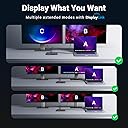
🚀 Elevate your workspace with power, speed, and stunning visuals — all in one sleek dock!
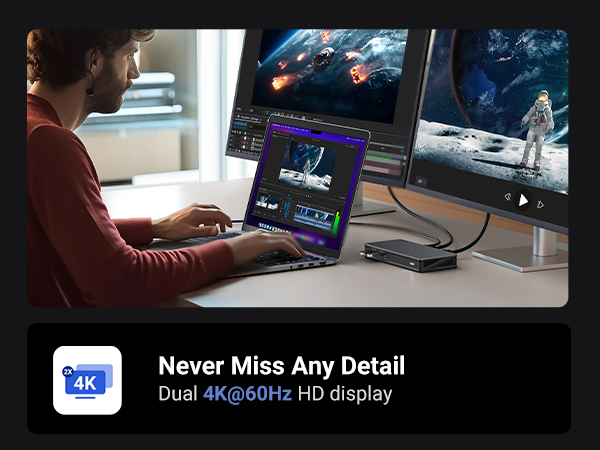
The UGREEN USB C Docking Station Revodok Pro 209 is a 9-in-1 powerhouse designed for professionals craving seamless multi-monitor setups and ultra-fast data transfer. Supporting dual 4K@60Hz displays via DisplayLink technology, it offers versatile connectivity with 2 HDMI, 2 DisplayPort, USB-C/A ports, Gigabit Ethernet, and a 100W PD charging port. Compatible with MacBook and Windows, it transforms your laptop into a productivity hub with rapid charging and effortless peripheral management.


| ASIN | B0BLNCNCMZ |
| Best Sellers Rank | #15,679 in Electronics ( See Top 100 in Electronics ) #247 in Laptop Docking Stations |
| Customer Reviews | 4.0 4.0 out of 5 stars (782) |
| Date First Available | January 18, 2023 |
| Item Weight | 1.12 pounds |
| Item model number | 90912 |
| Manufacturer | Ugreen Group Limited |
| Product Dimensions | 6 x 3 x 0.9 inches |
U**D
Easy to setup, works as advertised
I'm not using this device exactly as intended, I have a somewhat different scenario so I thought I would share my success in case it helps anyone. I have an LG 5K monitor and an ultrawide, and a Caldigit Thunderbolt dock. The 5K has to be connected via Thunderbolt, there are no other options for connecting this monitor. For the M1 Air, you have two Thunderbolt/USB-C ports so you can connect the 5K directly in one port, and then this device (UGREEN's DisplayLink adapter) can go in the second port and then you can connect the monitor to that, and it would work fine (I tested this). However as you can see from my images above I wanted one cable to connect and disconnect my peripherals. So my setup has the thunderbolt wire connecting to the laptop providing power, and data. That wire goes to my Thunderbolt Dock. From there, the passthrough Thunderbolt goes to the LG 5K (on the right). The USB-C port on the Thunderbolt Dock goes to this UGREEN DisplayLink adapter. Then my second monitor connects to this DisplayLink adapter. I've connected it with both HDMI and DisplayPort and both work without issue. However I'm using DisplayPort just because I feel it provides the best picture. Steps: 1. Plug in Adapter 2. Click "OK" when MacOS asks if you are fine with using this accessory 3. Find the folder in Finder or on your desktop that has the driver (see 3rd image) 4. Install driver 5. Second display should work (without restarting it). Huge disadvantage as pointed out by another user: Playing movies and TV shows from protected sources will NOT work. For example, AppleTV app, Netflix on a browser, Vudu on a browser, they will all not show any visuals anymore. I imagine this is because all that software is design to prevent people from ripping the media and this DisplayLink software probably gets flagged by its protection scheme, but I'm not sure. It didn't matter if I moved the video over to my 5K monitor which is connected via Thunderbolt, because the DisplayLink is turned on, the visuals don't work. Now what's nice is, if I do want to watch a movie, I can simply hit the power button on this UGREEN DisplayLink adapter and it turns off the device, and then the movies work. So if you watch a lot of movies and TV from legit sources, then this will not help unless you're willing to turn it off and just have one monitor work, which is possible in my setup because the first monitor doesn't connect through this device. It may not work for you.
A**R
Dual screen for M1 macbook pro 2020
Work perfect on dual screen for 2020 macbook pro M1 just follow the instructions to download the driver required and you will be fine.
K**R
I had to figure out how to make the UGREEN DisplayLink Adapter work for my situation
I have mixed feelings about DisplayLink. On one hand, i am mad that Apple stinks and I needed to buy a higher level Macbook Pro than the M3 which I bought to enable the use of more than one external monitor. I paid enough for it. The other aspect is frustration from the DisplayLink side. I have two monitors connected thru the UGREEN DisplayLink device. You will find that when you log into the Macbook, initial conditions being the computer running all night and all the screens are sleeping, the two external monitors do not run back on. The DisplayLink setup does not recognize the two screens. Yes, I updated the drivers. Yes, I have turned the monitors off and on again. Yes, I also unplugged and reconnected the HDMI cables to the UGREEN from the monitors. Also, forums do not provide any good info on troubleshooting. I can unplug the UGREEN from the external power supply (because that is required for this device) and also unplug it from the laptop so it does not get any power. Upon restoring all connections, the monitors are finally recognized and they will start displaying the desktop (or whatever you are showing). I find that lame as I do not want to wear out the connectors on the laptop or any other device by unplugging every single time I get on my laptop. Finally, I noticed there is a power button on the front of the UGREEN adapter. Turn it off, then turn it back on, and the monitors will finally be recognized and will be useable. That is better and easier than messing with the connections every single time. I have only owned the UGREEN adapter for one week so we will see how it works from here. Good luck to everyone.
J**E
Don't get it.
I purchased this for my Macbook Pro. I had two monitors, a microphone, ring light, ethernet cable, and a USB mouse/keyboard plugged in. It worked great until it stopped working. After 2.5 months, it stopped working. I recommend getting a dock that has its own power plug instead of this. I ended up getting a different one for $20 more. Hopefully that works better.
A**E
Great form factor
This is not a PNP device. It requires a driver for the Synaptics chipset. If you're on enterprise IT YMMV. Love the form factor. Lightweight, small and portable. Really like the USBC pass thru power arrangement. Works 100% with my company M2 Max and my personal Win 11 laptops. Tested rock solid for Powerpoint presentation situations for feeding dual outputs. Probably going to buy a few more for work!
M**.
You have to buy a power adapter separately.
My work uses these for connecting multiple monitors in the office, so I purchased it for home. I purchased the 100 watt Anker USB-C power adapter (no power adapter included) because I am just an Anker fan, but this setup is amazing. My monitors have the Digital Video connectors and the 4k video is amazing through this dock. I would absolutely recommend this product.
C**K
Great product
Initially impressions. Feels great and works perfectly allowed me to have two external monitors on my mac M1 (through display link) wish there were more usb and usb-c on the back though. Hasn’t got hot good value for money and feels like quality. Good brand
M**T
Mediocre
After trial and errors I was able to connect my 2 BenQ monitors to my Mac (m2). You can only connect 1 hdmi and 1 display port combination. I used 2 usb port for keyboard and mouse. The main cable doesn’t charge the laptop. When I connect anything to the usb c port, the dock starts to disconnect . VERY ANNOYING
D**K
Just works! The most important for me was DisplayLink support and it works without any glitches. Need a power supply unit (PSU), as it is not included. But typical laptop USB-C PSU is enough.
T**H
UGREEN markasının neredeyse tüm ürünlerini kullanmaktayım bu üründe beni yanıltmadı gayet başarılı bir ürün yazılım kullanarak monitörü extend etmesi bir sorun teşkil etmez kafanızda soru işareti kalmasın gayet stabil çalışıyor tavsiye ederim.
R**L
It was simple to install. Works instantly. Absolutely hazzle free.
A**A
I have an M1 Macbook pro ( the one with the ill fated touch bar) and while I love it for most use cases, it has the annoying limitiation of only supporting one external monitor. Fortunately DisplayLink software comes to the rescue and allows me to plug in up to three monitors with a DisplayLink dock. I had bought another brand dock before and this Ugreen dock was to replace it after it burned out. I couldn't be happier and this feels like a huge upgrade. My other dock didn't support full 4K resolution on output and the ports were also not as good. This one has all multiple USB C ports and a dedicated USB C for powering my mac so I really don't lose any conectity by using this on one of my ports.
W**L
Works perfectly, plug n play.
Trustpilot
1 month ago
2 weeks ago