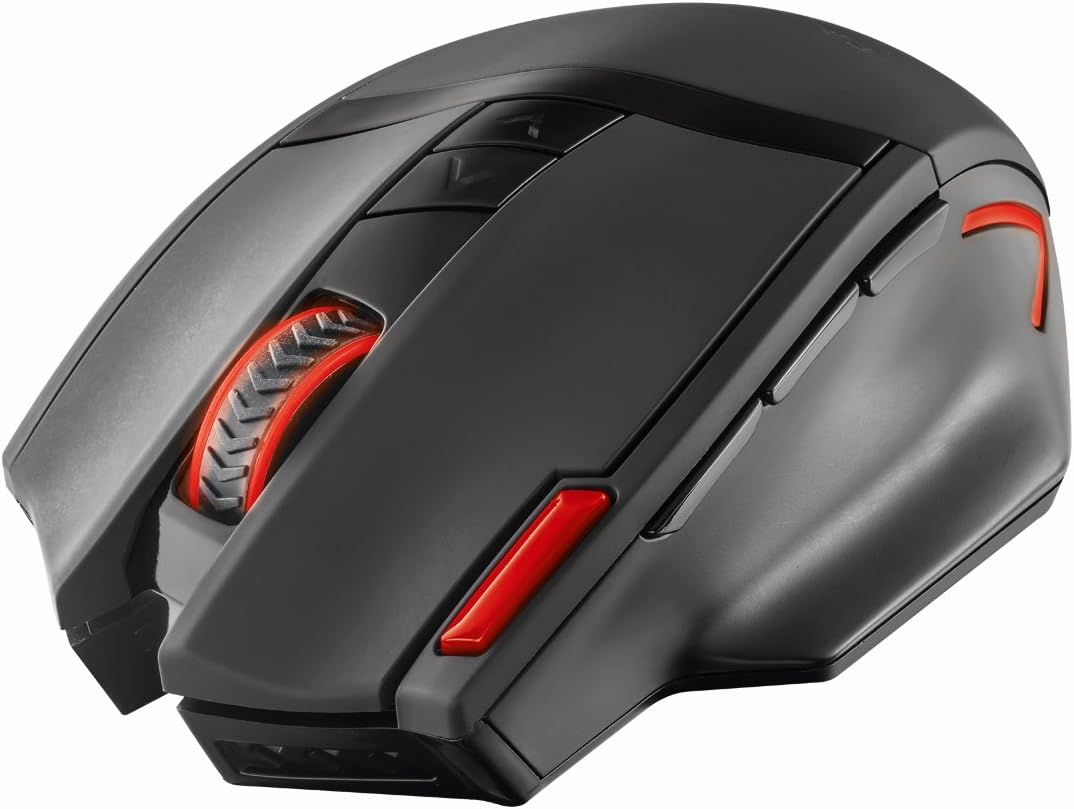


Trust GXT 130 Wireless Gaming Mouse
Product ID: 50600917
Details
- BrandTrust Gaming
- ColourBlack
- Connectivity technologyRadio
- Movement detection technologyOptical
🎯2400 DPI precision
🔋6 months battery life
🖱️9 programmable buttons
🖱️ Elevate your game and workflow with wireless precision that won’t quit!
The Trust Gaming GXT 130 is a wireless gaming mouse featuring adjustable DPI settings from 800 to 2400, 9 programmable buttons including 3 thumb controls, and a durable rubber-coated ergonomic design. It offers up to 6 months of battery life on 2 included AA batteries, with LED illumination that can be toggled for power saving. Compatible across Windows, Mac, and Linux, it delivers reliable wireless connectivity up to 8 meters, making it ideal for both gaming and professional use.


| ASIN | B0151GJYMW |
| Antenna Location | Gaming |
| Are Batteries Included? | Yes |
| Are Batteries Required | Yes |
| Battery Average Life | 6 months |
| Brand | GXTrust |
| Brand Name | GXTrust |
| Button Quantity | 9 |
| Colour | Black |
| Compatible Devices | Personal Computer |
| Connectivity technology | Radio Frequency |
| Customer Reviews | 4.3 out of 5 stars 635 Reviews |
| Embellishment Feature | LED |
| Enclosure Material | Rubber |
| Global Trade Identification Number | 08713439206876 |
| Hand Orientation | Right |
| Item Weight | 152 Grams |
| Manufacturer | Trust |
| Manufacturer Part Number | 20687 |
| Minimum Required Operating System Version | Windows 10 |
| Model Number | 20687 |
| Mouse Maximum Sensitivity | 2400 Dots per Inch |
| Movement Detection | Optical |
| Movement detection technology | Optical |
| Network Connectivity Technology | Radio Frequency |
| Number of Batteries | 2 AA batteries required. (included) |
| Number of buttons | 9 |
| Operating System | Windows, MAC, Linux |
| Pattern | Mouse |
| Power Source | Battery Powered |
| Product Features | LED indicators^Movement Resolution:2400 DPI^Movement detection technology:Optical^On/off switch^Receiver included^Scroll^Yes |
| Product Finish Type | Rubberized |
| Range | 8 meters |
| Special feature | LED indicators^Movement Resolution:2400 DPI^Movement detection technology:Optical^On/off switch^Receiver included^Scroll^Yes Special feature LED indicators^Movement Resolution:2400 DPI^Movement detection technology:Optical^On/off switch^Receiver included^Scroll^Yes See more |
| Style Name | Ranoo Old 2,400 DPI |
| Theme | Video Game |
| Unit Count | 1.00 count |
C**8
Good value wireless gaming mouse
Very smart and well built mouse with that gaming look to it. It has a red LED logo on it which can also be turned off by switching to eco, this also pro longs the battery life (takes two AA's). I use it on my sofa with no mouse mat and it's very responsive, has an auto off feature where it goes to sleep if no input is received for a while until you click to wake. And has DPI selector Also. I like the ergonomic design as my hand fits on it well and it sort of feels locked in to it which helps when using it as I do on a sofa. Would recommend. Good value for the price. And good mouse overall.
L**N
Excellent Mouse
This mouse is excellent, very comfortable to hold, attractive and stylist. The lights are a nice little touch, though can be swtched off if you put it in eco mode. It's smooth, quick and has multple buttons that do various things. It is a gaming mouse, however I bought it to use oin my office and I think the mouse is excellent all round and was real good value for money.
C**H
Great value gaming mouse, but not perfect.
Pros - Looks good. It's primarily black and isn't too 'flashy'. - Confortable shape, a good fit for my hand. - Buttons are responsive. - very useful to be able to change the dpi with the top buttons (how fast the mouse cursor moves). Cons - Slightly heavier than the non-gaming mouse I was used to. - The three mouse buttons are not customisable (FWRD, BACK, CTRL) - check your game lets you use those buttons for the action you want. For me, Dota2 doesn't let you bind the CTRL key so the third one is kind of useless. My fault not the mouse's. - It doesn't slide across surfaces as resistance free as I would like. Feels like you're dragging it. - The scroll wheel is not great, but its ok for general use like web browsing. If the scroll wheel is an important control in your games, then I don't reccomend. I don't need it so its fine. - The USB bluetooth adaptor is bigger than the slot in the mouse, which is really weird. It kind of just sticks out a bit. It also isn't magnetically attached like my previous mouse. It hasn't fallen out, but doesn't feel 100% secure. In general, its good value for £18.
L**L
Good Budget Mouse, no major flaws.
The main reason I bought this mouse was for the extra programmable buttons, which work well for almost all programs. The mouse has an 'eco' mode that turns the mouse on but without the LED lights, which makes the mouse look less flashy and more professional. The mouse is larger than I expected but is comfortable to hold.
R**K
Excellent mouse in general, however...
The mouse does seem to lose connection at times, especially if you place your phone between the mouse and receiver (even a vape causes issues). If you have many wireless devices or devices that can interfere with wireless, I wouldn't suggest it for gaming... Missed a couple of a good headshots because of it T_T GG Mouse wheel, the first one was crap, so I asked for replacement which proved better. Test it when you receive it, roll it vigorously! It does fit in your hand nicely.
A**R
Good value gaming mouse
Decent looking mouse, comfortable to hold and has a nice weight to it. Cant fault it.
Y**O
None working item ,i tried avery computer
I wish i know more about product as it looks decent and comfortable to use,but obviously has some issue with usb reciever ,so mouse after many atemps just flashing and not connected to anyc omputer at all(as i got 3 )
G**E
Little issues that cause annoyance during use
Lets start with the mehs, Scroll wheel is just getting worse and worse, you scroll UP and the page scrolls DOWN for a few seconds then oh its back to going up then down again, its not smooth scrolling at all, Left click loves getting stuck! and often when clicking links the mouse has grabbed hold of the link URL or when changing window on the web it will grab the window, when all i ask it to do is CLICK on it, but the mouse seems to think i am still holding the left click so it holds it and drags it around, The quality itself is good, its comfortable to hold in the hand, and the batty power for ECO is great its just a shame the quality of the scroll wheel and left clicks very temprimental, it does the job but isnt the best for the price!
P**N
Trotz vorheriger Skepsis überzeugt worden
In der Vergangenheit habe ich mit kabellosen Mäusen eher schlechte Erfahrungen gemacht, dabei hatte ich mich allerdings bisher im Niedrigpreissegment umgesehen. Oftmals war die Verarbeitung mäßig und selbst auf kürzester Distanz kam es zu Rucklern und Aussetzern. Mit der Trust GXT 130 wollte ich einen erneuten Versuch wagen und etwas mehr Geld ausgeben. Warum es sich für mich gelohnt hat, erfahrt Ihr in meinem Test. Lieferumfang: Im recht netten und stabilen Kartonschuber steckt folgendes: * Trust GXT 130 wireless Mouse * USB Empfänger 2,4 GHZ * ein Paar AA Batterien (noname, keine Duracell Batterien wie abgebildet) * Bedienungsanleitung * "Trust Gaming" Sticker * Garantiekarte Ersteindruck und Verarbeitung: Die Maus macht direkt eine gute Figur, mutet allerdings etwas klein an. Die schwarz-matte Gummioberfläche verspricht ein griffiges Spielevergnügen. Das Design gefällt mir besser, als abgebildet, auch weil die Akzente, welche auf den Bildern eher Orange aussehen, rot sind. Verarbeitungsfehler sind mir absolut gar keine aufgefallen. Ein wenig war ich enttäuscht, dass das Mausrad nicht aus Stahl ist, auf den Bildern sah es ein wenig so aus. Insgesamt aber dennoch ein sehr positiver Ersteindruck! Bedienung und Komfort: Meine Hand hat sich sofort von der recht weichen, aber griffesten Oberfläche geschmeichelt gefühlt. So kenne ich es noch von der "Sharkoon Shark Force" und so gefällt es mir am besten. Der Daumen kann bequem auf einer kleinen Plattform gelagert sein, während der Ringfinger ebenfalls an der rechten Seite seinen Platz hat. Handballen und kleiner Finger müssen leider auf dem Mauspad abgelegt werden. Das ist weniger schön. Ich habe eher kleine Hände, kann aber bequem alle neun Tasten erreichen. Ich kann mir gut vorstellen, dass die Maus daher nichts für Leute sein dürfte, deren Hände größer ausfallen. Das Gewicht mit eingelegten Batterien ist für mich gelungen. Weder ist die Maus so leicht, dass sie sich billig anfühlt, noch so schwer, dass sie sich nicht schnell über das Mauspad scheuchen lassen würde. Auf austauschbare Gewichte, mit der man das Gewicht an seine Ansprüche anpassen kann, muss man aber verzichten. Die Unterseite der GXT 130 bietet 4 große Mausskates, damit rutscht sie gut über die entsprechende Oberfläche. Hier sind wir auch beim Stichwort, denn die Maus funktioniert bei mir auf allen getesteten Untergründen. Das grobmaschige Sofa war für sie genau so wenig ein Problem wie mein sehr glatter Ikea-Tisch. Damit ist die Maus vielseitig einsetzbar und das auch ohne Mauspad. Sehr positiv ist mir die stabile Verbindung aufgefallen. Die kabellosen Mäuse, die ich bisher erlebt habe, hatten teilweise sogar auf einen Meter bereits Ausfälle und Unterbrechungen zu bieten. Diese Maus hier macht ihre Sache hervorragend und das obwohl Maus und PC mindestens drei Meter voneinander entfernt sind und sich mehrere Stühle und ein Tisch im Sichtbereich des Empfängers befinden. Laut Verpackung soll die Verbindung auf bis zu 8 Meter funktionieren. Da die Maus über fünf verschiedene DPI-Einstellungen verfügt, kann man sich problemlos das ganze so einstellen, wie es im Gamingbetrieb am besten ist. In Spielen hatte ich überhaupt keine Probleme. Die Maus rutschte schnell über das Pad und gehorchte auf jeden Befehl. Auf 2000 DPI komme ich unter Windows und im Spielbetrieb am besten zurecht. Da man schnell und bequem die DPI durchschalten kann, bekommt man in Shootern schnell bessere Präzision, z. B. wenn man zwischen einem Maschinengewehr und einem Scharfschützengewehr im Scopemodus hin- und herschaltet. Die Gamingleistung bewerte ich abschließend als wirklich gelungen. Features: Neben der Standardfunktionen hat die Maus noch etwas mehr zu bieten. So lässt sich über einen Schalter auf der Unterseite die rote LED-Beleuchtung an- und ausschalten. Letzteres erreicht man, indem man den Schalter auf "Eco" stellt. Ich bin kein großer Freund von LED-Beleuchtungen, da diese im dunklen Raum gerne mal zu grell ausfallen, aber da die beleuchteten Elemente eher dünn erleuchten, kann ich gut damit leben, zumal es auch gut aussieht. Im Gegensatz zu anderen Mäusen gibt es hier nicht nur einen DPI-Schalter, sondern gleich zwei, um zwischen die verschiedenen Stufen (800/1200/1600/2000/2400) durchzuschalten. Für Faule gibt es genau links von der linken Maustaste noch einen Doppelklickbutton. Für mich eher sinnfrei, da die Zeitersparnis so winzig ist und der Button auch eher zu klein ausfällt. Ansonsten besitzt die Maus noch einen Schacht, in dem man den USB-Empfänger verstauen kann, wenn man die Maus mal unterwegs nutzen will. Fazit: Mit der GXT 130 hat Trust ganze Arbeit geleistet. Neben der absolut gelungenen Verarbeitung und Bediengung überzeugt die Gamingmaus durch eine stabile Verbindung ohne Abbrüche, gute Gleiteigenschaften und ein ordentliches Gewicht. Lediglich bei größeren Händen sehe ich Problempotential, weil Handballen und kleiner Finger selbst bei meiner eher kleinen Hand auf dem Mauspad ruhen müssen. Dennoch eine absolut preiswerte und überzeugende Spielemaus.
L**E
Tres bonne souris gameur
Ce produit et vaiment tres bien. Elle reagit tres bien. Juste au debut j ai eu des petit problème avac les pilles fournies mais en les changeant ca a fonctionner corectement. Elle est ttes confortable et pratique. Et j aurais aimer avoir un logiciel pour la couris comme la trust gxt 161 que je possède aussi.
C**Y
De qualité
Commande pour mon fils a la place d une de marque Très satisfait bonne prise en main et le bluetooth est parfait et le prix plus abordable Très bon produit
S**A
Kaliteli Ele Oturan
Ürün yurt dışından ve normal bir sürede geldi. (3-4 Gün) Çok oyun oynayan biri değilim ama günümün çok büyük bir kısmını bilgisayar başında geçiriyorum. O yüzden 800-4800 DPI beni çok cezbeden bir özellik değildi ama denedim gayet güzel bir şekilde çalışıyor. Elimin biraz büyük olmasından ve avucumun içini kaplayan bir mouse almak istediğimden dolayı bunu tercih ettim. Eğer sizde aynı özelliklerde bir mouse kullanmak istiyorsanız pişman olmayacaksınız. Işıkları rahatsız edici seviyede değil ve isterseniz kapatabiliyorsunuz, benim gibi ofis ortamında kullananların istediği bir özellik. Beni tek rahatsız eden şey mouse un sol clik kısmının, avucunuza yakın olan kısmının plastiğinin sivri ve biraz çıkık olması. Tam baş parmağınızla basabileceğiniz 3 tuşun en gerisinin üstüne denk gelen kısım. Keşke onu daha oval yada çıkıntısız yapsalarmış.
R**A
Resistente y util,, buenos materiales
Me pidieron el favor de recomendar un mouse resistente y bueno yo tengo ese modelo desde hace 4 años se me a caído en varias ocasiones y aun funciona correctamente, este fue el comentario de la personita que lo utiliza "5 DE 5, ES ELMEJOR MOUSE DEL MUNDO"
Trustpilot
1 month ago
3 weeks ago