Buy anything from 5,000+ international stores. One checkout price. No surprise fees. Join 2M+ shoppers on Desertcart.
Desertcart purchases this item on your behalf and handles shipping, customs, and support to Thailand.
🎙️ Elevate your sound game — capture every detail, anywhere, anytime!
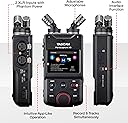
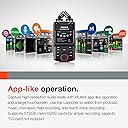
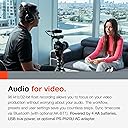
The TASCAM Portacapture X6 is a professional-grade portable audio recorder designed for video, music, podcasting, and field recording. Featuring 6 simultaneous tracks, a 2.4-inch touchscreen for intuitive control, and high-resolution 32-bit float/96kHz recording, it offers versatile XLR inputs and built-in mics with switchable patterns. With up to 6 hours of battery life and USB 2.0 connectivity, it’s the all-in-one solution for creators demanding studio-quality audio on the move.


| ASIN | B0BT571JKW |
| Battery Average Life | 6 Hours |
| Best Sellers Rank | #6,700 in Musical Instruments ( See Top 100 in Musical Instruments ) #8 in Portable Studio Recorders |
| Brand | Tascam |
| Compatible Devices | MP3 Player |
| Customer Reviews | 4.3 out of 5 stars 575 Reviews |
| Digital Recording Time | 6 hours (estimated) |
| Format | WAV |
| Hardware Interface | USB 2.0 |
| Headphones Jack | 3.5 millimeters |
| Item Dimensions D x W x H | 0.1"D x 4.21"W x 0.94"H |
| Item Type Name | Portacapture X6 32-bit float Portable Audio Recorder |
| Item Weight | 0.53 Kilograms |
| Manufacturer | Tascam |
| Memory Storage Capacity | 512 GB |
| Microphone Form Factor | Built-In |
| Microphone Operation Mode | Mono, Stereo |
| Model Number | PORTACAPTURE-X6 |
| Number of Batteries | 1 Lithium Metal batteries required. |
| Screen Size | 2.4 Inches |
| UPC | 043774035434 |
| Unit Count | 1.0 Count |
| Warranty Description | 1 year. |
A**R
So far really like this thing.
Kind of a multi-tool for audio solutions. I have been using it for a variety of uses with videos for my YouTube channel(Running Into History). I have been using it for folley, ambient sounds, a little ASMR and recently I decided to record my entire narration to a video using the attached mics and it sounds really good. I just pull out the SD card and copy it over to Davinci. I was using a Rode NT1 which sounds pretty good but this things also sounds nice, fat and detailed. I like that I can take it into a quiet area of the house and record the narrative then transfer it over. I also use it to run the Rode NT1 into it for a vocalist and use the attached mics of the unit in Y mode to mic my acoustic and it sounds incredible. With phantom power built in we can record anywhere including a recent video in the middle of the woods while camping. And I can add compression and reverb to both the vocals and the guitar while recording. Although the effects cannot be used in 32bit float. I think the effects are limited to 48khz if I remember correctly. I was using the Zoom h1n for most of my recordings before this and I still use it with a lapel mic when I am walking and talking for video(then synch later). It also sounds great but the 32bit float in the X8 makes post production life so much easier with full control. The X8 inspired me to start completely sound designing environments for my videos. I recently recorded a video in a secluded area of forest but unfortunately a highway passes over the area nearby and it was drowning out the nature sounds. I recorded the quiet nature ambience back at the car and then recorded shoes stepping up and down in place them put this all together with the video to capture the perfect forest experience. The mics are terrifyingly cheap feeling. Every time I switch their configuration I am concerned they will snap or crack open. No issues yet and I'm not sure how Tascam can make something so flimsy sound so good but hopefully they are more durable than they appear. I wish the screen rotated so that I can see it when it's recording my acoustic but Tascam most likely would rather you purchase the Bluetooth adapter, which I am about to purchase. Unfortunately not sold on Amazon. I haven't seen any screen bleed and I haven't ran the unit in anything above 48khz(and then reduced the pitch), so I haven't ran into the hum issue. It's really sensitive to handling noise but I purchased a cheap grip tripod thing that a youtuber suggested and it makes a big difference. I purchased one of the inexpensive pop filter and dead cat wind filter packages Amazon. The pop filter is garbage and does not prevent plosives at all but the dead cat does eliminate them and also cuts down on wind interference effectively. I am thinking about starting a podcast and it seems like this will also work great for that. But the unit has recieved two firmware updates since I purchased it almost two months ago. Unfortunately the updates do not address the podcast feedback issue(I think it's called zero sum or something like that). Other units have it to prevent a callers audio from being fed back to them. The other thing I didn't realize is if you plan on using this as a USB mic, your PC will disable any sound card you have. I have the Scarlett 2in 2out which works great but when the X8 is plugged in, the PC routes all audio to the X8 as an interface. I haven't been able to get them to both work together but it sounds like its a windows driver Asio limitation. It works if you don't use Asio but that introduces some serious latency. But I highly recommend this device if you want one audio unit that does almost everything perfectly.
K**S
Excellent 6 Channel (not 8) capture device
Overall, I am quite happy with this device, no problems Six Channels: this will record only six (6) input feeds, not 8 that they imply. Yes, along with the 6 it records a mix-down of the 6 to stereo, however I don't care about this and don't see why anyone would because you take the tracks, dump them into Audacity, and mix to stereo there when you can tweak and adjust correctly. There are ONLY 6 inputs to this device, and calling it X8 is a bit deceptive. I have seen magazine articles claiming that this will work as an 8 channel A-to-D converter, but that is wrong, there are only 6 channels of input. I knew it was only 6 inputs when I bought it, so no problem. Simple to Use: Every single time it records all channels, and I consider that a feature. Sometimes those channels are empty if there was no input, and so later I have to delete them, but the advantage is that you never forget to enable the recording of a channel. Mixer and volume settings were obvious to use. Attached mics did a great job. I set it up in the practice room using attached mics, and then additionally fed the vocal mic signal and some instruments, and the result (after mixing) was great enough for demo tracks. Batteries did die in the middle of one session, so you have to watch out for that, but that was after 5 or 6 hours of recording. For a serious recording you want to plug it in to USB power. Was disappointed that the blue tooth functionality required an additional $50 device, however I bought that so I can control it from the stage.
J**H
Very nice recording quality - UI not intuitive (for me)
This unit records guitar very nicely, with clear sound all the way down to low E and very low noise. Sound quality is at least an order of magnitude better than sound recorded from a costly Sony video cam. The user interface is OK once you get familiar with it, but there are many options and finding them in the various menu screens requires a learning curve, and it's easy to forget where to find what you want (e.g., enabling/disabling the phantom power). Better user instructions would help, and revising them would be less costly than revising the software. The touch screen has good color and resolution, and the touch function works pretty well. Overall, I'm very pleased with the purchase, and I salute the engineering team that developed the hardware.
F**L
Best Audio Recorder for the Cost - Competes with Recorders that are Twice the Cost
I have had the Tascam X8 for about a year and I would like to correct some false criticisms in the reviews. 1. The X8 is very quiet. You will not hear ANY noise from the unit in your recordings. Reviews that state otherwise are not accurate. 2. The touchscreen works flawlessly. I have never had it "freeze up," nor are there "lines in the display." Now it's not going to have as great a display as a Galaxy S23 Ultra - that's a silly expectation. However, it does have good resolution and color. It is sharp, clear and easy to see. 3. The touchscreen is very quick and responsive. I own a Samsung Galaxy S22 Ultra, which is a very powerful smartphone, and I have been pleasantly surprised at how quick and responsive the touchscreen is. It is very quick and it never slows you down. It's not quite smartphone quick, but it's damn close. 4. The Bluetooth control is freaking amazing. You have access to ALL of the recorder's controls using wireless Bluetooth. When connected to my S22 Ultra, the response is nearly instantaneous - there are no delays. Keep in mind that no other audio recorder in this ranges offers you full control of the recorder wirelessly (to my knowledge). It is very convenient to be able to mount the recorder where I am going to play guitar and record my songs and then control the recorder with my phone. Also having Bluetooth control of the recorder eliminates handling noise that accompanies all handheld recorders. Definitely spend the $50.00 on the optional Bluetooth module. 5. The audio quality of the recordings I have made has bee excellent. The X8 has been compared to the MixPre 6II audio recorder which costs twice as much. I don't own the MixPre 6II, but according to one review by a professional, the MixPre 6II has slightly better dynamic range, meaning it supposedly records more of the sound spectrum. However, I am not sure if you played a recording made by the X8 side by side with the same recording made on the MixPre 6II that you would able to hear an actual difference. However, considering that the X8 costs half the price as the MixPre 6II, and it has an excellent touchscreen interface, and it has superb Bluetooth control, there really is no comparison. The UI on the MixPre 6II is knobs - which is practically caveman in comparison. Professionals who review audio recorders are now saying that even $150.00 recorders produce high fidelity recordings, and that there is very little difference, if any, between a $5000 recorder and a $500 recorder. 6. I just updated the unit to the latest firmware version V1.32 and I had no problems. Tascam provides step by step directions. If you follow the directions, it is easy to do firmware updates. I had some apprehensions about this because updating firmware on a device like this can brick the device if it is done wrong. But Tascam's instructions worked the first time. 7. Tascam provides new features on the X8 for free with its firmware updates. This is just superb. After I updated to the latest version, the device boots in about 5 seconds, which is much faster than before the update. The X8 turns on very quickly with a slider switch and boots quickly. 8. You can connect the X8 directly to your laptop and your audio "DAW" (digital audio workstation) via a USB cable. 9. The X8 can be used as an SD card reader. So after you have made audio recordings, instead of having to remove the micro SD card, you can simply plug the unit into your laptop and select the card reader function. The X8 will show up in Windows Explorer as a separate drive (it's Drive F: on my laptop). Then you can open up the file with your audio recordings and drag and drop them onto your laptop. This is simple and easy. You can also rename the Wave files whatever you want after you transfer them to your laptop. I record original songs and then transfer to my laptop and rename them. 10. The X8 is pretty much bug free. Everything works as it is designed to work. Functions are very fast and work quickly. 11. The touchscreen UI on the X8 is FAR easier to learn and use than the the UIs on the Zoom H6 and Zoom H8. 12. For long recording sessions, you can plug the X8 into a rechargeable portable battery pack. I have a small 26 Amp hour Anker battery pack that is compact and will run the X8 for days. 13. The X8 will provide phantom power for condenser mics. I have a Rode NT1 condenser mic (which is an excellent mic BTW) and the X8 powers it with no problems. The X8 also works well with dynamic mics. 14. The X8 has very good sensitivity - better than the Zoom recorders I have owned. The unit will pick up sound much better than Zoom recorders I have owned. 15. The X8 is FAR easier to set up for recording than the Zoom recorders I have owned. It is easy to set the gain and the mix settings for your recordings. 16. The X8 allows you to add digital effects like reverb for vocal recordings. This is excellent. You can add this enhancements in your DAW, but for recording songs and vocals, it is much more convenient to add them into the original recording. Either way, it is a great feature to have. 17. There are several presets on the X8 for various recording modes. For example, there is a music setting for recording instrumentals and vocals. This is very convenient and for most applications, it has enough features. If you have a more complicated recording like recording two instruments and two vocalists in a band, you can use the Manual app on the unit. 18. The portable X-Y mics that come with the unit make excellent recordings. They can be set in A-B configuration if you need to create a more narrow soundstage. The only downside of the included mics is that they are made out of plastic. 19. The X8 has a headphone out jack that powers studio headphones. I have not purchased headphones yet, but different reviews state that the headphone jack powers headphones very well. It has a separate chip on the motherboard dedicated to powering the headphones. 20. The onboard speaker does not work well, but you will never use it anyway. You will either use headphones or connect it to your computer to play it on your sound system. It records in Wave files which are easy to transfer and play. 21. The guitar tune feature did not work for me. I am not sure why, possibly I don't know how to use it. Regardless, I would never use it to tune my guitar anyway. Most guitarists and musicians have specialized tuners for their instruments. Again, let me emphasize that it probably works and I don't know how to use it. I did not spend much time trying to learn how to use it. 22. You can record at 24 Bit, 96 Htz and get excellent recordings, that don't take up as much storage as 32 Bit recordings. Also, the gain is very easy to set on 24 Bit recordings. You can guess at the gain settings and you probably won't have any problems. For very difficult recordings with very "high" sounds or notes and very low sounds, you can use 32 Bit recordings. My original songs have a very wide dynamic range and I can easily record them in 24 Bit, 96 Htz settings. 23. You can power this unit with a plug-in power brick you can buy from Tascam. The Zoom power bricks will also power this unit. 24. It has four XLR inputs that work very well. It also has three 3.5 mm plug in inputs for lavalier mics (one is plugs into your camera). For the money, I believe this is the best audio recorder available. The MixPre recorders MAY have a little better audio quality, but they cost twice as much. I doubt if most people would be able to notice the difference between the X8 and the MixPre recorders, but keep in mind, I don't own a MixPre recorder. This unit is easy to learn and use by beginners and it has the quality and features that advanced audio recorders will want. I highly recommend it. Nothing in the $500 - $1200 price range competes with it.
B**.
For me, it's just about perfect...
Update May 2, 2022: Tascam did indeed release new firmware that addresses my biggest gripe below. Kudos, Tascam! ------------- I've seen all kinds of reviews about the Portacapture X8, so I wanted to put in a few words having owned and used it now for about a month and a half... I like it a bunch. It definitely has a few quirks, and my #1 biggest gripe is this scenario: I'm recording in Manual mode, which I mostly do. I turn off all inputs except #3, where my condenser is plugged in with phantom power. Then I record a bit, turn it off, grab a snack and come back to continue. When I power up, now all inputs are active again and if I forget to turn off all except #3, it'll record blank audio tracks for each until I remember to turn them off. This drives me mad, and it would be such a simple fix. That's why I often check the Tascam website for firmware upgrades. I'm sure it's in the works. I can't be the only one complaining about this. There are a few other quirks like this here and there, but nothing quite as irritating as that. Otherwise... This thing is fantastic. It powers my Earthworks Ethos just fine with 48v phantom, and it works very well with a Rode Podmic as well as an SM7b with no activator. I won't talk about 32-bit float recording since there are 9000 videos about it on YouTube. Just know it's a huge selling point for this device, and it works great on the X8. The on-board field recording mics are both amazing and awful. They sound amazing. They're very sensitive, and they record field as well as foley extremely well, in my opinion. For anything outside, the dead cat absolutely required. Don't even bother without it. The awful part is the build quality. These mics feel like cheap toys, for real. They feel like they have zero quality. I wouldn't want to drop one. Overall, though, the build quality of the actual device is solid. Yes, it's plastic, but I don't find it at all cheap-feeling. It feels like it weighs what it should. The touch screen is pretty nice for what it is, though I have experienced some touch-sensing issues (one of the quirks of this thing). I've seen reports of a thin noise band in the upper frequencies (above the audible range for humans) and I can say I've also seen this in my testing. It has zero effect on my recordings, but could be an issue if those high frequencies make it into your post production edits, ie you're lowering the pitch of the recording and now those high frequencies enter into the audible range... Not an issue for me but worth thinking about for pro foley artists and such. I bought this fully intending on returning it if any of the issues I read about were issues for me. In reality, outside of that track resetting issue that drives me bonks, I have no serious complaints. In fact, it's the opposite. I've grown to love this device and use it a lot indoors. Now that the weather is getting nicer, I'm hoping to use this alongside my Sony ZV-1 to create a whole bunch of quality content. Your mileage may vary, and the Zoom F3 is certainly an attractive option in the 32-bit float world, but for me, this is sorta the machine I would have designed for myself if I, you know, did that sort of thing. Oh, one note. The bluetooth adapter... It's really sort of fantastic. It should not cost 40 bucks, but it does. It might fit a little loose. But it really is quite fantastic. It lets you monitor (in real time, no discernible latency) your audio levels visually (there's no audio passthrough to your smart device, beware) and adjust all the settings right on your phone/tablet, thereby eliminating any sensitivity issues the built-in touchscreen may pose. It's not a must-have, but it's slick and makes the overall experience of using the X8 that much more fun. I definitely recommend giving the X8 a shot. Might not be your cup of tea but it is mine. If Tascam ever releases higher (build) quality onboard mics, I'll be the first in line. But I suspect the included cheapo plastic ones will do the job until they break/melt/evaporate/whatever cheap plastic does.... Tascam, if you're listening? Be awesome and keep pushing firmware updates. You can own this space if you continue to innovate on the products that are already in peoples' hands.
J**N
Capture Every Nuance of your performance, with 32-bit too!
Get ready to embark on a sonic journey because the Tascam Portacapture X8 is not just an audio interface – it's a portal to audio bliss, and I'm here to break it down with the seriousness of a tech guru and the playfulness of a DJ at a disco. First things first, this device is sleeker than a ninja in a tuxedo. The brushed metal finish is like the audiophile version of a sports car, making you feel like you're about to record the next Grammy-winning album just by touching it. And let's talk about those knobs – they're smoother than butter on a hot skillet. Adjusting levels has never felt so satisfying. It's like being a mad scientist, but instead of concocting potions, you're crafting sonic symphonies. Now, let's get technical. The Portacapture X8 boasts eight XLR/TRS combo inputs, which is basically the audiophile's version of having eight different flavors of ice cream at your disposal. It's a buffet of sound possibilities! The preamps are so clean, they make a hospital operating room look dusty. Recording with this thing is like having your own personal sound engineer – without the inflated ego. Need low latency monitoring? Fear not, my audio aficionado! The Portacapture X8 is like a time traveler, ensuring that your input and output are in perfect sync, saving you from the chaos of sonic time paradoxes. It's like having a musical TARDIS. And speaking of time, let's talk about the loopback function. It's not just a feature; it's a wormhole that lets you stream your audio to the past, present, and future. Whether you're live streaming, podcasting, or just sending musical messages to your future self, this feature is the DeLorean of the audio world. In conclusion, the Tascam Portacapture X8 is not just an audio interface; it's a sonic spaceship that propels you into the stratosphere of sound quality. Whether you're a seasoned producer, a budding musician, or just someone who wants to make their cat famous on social media with catchy tunes, this device is your ticket to audio utopia. Buckle up, sound explorers – your sonic adventure awaits!
J**S
Firmware nightmare
I usually never write reviews but sadly I feel like I should report that this is one of the worst audio recorders I have ever used. For professional use this recorder is not ready for prime time. I've had countless crashes and firmware glitches where the wheel won't work or gain controls won't even come up when you click on them. Also the manual mode will always make an extra mix wave file even if you are only using one input. Also the manual mode will always start with all inputs activated and if you forget to turn them all off, you will be stuck with 6 wav files for just one hit of the record button. Not only did it freeze up during a recording but at one point it started blipping and bleeping with not even a microphone plugged in and I couldn't get it to go away. Eventually entering manual mode got it to go away. There are too many touchscreen options that are critical recording features that I would not leave up to a glitchy touch screen or firmware to control. I have had several Zoom recorders and not one exhibited even the smallest bit of unreliability that this recorder has. I do professional gigs like weddings and promotional videos for higher end companies and thankfully I did not take this with me on any of those type of sessions. I literally just spent the weekend testing it out and I can't wait to send it back off to Amazon. This is obviously not Amazon's fault but Tascams. Definitely go for the Zoom h6 or f6. Both are way easier to use and light years more reliable. Hopefully Tascam will address this and release way more solid firmware but the most recent release of their firmware still did not address the extremely bad issues that this recorder exhibits. Sorry y'all hate to be this guy but if you are doing professional gigs do not use this recorder. It is not ready for prime time but hopefully someday it will be. Sorry to be a Debbie Downer thank you for reading hope this helps you.
D**A
Great product.
Definitely worth it.
Trustpilot
3 days ago
4 days ago