Buy anything from 5,000+ international stores. One checkout price. No surprise fees. Join 2M+ shoppers on Desertcart.
Desertcart purchases this item on your behalf and handles shipping, customs, and support to Thailand.
🌐 Unlock the world of cinema—region-free, 4K sharp, and streaming-ready!
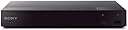
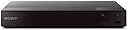
The Sony BDP-S6700 Region Free Blu-ray Player with Dynastar bundle delivers unrestricted playback of Blu-rays and DVDs from all global regions (A, B, C and 0-8), enhanced with 4K upscaling and 3D support. Featuring built-in WiFi, Ethernet, and compatibility with 300+ streaming apps, it transforms your HDTV into a versatile entertainment powerhouse. Its universal 110-240V power supply and included international plug adapters make it ideal for worldwide use. Unique closed captions support on DVDs adds an accessibility edge, making this player a must-have for discerning global cinephiles and professionals seeking seamless, borderless media enjoyment.
| ASIN | B077MW2F9H |
| Analog Video Format | NTSC |
| Audio Output Mode | Surround |
| Best Sellers Rank | #13,935 in Electronics ( See Top 100 in Electronics ) #17 in Blu-Ray Disc Players |
| Brand | Dynastar |
| Built-In Media | Blu-ray, dvd |
| Color | Black |
| Compatible Devices | PC |
| Connectivity Technology | Bluetooth, Ethernet, HDMI, USB, Wi-Fi |
| Connector Type | HDMI |
| Customer Reviews | 4.2 out of 5 stars 4,848 Reviews |
| File Format | AVCHD, AVI, FLAC, JPEG, MOV, MP3, MPEG-1, MPEG-2, MPEG-4 |
| Item Dimensions L x W x H | 1.54"L x 10.04"W x 7.56"H |
| Item Weight | 3.1 Pounds |
| Manufacturer | Dynastar |
| Media Type | Blu-Ray Disc, DVD |
| Mfr Part Number | BDPS6700_DynastarPackage |
| Model Name | BDPS6700 |
| Model Number | BDPS6700_DynastarPackage |
| Number of Channels | 1 |
| Other Special Features of the Product | Region Free |
| Resolution | 3840x2160 |
| Special Feature | Region Free |
| Supported Audio Format | AAC, Dolby Digital, DTS |
| Surround Sound Channel Configuration | 5.1 |
| Total Number of HDMI Ports | 1 |
| UPC | 655726996924 |
| Video Encoding | H.264 |
| Video Output Resolution | 3840x2160 or 4K |
S**R
Works perfectly as region free player, so far no issues
I had been shopping around for a region-free bluray/dvd player and I’d like to provide you the information I have gathered to help you with your decision. First: There are laws that prohibit the sale of region free bluray players from manufacturers or by retailers in the US. That is why you don’t see region free bluray players in brick stores like Bestbuy, WalMart, Target, etc. Second: Due to the first point, manufacturers like Sony, Samsung, etc. do not manufacture or market region free bluray players in the US. I’d like to emphasize this because I see a lot of comments and complaints from customers who purchased such players and when they contacted Sony, Samsung about their region free bluray player, they were disappointed because [insert bluray company] customer service said thay did not have region free bluray player in their line of products therefore could not provide service. If you pay attention, you will see all region free bluray players are sold by third-party sellers. There is nothing wrong with that. I have already purchased and tested two region free bluray players sold by such third-party seller on Amazon and both players met my expectations and did play discs from different regions of the world. However, you should not contact [insert bluray company] for any questions regarding region free functionality of your region free bluray player. Because they did not produce such a product. It was the third party seller (a company with technical skills and expertise) that purchased the player from [insert bluray company], changed the factory settings, unlocked the bluray player and turned it into the region free bluray player. Region free bluray player is simply an existing model of a bluray player (such as the one on this page) with all the functionalities of that model, but in addition to that, it is region free and plus converts PAL to NTSC (and the 110 - 220 voltage conversion is added if you wish to use it in another country that uses 220 voltage). Because of that, if you contact the third party seller for any of the features of the product, they will most likely refer you to the product page on the offical [insert bluray company]’s website. You should only contact them only if your question is pertaining to the region free functionality. My biggest complain is that third party sellers often double the price of that bluray player model. I checked many region free bluray models on the internet and found out that almost every bluray player is actually half the price when they are not region free. Basically, the third party seller charges the price of the bluray player to unlock it, thereby doubling its price. If a bluray player in its plain version is $75-80, the region free version will be $150 - $160. This is all because of the current regulations that prevent bluray companies from manufacturing their own region free models. I am not sure if that’s the case in other parts of the world. This Sony model works well as expected. So far I have used Region B Bluray discs imported from UK (The Avengers Series 4 Bluray) and it played it perfectly with no issues. Here’s what you need to pay attention to: 1) Make sure Quick Start Mode is off!! This is a setting on the player, very easy to see and confirm. Sony models show that when you turn on the player for the very first time and going through initial setup proceess. LG model I have tested (LG BP350), it’s in the settings. Both models have Quick Start Mode off by default so you probably won’t have to do anything. 2) Make sure your player is OFF before you press the button to change the region code. You don’t have to change the region for DVDs It is set to region free for DVDs. You only need to change it for Bluray discs. Turn off the player. For Sony models, press Yellow for Region A, Blue for Region B, Red for Region C. For LG models, press 1 for Region A, press 2 for Region B and press 3 for region C. When you do that, the player will turn ON. And it will be ready to play the disc. By habit, I turned the player on and pressed the region codes and it didn’t work. It is important that the unit must be off before you take that action. This model has wi-fi buit in and I was able to connect successfully with no issue. The third paty seller states that updating the firmware will not cause issues with the region free capability; they say they guarantee that their player won't lose region free capability but I would not want to test that theory unless my player starts having issues as I don’t want to risk losing region free capability (with so many firmware updates and codes, you never know what will happen). The only problem I had was when I played a region B Bluray disc that had 5.1 DTS audio track, and the audio kept cutting out for a second every 2-3 minutes. I had the HDMI out from the player to LG OLED TV and I was using the audio optical out from the TV to the receiver. For whatever reason, the sound kept cutting out for a second and came back on. I could see the signal going out on the front panel of my receiver. I am not sure if this issue has anything to do with the disc being region B (maybe the TV didn’t fully recognize the audio signal although I thought regions codes are only for picture signals and did not impact audio signals) I Googled it and saw recommendations about changing the audio settings on the player and turning them off (it also recommended changing the digital audio otput to PCM but that would defeat the purpose of enjoying the 5.1 DTS audio format). I have not had this issue with The Avengers Bluray disc whih only has 2.0 PMC audio track. So either the 5.1 DTS audio signal did not pass to the TV or TV did not pass it to the receiver consistently which caused the audio dropouts. But this player also had digital audio coaxial output. I think I will try that to see if it resolves the issue. The audio quality probably won’t be the same as HDMI signal but still better than constant cutouts. ONE AMAZING FEATURE NOT MENTIONED ANYWHERE ELSE: I noticed that under the Options menu, there is "Closed Captions" settings. This is a fantastic new feature that I have not seen on a Blu-ray player before. I have been trying for years for a way to turn on Closed Captions on DVDs that don't have subtitles. Not matter what I have tried, I have not been able to succeed. Recently, I read that Closed Captions signals work only on analog signals therefore I I needed to try analog cables. I tried analog cables, switched the picture settings on my Blu-ray player to analog output, also changed the settings on my TV to analog and I was not able to get a signal or turn on the Closed Captions (TV has closed caption feature but it mainly works with cable TV signal -when comes through tuner-, it has been impossible to turn them on while playing DVD without the TV tuner/cable network). All these years, I have been playing those DVDs on my laptop using Windows Player (you can turn on the closed captions on Windows Player) and using an HDMI cable from the laptop to the TV. This was the only solution I could find. Cut a long story short, this Blu-ray player enables the user to turn on the closed captions on DVD!!! My most sincere thanks and congratulations to whoever thought of adding this feature to the blu-ray player (nothing to do with 4K picture quality but such a useful and wonderful feature that had been missing from players until now).
A**T
YES, IT WORKS! (Tested minimum 20 discs)
This is an honest, non paid for, non free item given review. We are SO happy to have this!! And that the model is lightweight and compact. Not like my huge and heavy dinosaur first ever 4kUDH Sony model. For some reason we can't find movies in Region 1 (USA) Blu Ray/DVD disc's! We're old and like to collect our favourite movies. But also, we love watching films from ALL over the world, in MANY different languages etc! And don't prefer to have fifteen different streaming services just to be able to PAY to watch one movie. Now, I was hesitant buying tech that was altered, but I was desperate. And pleasantly surprised and super thankful that it works great and was still packaged carefully and safely. So we'll that we feared we bought the the un-altered unit. Soooo, we tested every region disc in Blu Ray, DVD, and 4k UDH Blu Ray. They ALL work flawlessly! I have read some reviews that the instructions are difficult to understand. They, are, not! They are VERY, easy, to understand! And if you have any problems, the seller gives their contact information to contact THEM. Not Sony. We love love love this! And it is worth EVERY penny!
B**M
Somewhat disappointing for regular DVDs...
Having an extensive library of regular DVDs, conversion to the Blu-ray format would not only be financially prohibitive, but actually impossible as several titles have simply not been issued in that format. Thus, the Sony BDP-S6700 player seemed to be an ideal choice as I ventured for the first time into the Blu-ray universe and purchased my first Blu-ray disc set. The S6700 performs superbly when I play the Blu-ray disc. However, when I use it to view a regular DVD with a 4:3 picture ( a classic TV program, for example ), the S6700 suppresses the "normal" option from the "wide mode" setting on my television; it forces the TV into the "full" option which stretches, and distorts, the 4:3 picture in order to fill the 16:9 format of the television screen. My television being also from Sony, I did not expect compatibility issues on that front. When I use my old, regular DVD player for those classic DVDs ( with 4:3 picture ), the "normal" option is available and everything is fine. I actually suspect that the disappearance of the "normal" option might be linked to the HDMI connection; my old DVD player has a 3-cable connection to the TV ( RCA plugs: composite video -yellow- and stereo audio -red and white- ). Since the HDMI connection is the only one provided on the S6700, the problem with playing classic DVDs on it remains unresolved. To make it absolutely clear, let me add that my only Blu-ray disc set is of a classic TV show with a 4:3 picture; the S6700 causes the TV's "wide mode" setting to default to "full", and yet, the picture comes out perfectly with a 4:3 ratio! ( without stretching or distortion ). The problem is when I play a regular DVD with a 4:3 picture on the S6700. I could add a minor quibble with the "Menu" and "Top Menu" buttons on the remote, but that might just be my lack of familiarity with a Blu-ray player. So the S6700 will not be putting my old DVD player out to pasture just yet. Somewhat disappointing...
B**.
Yes, It's a Real Sony! And Yes, You Can Play Discs from All Over the World On It!
Yes, this is a genuine Sony Blu-ray/DVD player. However, to disarm those silly regional restrictions, an outside lab has had to open the case and make a small adjustment or two. This violation of the factory sealed case, unfortunately, renders any manufacturer's warranty moot. But since Sony make fine products, it's unlikely you'll ever need warranty service. When I travel abroad, I like to look for Blu-rays and DVDs I can't get here in the U.S. With this tweaked Sony player, I can watch them from the comfort of my couch on my NTSC format TV. (That's the image format on all North American, Japanese, and other countries' TVs. Europe and elsewhere use PAL.) A handy, simple-to-read, one-page (one-sided) instruction sheet tells you how to set the player in case it doesn't automatically adjust for the zone, which it does most of the time. I keep the instructions in the same decorative box in which I keep my remotes, so it's always available in case I need it. I have been using region-free DVD and Blu-ray/DVD players for more than 20 years and love being able to view films and TV shows I can't always find at home. With this Sony player, you will, too.
P**E
What it will NOT do... 4 years old now and still going... 3 stars at first, 4 now.
This is a basic, bare-bones player. What it will NOT do: -- No zoom -- No slow motion -- No frame by frame -- Some subtitles will not play, but that is a very rare occurrence. On the positive side: the remote will control the TV set sound level and on/off. If you leave it on pause for 10 minutes, it will disconnect from the movie and revert to the loading screen. Then, one has to fumble with the remote to get back to the movie, but it usually will return you at the point of interruption. The user's manual is cryptic and challenging in places but aren't most of them? The spot where it addresses the workings of a zone free/international player can easily be overlooked. For reasons unknown, sometimes it will have difficulties in initializing a disc. This seems to happen more often with Blu rays. "There is no disc" will be posted, or "This disc cannot be read." It doesn't matter if the disc is NTSC encoded or from some other zone. It does not necessarily occur with discs being played for the first time; I've seen it happen with disc that were played the previous day! Patience is then called for. Various remedies: 1) turn off and on the machine, a few times may be required. 2) Eject and reinsert the disc. 3) Eject the disc, turn off the machine and reinsert the disc. So far, in 4 years, these remedies have always worked and there never was a disc that couldn't be played at all. After much fumbling, I discovered that to play the DVDs, you should NOT press the PLAY button! Instead, it is a central button with just a + [plus sign] symbol on it that will enable playing the DVDs. Nowhere is that mentioned nor explained. Play is only to be pressed after Pause or Stop buttons were used. Apparently it is possible to connect that machine to Netflix (I'm not a subscriber: I buy my foreign DVDs), to Wifi and load it up with apps (I don't use any), all sorts of functions perfectly useless to me. I just wanted an all zones DVD player, simple and easy to set up and use. To give it more stars, I'm waiting a few months to a year, to see how it will play and if it will last. I have been using it since March 4th, 2018, so far, it plays well French (regular and Blue Ray) and British DVDs. At that point in time I have no recommendation one way or another. March 28, 2019 After one year of use I cannot give more stars. It works fine, but I have noticed a rather bothersome flaw: the remote buttons are so sensitive to the touch that the slightest accidental pressure will activate them with undesirable consequences; too often one has to turn off the player and restart it to continue watching the DVD. I should have purchased a more expensive but better machine. Cheap I paid and cheap I got. May 23, 2022 Since March 4th, 2018, this machine has been used twice daily: at lunch (1 hour programs), at dinner (full length features). After 4 years of use it is still working well. As a budget-priced machine, it has been quite satisfying and is doing a good service. I'm adding a 4th star.
T**D
READ this if you have any doubts before you buy!
Ok, so I was skeptical about this playing any region. So many dvd/blu ray players advertise region free and don’t work. I went through three of them before I found this one. IT WORKS. The seller also provided detailed instructions to play different regions. This unit is flawless. I have been shopping on Amazon for over a decade and this was a fantastic purchase. Buy with confidence. I did a little research and this seller is known all over Reddit as being 100% genuine deal, so feel free to check yourself.
M**E
It works as advertised
Another reviewer has posted a pretty exhaustive and comprehensive description of the "why's and wherefore's" of DVD regions and Blu Ray zones, so I'm not going to comment on DVD and Blu Ray regions / zones. You should find the other reviewer and read his excellent tutorial. I will just emphasize that this product is as described, a new Sony Blu Ray player. The player has been modified by a third party to play all regions DVDs so you will receive the player in its shipping box that has been opened and re-sealed. I have not tried any European zoned Blu Ray disks, but I have played some non USA region DVDs and they play just fine on this player. No settings necessary; just load your DVD and press Play. The company that modifies the player provides a short instruction sheet for getting started and it is important that you read this and follow the instructions - don't lose this sheet! A couple of notes: the Sony BDP S1700 model is not wi-fi equipped. For internet connectivity, you will need to run an Ethernet cable from your router. However, the only reason that you would need internet connectivity is if you plan to stream Netflix or any other streaming service through this player. If you already stream through your Roku, Firestick or other device, you don't need the internet connection on this player, so don't worry about hooking it up. Not having the internet connection does not affect the functionality of the player. Also, the modifier company warrants only the modification, not the player. The player warranty remains with Sony. And I'm not sure of how Sony would honor a warranty request on a modified player. But I have not had any issues with this player. A note about the remote - it is terrible! And this is not a reflection on the modifier company because they simply pass on the Sony package - remote and all. So a big raspberry to Sony for this awful remote. The unlighted buttons are small and difficult to see in a darkened room. My biggest gripe is the large "Netflix" button located right next to the "Play" button. It is quite easy to press this Netflix button by mistake which will immediately switch you over to Netflix. You then have to back out of Netflix, restart the DVD and then find the place where you left off (and turn on a room light so you can see what you are doing). Simple solution: search on Amazon for part # RMT-B116A. This is another Sony remote that is slightly larger, has much more functionality and doesn't have the huge Netflix button. You can also set this one up to control your TV. It has the colored Blu Ray zone buttons and it works fine with this modified DVD player. The last time I checked, it is less than $10.00 on Amazon.
8**X
It's a SONY!
Great product! Sony reliable!
A**N
multiregion (german and US) and easy to install/ use
We were not entirely sure when we bought this whether it would be truly as easy, and play the multiregion DVDs without issue (based on my research of DVD players, and the associated reviews). Those worries were not warranted. It is a great product, easy to use and install. We already watched North American and german DVDs with it, and it plays those without any additional button press or other change- the machine does it all itself: put in any region DVD and press play, that's it (we have only 2 types of DVDs: german and North American, but I gather, it would be the same for the other supported regions: 1-6), and it plays DVDs as well as BlueRay. And it's so small- I guess that is evolving technology, but we like the size. All around a great product.
Y**N
Buen player multi regional
Pide X800M2. Hasta ahora funciona muy bien. Viene con un control remoto Sony original. El cable HDMI incluido es de alta velocidad. No es premium ni ultra. No es necesario cambiar de región para los DVD. Los Blu-ray son manuales, pero la caja incluye instrucciones en inglés. UHD, Blu-ray de Región A. Los DVD se reprodujeron sin problemas en NTSC Regiones 1, 2 y 4, y en PAL Región 2. No he probado otras regiones.
E**E
Lo mejor de hoy dia para discos compactos
Ya lo probé y muy buen reproductor, via hdmi a la pantalla , las funciones que describen todas al 100 %, blu-ray dvd cd ...oks
D**S
Sony BDP-S3700 REGOIN FREE BLU RAY PLAYEER
they will play region a blu ray dvds which is what i wanted would buy again
M**I
Excelente
Excelente producto , vale la pena el precio para seguir viendo películas en bluray . Se configura rápidamente, menú muy completo . Si trae control remoto y pilas , ademas trae cable HDMI
Trustpilot
5 days ago
1 month ago