Desertcart purchases this item on your behalf and handles shipping, customs, and support to Thailand.
🎨 Elevate your digital canvas—draw, design, and dominate with precision and style!
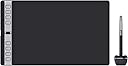
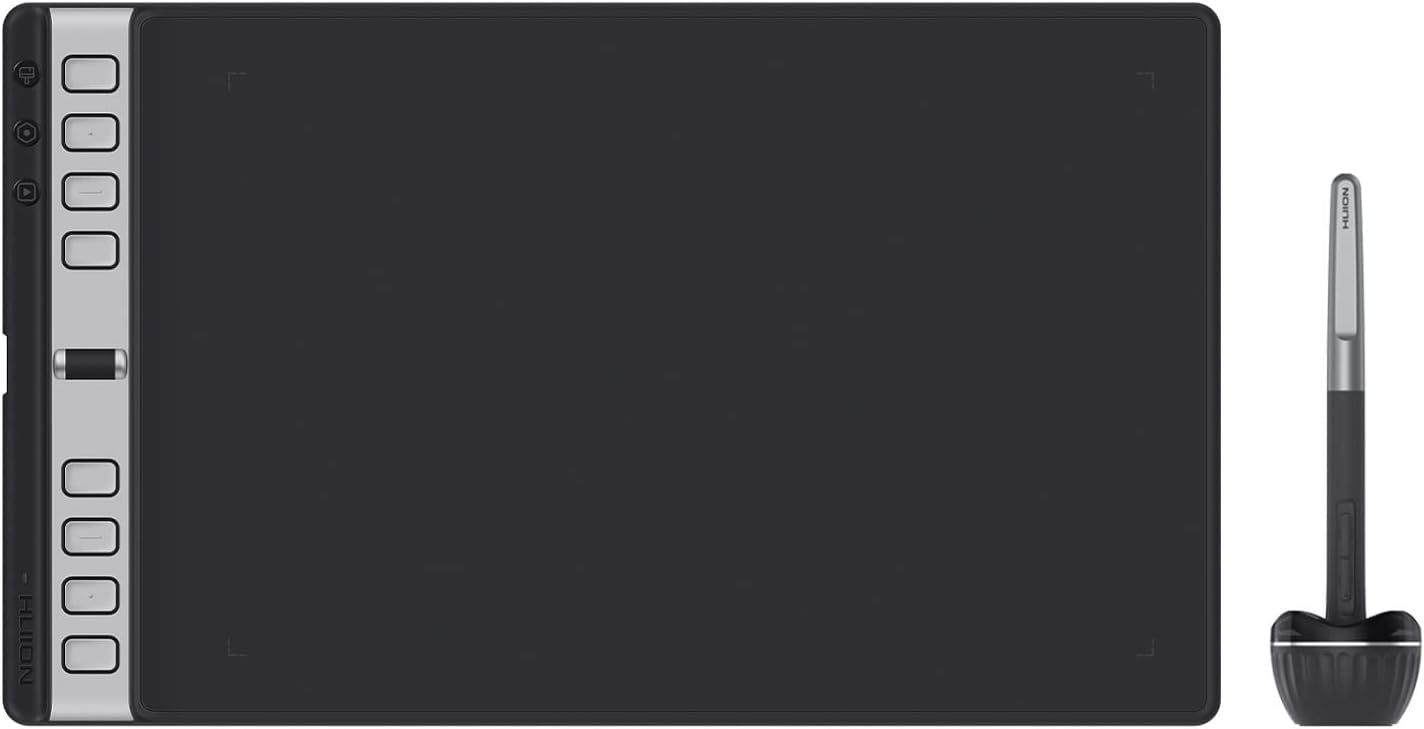
The HUION Inspiroy 2 Large Drawing Tablet is a professional-grade, battery-free digital art tool featuring PenTech 3.0 with 8192 pressure levels, a 10.5 x 6.56 inch active area, and a unique programmable scroll wheel plus 3 sets of 8 customizable shortcut keys. Designed for ergonomic comfort and ultra-portability, it supports Mac, Windows, Linux, ChromeOS, and Android 6.0+ devices, making it ideal for artists, designers, students, and professionals seeking seamless, precise, and efficient digital creativity.


| ASIN | B0BTLWRG2J |
| Active Surface Area | 10.5 x 6.56inch |
| Additional Features | 3-Set 8 Programmable Press Keys, Extra-Slim, Multi-OS Compatibility, New Stylus with PenTech 3.0, Unique Programmable Scroll Wheel |
| Best Sellers Rank | #1,304 in Computers ( See Top 100 in Computers ) #6 in Graphic Tablets |
| Brand | HUION |
| Built-In Media | H1061P Drawing Tablet, PW110 Digital Pen, Pen Holder & 10 Pen Nibs & Pen Nibs Clip, Quick Start Guide, USB-C Cable & Type-C OTG adapter |
| Color | Black |
| Compatible Devices | Desktop, Laptop, Smartphone, Tablet |
| Connectivity Technology | USB |
| Connectivity technology | USB |
| Country of Origin | China |
| Customer Reviews | 4.5 out of 5 stars 669 Reviews |
| Display Type | LCD |
| Global Trade Identification Number | 06930444802660 |
| Item Dimensions L x W | 35.2L x 20.9W centimeters |
| Item Type Name | Drawing Tablet |
| Item Weight | 1.2 Pounds |
| Manufacturer | HUION |
| Mfr Part Number | H1061P |
| Model Name | HUION Inspiroy 2 L Black |
| Model Number | H1061P |
| Model name | HUION Inspiroy 2 L Black |
| Native Resolution | 1920x1080 |
| Operating System | Android devices (OS version 6.0 or later), Linux(Ubuntu), MacOS 10.12 or later, Windows 7 or later |
| Operating system | Android devices (OS version 6.0 or later), Linux(Ubuntu), MacOS 10.12 or later, Windows 7 or later |
| Pressure Sensitivity | 8192 Levels |
| Pressure sensitivity | 8192 Levels |
| Screen Size | 6 Inches |
| Special features | 3-Set 8 Programmable Press Keys, Extra-Slim, Multi-OS Compatibility, New Stylus with PenTech 3.0, Unique Programmable Scroll Wheel Special features 3-Set 8 Programmable Press Keys, Extra-Slim, Multi-OS Compatibility, New Stylus with PenTech 3.0, Unique Programmable Scroll Wheel See more |
| Specific Uses For Product | Painting |
| Target Audience | Artist, Designer, Student, Teacher |
| Warranty Description | 1 year warranty |
S**M
Quality
Ive used a lot of drawing tablets , small large with screen other brands like cintiq , this one is by far my favorite, portable and priced well!
C**N
Great product
Very nice and cool
K**N
Good for its price
Its okay and responsice, problem is the surface area its too small.
D**.
Great quality at very affordable price
Very simple, easy to use and very intuitive that comes with good build quality and awesome price!
T**.
excellent
good buy
E**N
Excellent
Very high precision, great customizablity
J**J
Good for Students
It’s better than Wacom Tablet , works on Win 11 Pro
V**Y
The HUION Inspiroy 2: A Marvelous Drawing Tablet That Exceeds Expectations!
I recently purchased the HUION Inspiroy 2 drawing tablet from Amazon, and I must say, it has exceeded my expectations in every way! As an aspiring digital artist, finding the perfect drawing tablet was crucial for me, and this device has proven to be an absolute gem. First and foremost, the build quality of the HUION Inspiroy 2 is exceptional. The tablet feels sturdy and well-crafted, providing a comfortable drawing experience that allows me to focus on my art without any distractions. The sleek and slim design adds a touch of elegance, making it a pleasure to work with. The drawing surface of the Inspiroy 2 is incredibly responsive and accurate. The 8,192 levels of pressure sensitivity ensure that every stroke I make is captured with utmost precision. I no longer have to worry about my lines appearing wobbly or inconsistent. The included battery-free stylus glides smoothly across the screen, providing a natural and seamless drawing experience. Another standout feature of this tablet is the generous active area. With a 10-inch screen, I have ample space to unleash my creativity and work on intricate details. Whether I'm sketching, painting, or even editing photos, the Inspiroy 2 delivers a comfortable working area that accommodates all my artistic needs. Setting up the tablet was a breeze. The USB-C connection ensures a fast and stable connection to my computer, eliminating any lag or delay. Additionally, the tablet is compatible with various software programs, making it versatile and suitable for artists of all skill levels. One aspect that pleasantly surprised me was the battery life of the HUION Inspiroy 2. Even after several hours of continuous use, I have yet to experience any battery drainage issues. This is a huge advantage, especially during long creative sessions when I don't want to be interrupted by low power warnings. Finally, I must mention the affordability of this drawing tablet. The HUION Inspiroy 2 offers exceptional value for its price. Considering its impressive features, build quality, and overall performance, it easily rivals more expensive alternatives on the market. In conclusion, the HUION Inspiroy 2 has quickly become an indispensable tool in my artistic journey. Its remarkable performance, precision, and affordability make it a standout choice for any digital artist. Whether you're a beginner or a seasoned professional, this tablet is bound to elevate your artwork to new heights. I wholeheartedly recommend the HUION Inspiroy 2 to anyone in search of an exceptional drawing tablet!
K**Y
Easy to use.
love the product, everything works as it should, and the software is very intuitive.
B**_
Para escrita e estudo
Comprei para uso de escrita em estudo, porém apesar da função configurável a rolagem horizontal não funciona, ela responde apenas com vertical, independente do movimento. Uso do zoom também nem sempre funciona, apesar de já vir configurado automaticamente na rolagem do produto.
S**H
Very good graphic tablet.
Excellent size. Sturdy USB C connection and the pen is very responsive. Very easy driver installation and configuration even for MacBook. Also Product came in pristine packing and Amazon’s delivery was very quick. Reasonable cost as well. Recommend this product.
U**5
ممتاز جداً
تابليت ممتاز جداً و جودته محترمه جداً على سعره و حجمه مقارنة باللي موجود في السوق بالنسبه للتابليت نفسه حجمه ممتاز جدا و مديني مساحه حلوة جداً و انا بستعمله و الازرار بتاعت الاختصارات حلوه جداً انك ممكن تخصص. لكل زرار اكتر من حاجه من خلال ازرار جروبات الاختصارات اللي موجوده مشوفتهاش في اي تاب تاني بصراحه و مميزاه جداً من الحاجات اللي حلوه جداً برضو ان سمكه خفيف و وزنه خفيف جداً على الرغم من كده ممكن يكون عيب في نفس الوقت لما بريح ايدي عليه بحسه بينزل من النص لتحت شويه لانه مرفوع بلسنادات اللي بتبقا في الاربع جوانب من تحت بس مش لدرجة انك تكسره اكيد بس مش مأثرة في اي حاجه و القلم حساسيته حلوه جداً و مظبوطه لو انت هتستعمله في رسم او تصميم ممتاز جداً و هتنبسط بيه ممكن القلم خفيف شويه كوزن بس بالنسبالي مش ازمه ، و بالنسبه للكابل اللي جاي معاه كواليتي محترمه جداً الدرايفر كويس جداً و موجود فيه اي حاجه ممكن تحتاجها من تخصيص حساسية القلم انه يكون بيحس باقل ضغطه او لازم تضغط و كذلك تخصيص الزراير اللي في القلم و التابليت الخلاصه فعلا بالنسبه لسعره بيقدم كتير و هتاخد منه التجربه اللي تتوقع تلاقيها في حاجات اغلى منه بكتير و انصحك بيه و بشده لو دي اول تجربه ليك هتنبسط جدا و حتى لو انت بروفيشينال هتلاقي التجربه قريبه جدا جدا للحاجات الاغلى زي الواكوم
A**.
Fantastic Entry-Level Pen Tablet
I previously tried to use an entry-level Wacom pen tablet years ago and never enjoyed it. I'm sure most of that was on my lack of experience, but some of it can be chalked up to the small drawing area and the fact I never enjoyed how Illustrator handled brushes. In the end, if was always better to just use a mouse. The rise in free (or inexpensive) painting apps lately inspired me to get another pen tablet and try again. Wacom's products were too expensive for something I might not enjoy, but research led me to the Inspiroy 2. For a much cheaper price I got a larger drawing area and a solid tablet with (a) more buttons and (b) a scroll wheel. The value is terrific, but how does it perform? Terrific! I was able to buy extra nibs for $10 that are made of felt, so they give more friction on the tablet (I don't remember my Wacom pen allowing that). The pressure sensitivity seems to work just fine though I have little to compare it too, and overall my experience has been well worth my purchase. If you are looking for a beginner tablet, absolutely start here and bump up to something elite as your talent grows. I also feel that drawing apps have come a long way. Adobe Fresco's brush engine, for example, is far better than anything Illustrator has and the vector brushes in Fresco are fantastic. My only complaints come from a few quirks with the Huion app that is used to specify the actions for each button. I'm left-handed so I work with this turned upside down. The Huion app lets you turn it 90 or 180 degrees to accommodate your needs. That all works fine. What could be better, though, is that when you tell the app you are working with it turned 180 degrees, picture of the tablet in the app doesn't also turn 180 degrees. So, I have to specify the functions of each button while trying to figure where it will be once the tablet is spun around. That's a simple change they can make in software -- and I hope they do. I also found that a change to the button functions is not immediately represented when using UWP apps, like Adobe Fresco. Sometimes, I have to restart the Huion app or unplug and re-plug in the tablet. Those are small issues overall and do not kill the experience.
Trustpilot
2 months ago
2 months ago