We remain fully operational. Our teams are working around the clock to ensure your deliveries continue safely.

DOWNLOAD THE APP


Copyright © 2025 Desertcart Holdings Limited
DOWNLOAD THE APP


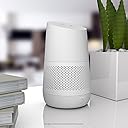


🔊 Elevate Your Audio Experience Anywhere!
Ninety7 Battery Base for Google Home Audio/Video Product Snow/White (Loft Snow) Review: HOLD! It's not broken...read some reviews to revive these gems! - There are some great reviews here about how to get these working. Here is my summary, and the solution that worked for me. 1) These are old stock, and the batteries are completely drained...to the point that they are not recognized when you plug in this unit to charge. 2) Once you get them charging, they work great, and are definitely worth the $15 I paid in Aug. 2022. 3) The trick is to get _some_ power into _one_ of the batteries in the 4 battery array. 4) People either do this by buying a battery that is somewhat charged, or by charging a battery. 5) Once you have a battery with some juice in the mix, the rest will charge up and you're in business. You'll be surprised that there really are just 4 Blackberry NX1 batteries in here. Remove 4 screws under the rubber foot, and you'll see them. They pop right out, no problem. Most reviews mention ordering an NX1 battery from ebay, which I did. (I'm still waiting for it.) I got impatient, so I wondered about getting a bit of charge into a battery, and going from there. A quick youtube search of "charging a battery without a charger" brought a simple solution. See pics. 1) Cut and old USB charging cable (I used a mini-usb), and find the + (probably red) and - (probably black), and ignore the other colors. 2) Strip the wires, and tape them to the battery in the right locations. These batteries are marked + and -, so just tape red to +, and black to -. 3) Plug in, and monitor. These will generate some heat, so I didn't want to leave them plugged for long. 10 minutes is all I waited, and it must have been enough of a jumpstart. 4) Put the slightly-charged battery back in your speaker unit and plug it in. You should see the charging lights on the front start to do their biz. I then unplugged the unit, added the other 3 dead batteries back in, and blam...they all charged up. Screw the top back on, slide your speaker in, and "Ok Google, play Paul McCartney" to your hearts content while you're working in the yard. I tested the batts with a multimeter before and after to verify, and they were indeed getting power and charging up. After a few hours of charging, all 4 lights were filled, and I used (unplugged) it for a few hours with all 4 lights still strong. I may add a little loop of fabric to the plug for an easier pull so I don't eventually cause a short in the plug by wedging my sausage fingers in there to unplug it. Now I want a few more of these speakers so I can make more portables! Review: Dead out of the box, twice! - I plugged it into the same outlet and used the same cord that my Google Home Speaker used (and worked with), but nothing happened. No lights on the base or the Google Home Speaker. To test, I plugged my speaker back into its own cord and the speaker, cord, and outlet all work perfectly. Thinking this was a fluke, I returned the first one and got another one. The exact same issue. I am not getting a replacement for this and I am just shipping it back. If I can get 2 duds in a row, then I don't even want a working one at this point. This is a shame because this product is amazing to look at and is such an amazing idea, but this company needs a better quality product or at least a better QA system in place.


| Best Sellers Rank | #53 in MP3 Player & Cell Phone Audio Docks #35,930 in MP3 & MP4 Player Accessories |
| Customer Reviews | 3.5 out of 5 stars 1,207 Reviews |
M**M
HOLD! It's not broken...read some reviews to revive these gems!
There are some great reviews here about how to get these working. Here is my summary, and the solution that worked for me. 1) These are old stock, and the batteries are completely drained...to the point that they are not recognized when you plug in this unit to charge. 2) Once you get them charging, they work great, and are definitely worth the $15 I paid in Aug. 2022. 3) The trick is to get _some_ power into _one_ of the batteries in the 4 battery array. 4) People either do this by buying a battery that is somewhat charged, or by charging a battery. 5) Once you have a battery with some juice in the mix, the rest will charge up and you're in business. You'll be surprised that there really are just 4 Blackberry NX1 batteries in here. Remove 4 screws under the rubber foot, and you'll see them. They pop right out, no problem. Most reviews mention ordering an NX1 battery from ebay, which I did. (I'm still waiting for it.) I got impatient, so I wondered about getting a bit of charge into a battery, and going from there. A quick youtube search of "charging a battery without a charger" brought a simple solution. See pics. 1) Cut and old USB charging cable (I used a mini-usb), and find the + (probably red) and - (probably black), and ignore the other colors. 2) Strip the wires, and tape them to the battery in the right locations. These batteries are marked + and -, so just tape red to +, and black to -. 3) Plug in, and monitor. These will generate some heat, so I didn't want to leave them plugged for long. 10 minutes is all I waited, and it must have been enough of a jumpstart. 4) Put the slightly-charged battery back in your speaker unit and plug it in. You should see the charging lights on the front start to do their biz. I then unplugged the unit, added the other 3 dead batteries back in, and blam...they all charged up. Screw the top back on, slide your speaker in, and "Ok Google, play Paul McCartney" to your hearts content while you're working in the yard. I tested the batts with a multimeter before and after to verify, and they were indeed getting power and charging up. After a few hours of charging, all 4 lights were filled, and I used (unplugged) it for a few hours with all 4 lights still strong. I may add a little loop of fabric to the plug for an easier pull so I don't eventually cause a short in the plug by wedging my sausage fingers in there to unplug it. Now I want a few more of these speakers so I can make more portables!
L**I
Dead out of the box, twice!
I plugged it into the same outlet and used the same cord that my Google Home Speaker used (and worked with), but nothing happened. No lights on the base or the Google Home Speaker. To test, I plugged my speaker back into its own cord and the speaker, cord, and outlet all work perfectly. Thinking this was a fluke, I returned the first one and got another one. The exact same issue. I am not getting a replacement for this and I am just shipping it back. If I can get 2 duds in a row, then I don't even want a working one at this point. This is a shame because this product is amazing to look at and is such an amazing idea, but this company needs a better quality product or at least a better QA system in place.
B**N
You will need minor technical knowledge, but it's great once you do it.
Frustrated by the lack of affordable battery-powered Google speakers, I decided to try this device despite the negative reviews. I've had several JBL Link speakers in the past, all of which have unfortunately failed. Replacing the internal batteries in those JBL speakers proved to be nearly impossible, even with online guides, and also doesn't fix the well known "clicking" problem those speakers seem to develop over time. While this battery base seems to require a bit of initial effort to get started, the fix is quite straightforward, and well worth it, and the first generation Google Home speakers are solid performers, and can be found at reasonable prices on the used market. As many other reviews have noted, these appear to be new-old-stock units with completely discharged internal batteries, rendering them non-functional due to a flawed charging design. However, you only need to apply a small charge to one of the internal batteries to revive the device. This does require opening the unit: first, carefully remove the rubber base (applying gentle heat from a hairdryer or space heater can soften the adhesive). Then, unscrew the four Phillips head screws holding the case together. Inside, you'll find four Blackberry NX1 batteries. Note their orientation during removal, as the top battery has a rubber bumper, and the top two are installed in the opposite direction of the bottom two. To jumpstart the speaker, remove at least one battery and briefly apply a small voltage to its positive (+) and negative (-) terminals. Many suggest using a USB charging cable for this. I personally used an old cell phone battery and paper clips to connect the positive and negative contacts of the old battery to the corresponding contacts on the removed speaker battery. Once this is done, reinstall all the batteries, plug in your charging cable, and the unit should power on. Despite this initial step, the current clearance price makes this battery base an exceptional value. You simply couldn't buy the individual components to build this yourself for anywhere near the same cost. In fact, I'm so pleased with it that I've ordered a second one as a backup, anticipating the eventual failure of the batteries in this one. Having an extra unit provides me with four additional replacement batteries down the line. I'll also keep watching this in my Amazon cart, and may even order a third. Once this device was charged, I was able to use my google home unplugged for over 6 hours, with battery life left to spare. I am once again free to listen to music on my patio, even though there are no outlets available there.
J**N
Mine works, lots of haters here **update one day later and haters are right**
I got the used - like new one for $13. It works great, charged it up for a few hours and had to do a little bit to get it going. Be sure to delete the speaker from your google home app, then add it back and you may have to turn off the speaker and back on. I got it going and can't believe I've gone years without adding this portability to my google home. My life is changed, this is a big deal. **update one day later** Haters are right, battery doesn't hold charge for more than a day, much less really, like maybe a few hours.
E**C
Just a great battery.
The battery life is as advertised. It can last for several hours with a pretty decent charge. It looks nice, and i swear it does improve the sound quality a little bit. And you dont have to worry about it draining the battery when you not using it as you can simply turn it off and pack it up, but more on that later. The install was incredibly easy. Just twist off the old base and gently slide this one on. The existing power cable simply plugs into it. From there the google home gets its power from the battery. I havent noticed any issues like a degrading battery so im pretty sure that once its fully charged it simply passes through the power to the google home. This also makes for a pretty decent battery backup. Ive found that these devices will remember the alarms they are set for, even if they loose internet. Or at least ive been lucky in that regard. I wouldnt buy this exactly for that purpose. Instead the reason i bought it was to easily take into the bathroom or out on the patio. In both scenarios while there is an outlet, using it or having to move the power cable with it was just a chore making cheap bluetooth speakers the better options. Not anymore. Now i can just unplug the home and bring it in the bathroom with me or out onto the patio or porch. One decent feature is the ability to power it off. My most common place to use it is in the bathroom since i have Minis in other rooms for more basic stuff. But listening to music in the shower with it is quite nice. (Its not water proof, please dont take it into the shower. But ive had no issues with steam.) But once im done using it, i just need to hold down the power button and it simply powers off. This greatly extends the battery life and makes it so i can just leave it in the bathroom without charging for a week or more. And not having to worry about plugging it in when the bathroom outlets are already plenty limited is a huge plus to me. IMO, this is a must for any google home. It just makes the device far more versatile and useful. You wont regret getting this.
J**N
BIG Risk Of Getting A Defective Unit
I would highly recommend not buying one of these now, in 2021 (or later). This looks like it was a great product when it was new, but since Google stopped manufacturing the original Google Home, Ninety7 no longer makes this product and anything sold is old stock that has a tendency to stop working completely. I've received two brand new units (the second a replacement for the first) that simply don't turn on or charge at all. There are many others who have experienced the same thing (check the Q&A section of the product page) and because of that, there is a large risk that the one you order and receive will not work either. The product is relatively cheap now and Amazon will issue a refund if it doesn't work, so there's not much to lose if you do decide to buy one, but I thought I'd warn against the issue with many of the units not charging/turning on so that more people are aware before buying.
C**L
Works very well, makes Google Home nice and portable
It's nice having the ability to just replace the base of the google home to make it portable. The price is a bit steep for what it does. I'm also kind of surprised there aren't more competitors. The only thing I don't like about it is mine seems to leave the battery level lights on which I don't think is supposed to happen considering there's a button there to be able to turn on the lights for the battery level. So at night in a dark bedroom, 4 white LED's is very annoying. I just place something in front of them though to block the light.
J**Y
Loose batteries can certainly be an issue
One of these arrived today, and, based on the bulk of recent reviews, I wasn't surprised to set it up and find it DOA. Read a previous review that included a photo of their device disassembled and decided to open mine up (removed 4 screws hiding behind underside pad). Found four Blackberry NX-1 batteries that didn't seem to have much spring resistance against the contacts when removing. I used a small screwdriver to bend each of the 8 contacts (2 per battery) out maybe 1/2mm to ensure a better connection. Reassembled the LOFT, plugged in the Google Home AC Adapter, and lo and behold - the leftmost white LED began flashing and the Google Home fired up. It charged up in about 6 hours, ran for several hours on battery power and went from 4 leds to 3. Then it held its charge overnight and resumed where it left off the night before. It would appear that all is not lost for these purchases. This might even be a remedy for units that suddenly stopped working.
Trustpilot
1 day ago
2 weeks ago