We remain fully operational. Our teams are working around the clock to ensure your deliveries continue safely.

DOWNLOAD THE APP


Copyright © 2025 Desertcart Holdings Limited
DOWNLOAD THE APP




Buy anything from 5,000+ international stores. One checkout price. No surprise fees. Join 2M+ shoppers on Desertcart.
Desertcart purchases this item on your behalf and handles shipping, customs, and support to Thailand.
💿 Elevate your media game—because your Mac deserves more than just USB sticks!
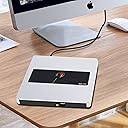
The NOLYTH External CD Drive is a sleek, aluminum-encased optical drive designed for Mac, Windows, and Linux users. Featuring USB-C and USB 3.0 compatibility, it delivers fast 8x DVD and 24x CD read/write speeds. Its plug-and-play functionality requires no extra drivers, making it the perfect portable companion for laptops without internal drives. Compact and durable, it supports a full range of media tasks including burning, ripping, and playback.


| ASIN | B0BX3R5KNZ |
| Best Sellers Rank | #234 in External CD & DVD Drives |
| Brand | NOLYTH |
| Color | R-Silver |
| Customer Reviews | 4.3 4.3 out of 5 stars (1,525) |
| Date First Available | February 28, 2023 |
| Hard Drive | External CD Drive |
| Hard Drive Interface | USB 3.0 |
| Hardware Platform | Laptop, Mac, PC |
| Item Dimensions LxWxH | 5.71 x 5.63 x 0.71 inches |
| Item Weight | 10.6 ounces |
| Item model number | 726133312499 |
| Manufacturer | Confoly Tech |
| Operating System | Linux, Windows, macOS |
| Product Dimensions | 5.71 x 5.63 x 0.71 inches |
E**.
With the correct Region setting, this player works perfectly!
Got it a month ago. Free return ending in a couple of weeks. I will take a chance that it will continue working well. In my Ubuntu computer, I have ripped 50 audiobook CDs. No issues playing the files back. For the past three weeks I was able to play some DVDs, but not others. After a lengthy troubleshooting with the help of Duck.ai, we figured it out. The player I got was factory-configured for Region 2. I am located in Region 1 and the (commercial) DVD was produced for Region 1. Once I changed the region setting to Region 1, this player played the DVD beautifully!
M**Y
Great Drive
This is a great CD Drive. Very quiet and easy to use. USB connection is perfect. Very easy to read and very fast.
J**T
Great Burner, does the job well.
Burning CDs of my original music is a piece of cake with the NOLYTH USB C SUPERDRIVE. Great value, good response from company to my question about the tray not opening all the way. I know i'm old school, but I needed a burner and this one came highly recommended from a friend. I've had it a couple of months, and just finished burning a bunch of CDs with no problems.
R**D
Works as advertised; easy to use.
I ordered this disc drive for my new Mac mini Mac OS Big Sur 11.1). The first one I received did not work. When I plugged it in the USB port, the drive indicated that it was getting power, but the Mac did not seem to recognize that the drive was plugged in, with or without a disc in the tray. As instructed by a note included with the drive, I contacted the seller directly in hopes of getting a fix for this problem. The very nice sales manager (Coco) sent me some useful information, including a video, that helped me conclude that the problem was with the drive. When I let her know this conclusion, she immediately agreed to send me a replacement, which arrived within the week. The new one worked just fine, as advertised. You just plug the drive in (either in one of the USB-C ports or a USB 2 port), insert a disc, and it starts right up. No extra software is required. It comes with a USB-C to USB 2 adaptor and a nice hard-case carrier. I've played music CDs and ripped some CDs. Those procedures worked fine. I have not tried to burn a disc. I've had the working drive for only a week, but so far I have been pleased with it--works just like I expected.
Z**R
Works fine, but setup instructions laughably bad for use with an Mac
For a Mac user: IGNORE COMPLETELY the little insert with the setup instructions. JUST: 1. Connect the drive to your Mac with the USB cable. 2. Push the eject button on the front of the drive to verify that the drive is powered via the computer But do not look in vain for the drive icon to appear on your desktop -- go immediately to Step 3 3. Insert a readable disk into the drive. And at once there now appears a DVD drive icon on your desktop, labeled with the digital name of the disk you inserted! Transferring AIFF music files (mostly what I need to do) starts out slowly for 30 seconds or so, then goes ripping along quickly. The files are transferred error-free, so far as I can tell The unit is compact ( 6.5 " by 7" by 1.5") and seems to be build sturdily. The setup instructions were written by someone a) for whom English is not a spoken language, and b) has never tried to install and run on a contemporary iMac . (Tells you to look for a 'My Computer' icon on the desktop. I'm running OS iBig Sur 11.3.1 and there ain't no such icon to be found. Anyway, it works fine, is very quiet, and worth the money.
T**I
Unable to Play on 2022 MacBook Air
This is a nicely made external drive and very well designed. I love that its not plastic and the way the USB and cable fit into the bottom of the drive so they're available without having to search. However I tried multiple things to get the one I received to work and my MacBook Air would not play a music CD and I tried multiple ones. It did open a movie DVD momentarily but when I tried to play movie it ejected it. I was using my installed Apple Quick Time Program and Music Program. Not sure if it was the particular drive but obviously not good quality control on a new item. Perhaps the Seller can weigh in on the possible problem. I returned because didn't want to have to go through another return if it's an issue with the MacBook Air or Sonoma OS.
J**S
High quality external driver a great price.
I ordered the Nolyth external drive to complement my new MacBook. Neither the MacBook nor my PC laptop came with an optical drive, and with hundreds of CDs and DVDs I needed a way to play them. The Nolyth was completely plug and play. There was virtually no setup involved. I just plugged in into my MacBook Pro and started using it. It is fast, quiet, and works perfectly. I contacted to the company to register for the 2-year warranty, and right away I received a personal response. Although there has been no need for technical support, the quick response is an indication that the company will support there product in the case that something goes wrong.
E**O
Me ha salido bueno. Muy recomendado.
A**N
Perfecto para el trabajo ...
S**3
Ich suchte ein CD/DVD Laufwerk für das neue MacBookPro M1. Das Apple eigene funktioniert nicht. Zwei weitere Laufwerke verweigerten das Digitalisieren von Audio CDs. Der Fehler liegt in der Stromversorgung. Also recherchierte ich im Internet und fand dieses hier. Bisher habe ich eine Vielzahl von Audio CDs digitalisiert. Ohne Probleme !! Von daher für mich eine klare Kaufempfehlung. Der Geräuschpegel ist super, das Design klasse, die Schublade wertig. Keine Kritikpunkte.
J**.
Opened the delivery box (fast postage) to find a really useful zip up carry case holding the drive looking very smart, a cool bonus. Lightweight with a sturdy construction, relies on the single in/out button operation or software eject - much nicer to use. Found by the iMac almost instantly, no install or software settings needed - tested with some real world usage of uploading CD's to Apple Music App Cloud and using the same App to burn a Playlist to a 3 CD sequence. All worked without a hitch, happy customer and the new Nolyth Drive has taken up a permanent place connected via the (neatly stowed underneath) Drive USB C plug as an outboard Read/write SuperDrive on my desktop.
S**I
It can’t read all cd s, having hard time with it. Not a good buy at all.
D**S
Works well. No complaints at all. The carry case is stiffened for protection and works well for storage of cables. I've used it for DVDs, CDs, and CD-ROMs with everything working right the first time.
Trustpilot
1 month ago
2 weeks ago