Buy anything from 5,000+ international stores. One checkout price. No surprise fees. Join 2M+ shoppers on Desertcart.
Desertcart purchases this item on your behalf and handles shipping, customs, and support to Thailand.
🚀 Unlock lightning-fast storage and never miss a beat!
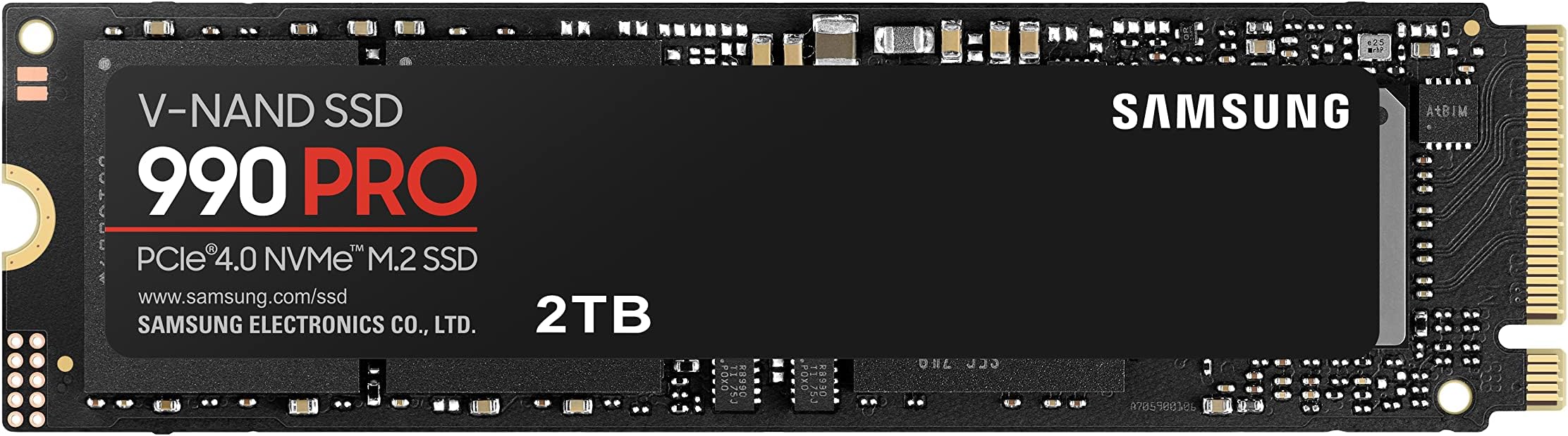
The Samsung 990 PRO NVMe M.2 SSD is a cutting-edge PCIe 4.0 internal drive offering ultra-fast read/write speeds up to 7,450/6,900 MB/s, 2TB of high-capacity storage, and advanced thermal management. Perfectly engineered for gamers, video editors, and professionals seeking top-tier performance in a compact M.2 form factor, it includes Samsung Magician software for seamless optimization and reliability.
| ASIN | B0B9C4DKKG |
| Additional Features | Portable |
| Best Sellers Rank | #189 in Internal Solid State Drives |
| Brand | Samsung |
| Built-In Media | Samsung Magician software, integrated heatsink |
| Cache Memory Installed Size | 94 |
| Color | Black |
| Compatible Devices | Gaming Console, Laptop, PC, Playstation5 |
| Connectivity Technology | NVMe |
| Customer Package Type | FFP |
| Customer Reviews | 4.8 4.8 out of 5 stars (14,631) |
| Data Transfer Rate | 7450 Megabits Per Second |
| Digital Storage Capacity | 2 TB |
| Enclosure Material | Aluminium, Stahl |
| Form Factor | M.2 |
| Global Trade Identification Number | 08806094215038 |
| Hard Disk Description | Nvme |
| Hard Disk Form Factor | 2.2 Centimeters |
| Hard Disk Interface | PCIE x 4 |
| Hard-Drive Size | 2 TB |
| Hardware Connectivity | PCI Express 4.0 |
| Installation Type | Internal Hard Drive |
| Item Dimensions L x W x Thickness | 3.15"L x 0.87"W x 0.09"Th |
| Item Type Name | SSD |
| Item Weight | 9 Grams |
| Manufacturer | Samsung |
| Media Speed | 6900 |
| Model Name | 990 PRO |
| Model Number | MZ-V9P2T0BW |
| Number of Items | 1 |
| Read Speed | 7450 Megabytes Per Second |
| Specific Uses For Product | Gaming, High-performance computing |
| Unit Count | 1.0 Count |
B**K
Fast, reliable SSD.
Samsung 990 PPO SSDs are top quality. Fast, reliable, easy to install and operate at lower temp even when running maxed out. Highly recommend
A**E
Fast, Reliable, Samsung, i'm buying more
one of the best values in fast nvme drives. almost 3 times faster than the old one it replaced. I've got 6 of them and never had one fail.
S**H
Were the best, now the competition is close enough to matter
I have purchased Samsung Pro NVMEs for years starting with 960's and always paid the premium because of their warranty and I never had one fail. Now the landscape is changing and there are competitors that offer close to the same performance and similar warranties at lower costs. With that said, these are great drives, reliable but not good value for the money.
K**R
Flawless
Great speed and quality for the price. I have never had a failure with Samsung SSDs.
J**D
Fast and easy
Huge upgrade from my old SSD. Fast speeds, no issues. Easy to install.
R**N
Great ram
I upgraded my desktop with a new mainboard, i9 cpu, samsung m2 2280, and this ram to meet Windows 11 requirements. My old i7 ran great on windows 10, but with end of live in October 2025 I made the switch. I need it to run Windows programs and Linux wasn’t an option for me. The upgraded system runs lightning fast.
D**E
Nice and fast
Nice and fast drive. Was an upgrade to the 0.5TB that came with my new laptop.
R**D
Great speed, great value
Awesome!
Ö**R
Mükemmel bir SSD ama fiyatı aşırı yükselmiş alalı bir ay oldu bir ayda 20 bin TL yükselmiş
C**R
Okay, dependiendo donde la compres es lo que se va a tardar, soy de México y tardo en llegar 15 dias, vino desde Europa. Recomendaciones: - Hay videos en internet de como instalarla, pero la forma mas fácil de poderla instalar es comprar una carcasa para poder meter la ssd y clonar tus datos, en mi caso 400 Gb se tardo en 15 min hacer la clonación, forzosamente necesitas una carcasa para hacer la clonación, si no deseas clonar los datos y no cuentas con una carcasa necesitarías descargar el sistema operativo deseado y guardarlo en una memoria USB para desarmar tu equipo, meter la memoria, entrar en la bios y meter el sistema operativo que ocupes en la memoria para usar con normalidad tu equipo, pero eso no es todo. - Una vez instalada la memoria en tu equipo necesitas actualizar la bios para utilizar la memoria con eficiencia, también hay videos en YouTube para hacerlo, de lo contrario tu equipo puede aumentar de unos 3 a 4 grados centígrados, activar los ventiladores o poca eficiencia en juegos o programas, no actualizar la bios te da menos Mb de escritura y de lectura, de 300 a 500 aproximadamente. Espero le sirva a los demás usuarios que no saben o están adentrándose a esto. por ultimo a la memoria le doy 4.5 de 5 por hacer muchísimas cosas para poderle sacar el máximo rendimiento.
Z**H
Recently SSD price increased much as crazy, but this one increased slightly less than other products. That's the reason I purchase it. Unfortunately, its Write speed at 6650MBps and Read speed about 6800MBps on my PC which are lower than expected.
J**E
works great!
H**N
I originally used SSDs as my system drives, specifically the 870 EVO, which I found reliable. When I built a new computer with four PCIe 4.0 slots, I decided to upgrade to a 1TB 980 PRO as my system drive. The experience has been exceptionally stable and smooth. At the beginning of 2024, I came across a sale and purchased a 4TB 990 PRO for data storage. Its transfer speed has proven to be very stable and fast. When it went on sale again recently, I didn’t hesitate to buy another 4TB 990 PRO. This time, I plan to use it as an external hard drive. Since I often travel for photography, having a portable and convenient external drive is essential. Using SSDs like the 870 EVO is fine, but their bulk makes them less ideal for portability. An M.2 SSD is a perfect fit, and modern M.2 external enclosures with Type-C connectors ensure excellent transfer speeds. This setup is not only practical but also greatly enhances data security. If there’s another sale, I plan to buy more!
Trustpilot
1 month ago
3 weeks ago