Buy anything from 5,000+ international stores. One checkout price. No surprise fees. Join 2M+ shoppers on Desertcart.
Desertcart purchases this item on your behalf and handles shipping, customs, and support to Thailand.
🎨 Unlock your inner artist—wireless, precise, and ready to create!
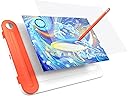
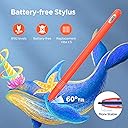
The UGEE Q8W is a sleek 8.5-inch Bluetooth 5.0 drawing tablet featuring 8192 levels of pressure sensitivity and a battery-free stylus with a uniquely designed pen tip. Compatible across Windows, Mac OS, Chrome OS, and Android devices, it offers a large active area and beginner-friendly tracing paper, making it perfect for professionals and aspiring creatives seeking versatile, wireless digital artistry on the go.


| ASIN | B0C4YN7JS8 |
| Active Surface Area | ≥ 20,32 cm (ancho) x 12,7 cm (alto) |
| Best Sellers Rank | 14,481 in Computers & Accessories ( See Top 100 in Computers & Accessories ) 42 in Graphic Tablets |
| Box Contents | Battery-free Stylus, Integrated Pen Holder, Pen Nib, Transparent Tracing Paper, Type-C Cable |
| Brand | Ugee |
| Brand Name | Ugee |
| Colour | Orange |
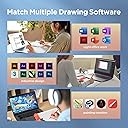
| Compatible Devices | Wire connected:Windows 7 or later 、Mac OS X 10.10 or later、ChromeOS 88 or later/ Bluetooth connected:Windows 10 or later、Mac OS X 10.10 or later、ChromeOS 88 or later |
| Connectivity technology | Bluetooth (Wireless) |
| Country of Origin | China |
| Customer Reviews | 4.0 out of 5 stars 2,302 Reviews |
| Display Type | LCD/LED |
| Item Dimensions L x W | 28L x 20W centimetres |
| Item Weight | 341 Grams |
| Manufacturer | Ugee |
| Manufacturer Part Number | digital drawing pad |
| Model Name | Q8W |
| Model Number | Q8W |
| Model name | Q8W |
| Native Resolution | 1920x1200 or 1600x1200 |
| Network Connectivity Technology | Bluetooth (Wireless) |
| Operating System | Windows 7 e versioni successive, Mac OS 10.10 e versioni successive, Chrome OS 88 e versioni successive, Android 6.0 o versioni successive |
| Operating system | Windows 7 e versioni successive, Mac OS 10.10 e versioni successive, Chrome OS 88 e versioni successive, Android 6.0 o versioni successive Operating system Windows 7 e versioni successive, Mac OS 10.10 e versioni successive, Chrome OS 88 e versioni successive, Android 6.0 o versioni successive See more |
| Pressure Sensitivity | 8192 Levels |
| Pressure sensitivity | 8192 Levels |
| Product Features | Battery-free stylus with 8192 levels of pressure sensitivity and 60° tilt function, Bluetooth 5.0, Unique mushroom-shaped pen nip |
| Product Warranty | 2 |
| Screen Size | 8.45 Inches |
| Special feature | Battery-free stylus with 8192 levels of pressure sensitivity and 60° tilt function, Bluetooth 5.0, Unique mushroom-shaped pen nip Special feature Battery-free stylus with 8192 levels of pressure sensitivity and 60° tilt function, Bluetooth 5.0, Unique mushroom-shaped pen nip See more |
| Specific Uses For Product | Drawing |
| Target Audience | Student, Teacher |
| UPC | 850013593699 |
| Unit Count | 1.0 count |
G**L
Pretty colour, good tablet
Very good tablet, packaged nicely and looks very sleek. Fantastic price, the buttons are nice and easy to use. I like that it can connect to your phone. Surprisingly large considering the price, but still small enough to use in cramped spaces
S**E
Ugee 15.6 Graphics Tablet - Brilliant
I was amazed at how big a tablet you get for your money and how great the pen that comes with it. I can use it at my desk but also sat on the sofa (with the laptop beside me and tablet on my knee) It does need to attach to a computer and it attaches fine to my desktop. I use my old Windows 7 laptop with a VGA to HDMI converter as it doesn't have an HDMI port. (The USB C to C converter didn't work for me) Benefits of a big screen means I can clearly see all the tiny tool icons and it feels like I have a touch screen monitor on my knee. So pretty much doing all my computer work on it. To my joy I discovered Krita a completely free graphics package online (similar to photoshop but much easier to use. Great for drawing, painting and animation with plenty of free online tutorials to help you use it) So if you are just starting to use tablets or don't yet have a graphics package I definitely recommend Krita to use with this Ugee tablet as a match made in heaven. Having used this Tablet and software for less than a week I can only say that it is addictive. Its wonderful to draw directly onto the computer and so easily. I love the pen. It reacts well to the different pressure on the screen and the end works as a digital rubber/eraser. Now I've started using this size screen I'm totally spoilt and could never go back to a smaller screen. What a bargain compared with other brands.
N**M
Functional, cheap, not free of smaller problems.
Although I have only acquired this Graphics Tablet a good two weeks ago, I have made extensive use of it while preparing an image for a drawing competition, making me confident in giving it a preliminary review. To make matters short: This graphics tablet - as of yet - appears an ideal and cheap entry point for traditional drawers like me into digital art, that are searching for a graphics tablet (one with a screen). If you just want to draw digitally maybe a screenless table might be a much cheaper entry though. The long version. I have been drawing traditionally - with a pencil - for a great part of my short life now and - while employing GIMP for the colouring - have never drawn digitally. For the use of this Tablet, I haver switched to Krita, another free and open-source software better suited to the process of drawing. These are my Observations: Responsive: For my part I value seeing what and where I draw and lines appearing at the time I move my pen. This tablet does not perfectly replicate that feeling of traditional drawing but it sure comes close. Lines appear after a noticeable - yet non-distracting or disturbing - delay. The force needed to trigger the pen to actually cause the appearance of a line is surprisingly heavy, which is perfect for me and dispels my initial fear of damaging the screen. It might however be an issue for those used to very light drawing. Screen: First of all, the screen brightness is sufficient but not overwhelming. Further have I heard it might be susceptible to scratches over time with normal use. Another aspect of note should be its size that is smaller (in length) than the standard A4 paper. I have not had an issue with any of these - quit to the contrary do I love the ability to zoom in and out at my convenience at add useless detail - yet should these weaknesses not be discounted. The Screen does thankfully not react to the touch of anything but the provided pen (replacement tips are provided.) Technology: The biggest umph is the quality and functionality of the driver. While the buttons on the tablet can be freely bound to certain actions and keys, the pen buttons can only in theory, with some actions not working for whatever reason. This was only tested in Krita though and binding those actions that do to the pen and those that don’t to the tablet worked well enough, so take this both with a grain of salt and as non-impeding to the enjoyment of the tablet if you are one without prior digital drawing experience like me. What you should contrarily take seriously is that I have yet to find a way of using this tablet as anything but a mirror to the Computer screen (Meaning, I am unable to use this as a second screen with them displaying speperate images like reference and the drawing programm, without the tablet turing unresponsive.). Much worse, rarely the screen displays nothing, turns unresponsive or similarly unusable. This does not appear at random but as result to the Computer booting or waking from sleep. Simply reconnecting the usb-conector fixes this, but it remains an issue one might not expect to have on Windows 11 24H2 built. I blame the driver, but that’s really just a wild guess. Overall: You get what you are paying for. An alright but small display, that won’t last you forever, technical difficulties to a limited degree and other small inconveniences. In exchange you get a functional introduction into digital art for barely a hundred bucks, that enables the use of many convenient features of digital drawing without causing bankruptcy. I recommend it for those tight on money who are non-committal and inexperienced with digital art, yet thirsting for a drawing tablet with a screen.
P**W
WONDERFUL
Amazing quality for something this cheap, an amazing choice for young artists trying to better their art style and their craft
G**E
Awful
The installation on a perfectly working Windows 11 laptop was a nightmare. I had to fiddle with Bluetooth settings to convince this device even to show up in order to pair the laptop with it. Having finally installed it, the behaviour was erratic. The tablet kept disconnecting and behaving unpredictably, while the manufacturer's instructions and website said nothing about what to do if something didn't correspond to the instructions supplied in the box. Either I received a faulty device or Ugee isn't a reputable company. Either way, I will think more than twice before I buy anything marked with that name again. As for the functionality/design of the tablet -- for those lucky enough to get it working, that is -- it's nice for people learning to draw because the tablet helps them trace drawings into the computer. But that's pretty much where the positives end. The thing is, whether you do digital drawing or just want to take course notes on a tablet like this, you need SOME buttons. I am not talking about overkill, with buttons everywhere, but things like changing brushes, zooming, etc. become really tedious if one has no buttons at all. And this tablet has NO buttons -- not on the tablet's body, not on the stylus. This makes me think that it's probably just a toy designed for children. It lacks the basic foresight any reasonable manufacturer of digital tablets would have designed into their product. Pity, though. The idea of Bluetooth connection, the compartment for the stylus and the convenient setup for tracing drawings could have been lovely features if the rest of the design wasn't so poorly thought out and limiting.
P**L
Fairly good for the price
the buttons on the pen and tablet are very nice, along with the customizability of all of them. However using the pen with the tablet does feel a little sluggish. The screen on the tablet has ALOT of ghosting with moving images and while moving the pen along the surface, the cursor does seem to lag behind making it feel not the best to use. The viewing angle are also not the best if using the tablet flat so i would suggest getting a stand. Considering other drawing tablets prices the ue12 is really good value but i would probably go with something else.
C**D
Easy to use, value for money
I have two Chromebooks a Lenovo S330 and Lenovo Ideapad, the former has an HDMI port so the 3 in 1 cable works fine with it, the Ideapad does not have an HDMI port so you need to order the usb C to usb C cable to connect to your usb C socket, the Ideapad has another charging port on the opposite side so don't worry about you computer running down as it provides the power for the U1200 or U1600 tablet, but don't think you can use any cable, you need to buy the Ugee one, Amazon offer you the option to do this when you purchase your U1200 or U1600 graphics monitor. The 3 in 1 cable comes with your monitor. However, with Chromebooks it is a plug & play system so no drivers are required, the drawback you haven't the driver to set up the stylus, but most art software has options to set the pressure for you stylus, note on Ibispaint you need to set the stylus to the sonar pen. After all this technical stuff, the U1200 works fine on both my Chromebooks and I don't find the U1200 too small like some Youtube reviewers say (they're mainly professioners). It is a great drawing experience and many others have pointed out their young children can use it as I do at 74. Never too old to go digital, and have fun.
S**E
Works well. Loved by a teenage artist
Very frequently used by my teenager. Worked ok with various laptops including Chromebook.
M**E
Bra kvalitet, väl förpackat
Fungerar bra, men hade gärna önskat att mjukvaran var litet smidigare. Det kanske har löst sig med uppdateringar. Kvaliteten känns också ok och förpackningen är exemplarisk. (Har tyvärr ingen annan platta att jämföra med och använder den ganska sällan än så länge )
C**R
Producto redondo 👌
Fué un regalo para mi hijo. Está encantado con la tableta. Tenía otra pequeña y sin pantalla y el cambio es espectacular. Según indica el tamaño es muy bueno para dibujar y la pantalla funciona a las mil maravillas. No tiene desplazamiento de la punta respecto a la pantalla, lo que es señal de buena tablet. En cuanto al funcionamiento es muy bueno y los colores se ven muy realistas en cuanto a la pantalla del pc. Al ser con pantalla se dibuja mas fácilmente que sin ella y la adaptación es muy rápida. Por ponele una pega en las instrucciones no explica muy claro como conectar como segunda pantalla en el Windows y si no tienes idea de informática puedes tardar un poco pero no es complicado. La recomienda al 💯 es muy buena tableta a un precio accesible para el tamaño que tiene y ser con pantalla
R**M
Works great!
Works great, no issues to report
U**E
Pentablet für Linux und Raspberry
Der Bildschirm ist nahezu die ideale Ergänzung für einen mobilen Zweitbildschirm. Mit knapp 800 Gramm ist er nicht ganz leicht, liegt aber bequem in der Hand oder auf dem Tisch. Der Monitor von knapp 12 Zoll löst mit 1920 x 1080 Pixel besser auf als viele Notebook Displays. Die Schrift ist noch gut zu erkennen, anderenfalls gibt es das Display auch in einer 16 Zoll Ausführung. Das Gerät verfügt über zwei USB-C Buchsen. Ein Adapterkabel separiert HDMI für Video, USB-A für die Stromversorgung und nochmals USB-A für die Maus. Das Pentablet ist das ideale Display für einen Raspberry. Dank seiner standardisierten Schnittstellen ist es gleichzeitig Display und Maus, ohne irgend welche Einstellungen vornehmen zu müssen. Wegen des Strombedarfs von 1 Ampere wird der Raspberry Pi recht warm, ein separates USB-Netzteil ist sicherlich die bessere Lösung. Als Zweitbildschirm erweitert das Pentablet ein Notebook um Freihand-Zeichenfunktionen. Während die Bildschirmfunktion einwandfrei funktioniert, ist die Stift-Standardeinstellung wenig hilfreich. Sie geht davon aus, dass der Stift beide Bildschirme erfassen soll, Stiftposition und erfasste Position passen nicht mehr zusammen. Die Herstellerwebseite ugee.com bietet Windows- (nicht getestet) und Linuxtreiber als .deb-Datei an. Unter Ubuntu 20 läuft das Programm fehlerfrei. Etwas versteckt unter work_area/screen findet sich die Auswahl "Monitor2". Danach schreibt der Stift auf die Oberfläche des Pentablets wie auf einem Blatt Papier. Leider fehlt (unter Linux?) die Möglichkeit, den Blickwinkelversatz zwischen Stiftposition und erfasster Position auszugleichen.
P**E
Works great on Linux
This is a great product. I'm not much of an artist but it works well as a digital whiteboard on teleconfrences. Works well with Ubuntu 22.04.
Trustpilot
2 weeks ago
1 month ago