Buy anything from 5,000+ international stores. One checkout price. No surprise fees. Join 2M+ shoppers on Desertcart.
Desertcart purchases this item on your behalf and handles shipping, customs, and support to Thailand.
❄️ Cool Like a Pro, Show Off Like a Boss
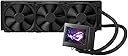
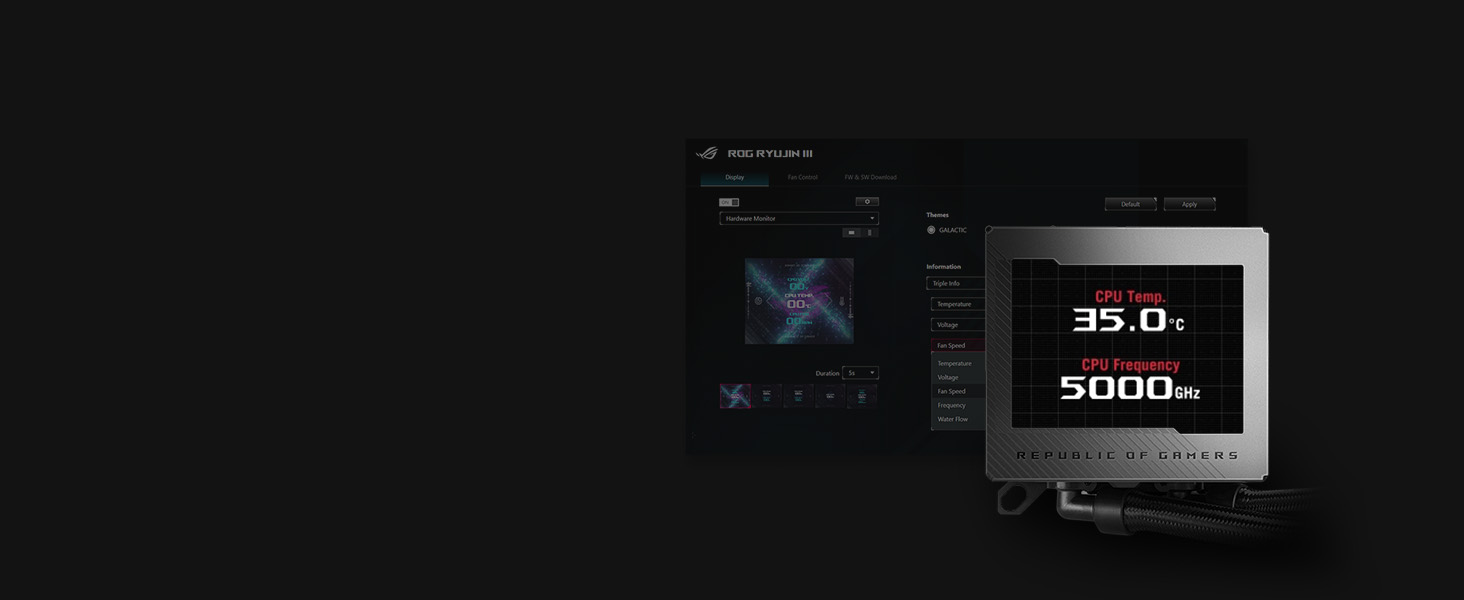
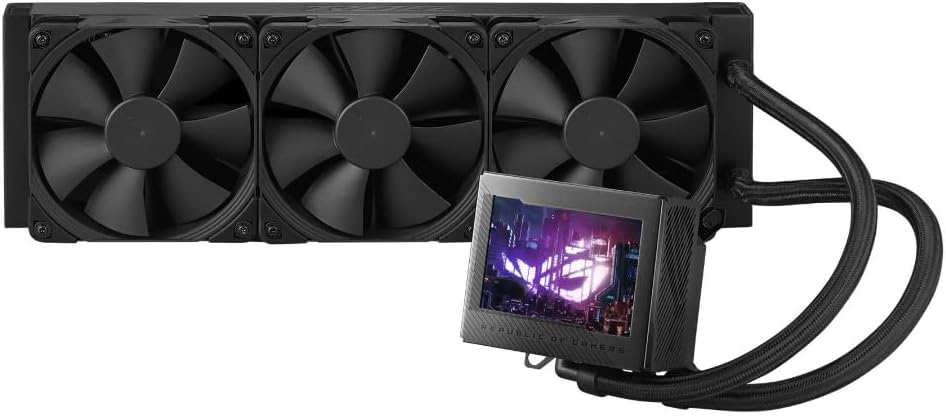
The ASUS ROG Ryujin III 360 is a premium all-in-one liquid CPU cooler featuring a 360mm radiator, 3x industrial-grade Noctua iPPC 120mm fans, and the latest 8th Gen Asetek pump for exceptional cooling performance. Its standout 3.5” customizable LCD display offers real-time system monitoring and personalized animations, while the embedded VRM fan and Armoury Crate software provide advanced thermal management and full user control. Ideal for high-performance gaming rigs and professional builds seeking silent, efficient cooling with sleek aesthetics.


| ASIN | B0C8BVRYB5 |
| Best Sellers Rank | #25 in Water Cooling Systems |
| Brand | ASUS |
| Brand Name | ASUS |
| Compatible Devices | Desktop |
| Cooling Method | Fan, Water |
| Customer Reviews | 4.4 out of 5 stars 183 Reviews |
| Item Weight | 3.9 Pounds |
| Manufacturer | ASUS |
| Material Type | Acrylonitrile Butadiene Styrene, Aluminum, Plastic |
| Maximum Rotational Speed | 2000 RPM |
| Model | ROG RYUJIN III 360 |
| Noise Level | 36.45 Decibels |
| Number of Items | 1 |
| Part Number | ROG RYUJIN III 360 |
| Power Connector Type | 4-Pin |
| UPC | 197105050525 |
| Unit Count | 1.0 Count |
| Warranty Description | 6 Year Warranty |
| Wattage | 7.5 watts |
H**R
Expensive
This cooler is expensive but it is high quality and beautiful . I love everything about it and it is so easy to install and connect everything . I tried quite a few coolers before this one and to be honest i like this one the most . Im going to keep it until it breaks or i build a new rig in few or what ever years . The reason i switched to this cooler is that i have everything else in my pc from ROG and want it to match it but it turned out i have the best temps with this cooler . 32C on idle and 45C when gaming . Also love that i cat monitor the temps of the cpu and gpu while using pc . I switched to this cooler from DeepCool Mistique 360mm and the temps are 5 to 10 Celsius lower with ASUS ROG Ryujin 360mm . Also the software is much easier to deal with than with any other cooler . The best thing about having the complete Asus ROG parts is that i dont need to connect any rgb wires and all works for some reason , not sure why ? I would guess it goes through the mobo . I mean the cooler is almost the twice the price than most others but im ok with it because is worth it . It is hard to decide what cooler to buy by looking the reviews because its not the same for everyone . In my case i would say it is perfect because i have all Asus ROG parts and there is no software conflict of any kind so it works perfect in my build . Btw , I have my 14700K oc to 5.6Ghz and the temps are just awesome . Also , ASUS - ROG MAXIMUS Z790 HERO (Socket LGA 1700) USB 3.2 Intel Motherboard ASUS - ROG Strix NVIDIA GeForce RTX 4080 SUPER Overclock 16GB ROG Thor 1200W Platinum II 1200 Watt Fully Modular Power Supply 80+ Platinum If the money is not the issue get it , if it is than you wont even look at it i guess .
S**R
Powerful Cooling with a Premium Look!
The ASUS ROG Ryujin III 360 is hands down one of the best AIO coolers I’ve used! The Noctua Industrial PPC fans deliver excellent airflow while staying surprisingly quiet, and the cooling performance is top-tier, keeping my high-end CPU at low temps even under heavy loads. The 3.5-inch OLED display is a standout feature—it looks incredible and lets me display system stats or custom animations. The added VRM cooling fan is a nice touch, keeping motherboard components cooler. Setup was straightforward, and the build quality is top-notch. My only minor gripe is that Armoury Crate software can be a bit buggy, but once set up, everything works great. If you want elite cooling with premium aesthetics, this is the AIO to get! Highly recommended for high-performance bu
J**O
Best cpu cooler
Don’t get me wrong it’s a little pricey but totally worth the money. It keeps my intel i9 14th gen cool even well under a lot of stress so great performance it just barely fit in my NZXT H6 flow case but a little wiggle and it was good. The noise isn’t to bad but for the fans and the pump being on full speed it’s not to bad. The screen is a great plus I have all my temps and volts along with the speed of my fans. The noctua fan speed is perfect to exhaust all heat out of the case.
R**3
Amazing cooler worth the money
I've owned 4 different aio coolers, 3 different ones in this pc case. I've used the 360mm corsair aio with the lcd screen, the evg 360mm with the lcd screen and now this Asus rog ryujin. This thing is a beast. It's keeping my 14900k between 45c to 55c while gaming. I set my own custom fan curve. The speed stay in the 60% range while gaming. The display is huge and looks amazing. The hoses are plenty long. I have one of the biggest cases you can buy. Cooler Master Haf 700 Evo and I have no issue mounting the radiator in the front side fan location. I bought the one with the noctua fans. At full speed they can be a little loud. I run mine sind 60%, I can't hear them and they still move a ton of air. I hope this review helps you make your decision.
B**N
Missing a manual and screws for 120mm fans
First CPU cooler: I'm not so irritated about the missing manual, because anyone buying this has likely already built several computers. Still, the fact that the 120mm fans came without hardware was a little irritating. The second-most irritating part is that you can see in the pictures this has clearly been used. Components such as this usually offer a choice: buy this brand-new at full price or pay less for an item with some cosmetic damage. I paid for the former, got more than the latter and for the price of this thing, I expected better. The third, and worst thing of all, is that this "CPU cooler" had a micro-USB cord on it! The same cord that typically charges small devices like cellphones and headphones was attached to the cooler's display instead of a 4-pin! Confused, I looked up the manual online but it showed a 4-pin connector. I contacted ASUS and talked to the heavily-accented tech support. THEY were confused. After verifying the 9-pin USB connector was connected, we went back and forth several times to establish that no, I did NOT have a 4-pin but had a micro-USB instead. Once this difficult concept was established, they offered me top-notch support... by telling me they would create a ticket to escalate it and that I'd be contacted in 24-48 hours. #sarcasm So, as this was part of the Amazon Prime computer build, which I have yet to be able to put together and use, I contacted Amazon and will just be replacing it through them. For reference, I attached an additional picture showing the replacement (top) next the original (bottom.) Note the 4-pin connector vs the micro-USB. Also, note the chewed up 9-pin USB connector. In addition to that, further evidence (if any was needed) was shown that the original cooler was pre-used. The new radiator had ROG plastic that contoured the shape on both sides whereas the original did not. Finally, as you can see on the CPU mount was shiny and clean when it arrived. The new one had a square of generic thermal compound on it. Second CPU cooler: I had it replaced with an identical model and, this time, I did get a 4-pin connector instead of some ridiculous cable. However, I'm finding it's not doing a very good job of keeping my new system cool. First, I tried to use TPM7950 on my 13900k CPU. I had temperatures spike up to 100C. I looked it up, people sang nothing but praises for the TPM7950, and recommendations were to redo the mounting pressure by loosening and tightening the screws. Temps dropped about 15°C, but when I went to do something as simple as install a game, the temperatures shot up to unfeasible levels again. It was enough to make the display spazz out and continually display "Warning 95°!" even while the computer was off. I had to toggle the power switch on the PSU to get it to stop that. I took off the TPM, applied MX-4 silver compound (I ran out so I used some spare compound), and retried it. Temperatures were a lot better, resting in the low 40s, but when I tried to run that game I mentioned, temperatures again shot up to 100°C. Tomorrow, a much larger syringe of Arctic Silver MX-4 will arrive, and I'll redo the application on the CPU, but this cooler is NOT doing me any favors. I even removed the Noctua fans and added on Silent Wing Pro 4 120mm fans, because they move a lot more air, and yet this cooler is STRUGGLING to keep this CPU from burning itself to a crisp doing the simplest of things. So, that makes me wonder: if I redo the thermal application with high-quality compound, and it STILL wants to melt down like a nuclear power plant, when do I do then? Do I send a SECOND CPU cooler back to Amazon? Do I bark at Asus support to correct the problem? They seemed clueless the last time I talked to them about the first one, so I'm skeptical about how well they'll do with the second. I have what is supposed to be a top-of-the-line system with components that cost thousands of dollars, and it amounts to a very heavy paperweight as I try to figure out how to keep it cool. So far, from Asus and in this one computer build, I've come across these two CPU coolers (one having the wrong cord and the other under suspicion of cooling poorly) and a motherboard that would pop errors when any memory was used in the first two channels. Asus used to be a good brand to me. Now, I'm wondering how many circles they're making as they keep cutting corners. So far, they're 0/3 in this build. Not impressed Asus. Not impressed at all.
D**T
It’s a little pricey for what you get
I have a 240 ARGB Ryujin 2 and a 360 Ryujin 3. The 360 is quieter and has awesome Noctua fans. The problem is that both work about the same. Don’t get me wrong, they both do a great job but one is at least $150 cheaper than the other. There really isn’t a marked improvement in stepping up to the 360 unless you’re trying to tackle something like a 7950x or a 14900k. If you are on a 7600x or a 14700k and below, get the 240. The cpu heatsink fan helps a lot with temps but gets loud quickly. I currently use the 360 and have it tuned to where my 5800x3D stays at around 30c at idle. Around 70c in gaming. With the 240 I got around 32c idle with gaming temps at around 75c. Neither reach 80c. They’re good coolers but the asking price is most likely for the screen. They’ve done a good job on the screen placement and abilities. But with products by Lian Li and others being at least a hundred bucks cheaper and with nearly the same specs, I probably won’t make the same mistake again
D**S
Best AIO
These AIO's are expensive, but they are currently the best ones on the market with the top fans for air flow and pressure. I wish asus would sell their rgb AIO fans from the ryugin III extreme line separately because of there quality as well as being in the top 5 for static pressure and airflow even better than noctua fans. Also, with how hot components on the newer motherboards get, the vrm fan helps to disperse heat around the cpu where there is little airflow.
A**Y
Keeps AMD Ryzen 9 9950X3D Cool
This cooler does good work. It keeps my 9950X3D well below thermal throttling, even with moderate overclocking/PBO/Curve Optimization. Almost never even gets to 80°. It’s also kinda neat how the VRM fan (which is loud, just like the 8th gen pump) blasts air across the motherboard under load. The LCD screen helps me keep my theme going.
E**S
Bueno pero con una mala primera impresión
El enfriador es muy bonito y cumple excelente su función pero tuve un problema, la bomba del enfriador hacia mucho ruido sin importar a que velocidad la pusiese, lo bueno es que Amazon pudo resolver mi problema enviándome otra unidad, la nueva ya trabajaba bien pero le faltaba el cable de 1 a 3 conectores de ventiladores, hablé con Amazon y de nuevo pudieron resolver mi problema. La pantalla del AIO y los materiales de construcción en si son muy buenos y la instalación muy sencilla. Los ventiladores son Noctua Industrial así que son perfectos de fabrica. Si no te importa gastar de más en un AIO para tener uno que se vea bien y rinda excelente recomiendo este Asus ROG Ryujin III a pesar del problema que tuve pero que Amazon me pudo resolver.
K**E
Expensive but it works really well.
I was unsure about this product as reviews said the vrm fan is loud. I even tried cancelling the order but was too late. On reflection the next day I thought I would at least see what it looked like before returning it. Big mistake, its kin top notch, well made, its now fitted, and running 5-10 degrees cooler than my Lian Li 360 performance was. BUT still loud vrm fan, and as I have NOT installed armoury crate, the fix is to download Fan Control, (the one Jayz2c did a video on), its free to use and you can set your fan speeds with that. Sorted. I get great cooling on a 7950x3d, lower idle temps and my PC has stopped increasing fan speeds every time I open something in windows. Plus at the moment you can pay over 5 months interest free, so that makes the price a bit easier to justify.
R**D
Great product, Keeps CPU temps cool
Great product, keeps temps very cool. EZ To use, but becareful what PC brands you choose if your making a custom PC, some companies to don't work as well due to conflicts in software, for example Gigabyte and ASUS
N**K
WOW! Worth every $
Arrived NEW! All hardware required intact . Easy to install. Software is smooth and useful. I just upgraded to the 7800x3D and was using my old AIO for a day, and it was clocking at 65 Degrees C idle. This freaked me out and I started looking into an alternative. This is the best decision I have made and this thing is keeping my cpu at 35 degrees idle and max 55 degrees with moderate load. I haven't tried any intensive gaming or other applications but am confident it will hold well. Worth every penny!
H**M
El mejor enfriamiento liquido
Lo mejor en cuestión de enfriamiento liquido se refiere. Tenía la primera edición del ryujin. Y definitivamente ya era necesario esta actualización. Un pantalla altamente estética y configurable.
Trustpilot
1 month ago
2 weeks ago