Buy anything from 5,000+ international stores. One checkout price. No surprise fees. Join 2M+ shoppers on Desertcart.
Desertcart purchases this item on your behalf and handles shipping, customs, and support to Thailand.
๐ฌ Elevate your AV gameโswitch, extract, and immerse like a pro!
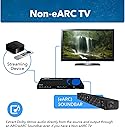
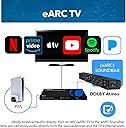
The OREI eARC 4K 60Hz Dolby Atmos Audio Extractor Switch (HDA-934) is a professional-grade HDMI switcher with 3 inputs, supporting 4K HDR and Dolby Vision video formats. It extracts high-quality Dolby Atmos audio via eARC to compatible soundbars, features HDMI 2.0 and HDCP 2.2 compliance, and includes CEC pass-through for simplified control. Designed for global use with a dual voltage power supply, itโs ideal for millennial professionals seeking a sleek, reliable AV hub that enhances both video and audio performance.


| ASIN | B0C9SSVV23 |
| Best Sellers Rank | #195 in Audio & Video Selector Boxes |
| Brand | OREI |
| Built-In Media | Extractor |
| Cable Type | HDMI |
| Color | Black |
| Compatible Devices | Television |
| Connector Type | HDMI |
| Connector Type Used on Cable | HDMI |
| Customer Reviews | 3.7 out of 5 stars 95 Reviews |
| Global Trade Identification Number | 00850031132528 |
| Item Dimensions D x W x H | 3.41"D x 6.89"W x 1.04"H |
| Item Weight | 13.3 Ounces |
| Manufacturer | OREI |
| Manufacturer Contact Information | [email protected] |
| Mfr Part Number | HDA-935 |
| Model Number | HDA-935 |
| Number of Ports | 3 |
| Packer Contact Information | [email protected] , 99250 12671 |
| UPC | 850031132528 |
| Warranty Description | 1 Year Warranty |
J**Y
Huge Upgrade over UHDS-401A w/ hidden eARC emulation for Sonos Beam/etc.
For context: I previously tried to use the UHDS-401A as a switch and eARC emulator/extractor and it _almost_ worked. I am using a Sonos Beam with this and my display is a generic HP monitor with no advertised audio features. So, not only does my display NOT have eARC it doesn't even accept audio signals as is reflected in its EDID. When I setup the UHDS-401A, it was able to emulate the ARC/eARC signal back to my sonos beam from one of my inputs by enabling EDID emulation to force 2.0/5.1 mode. This made my HP monitor "look" like it could accept audio from the perspective of my input devices, but what it really did was put an audio signal on the wire that the eARC emulation could pick up and redirect back to my sonos beam on input 1. The problem with the UHDS-401A, was the audio was cutting out every few seconds and made the solution unusable. I heard better things about this HDA-934 (the product this review is for) and ordered it as a replacement. The Result: Finally! The HDA-934 is appropriately emulating eARC and sending audio back out input 1 as long as I have the EDID mode set to 2.0 or 5.1 and enable eARC on the switch. My HP monitor is none the wiser and my Sonos Beam is playing audio without any interruptions!
J**N
โAinโt nobody got time for that!โ
Failed to work with Sonos Arc and Putrims K12 projector. Followed instructions by using Xbox, but no sound. Called customer service, who walked through my setup with me and then said they need to send it to technical support and I would receive an email within 24hrs I did receive an email asking to share how I had it set up and was asked to turn eARC switch on and off and see if that works. I did that and responded that it didnโt work. โCricketsโ from them even though I sent 2 more follow up emails asking them to please respond. 1 week later I received a response apologizing for the delay and it was do to them โlooking at it internallyโ they also asked for me to send copy of invoice. By then I had already returned item for a refund. Poor customer service. Ainโt nobody got time for that!
A**R
Works great for Projector + Sonos
I was trying to find an alternative for the HDFury Arcana, specifically because my setup was also going to also require an HDMI switcher. I wasn't sure if this was going to do the trick, because none of the reviews called it out very clearly and the instruction guide wasn't very clear on Scenario three, which is the setup I was going for. My setup is as follows: Projector: Epson 3800 Soundbar: Sonos Arc Inputs: Fire Cube Gen 2, Steamdeck The project does not have an eARC connection, and even if it did, it's a 35 ft run through a conduit so a run there and back for all the decides just wouldn't work out. I recieved this, hooked it up as follows: Input 1: Output to Soundbar (a little counter intuitive, I know, but the instruction manual says to do it) Input 2: Fire Cube Input 3: Steamdeck from dock Output: Projector EDID Toggle: Auto eArc Toggle: Enabled To my excitement, everything fired up right away, and I was able to select the Fire Cube from input 2, have video out the projector, and audio coming out my Sonos. Just having it functional was a delight. Then fired up the Fire Cube Audio and Video diagnostics and was surprised to see the Dolby Atmos as supported. That was way easier then I expected. Then played the Dolby Atmos sample content from the Fire Cube and was blown away. Will continue to use it and provide additional feedback, but was very excited that it worked right out of the box without any fiddling, including Dolby Atmos!
H**M
Brings eARC functionality to your non-eARC device!
So far, works like a charm! This was my problem: I have an Apple TV paired with HomePods, connected to a projector that doesnโt support eARC. Nice for Apple TV content, but I wanted a streamlined setup where we could enjoy video games on HomePod audio, like I could on my other TV that does support eARC. Make sure your Apple TV is plugged in to input 1 and turn on eARC in your settings. The Apple TV might tell you eARC is โnot availableโ, but as long as itโs turned on, it will work! I knocked one star off, only because, although I now use my HomePods as my primary theater speakers, the speakers in my projector will produce a weird humming noise unless the projector is set to โmuteโ.
K**.
Works with Sonos Arc Ultra and Epson printer
Worked well with my setup: Sonos Arc Ultra, Epson projector and a video input (cpu, chromecast). Impressed with the value compared to the much more expensive Vrroom. The seems very sturdy, as well. Nice metal casing. The Vrroom and Arcana are good, maybe some more advanced features (that are very complicated and hard to grasp), but for my needs, I now realize I didn't need to spend 4 or 5 times as much money... This product is a better value, in my opinion and worked well, so far!!
F**.
It works!
I bought this extractor to get Dolby Atmos sound on my soundbar paired with a BenQ monitor that doesn't support Arc/Earc. At the beggining I got frustrated when this extractor would turn off my monitor as soon as I turned on the soundbar. I started to suspect this could be something related to CEC and decided to use a cec-less hdmi adaptor plugged to the hdmi entry of the soundbar and then plugging the normal hdmi cable. That did the trick! This switcher/earc extractor does the job perfectly!
M**D
Very disappointed
We have a 2019 82โ TV that I donโt want to let go yet as it still functions except for e-Arc capability, Dolby Atmos and Dolby Vision. I was hoping that this device will remedy what features are missing in my TV but unfortunately this is not it. Upon setup and following the instructions, I connected my PS5 after my Sonos ARC. After turning on my PS5 then TV, the TV keeps flickering continuously and will not stop. I tried the usual power cycling and cable checks but to no avail. I used 4k & 8k high quality hdmi cables between connections and it didnโt solve the issue. The only thing that worked on this device is the audio as I noticed no issues during troubleshooting with my PS5 (using remote play to make sure the issue is not due to the console/cables etc.). In the end this device is defective and Iโm returning it. Looks like Iโll be looking for another brand that hopefully is compatible with devices that I have in my home.
I**V
It extracts sound as promised
Honestly itโs not the best. While itโs working as it should it looses the connection so many times and I need to reset and change input and change source. More hassle than I wanted
R**T
Excelente producto
Despues de probar como 5 o 6 marcas por fin encontrรฉ un equipo capas de extraer audio y que sea compatible con barras de sonido Sonos, lo recomiendo ampliamente.
A**R
Perfect workaround device to get Atmos sound to Sonos Arc
Worked perfectly to connect my devices to Sonos Arc in order to get Dolby Atmos quality sound. Samsung TV from 2017 lacked an eArc port and this was the perfect workaround. Super easy to setup and connect ! Very happy with the purchase
S**A
Best in all aspects !
Got it on time, there is no review of HDA 934 on youtube, so it is my own decision to buy it by relying on advertised details, My doubts before buying were :- 1, as it supports 5.1 and 7.1 dolby atmos audio, but i have 5.2.4 setup, so it works well on it, even top firing speakers working well. 2, it have a remote with it, thats good but i felt that averytime i turn on it needs to be setup by remote about channels and input, but once you set your preference ut remembers so no need of remote I am using it with 3D DLP projector and it supports it, also its a all in one audio extractor cum hdmi switcher with very sleek and strudy form factor, One thing to mention that my TV with eARC support never gives DTS X support on DC movies but Orei HDA 934 keeps decoding all audio formats effortlessly with no lag and no lip sync delay, And the best part is its auto switching and cable management, especially for projector, even it supports CEC and universal remote feature with dolby atmos on jio setup box.
C**S
No funciona bien
No sirve correctamente, el volumen se sube y se baja solo hasta 100 o 0
L**F
Super
Vraiment super
Trustpilot
2 months ago
5 days ago