Buy anything from 5,000+ international stores. One checkout price. No surprise fees. Join 2M+ shoppers on Desertcart.
Desertcart purchases this item on your behalf and handles shipping, customs, and support to Thailand.
🖥️ Stick with the best—keep your iMac display flawless and secure!
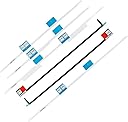
This OLVINS adhesive strip kit includes 6 precision-cut strips designed specifically for the 27" iMac A1419 models (2012-2015). Engineered for professional repairs, the heat-activated adhesive ensures a strong, lasting seal after display removal. Lightweight and easy to apply, it guarantees your iMac’s screen stays perfectly reattached post-upgrade or repair.


| ASIN | B0748DDRQZ |
| Best Sellers Rank | 146,482 in Computers & Accessories ( See Top 100 in Computers & Accessories ) 651 in Laptop & Netbook Computer Replacement Screens |
| Brand | OLVINS |
| Brand Name | OLVINS |
| Clarity | 100 |
| Compatible Devices | iMac |
| Compatible Phone Models | Apple iMac 27" A1419 |
| Compatible devices | iMac |
| Compatible phone models | Apple iMac 27" A1419 |
| Country of Origin | China |
| Customer Package Type | FFP |
| Customer Reviews | 4.0 out of 5 stars 754 Reviews |
| Finish Type | Glossy |
| Item Dimensions L x W | 68.6L x 68.6W centimetres |
| Item Hardness | 3H |
| Item Weight | 0.02 Pounds |
| Item hardness | 3H |
| Manufacturer | OLVINS |
| Material | Adhesive tape |
| Model Name | A1419 |
| Model Number | A1419 |
| Number of Items | 6 |
| Part Number | a1419 glue |
| Product dimensions | 68.6L x 68.6W centimetres |
| Screen Size | 27 Inches |
| Screen Surface Description | Glossy |
| Special Features | Innovative installation method |
| UPC | 680491823595 |
| Unit Count | 1.0 count |
| Water Resistance Level | Not Water Resistant |
A**J
Perfect for the iMac
After buying "genuine" ones from another place and being completely incorrect, I got these from Amazon and instantly knew they would work. They were numbered, cut to the right size and stuck down without any issues. I'm sure there is a knack to peeling them off before placing the screen down so you get the exact spacing either side of the screen but I don't yet know it - having said that, I made a slight mistake and it was easy enough to pull away without cracking the screen or ruining the tape and yet once fully down, the screen did not budge. I probably will not need to open this again so I won't know how easy it is to remove compared to the original Apple one however as something to seal the screen to the chassis, this is perfect
D**N
Good Adhesives
Have used these a number of times. The quality of the adhesive is good and if preperation and care is taken in applying them (clean old adhesive off, careful not to overlap the aluminium edge) then have never had any issues with them.
B**.
Dangerous, screen fell out after 10 days!
I repair Macs for a living. Used this product for a 27" iMac 10 days ago. Was horrified to get a call from the customer today saying the screen had completely fallen off! When fitting, I took great care to remove all of the old tape, cleaned the contact surfaces and applied this Olvins tape. Noticed that it was very thin and some of the strips overlapped so had to cut it to fit, even though I ordered the 27" and made sure the year model (2017) was included in the compatibility list. Luckily the screen did not break, nor did it hit the customer on the head like with my poor colleague elsewhere on here. A new display costs £400! This product is useless and dangerous, avoid at all costs!
A**R
Easy and effective
I followed iFixIt's instructions, and the screen was very straightforward to refit. Perfect join. Note, it is easier to refit an iMac screen with two people!
B**Y
Be careful when applying!
Seems like it should be okay but I would note that this is slightly thinner than the original tape strips. Because the foam tape is slightly thinner than the original, it needs to be really pressed down well all the way round. You can only really do this well enough with a cloth over the edge so that you can squeeze while sliding along the top and sides. The tape needs to be applied to clean surfaces, so remove the old tape from both the screen and the chassis. Apply the tape to the chassis side so that no part overlaps the aluminium edge of the chassis and only adheres to the black area. (This is vital) Note: If you get any tape on the aluminium edge, you will create a high point and the rest of the tape won’t have a chance to stick correctly, resulting in a screen that will likely fall off. So if you get it on the aluminium, take that strip off and you will probably need to order a second set to start again. Ideally, there wants to be a 0.5-1mm gap between the tape edge and the aluminium edge. Use a small screwdriver to pin the tape in place at one end using the holes provided and start at the opposite end. As these are thin, you could always double them up. There is also a slight lip at the bottom of the screen once fitted, (maybe 0.2mm) where the glass is no longer far out enough to accurately sit level with the aluminium area. This may be solved by doubling up the tape. Also: Anyone wanting to get the screen back off after using this kit will likely crack the screen because you can’t really get even the thinnest blade between the glass and the aluminium so again, use two kits to double up the gap. Bottom line, I think this will hold fine but I would certainly use two kits next time or give another item a try.
M**K
Five Stars
perfect fit
D**D
terrible screen fell off ater a week and shattered
do not buy this cheap rubbish it didnt stick the screen properly and after a week my 27" imac screen fell off and shattered ....cost me a new screen and now the imac isnt working properly for some reason ..now the FAn is on full blast all the time and performance is so slow the mac is unusable where as before the screen fell off everything was working fine .its been one long headache and cost me an extra £400 on a new screen ....DONT BY CHEAP RUBBISH
C**D
Adequate
My engineer said it was adequate not the best a little fiddly.
A**O
Perfetto sul mio iMac 27 late 2013
Ordinati ieri pomeriggio, arrivati oggi in mattinata. Sono ottimi ma vi do alcuni consigli se è la prima volta che li applicate. Metteteli esattamente come descritto qui nella descrizione del prodotto, dovete staccare prima i lati senza numero e applicarli bene, con precisione. La prima cosa che dovete fare è staccare gli adesivi di Apple o comunque quello che vedete, togliete tutto, deve essere pulitissimo e solo dopo cominciate a mettere gli adesivi. Quando finite di applicare il primo pezzo, per esempio quello in alto a sinistra, prendete un oggetto duro, di plastica che non rovini l’adesivo e fate pressione trascinandolo dall’inizio alla fine dell’adesivo in modo tale da farlo aderire bene. Continuate con tutti gli sticker e lasciate per ultimo il 15-16 (credo) quelli che stanno sotto alla base del display per intenderci. Occhio che dovete metterli nel display solo questi due, tutti gli altri vanno sul case. Da pc messo dritto, normale, alzate lo schermo e li applicate il display facendo attenzione di farlo attaccare perfettamente a uno dei bordi, deve essere perfetto, non fate leva e metti o troppe prove perché vi conviene smettere di continuare e applicare dei nuovi sticker da capo. Importantissimo, per quelli che dicono che ad alcuni gli si è scollato lo schermo. Non è vero, è solo che non sono riusciti a farlo bene e non hanno ascoltato quanto descritto dal prodotto. Per evitare che questo succeda fate come ho fatto io, qui su amazon c’è scritto di lasciarlo 30 minuti, io ho fatto così: Dopo che ho chiuso lo schermo, ho provato ad accenderlo intanto per vedere se era tutto apposto e dopo di che ho spento il pc è l’ho messo capovolto, con lo schermo sulla scrivania, così il peso del pc schiacciava i due lati e l’ho lasciato così per 4 ore, altro che 20 minuti. Adesso lo sto usando ed è attaccato alla perfezione, tiene durissimo. Ottimo. Riacquisterò sicuramente un domani se dovrò fare qualche altro upgrade dall’ interno.
P**N
Parfait pour refermer correctement un iMac après ouverture
Ces bandes adhésives sont parfaitement bien étudiées et découpées pour assurer une fermeture étanche à la poussière des iMac modèles 2012 et ultérieurs (extra-plats avec écrans 27". Quelques conseils pour un résultat parfait : a) prendre le temps de retirer totalement toute trace de l'ancien adhésif, découpé lors de l'ouverture b) l'iMac peut être refermé de manière provisoire avec une simple bande d'adhésif type "chatterton" tout du long du bas de l'écran et aux deux angles supérieurs si vous voulez d'abord vérifier son fonctionnement avant une fermeture définitive c) attention à bien découper l'adhésif sur les modèles d'iMacs récents, à l'emplacement du micro, légèrement à droite en partant du milieu en bas de l'écran. Si l'adhésif recouvre le minuscule trou du micro, il ne captera pratiquement plus aucun son. d) replacer l'écran en le calant à partir du bas et en vérifiant bien son parfait alignement à gauche et à droite, et même sur le dessus car la coque du Mac n'est pas d'une rigidité parfaite. Enfin, une fois que l'écran est recollé, il faut laisser pendant quelques heures l'iMac posé à plat sur son écran, sur une surface propre et douce (une couverture par exemple) afin que son propre poids puisse écraser parfaitement l'adhésif et assurer un collage définitif parfait sur tout le pourtour.
M**E
Super !
Colle parfaitement, j'en commanderai encore.
M**S
Perfekt
Perfekt
C**.
failing adhesive layer!!!!!
They sell old stock, because the adhesive layer is very weak, the screen of several iMacs has broken within 6 months because they fell out of the frame. Five years ago I didn't have any problems with this item
Trustpilot
1 week ago
2 weeks ago