Buy anything from 5,000+ international stores. One checkout price. No surprise fees. Join 2M+ shoppers on Desertcart.
Desertcart purchases this item on your behalf and handles shipping, customs, and support to Thailand.
๐จ Never let filament mishaps kill your print flow again!
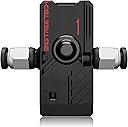
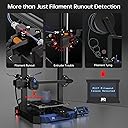
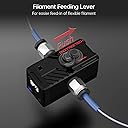
The BIGTREETECH Filament Runout Sensor is a precision 3D printer accessory designed to detect filament runout, breakage, and jams. Compatible with popular control boards like SKR Mini E3 and Octopus V1.1, it supports 1.75mm filament and dual extrusion setups. With Marlin 2.0 firmware customization, it auto-pauses prints to prevent failed jobs, enhancing print reliability and reducing material waste.


| ASIN | B0C7PZDBNC |
| Additional Features | Smart Filament Detection, High Precision, Bi-Directional Feeding, Real-Time Status Light, Wide Compatibility |
| Best Sellers Rank | #238,723 in Industrial & Scientific ( See Top 100 in Industrial & Scientific ) #1,789 in 3D Printing Filament |
| Brand | BIQU |
| Brand Name | BIQU |
| Color | Black-sfs V2 |
| Customer Reviews | 4.2 out of 5 stars 54 Reviews |
| Item Diameter | 1.75 Millimeters |
| Item Weight | 36 Grams |
| Manufacturer | BIQU |
| Manufacturer Part Number | BIQUSFS2.0 |
| Material | Plastic |
| Material Type | Plastic |
| Number of Items | 1 |
| Special Feature | Smart Filament Detection, High Precision, Bi-Directional Feeding, Real-Time Status Light, Wide Compatibility Special Feature Smart Filament Detection, High Precision, Bi-Directional Feeding, Real-Time Status Light, Wide Compatibility See more |
| Unit Count | 1.0 Count |
N**S
Practical Addition to My Voron 2.4 Setup
I grabbed the BIGTREETECH Smart Filament Runout Sensor V2.0 for my Voron 2.4 running Klipper and I must say, itโs been a practical addition to my setup. Installation was pretty straightforward which was a relief. I was able to get it up and running in no time, and it integrated well with my existing setup. The sensor has been doing its job in reducing print errors. It's caught a couple of filament runout situations and saved me some potential headaches. The feature where it can detect not just filament runout but also breakage and clogging is something I find quite useful. Itโs nice knowing that it's monitoring and will halt the print if something goes awry. One thing that stood out to me was the bilateral feeding feature. Itโs a small thing but it does make the installation and filament feeding a tad bit easier, not having to discern between filament inlet and outlet. The sensor is lightweight, so I didnโt notice any added inertia to the direct-drive extruder which was a concern initially. I havenโt had to deal with false triggers so far, so the sensitivity of the sensor seems to be well-calibrated for my use. All in all, the BIGTREETECH Smart Filament Runout Sensor V2.0 has been a handy addition to my 3D printing setup. Itโs been working as advertised, helping to catch filament issues early and save me from failed prints. Itโs a small piece of hardware thatโs added a bit more reliability to my printing process.
I**R
great, avoid air prints, must have for Elegoo CC
Works great, also with ELEGOO Centauri Carbon, with an added ESP32S3 as per Utube 6JYKpZ3HX2Y
R**L
Pretty good
So I've purchased three. Of those three one of them was very hard to feed, and very loud. The other two are excellent. So quality control gets a little iffy at times, but they all work very well.
J**.
If you're capable of changing your printer's settings, BUY THIS ONE!!
Even when you have a direct drive extruder and and filament switch right inside the tool head, a normal filament switch won't detect an issue if your filament is stuck. This is where this beautiful device comes into play. It detects the presence of the filament just like a normal filament switch but it also detects the movement of the filament. So, if your filament gets stuck and your extruder just starts to dig into the sides of the filament and slowly eat it away from the sides, this will detect the issue before anything goes horribly wrong and you loose your print. You need to make some configuration changes on your printer (I use klipper so it was easy for me) and you will need an additional input to your board if you want to use both motion and normal filament sensor, but it is worth it. I've installed this into my K1 max (which required some soldering on the board to get additional input) and now, I'm really happy with the results. I've 3Dchamelion installed and due to additional bowden tube length and some added friction from the 3d chameleon sometimes the filament just gets stuck. Extruder tries to push it but cannot pull it due to friction and all the while normal filament sensor would not warn you because filament is there. This however, catches problem if the movement of the filament does not match speed of the extrusion. It has already saved two of my prints.
L**B
Terrible tech support, difficult to configure without support
I bought this because it provides both run out detection and clog detection. The run out detection works fine, the clog detection (it detects when the filament stops feeding) sometimes reports false clogs and pauses the print. This is a pain on long running prints if you do not check the printer regularly. I installed this on an Ender 3 with Creality 4.2.7 system board, BL Touch, Micro Swiss extruder and Micro Swiss hot end, using Marlin software. Physical installation was easy. Electrical connection took some effort and finding the right configuration was very time consuming. When I contacted their tech support they said they could not support me because they did not have schematics of the Creality system board. I never had this problem from other vendors that had products that connect to the system board and expected better from a company that has the skills to produce a system board. I found electrical connection directions from a user on the bigtreetech github page for the product under issue #43: BTT 2.0 with Creality 4.2.7 system board. It was a group of users solving the problem without help from the vendor. It also has configuration settings. I had to rewire the connectors to work with the 4.2.7 board. I connected it to the Z- connector and run-out connector (left of X- connector) on my system board. My Z- connector was available because I use the BL Touch which replaces the Z- switch. Here are my connections: Blue cable - Pin 1 (left) of 3-pin run out connector - PA4 Black cable - Pin 2 (center) of run out connector - Ground Red cable - Pin 3 (right) of run out connector - +5/3.3V Green cable - Pin 1 (left) of 2-pin Z- connector - PA7 I printed a mounting bracket from the BTT github page and the device was easy to mount. I used Marlin beta version 2.1.3-b2. I read you need at least Marlin version "bugfix-2.1.x" (not 2.1.2.5). Finding the right version of Marlin was one of the issues. To configure the Marlin software, I did the following: Uncomment and set the values below in configuration.h: #define FILAMENT_RUNOUT_SENSOR. #define FILAMENT_RUNOUT_DISTANCE_MM 20 #define FILAMENT_MOTION_SENSOR #define FILAMENT_SWITCH_AND_MOTION #define FIL_MOTION1_PIN PA7 #define FIL_RUNOUT_PIN PA4 #define NOZZLE_PARK_FEATURE #define FIL_RUNOUT_STATE LOW #define FIL_RUNOUT_PULLUP Changes to configuration_adv.h: #define ADVANCED_PAUSE_FEATURE And set the values below it based on the length of my Bowden tube, etc. I also calibrated by esteps to make sure the extruder extrudes the right length of filament. It is also important to make sure you are not trying to feed filament faster than your printer can handle it. If the extruder is clicking, it is probably not feeding the filament properly and will generate run out/clog alerts.
C**C
Absolutely useless as anything more than a basic runout sensor
Absolutely useless as anything more than a basic runout sensor. I've tried every config I could find online, followed the instructions, incremented in .1mm detection lengths, and it either gives a million false positives or doesn't engage; there is no way to configure it that I can find to not get false positives when there is travel and also have it correctly detect filament flow stoppages when it should be printing. A waste of money.
J**E
Works as it was described.
Oddly shaped but smaller then I imagined it. Works flawlessly with klipper. Set it to 3.00mm, as the instructions recommended, instead of its advertised accuracy. I've printed a lot since installing and haven't had any false positives. Would by again. Also my main board is a btt skr mini e3 v3 running klipper on pi.
R**G
Great Sensor, Poor Documentation
I bought the SFS V2.0, not the V1.0 which many reviews complained about. The V2 improves on the design flaws of the V1. The trigger pressure applied on the filament itself has never resulted in a jam thus far. However, BTT failed to provide sufficient documentation for older boards like SKR 1.3, 1.4, 1.4 turbo. I have a SKR 1.4 Turbo board with TMC 2209 drivers. To get this working with the latest Marlin (2.1.2) there were several things required: 1) TMC2209 drivers or above need the 'diag' pin disconnected for E0 stepper drivers. This is a requirement for all other endstops to work as well, and has been documented in the BTT github repo for the BTT TMC2209 V3 stepper drivers. 2) The documentation states to plug the motion sensor pins to E0DET and the switch sensor to to E1DET. This is WRONG. They must be swapped. This took me a very long time to figure out and was the main reason for troubleshooting issues. The switch sensor needs to be plugged into E0DET and motion sensor to E1DET, or you can re-map them digitally like I did by explicitly declaring the pin outputs for FIL_RUNOUT_PIN and FIL_RUNOUT_PIN2 respectively. 3) I had to invert the endstop logic for the filament runout sensor. Instead of LOW I had to have it HIGH. 4) You can find the STEP files on their SFS 2.0 github repo to design yourself a custom mount for your printhead. I have a direct drive setup, so I extended the X-Carriage backplate taller to fit a mount for the new sensor. It is easier to import the STEP file in CAD than measuring it out with a caliper, which is what I did initially before discovering the STEP file. Using this new device, I successfully have motion tracking and runout tracking working after many tests. It seems very reliable. I've had no issues with the actual device, except the lack of documentation which lost me 4 days figuring out with trial and error. Here is my configuration.h snippit for enabling the sensor. I hope it saves other people more time with other boards. Keep in mind I remapped the E0DET and E1DET pins instead of physically swapping them on the board. #define FILAMENT_RUNOUT_SENSOR #if ENABLED(FILAMENT_RUNOUT_SENSOR) #define FIL_RUNOUT_ENABLED_DEFAULT true // Enable the sensor on startup. Override with M412 followed by M500. #define NUM_RUNOUT_SENSORS 1 // Number of sensors, up to one per extruder. Define a FIL_RUNOUT#_PIN for each. #define FIL_RUNOUT_STATE HIGH // Pin state indicating that filament is NOT present. #define FIL_RUNOUT_PULLUP // Use internal pullup for filament runout pins. //#define FIL_RUNOUT_PULLDOWN // Use internal pulldown for filament runout pins. //#define WATCH_ALL_RUNOUT_SENSORS // Execute runout script on any triggering sensor, not only for the active extruder. // This is automatically enabled for MIXING_EXTRUDERs. // Override individually if the runout sensors vary //#define FIL_RUNOUT1_STATE LOW //#define FIL_RUNOUT1_PULLUP //#define FIL_RUNOUT1_PULLDOWN //#define FIL_RUNOUT2_STATE LOW //#define FIL_RUNOUT2_PULLUP //#define FIL_RUNOUT2_PULLDOWN //#define FIL_RUNOUT3_STATE LOW //#define FIL_RUNOUT3_PULLUP //#define FIL_RUNOUT3_PULLDOWN //#define FIL_RUNOUT4_STATE LOW //#define FIL_RUNOUT4_PULLUP //#define FIL_RUNOUT4_PULLDOWN //#define FIL_RUNOUT5_STATE LOW //#define FIL_RUNOUT5_PULLUP //#define FIL_RUNOUT5_PULLDOWN //#define FIL_RUNOUT6_STATE LOW //#define FIL_RUNOUT6_PULLUP //#define FIL_RUNOUT6_PULLDOWN //#define FIL_RUNOUT7_STATE LOW //#define FIL_RUNOUT7_PULLUP //#define FIL_RUNOUT7_PULLDOWN //#define FIL_RUNOUT8_STATE LOW //#define FIL_RUNOUT8_PULLUP //#define FIL_RUNOUT8_PULLDOWN // Commands to execute on filament runout. // With multiple runout sensors use the %c placeholder for the current tool in commands (e.g., "M600 T%c") // NOTE: After 'M412 H1' the host handles filament runout and this script does not apply. #define FILAMENT_RUNOUT_SCRIPT "M600" // After a runout is detected, continue printing this length of filament // before executing the runout script. Useful for a sensor at the end of // a feed tube. Requires 4 bytes SRAM per sensor, plus 4 bytes overhead. #define FILAMENT_RUNOUT_DISTANCE_MM 10 #ifdef FILAMENT_RUNOUT_DISTANCE_MM // Enable this option to use an encoder disc that toggles the runout pin // as the filament moves. (Be sure to set FILAMENT_RUNOUT_DISTANCE_MM // large enough to avoid false positives.) #define FIL_RUNOUT_PIN P1_25 #define FIL_RUNOUT_PIN2 P1_26 #define FILAMENT_MOTION_SENSOR #define FILAMENT_SWITCH_AND_MOTION #endif #endif
Trustpilot
3 weeks ago
1 month ago