We remain fully operational. Our teams are working around the clock to ensure your deliveries continue safely.

DOWNLOAD THE APP


Copyright © 2025 Desertcart Holdings Limited
DOWNLOAD THE APP
Buy anything from 5,000+ international stores. One checkout price. No surprise fees. Join 2M+ shoppers on Desertcart.
Desertcart purchases this item on your behalf and handles shipping, customs, and support to Thailand.
✨ Elevate your workspace with backlit brilliance and dual-mode freedom! 🔄💡
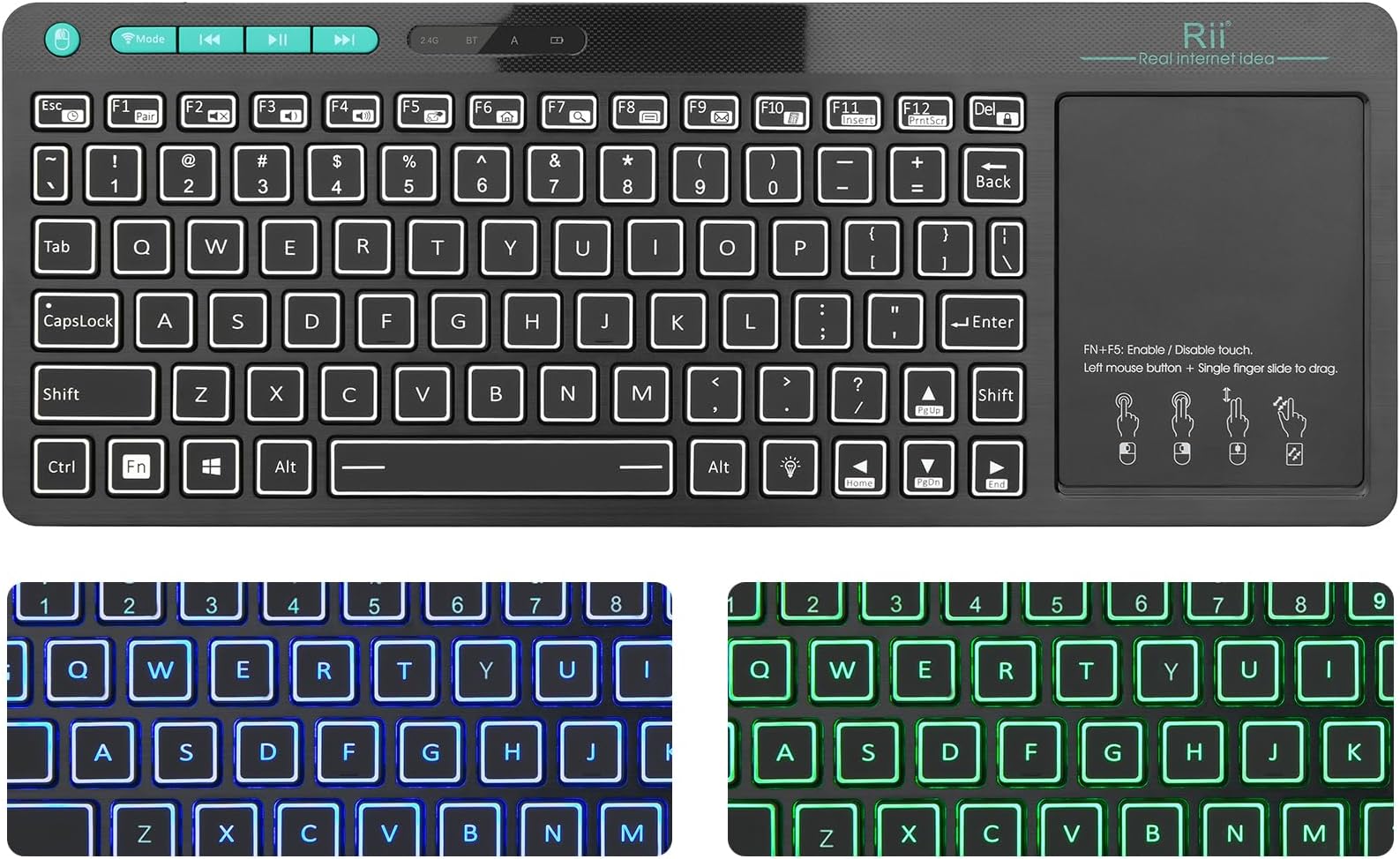
The Rii RT518S is a compact, rechargeable wireless keyboard featuring dual Bluetooth and RF 2.4GHz connectivity, vibrant two-color backlit keys, and a large multi-touch trackpad. Designed for seamless compatibility with Android TV boxes, PCs, tablets, and Smart TVs, it offers multimedia shortcut keys and a responsive typing experience ideal for professionals seeking versatile control in any lighting environment.


| ASIN | B0C7VQHLM6 |
| Additional Features | Backlit, Rechargeable, Trackpad |
| Antenna Location | Office |
| Best Sellers Rank | #645 in Computer Keyboards |
| Brand | Rii |
| Built-In Media | USB Cable |
| Color | blue, green |
| Compatible Devices | PC, Smart TV, Tablet |
| Connectivity Technology | Bluetooth, RF |
| Customer Reviews | 3.9 3.9 out of 5 stars (4,904) |
| Enclosure Material | Plastic |
| Hand Orientation | Ambidextrous |
| Item Dimensions L x W x H | 12.79"L x 12.79"W x 0.74"H |
| Keyboard Backlighting Color Support | Single Color |
| Keyboard Description | Multimedia |
| Keyboard Layout | QWERTY |
| Manufacturer | Riitek |
| Model Number | RT518S |
| Number of Batteries Required | 2 |
| Number of Keys | 104 |
| Number of Sections | 2 |
| Power Source | Battery Powered |
| Style Name | 2.4G+Bluetooth(New Version) |
| Switch Type | Button |
| Theme | generic" or "computing |
| Unit Count | 1.0 Count |
| Water Resistance Level | Not Water Resistant |
R**H
I like this keyboard with touchpad, one very small issue.
I have a computer hooked to my TV/surround-sound/home-entertainment-center to use as a streaming platform. I have an old, not-smart TV that does not support apps, so the PC handles all that. Using a PC also has the advantage that I don't have a bunch of bundled apps I don't want (cluttering up my screen/menus), and I can get every stream-system I want, whether they are "partners" with the TV manufacturer or not. I actually have a smart DVD player, but it can only load new apps on it that are from "partners". Nuts to that. * I've used several different keyboards, mice, and keyboard/mice-or-touchpad combinations with it. I definitely like this one the best. * The touchpad is much better than a previous keyboard/touchpad combination and TOTALLY better than a keyboard that had a (tiny) trackball built into it. The only thing I slightly don't like with this new one is the need for two hands to hold the "drag button". I actually have an additional (cordless) mouse with a nice thumb-trackball, attached as well, so I can use either the touch-pad or mouse (windows supports multiple, simultaneous mice), and find each has its advantages. * I like the backlighting. Bright enough. Even enough (not all are). Two solid colors are enough for me. I don't like keyboard colors that change, pulse, swirl, etc., anyway. * I've only use the 2.4 dongle-connection, so can't evaluate the bluetooth. But I'm glad it's there should I ever want to connect to one of my mobile devices. This is part of why I picked this one to buy, in the first place -- to keep my options open. * Battery life seems fine. Recharging is as expected. The auto-sleep is good, although about half the time (when I think to do so) , I switch it off when I am done using it for the day. I don't know if there is any advantage to switching it off, over auto-sleep. I'm guessing switching off saves some battery -- there has to be some kind of active circuit that recognizes a key-press to "wake up"... * I've had this about 2 months, and no problems at all so far. Build quality looks to be good. Hope it lasts a very long time. >>> I like it.
D**T
Good for most uses
The keyboard works fine and I like the backlight. I just have a couple issues with the trackpad on Windows. Whenever I use the scroll gesture on a webpage, it often zooms in because my fingers move apart slightly when doing the gesture. RII doesn't produce drivers for this, so there is no option to turn off the zoom gesture. The trackpad does have a one-finger scroll area on the right side, so I recommend using that instead of the gesture. The other issue I have is that I can do a left click drag, but when I try to do a right click drag, it performs the zoom gesture. So this trackpad won't work for games or applications where you need to drag something while holding down the right mouse button.
A**N
Great Keyboard
Edit: I've had this thing for about a year and my opinions have not changed. It's a solid mini-keyboard and definitely worth the price, holding up well. Charge lasts 4-6 weeks before having to plug it in. Touchpad has sort of lost its texture from all the use, but still works well enough. Keys are small enough that they're difficult to type on, but finger peckers / typing novices will find it just fine. Charge indicator has never worked, nor has the low battery indicator. It has always just lit up the wireless LED when charger is plugged in. So the only warning it's going to need a charge is when it simply stops working. Not a deal breaker, but hope they fix that in future versions. ORIGINAL REVIEW: I've owned this keyboard for about 6 weeks now and it's an absolute gem for a home theater PC. It's proven durable so far, having four kids tends to put handheld devices through quite a torture test. The backlight LEDs are bright and having the three color options is awesome. I've used plenty of expensive brand name keyboards, and the touchpad on this is among the best. I don't like that there's not physical mouse buttons under the touchpad, but thankfully there is a physical left click button (on the left side of the keyboard) that saves the day. Perfectly usable is how I'd describe it. The keys are small and hard to type on, but nothing worse than what I've experienced on any other small form factor HTPC keyboard. They work just fine otherwise. I really love that the F1-F12 keys are the primary button, and you have to hold down the FN to access the secondary media functions. A lot of HTPC keyboards have this backward where you have to hold FN to use F1-F12 keys at the top, and media keys are the default-- I'm a PC user going back a couple decades, so not having native F1-F12 keys is almost impossible to get used to. This keyboard does it right in my opinion. I'm 6 weeks into it and I haven't had to charge it other than when I first got it. My kids and wife are the primary users and they know to switch the keyboard off (it has a power switch on top) when they're done with it. Switching the power on activates it immediately, I've never had to reconnect the transmitter or do any kind of re-pairing. If you leave it set for awhile with power on, the backlight turns off and seems to go to sleep on its own, but wakes right away with any keypress or mouse movement. It just works every time. The only flaw I've noticed is that when I plug it in to charge, the wireless LED turns on. I can see that there is a low battery indicator, and a battery charge indicator, but I haven't seen the charge LED light up, even with the charger connected. If you have the keyboard switched off or on and plug it into a charger, the wireless LED lights up. I've verified the keyboard is taking a charge by connecting a USB load meter to it in between the keyboard and charger. It draws about 300 milliamps anytime the charger is connected, which tells me it's charging just fine. That said, I've never depleted the battery, so I'm not really sure if the low battery indicator works. But the charging LED certainly doesn't, it turns the wireless LED on instead while charging. Why? I'll never know but since it seems to be charging fine, I won't complain. I'll know for sure when it finally runs dead whether the low battery indicator works, and will try to update this review. In conclusion this is an awesome keyboard and works perfectly for this application. My last keyboard was an expensive Logitech and the charger port broke off a few months in. This keyboard works better and using the touchpad is a much better experience. This has a USB tether for charging (that slips inside a plastic cover) which will likely last a long time if not abused. They also include a USB extension cable in the box so you don't have to put any strain on the short USB tether. The fact there's no charger port to break off is a good thing in my opinion. I really feel like buying a couple more of these just to store away in a closet because I'm sure it won't last forever and they will probably stop making these at some point-- this keyboard is that good that a spare or two would be nice to have and the price is right!
L**.
Excelente producto, mando a distancia perfecto con el touchpad, sensible al tacto, tiempo de respuesta es muy buena... para pcs o smart tvs... compatibles. Sigue funcionando después de 5 años de uso... Muy bueno.
N**K
Good keyboard. Works fine with my fairly old laptop. I was a little worried it might be too small to type on the keys the same way as a regular sized keyboard, becuase it`s dimenions were smaller than my previous keyboard, but it`s big enough to type properly with both hands on the keyboard. The function keys seem to work. Touchpad works fine. The backlit colors look cool, exactly what I wanted. The only small complaint is that the backspace button is smaller than usual (it`s not totally annoying or useless, but sometimes the finger misses it, and i`ll likely get more used to it).
F**S
الكيبورد ممتاز ومفيد ولكن لمن تشبك بالشاحن تشتغل علامة الوايرلس وما ادري اذا شخن او لا.
R**R
This keyboard looks good, but sadly, that's about it. From the distance between my TV and couch, there was significant latency and skipping issues. This is no more than a 6 foot distance. Also, the keyboard is NOT full size, meaning typing proved difficult/unnatural. I returned this item, which cost me half the overall cost just in shipping (from Australia to US). Disappointing.
J**O
Me parece cómodo! Está pequeño pero es suficiente para trabajar! El pad funciona muy bien. Tres colores de luces que incluso se pueden apagar. Si no lo tocas por más de 3 min entra en modo ahorro de energía (se apagan las luces y se bloquea el pad). Una excelente compra!
Trustpilot
2 weeks ago
2 months ago