We remain fully operational. Our teams are working around the clock to ensure your deliveries continue safely.

DOWNLOAD THE APP


Copyright © 2025 Desertcart Holdings Limited
DOWNLOAD THE APP






Buy anything from 5,000+ international stores. One checkout price. No surprise fees. Join 2M+ shoppers on Desertcart.
Desertcart purchases this item on your behalf and handles shipping, customs, and support to Thailand.
🚀 Elevate your network game with blazing speed and seamless control!
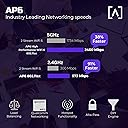
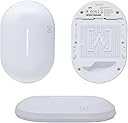
The Alta Labs AP6 Dual-Band Wireless WiFi 6 Access Point delivers ultra-fast 1.8 Gbps speeds and wide coverage with advanced antenna technology. Its sleek, compact design supports Power over Ethernet for easy installation, while cloud-based management and multi-password access control provide enterprise-grade security and flexible network segmentation. Ideal for homes and businesses needing reliable, scalable WiFi 6 performance.


| ASIN | B0CB9DZSG1 |
| Antenna Location | Business |
| Antenna Type | Internal |
| Best Sellers Rank | #91,917 in Computers ( See Top 100 in Computers ) #334 in Wireless Access Points |
| Brand | Alta Labs |
| Built-In Media | Access Point, Drop Ceiling Mount Bracket, Hardware Kit, Safety Instructions + Quick Start Guide QR Code, Wall/Ceiling Mount Bracket |
| Color | White |
| Compatible Devices | Laptop |
| Connectivity Protocol | Wi-Fi |
| Connectivity Technology | Wi-Fi |
| Control Method | App |
| Controller Type | Alta Labs Management Platform |
| Coverage | Wide Area Coverage |
| Customer Reviews | 4.3 4.3 out of 5 stars (37) |
| Data Transfer Rate | 3 Gigabits Per Second |
| Frequency | 5 GHz |
| Frequency Band Class | Dual-Band |
| Has Internet Connectivity | Yes |
| Has Security Updates | Yes |
| Is Modem Compatible | No |
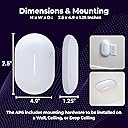
| Item Dimensions L x W x H | 19.1L x 12.4W x 3.2H centimeters |
| Item Weight | 408 g |
| LAN Port Bandwidth | 10/100/1000 |
| Manufacturer | Alta Labs |
| Maximum Upstream Data Transfer Rate | 3000 Megabits Per Second |
| Mfr Part Number | W128433082 |
| Model Name | AP6 |
| Model Number | AP6 |
| Number of Antennas | 1 |
| Number of Ports | 1 |
| Operating System | Alta Labs OS |
| Other Special Features of the Product | Access Point Mode, Guest Mode, Mesh, Parental Control, Remote Access |
| Router Firewall Security Level | Advanced |
| Router Network Type | wireless |
| Security Protocol | WPA-Enterprise |
| Smart Home Compatibility | Not Smart Home Compatible |
| UPC | 845882005466 |
| Unit Count | 1 Count |
| Voltage | 42.5 Volts (DC) |
| Wi-Fi Generation | Wi-Fi 6 |
| Wireless Compability | 802.11ac, 802.11ax, 802.11n |
N**.
Cost effective but great quality access point. Very easy to mount. I use this one at home. Mounted to the wall in my daughters room. There are metal mounts to mount in drop ceiling. I mounted a pro at work in a school to test out as well. It's the same mount and size. Went from wifi 5 to wifi 6. You can limit speed rates in the app. So I reduced my kids to prevent them hogging up our bandwidth since we cant get any better speeds out where I live. Range I can see the network throughout my house just fine. It's 80 foot mobile manufacture house. I hooked up 2 which is overkill but wanted connection throughout my acre property. You don't have to be a computer nerd to figure it out. You can hook up, open the application, hit setup and be up within 5 to 10 minutes. I felt this was easier to setup than other access points. Access to setup different passwords for different locations and use the same ssid. So if you had different residents or work areas to deploy to that need different wifi passwords. It doesn't require their router to setup. I definitely like having it powered with the route 10 but at work in dont have a route 10. Able to set up to mesh it another access point. I used this before running cable to my daughters room. Worked great. I used a poe injector to power on. It auto connected to my other ap in the living room and was up within minutes. I did not test with another ap brand though.
S**E
Alta Labs gear is great. I needed another access point in my garage and was super simple to setup.
A**R
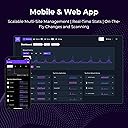
We install network solutions for small businesses and residential customers, and the Alta Labs AP6 has become our standard access point for the majority of our deployments. These APs pair perfectly with the Route10 router for clean, professional installations. Why we love these for our business: The value proposition is unbeatable. At this price point, you're getting enterprise-grade features that used to cost 2-3x more. WiFi 6, built-in DPI filtering, cloud management, and PoE+ - all in a sleek package that clients actually like the look of. Installation benefits: QuickMount system makes ceiling/wall installations incredibly fast PoE+ powered means single cable runs - huge time saver Compact design blends into any environment (residential or commercial) Bluetooth setup gets them online quickly during deployment Performance in the field: We're consistently seeing excellent coverage and throughput. The 2x2 MIMO handles our typical client density without breaking a sweat - homes, small offices, retail spaces. Seamless roaming works great when we deploy multiple units. Clients with 20-50 devices connected report zero issues. Management is a dream: The Alta Cloud management platform lets us monitor all our customer sites from one dashboard. When a client calls with an issue, we can troubleshoot remotely instead of rolling a truck. The mobile app is surprisingly robust for quick checks. Standout features for our use cases: Built-in content filtering (DPI) - parents love this for home networks AltaPass multi-password feature is perfect for guest access VLAN support for separating IoT devices Mesh capability as a backup if we can't run cable somewhere The ecosystem advantage: Pairing these with Route10 routers and Alta switches gives us a unified management platform. Everything works together seamlessly, and we're not juggling multiple vendor interfaces. For installers serving the SMB/residential market - this is the sweet spot. Professional performance and features at a price point that doesn't require explaining to customers why they need to spend more. We keep these in stock and recommend them confidently. Highly recommended for anyone doing volume installations who needs reliability, performance, and easy management!
D**J
I bought these Alta Labs access points thinking they would be the next generation. They turned out to be the bleeding edge. The firmware has a bug that causes cycling the WiFi connection off and on when moving between access points. I reached out to their Tech Support, but apparently they have only 1 person who either works part-time or is completely overwhelmed because they sell half-baked products. I pulled the AP's and replaced them with UniFi AP's which have performed flawlessly.
J**N
I've never heard of Alta until I came across this, but after some research, seeing they're in Utah, how they've setup things, and how others have reviewed their products, my interests were peaked. I ended up picking up this AP6, although, I think I would've preferred the AP6 Pro. At $139, this isn't priced bad at all for a wifi 6 AP. It arrives in a good looking black box, and opens up easily revealing the AP itself. It looks good, and, in my opinion, is one of the better looking AP's out there you can buy. Included in the box is basically the AP, and some mounting supplies. Surprisingly, no ethernet cable, although that isn't the end of the world. Since the AP6 is only PoE, I had to setup an injector I have to get it powered up and running. I setup an account on Alta's website, setup a site, but, after connecting the AP6 to the PoE injector, the website was still unable to locate the AP for setup. I ended up scanning the included QR code in the box, and it mentioned the Alta Networks app. I ended up downloading the app, logging in with my account, and it quickly was able to locate the AP for setup. Within seconds, I felt, it was up and running within the site. It was easy to add an SSID for wifi, and the AP did indicate it had an update. I had it run the update immediately, and, that too, was installed quickly. I was able to connect my iPhone 15 Pro to the AP quickly, and it showed up within the app. I loved the live network data for each device, including the applications that were used. I tried various apps, and it was able to recognize all of them, except Paramount+. These included Netflix, Amazon, some Apple services, eBay, Disney+, and others. Speed tests with the AP maxed out the connection it was connected to. I do have a gigabit+ connection, but am disappointed in the fact that Alta Labs chose not to include the faster 2.5GB port. If you're touting wifi 6, and with the AP6 pro, wifi 7 speeds, why limit yourself by including only a gigabit port? That defeats the purpose in my mind, and makes the claims really null in my mind. There is no way to really test a connection above gigabit, which is what wifi 7 really touts. This AP6, however, doesn't claim those, and the gigabit port is sufficient, but it would have been nice to see if it could achieve anything faster. I do with they also included another port, but I know that is pretty standard for AP's these days. The interface/app Alta has used is good looking. Easy to use, and easy to understand. They've done some cool things like allowing you to setup multiple passwords for a single SSID, allowing you to adjust rules for devices based on which password they use. I really think that is cool, and would be very handy to use to differentiate between IoT, kids, parents, and other devices for a home setting. I do wish the application section was more in-line with what Aruba Instant on does, however, and shows the overall application usage based on not only device, but site/network as well. I've not really seen that elsewhere, and is one of the primary reasons why I think I'd stick with the Instant On products versus switching to something else. All in all, Alta has done a nice job with this product. It's priced well, performs well, looks great, has good software, and is continually being improved. This is certainly a great option to look at for a prosumer AP.
Trustpilot
2 weeks ago
2 weeks ago