

Buy anything from 5,000+ international stores. One checkout price. No surprise fees. Join 2M+ shoppers on Desertcart.
Desertcart purchases this item on your behalf and handles shipping, customs, and support to Thailand.
🚀 Switch Smarter, Work Faster — The Ultimate 4K KVM Hub for Power Users
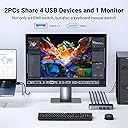
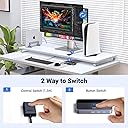
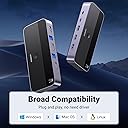
The UGREEN KVM Switch HDMI 4K@60Hz is a premium 4-port USB 3.0 hub designed for professionals managing two PCs with a single 4K monitor. Supporting ultra-high resolutions up to 4K@60Hz with HDR, it features 1 USB-C and 3 USB-A ports for versatile device connectivity. With push-button and remote switching modes, durable aluminum construction, and broad OS compatibility, it streamlines multitasking and workspace efficiency for the modern manager.


| Actuator Type | Push Button |
| Asin | B0C8NFPSJV |
| Best Sellers Rank | 8,390 in Computers & Accessories (See Top 100 in Computers & Accessories) 16 in KVM Switches |
| Brand | UGREEN |
| Circuit Type | 2-way |
| Colour | black |
| Compatible Devices | Gaming Consoles, Computing Devices |
| Connectivity Protocol | HDMI, USB |
| Connector Type | USB, HDMI |
| Contact Material | Aluminum |
| Contact Type | Normally Open |
| Control Method | Remote |
| Control Type | Remote, Manual |
| Controller Type | Amazon Alexa, Google Assistant |
| Country Of Origin | China |
| Current Rating | 500 Milliamps |
| Customer Reviews | 4.2 4.2 out of 5 stars (994) 4.2 out of 5 stars |
| Included Components | KVM Switch, USB A to B Cable, HDMI Cable, Desktop Controller, Operation Guide |
| International Protection Rating | IP00 |
| Item Dimensions | 9.5 x 5.7 x 2.4 centimetres |
| Manufacturer | Ugreen Group Limited |
| Manufacturer Part Number | 15707 |
| Material | Acrylonitrile Butadiene Styrene, Aluminium |
| Model Number | 15707 |
| Mounting Type | Surface Mount |
| Number Of Items | 1 |
| Number Of Positions | 6 |
| Operating Voltage | 5 Volts |
| Operation Mode | Manual |
| Smart Home Compatibility | Not Smart Home Compatible |
| Specification Met | Ce, Hdcp2.2/1.4, Hdmi 2.0, Hdr, Cec |
| Switch Type | KVM Switches |
| Terminal | HDMI and USB switcher |
| Unit Count | 1.0 count |
| Wattage | 30 watts |
User
Excellent!
Excellent. Easy to set up and works exactly as intended. Includes all the cables you need - powers by one of the USB ports so no additional power required. The indicator to show which input is active could do with being a bit clearer but other than that very neat.
User
Happy with this KVM switch
Does exactly what I required of it - easy to set-up and a variety of cables are included (and although I needed to buy other cables to suit my setup rather better, those included may be perfectly suitable for most users). Switching between PCs isn't instantaneous, with a delay of perhaps just three seconds or so, but thus far everything has worked as expected and I couldn't be more pleased with this KVM switch Hopefully, this will continue to be the case going forward.
User
Does exactly what it says on the tin
This is exactly what I was looking for. Works really well and switches flawlessly between my desktop and laptop top with a flick of a button. There is a toggle button on the top but also comes with a breakout button for convenience. Comes with all the cables to connect two computers to the screen. Only reason for 4 starts is it dosent cone with a wall adapter or a usb C cable to power it up. Having said that it's not required atleast not in my case and works fine without the need for external power. Finish is really good and connectors feel sturdy with good spacing. Definitely well worth it. Connected one keyboard and a mouse via dongle which works for both computers flawlessly.
User
Superbly useful KVM switch.
This device has been on my desk for over 18 months, allowing me to switch from 2 different devices depending on the task I am udnertaking. Its small and discrete on my desk and took only a few minutes to install by swapping a few cables. It has great functionalty with one simple button to allow me to switch from 1 machine to another.I would highly recommend this to any power-user with limited space to get access to two machines at once.
User
Fast, neat
Works with Logitech bolt which fails with many KVM. Screen switches fast, Surface laptop tends to lag when switched many times, works perfectly with other devices on 4k@60Hz, with a HUB and bolt receiver, have keyboard, mouse, drawing board, mic with headphones and webcam on. No issues. Small form factor, great reliability.
User
Great bit of kit
This well-made and well-thought-out KVM switch ticks all the boxes. Love that the cables enter from the back and that the USB's are well placed on the front for ease. The top-mounted switch is easy to reach even when tucked under the monitor, and the blue indicator light, while not strictly needed, is a nice touch. Seems well made. Easy to set up and use.
User
Lack of customer support
Would have been a 5 star if there was some technical support.All plugged in OK, a windows 11 PC on input 1 and a windows 10 PC on input 2, the problem was that the windows 11 PC would not connect to screen, kept getting an error message "Input signal out of range change setings to 1920 x 1080 60hz". Could get it to change if I turned the windows PC off then started it again after pressing ugreen button and waiting for screen to say it was turning off.Managed to get both working by reducing monitor refresh rate to 50hz NOT the 60hz as shown in error message.All works fine now about a 3-5 second wait between PCs when button pressed.Am now a happy bunny.Have had to change my opinion as to the reliability, as after continued use I have found lots of screen flickering and re sized pages during use, now not so happy a bunny. Have changed my setup to exclude the KVK switch
User
No manual, no support, no satisfaction
This is the first product I have purchased from Ugreen that didn't work as expected. The HDMI ports are not showing my monitor output no matter what I do. The "manual" is basically just a diagram of the ports with no proper user guide and not even a hint of a troubleshooting guide. Disappointing, I thought. Then I looked for the support email or website in the documentation or box. There is none. Nothing. Even the "Get product support" button in my Amazon account says that this product is not eligible for support! So UGREEN - HOW THE HECK AM I SUPPOSED TO GET YOUR PRODUCT WORKING PROPERLY WHEN THERE IS NO TECHNICAL SUPPORT OF ANY KIND!!!!!! I will not be so quick to trust this company again in future.
User
Very good does the Job and then some
Monster fast great KVM worth the money Amazon comes again with great value
User
Finally a KVM switch that actually works
I have a gaming PC the kids use and a work laptop, and I needed one monitor, keyboard, and mouse to work with both without the hassle of swapping cables every time. Been looking for something like this for a while but every one I tried before either didn’t work or was a nightmare to set up. This one worked right out of the box. Setup took maybe five minutes and the button switch between computers is seamless, no lag, no fuss. The 4K at 60Hz looks great and having four USB 3.0 ports means the keyboard, mouse, and anything else stays connected without having to think about it. If you’ve been burned by KVM switches before like I was, this is the one to try. Should have found it sooner.
User
Value for money
An excellent choice for anyone who needs to manage two systems efficiently. Its reliable performance, 4K support, and ease of use make it a valuable tool for both professional and personal setups. However, users should be prepared for minor cable clutter and limited USB functionality. Overall, it offers great value for its price.
User
Ugreen USB 3.0 HDMI KVM for my Mac Mini and Windows Laptop that share a Monitor, Keyboard and mouse
This just works! This is my 3rd KVM I have tried - first from UGREEN - but have several of UGREEN other products (Cable, adapters, PowerBank) so I'm a big fam of the UGREEN Brand.My setup:2025 MacMini, Windows 11 Dell Laptop sharing a Dell 4K 120hz monitor, and a Bluetooth Keyboard and Mouse.Although my monitor can support 4K-120hz - I do not to any gaming and my primary use is for editing 4K footage. So a KVM that supports - 4K 60Hz is 100% fine. I did consider KVM's that support 4K 120 Hz but decided I did not need it.My previous KVM (not a UGREEN brand ) worked fine until I added my Mac Mini.The Monitor would often go to sleep and to "wake up" I would have to power off/on the monitor.Just received the UGREEN KVM switch today and everything works like a charm.Observations:1. The package comes with 2 HDMI cables - but for my setup I need 3.HDMI cable 1 - from Laptop to KVMHDMI cable 2 - from MacMini to KVMHDMI cable 3 - from KVM to shared Monitor.But had 3 HDMI cables from my old KVM - so no issue.2. The KVM unit has a push button to switch between connected devices.Worth noting: It also comes with a separate - long wired switcher which is quite handy.Once I configured the cables for my devices - I placed the KVM under my desk - out of the way.I only have the wired Switcher on my desk - less clutter. See pic.3. Switching between devices great - 5 seconds.Sometimes it is around 10 seconds but that is more tied to either my Mac Mini or Windows laptop - waking up from sleep mode. If I am quickly toggling between devices - switching connections is 5 seconds.4. It just works! My Monitor no longer goes into sleep mode randomly.5. The KVM switch comes with a 1 USB-C , and 3 USB-A ports.I use 1 USB-A port for my Keyboard and Mouse dongle.Unexpected Bonus:I use the other (2) USB-A ports to connect (2) External Drives - and both are accessible when using eithermy Mac Mini or Windows Laptop.It's so satisfying when electronics just work and provide the solution you were looking for.Setup was a breeze, Zero issues, 5/5
User
Good item
Good
Trustpilot
2 months ago
1 day ago