Buy anything from 5,000+ international stores. One checkout price. No surprise fees. Join 2M+ shoppers on Desertcart.
Desertcart purchases this item on your behalf and handles shipping, customs, and support to Thailand.
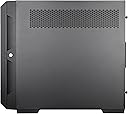
🚀 Elevate your NAS game with SilverStone’s powerhouse micro-ATX chassis!
The SilverStone CS382 is a high-performance, compact NAS chassis designed for professionals demanding maximum storage in minimal space. Featuring 8 hot-swappable SAS-12G/SATA-6G drive bays, support for Micro-ATX/Mini-ITX motherboards, and compatibility with 240/280mm liquid cooling radiators, it delivers robust cooling and expandability. Its front I/O includes USB-C and USB 3.0 ports, while a lockable front door and dust filters enhance security and maintenance. Ideal for building a versatile, efficient NAS server that keeps your data cool, accessible, and secure.


| ASIN | B0CKTYSZV9 |
| Antenna Location | Business |
| Best Sellers Rank | #373 in Computer Cases |
| Brand | SilverStone |
| Case Type | Mini-Tower |
| Color | Black |
| Compatible Devices | Servers |
| Cooling Method | Air, Standard air cooling, optional liquid cooling |
| Customer Reviews | 4.1 out of 5 stars 61 Reviews |
| Enclosure Material | Plastic front door, steel body |
| Hard Disk Form Factor | 3.5 Inches |
| Internal Bays Quantity | 8 |
| Item Dimensions D x W x H | 25.9"D x 10.3"W x 22.7"H |
| Manufacturer | SilverStone Technology |
| Material | Plastic front door, steel body |
| Mfr Part Number | SST-CS382 |
| Model Name | ALTA F2 |
| Model Number | SST-CS382 |
| Motherboard Compatability | Micro ATX , Mini ITX |
| Number of Fans | 2 |
| Other Special Features of the Product | Built-In Fan |
| Power Supply Mounting Type | Rear Mount |
| Recommended Uses For Product | Business |
| Supported Motherboard | Micro ATX, Mini ITX |
| Total Expansion Slots Quantity | 7 |
| Total USB 3.0 Ports | 2 |
| Total Usb Ports | 3 |
| UPC | 844761024529 |
| Warranty Description | 1 year limited |
C**O
Best compact NAS case out there
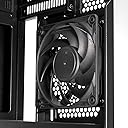
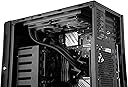
This case is definitely not what I'd consider a "small NAS case." It's somewhere between a compact NAS case and large tower. Check the dimensions carefully if you're planning on putting it on a shelf in closet or something like that. I have a Supermicro X12STL-F mATX motherboard with a Xeon E-2334 (80w TDP) and a Noctua NH-U9s heatsink in this case. CPU temps idle in the low 30C range and under about 50% load are in the high 30's/low 40's. Perfect, IMO. The fan for the bottom drive cage blows directly into where the PSU goes, which is a dead end, airflow-wise. Those bottom drives run about 4-5C hotter than the top cage does, but 100% drive usage temps are still really good for this type of case. I have 7200-rpm SATA drives and the top cage drives run mid-30s under load and top drives high 30's/low 40s. Again, really not bad. I had an Audheid K7 8-bay NAS case previously and the same drives would hit mid-50's under load, which really isn't great. Big improvement there. I have also swapped out the thin hard drive cage fans with Noctua NF-A9 92mm fans. You can see the fans are a tight fit, but they do fit. You will need to remove the two backplanes to access the fan screws. Inconvenient, but easily doable. Just need a long Philips screwdriver. I swapped out the rear 120mm fan for a Noctua Redux fan. System runs cool and quiet. Because of the very small interior space to work with, you do have to be creative with your cable routing, but the many backplate passthrough grommets make it pretty easy to do so. With a mATX motherboard, the first 2" or so of the board are covered by the drive cage when it's inserted. As such, you must remove the drive cage before installing the motherboard or you won't be able to reach the motherboard mounting holes in that area. You also won't be able to plug in any cables at the front of the board with the drive cage inserted. Building in this case isn't hard, just different. Especially if you're used to full size ATX cases or 4U server style cases. Take your time and things will go well. The front door is removable and you get better airflow with it off anyway. I already recycled mine. You also can't leave anything plugged into the front ports with the door closed, if that matters to you. This case can take a 120mm radiator up top, fits a full size CPU HSF, has an 8-bay HDD backplane, 5.25" bay, slim ODD bay and space for another 2 SSDs and another 3.5" HDD under the drive cage. It's pretty much the perfect NAS case. I am very happy I bought it.
H**…
An excellent case despite QA issue
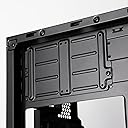
Upped to 5 stars based on both the quality of the chassis and Silverstone's fast and easy RMA in the end. When I got this case, it took me awhile to actually be able to build in it due to some health issues, and I got a bad backplane PCB. There's two of them, each supporting for SATA drives with hotswap, if supported. It took me quite awhile to get in touch with Silverstone (issues mostly on my end), but when I did a human being answered the phone and told me what to do with my RMA form. That was less than two weeks ago as I write this and I just installed the replacement PCB tonight. First bit of advice for this case: Use a downdraft server CPU cooler, not a big dual tower box air cooler like I did. The tower cooler fit, but it means that every time I need to really get at the back of the drive cage for cabling stuff, I need to take out five screws and at least partly remove the drive cage so that I can route cables. Likewise, Silverstone says something about water cooling being possible in this case … no, no not really it just isn't. By the time you pack in even relatively short mini-SAS to 4 SATA breakout cables, run all the power lines, etc., this case doesn't have a lot of internal room for an AIO, and you'd be stuck with like a single 120 as it was. You can do better with air cooling in this case, and for less money. The case is well-built and has a lot of flexibility within the constraints of the mATX form factor otherwise. The case is upside-down from what's traditionally done, so if you have a heavy GPU you're going to need to find a way to keep it from sagging the opposite direction, which is something you might need to think about if you have a multi-slotted monster like some of the most recent cards—though this case screams media server to me, so your video card might wind up being a pretty small thing that does H.265 pr AV1 encodes and little more. In my case I opted for an AMD chip that's got both onboard graphics and ECC support, which left the x16 slot free for a SAS card in IT mode. These things run hot so I've got some fans mounted in the top, and I generally recommend doing so no matter your configuration. The two stock fans behind the drive cage are "fine" but they're not silent by any means—you could replace them with quieter PWM fans. Note, this requires removing the drive cage's PCBs. and you really want a good long #2 philips for that. Which requires me to segue for a moment to discuss tools: I swear by my iFixit Pro Tech toolkit for most electronics work. For PC cases though, I use two nothing-fancy/nothing cute Klein #2 Philips drivers. One is a Klein #603-4 (your average 4" bladed philips) and the other is a #603-7 which is, you guessed it, a 7" blade. To get the PCBs and fans out of the drive cage, use the 7". These drivers don't have spinny caps or ratchets, and they don't have magnetic screw retention (unless you use a magnet on them periodically, which I do), but I want precision more than anything else and a grippy handled "basic" screwdriver is indespensible for this kind of thing. The drive bays… You obviously have your eight sleds for classic spinning rust. You could screw a 2.5" drive into it, but that's not what this case is made for (and they're obviously not toolless that way.) You've got space for a couple of 2.5" drives screwed into place on the left (back) side of the case. It requires removing the drive cage (five screws) and then the platform the cage sits on (didn't count how many screws) but you could install a 9th drive under the cage, but I don't know who realistically ever would. You're probably not going to do that though. But there's also provision for a 5.25 optical drive or device if you need one, and a slim laptop optical drive! Cabling around this is a little tight but I made it work, and you can remove the big 5.25 bracket if it interferes with your monster GPU. The toolless drive sleds … the little rails that snap in to make them toolless feel breakable to me, but I've yet to break one and I've had some drive turnover in this case. I didn't ask Silverstone if I could buy some extras, but … I might do that JIC. Using the case for a server under Linux … drives connected to the LSI SAS card appear _in random order_. They appear before the 2.5" SSD I'm using for containers. Of course ideally your server setup only ever cares what the UUID of the drives or the partitions on them are. It'd be really cool if you had a nice dashboard that would show you all the drives in physical order—and that's something you could do using /dev/disk/by-path: pci-0000:01:00.0-sas-phy0-lun-0 -> ../../sda pci-0000:01:00.0-sas-phy1-lun-0 -> ../../sdd pci-0000:01:00.0-sas-phy2-lun-0 -> ../../sdc …etc …but it'd be a roll your own sort of thing. If TrueNAS Scale has a facility to do that, neat, I don't know about it. Whatever random fedebuntuEL Linux you install won't unless you feel like writing a module for Cockpit, which might be cool but I haven't done it. If you're a terminal user it would be trivial to write udev rules to create per-bay device symlinks using the physical path and set up your monitoring scripts to use those. But that'd again be a custom-rolled solution that isn't what a canned storage appliance server distribution is going to do for you. Oh, how do I know those physical disks are in the right order? Why, I created labels on the partition tables, and the partitions themselves, of course! NOT that the OpenMediaVault web interface even knows those labels exist, or care. No, it mounts the partitions by UUID and refers to them by whatever /dev/sd[a-h] they get assigned. But this isn't a review of OpenMediaVault. If it were it would not be five stars—I'm using OMV because it's the only storage appliance distribution that supports mergerfs/snapraid, which make a lot more sense than any other form of disk spanning and parity I could come up with. It just has a UI that's obnoxious and the backend salt database is basically technical debt IMO. But in terms of the hardware, it all works very well at this point. What more could I want here? Full ATX maybe. If this machine were going to use a modern monster GPU, I might want that to be able to have that and room for a NIC or something. But since this is just a file server, I was able to make it work with a good mATX board. But seriously, you NEED those skinny SATA cables if you're not using a SAS controller like I am. That's not optional here.
E**A
Disappointing from Silverstone
Got this to replace a microatx cube case for my more-than-a-nas-but-less-than-a-homelab server, after getting tired of taking it apart to add or replace disks. So I've always thought of Silverstone as a brand you go to if you want good looks and serious quality, at a bit of a price premium, and this looked like the best option. Sadly, t·his definitely comes with the price but the quality leaves much to be desired. - The front facade is all plastic, including the main door, and all the drive sleds. It's not even a particularly good feeling plastic. -The drive sleds, being plastic, have a lot of flex and it's very easy to put them in a bit wrong. My case actually came with one of them misaligned and i had to exert more force than I'd like to get it out. -The sleds come with these semi-toolless rails that feel incredibly flimsy. A cheap coolermaster case I got 15 years ago had better drive mounting hardware. -The metal feels noticeably thinner than I'm used to in a PC case. it feels like there were some more corners cut here. -The front door only has a magnetic closure if it's unlocked, so it really likes to swing open while you're moving around. Best to lock up (and hopefully not lose the key) That said it's not completely horrible -No sharp edges on the metal. Most of the edges are folded over. -The design itself is nice and understated. No windows, no fancy gamer lights. -Good cable management options -Has a lot of drive bays in addition to the hotswap ones. It can take a full-size 5.25 bay at the very top, a couple drives underneath the hotswap bays, and even a bonus slim optical slot off to the side.
S**N
Over priced but god case overall.
Pros: -Design ( looks good can see leds with front mesh panel closed) -Removeable PSU mesh filter -Layout ( good use of space and compact if loaded up with expansion cards and all the drives. -SAS drive compatible -keeps 7.2k SAS drives cool =< 40*c -comes with plenty of screws and hardware to install drives and drives and MOBO. —— Cons: -Loud!!! Stock bay fans are loud roughly 63db ( installed slim noctua fans to quite the system down but the drives in the bay got to hot under load ) -Can feel cheap. Hot swap trays do not align very well and are made of all plastic. The front panel plastics and hinges feel cheap for the price. But are fine. Over all would recommend if you need a micro atx case with 8 bays.
D**P
Perfect for my NAS build - worked well.
My objective was to take some old parts I had, and buy some additional compatible parts from ebay to build a NAS server running TrueNAS scale. This case is exactly what I was looking for to make it all happen. The build pictured features: P8Z77-M (matx and has 2 pcie x16 slots) 32GB of 1333mhz ram (zfs eats ram) intel i7 2600 lsi 9210-8i (set it to IT mode and let the OS handle the redundancy) P620 graphics card. (plenty of juice for transcoding in a small form factor) A few of the beQuiet! 120mm fans from amazon. Six EXOS 12TB drives and two 1TB SSD's. (4 drive for live storage, 2 for replication/snapshots). Unrelated but I use a QNAP TR-004 in JBOD for my third backup and some cloud storage too for really important stuff. This is a case review right? But there's a hundred chassis out there for this purpose - but this one fit all my requirements perfectly and the above list of parts I wanted to use is why. Packaged really well so zero damage from shipping. The case was pretty easy to assemble, it did take some patience and time - cable routing required some thought and planning but honestly it went together pretty nicely. Take your time and plan things out, and be prepared to pull the cabling back out and try again. Anyone can smash some cables together but you want to maintain the airflow, reduce places that dust can build up, and keep it easy to maintain so In a year you aren't irritated at a hardware failure AND your lazy cabling job. It came with 2 fans on the drive bays and 1 in the rear of the chassis. The rear fan is pretty quiet, the two drive bay fans run at full speed and are loud out of the box. I haven't resolved that yet so it's behind me - not screaming like a server but it's not for a quiet home office. You'll want to plan to do something to quiet those down (using 4 pins on mobo or fan controller card). I reused a power supply that was too big and I regretted it. It worked but wasn't super fun. The rest of it went together pretty easy, follow the instruction booklet as the chassis does need disassembly in a certain order. One more thing to note. The enclosure requires 4 power connectors total. Backplane for the top 4 and the bottom 4 each require 1 molex and 1 sata power connector. Overall happy with the chassis, and how it came out. No regrets with this purchase. Update 01.08.24 I unplugged the fans from the drivebay, attached to motherboard and moved my motherboard fans to a separate fan controller. They went from 2300RPM to about 1000RPM but controlled by the motherboard which is normal white noise instead of a screaming fan at full speed. The 2 drivebay fans are intake and my two chassis fans are exhaust. Great case.
A**N
Nice case for DIY NAS
This case is mostly easy to work with. If you want to replace the fans for the hard drives, it’s necessary to remove the two backplane PCBs. This was quite tricky without a powered screwdriver. My Micro-ATX motherboard fits well. Nice to see that it also supports Mini-DTX, Mini-ITX. There are several well-placed holes to route cables. There is sufficient space for a full ATX power supply and its cables, which is nice. The build quality is pretty nice. The front door is plastic, as are the HDD caddies. It would be nice if it did not have plastic, but it will do for an at-home or small business setup. I still haven’t been able to figure out how to de-hinge the door to remove it, even after watching a video of it being removed. Functionally, this is a great case for a DIY NAS system. As others have said, for this price, it’s disappointing to see plastic being used. But it has decent value for money. As far as cooling, it would seem with the vented side, there wouldn’t be enough airflow from front to back, but I haven’t had any temperature issues on my system. That venting on the side panel might need to be duct-taped over if you’re using this with a setup that runs hot.
C**M
Overall a good case ruined by cut corners
For the price of this case, some of the corners cut are ridiculous. As numerous people mention, the front fans behind the hard drive bay are garbage. And not just because they are loud - they are cheap garbage. Haven't had the case a week and already having to replace the fans because they are hitting their own enclosure when spinning. ****Reducing to one start and returning. The front hinge is held together by nothing but a tiny plastic bit, which broke simply opening and closing.
R**Y
Case with space
Silverstone cases were always built with quality in mind. There is plenty of room for air flow, even with a 240 mm AIO. The 8 hard disk bays are perfect for Truenas systems. My Truenas Scale NEVER goes over 30° Celsius with all eight 4 Tb drives running for a long time. Everyone is complaining about the fan noise, well plug the fans into the main board PWM connections. It works just fine and reduces the noise considerably (you need PWM extension cables). I've watched several so called "professional" reviewers on YouTube and it's always the same mistakes while they setup the systems. They set it up wrong and exceed extremely high heat in the case and main board. I only found a few cons. 1. If installing an AIO radiator then only use a micro ATX or Mini ITX motherboard, because although a full ATX board will fit, then there is no room for an AIO radiator, unless you don't care about the last two PCIe slots. 2. The sata power connectors are turned 180° the wrong way, which means your cable also needs to be turned 180°, again use extenders and you'll be fine. 3. Airflow is great, but the bottom fan for the first four sata drives blows directly into the PSU frame which causes the hot air to build up while heating up the sata drives and the PSU. I am constructing a pvc pipeline to exhaust the hot air directly to the rear fan. Other than that, this was the case I was waiting for! A little expensive, but excellent quality. And yes, I'm buying another in six months for my second NAS.
J**R
Well built great NAS or Home Server case
Fantastic NAS or Home Lab server case. Well built with nice features like inbuilt SATA backplane for the removable 3.5" HDD caddys. I did replace the HDD cooling fans with some Noctua ones as the fans provided by Silverstone seem a bit loud for my use in a living room. I was impressed with the good amount of dust filters and there seems to be enough space for a reasonably large GPU. I only struggled a little bit with the cable management but being able to slide out the HDD section helps.
Trustpilot
3 weeks ago
3 days ago