๐ Lock down your network like a proโsecurity that means business.
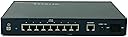
The NETGEAR FVS318 ProSafe VPN Firewall is a compact, wired router featuring an 8-port 10/100 Mbps switch and eight dedicated VPN tunnels for secure multi-location connectivity. Designed for small to medium businesses, it offers an intuitive setup interface and reliable firewall protection at an affordable price point, making it ideal for professionals seeking enterprise-level security without complexity or high cost.
| ASIN | B00006B9HC |
| Antenna Location | Business |
| Antenna Type | Internal |
| Brand | NETGEAR |
| Brand Name | NETGEAR |
| Compatible Devices | Laptop, Personal Computer, Smart Television, Smartphone, Tablet |
| Compatible devices | Laptop, Personal Computer, Smart Television, Smartphone, Tablet |
| Connectivity Protocol | Ethernet |
| Connectivity Technology | Wired |
| Control Method | Touch |
| Controller Type | Switch |
| Coverage | Up to 8 simultaneous VPN connections |
| Customer Reviews | 4.1 out of 5 stars 61 Reviews |
| Data Transfer Rate | 100 Megabits Per Second |
| EU Spare Part Availability Duration | 3 Years |
| Frequency Band Class | Dual-Band |
| Frequency band class | Dual-Band |
| Global Trade Identification Number | 00606449023381, 10606449023388 |
| Has Internet Connectivity | Yes |
| Is Electric | No |
| Is Modem Compatible | No |
| Item Dimensions L x W x H | 25.3L x 18W x 25.3H centimetres |
| Item Weight | 3.7 Pounds |
| LAN Port Bandwidth | 10/100 megabits_per_second |
| Manufacturer | NETGEAR |
| Manufacturer Part Number | FVS318NA |
| Maximum Upstream Data Transfer Rate | 100 Megabits Per Second |
| Model Name | NETGEAR FVS318 ProSafe VPN Firewall |
| Model Number | FVS318NA |
| Model name | NETGEAR FVS318 ProSafe VPN Firewall |
| Number of Ports | 8 |
| Operating System | [Proprietary router operating system] |
| Other Special Features of the Product | WPS |
| Recommended uses for product | Business |
| Router Firewall Security Level | Advanced |
| Router Network Type | wired |
| Security Protocol | WPS, VPN |
| Smart Home Compatibility | Not Smart Home Compatible |
| Special feature | WPS |
| UPC | 606449023381 |
J**T
A excellent perimeter defense appliance with outstanding remote VPN capabilities
As a security consultant, I consult people everyday on the need for a solid defense-in-depth strategy to protecting their network resources from potential attacks. The same applies to your home networks! Most broadband/HSI providers do not provide much in terms of securing "your assets", but rather, are interested in protecting their own. Often times, the perimeter equipment that is recommended (such as a typical wireless AP/router) does not really provide much in terms of security, and does nothing in terms of providing remote connectivity to resources on your home network when away. In comes the FVS318 Firewall with built-in IP Security (IPSec) Virtual Private Networking (VPN) capabilities. The appearances of this appliance seemed to meet almost all of my basic requirements ... with one key exception: NetGear does NOT provide support for remote Mac OS X clients in any of their VPN solutions and corresponding documentation. Most client OS's support VPN's (Windows XP/7, Mac OS X, Linux/Ubuntu, Android, iOS, etc.) that require a "login mechanism" for user authentication, and they utilize a secure tunnel to maintain communications. The FVS318 is really meant for a site-to-site typeo of VPN which utilizes the IPSec tunnel without any user authentication. This would be the case when two branch offices are connected together. Enough of the heavy technical details ... the problem is "how can I connect my Mac OS X computer to the FVS318 remotely?". After researching this for some time, I found two products that both work exceptionally well for the Mac environment. The first is freeware called IPSecuritas from Lobotomo Software. This comes with a preconfigured template for the FVS318. The other, which is available for a free, is called VPN Tracker. Like IPSecuritas, it also has preconfigured templates for the FVS318. So, if you are considering a security appliance to use at your home, and are concerned about the lack of Mac client software, do not worry any longer ... a solution is available to make your FVS318 work seaminglessly in your local and remote network.
L**R
Router and powerful Firewall. Used but in great condition. 10/100 NOT Gigabit
This model is past "end of life" according to Netgear, so don't expect any technical support. Even the Netgear webpage is not much use; however, the router is totally intuitive to set up and configure and works very well. This model does NOT have Wi-Fi LAN. After configuring the FVS318, I connected my old Wi-Fi modem in pass-through mode on the LAN side behind the firewall, so wired and wireless devices are now all behind the wall and all on the same LAN. Easy. Does a great job at a super low price. EDIT-A few more days later. Did not notice at first, but ethernet traffic has slowed down. Most noticed when streaming (Amazon Prime, Netflix etc....) the buffering is annoying.
M**N
Stable and feature rich router at a good price
I am the sole IT person for a company that has several branch offices and they are all equipped with one of these routers. They are updated to the latest firmware which may play a key role in my success with these routers, but so far I couldn't be happier. Not one has had a problem that couldn't be resolved with a power cycle. I am not doing anything too complex with these as their DHCP/DNS functions are being handled by a windows server and there is no need for VPN yet, but the expandability is good to have. Port forwarding is in use and working fine and the internet access policy, although not the most robust I've seen, it does the job. Internet access is quick and the setup is relatively easy. I am A+,NET+, and CCNA certified, however I don't think the setup requires a professional touch as the web access GUI is pretty intuitive. Lastly the body is good at keeping the unit cool, is easy to mount, and has a pretty small footprint. To combine all of this with a price tag that any power user or SOHO can afford makes it 5 stars to me.
S**K
A great full featured firewall/router with no hassels
I bought this router when, after switching modem's to a Motorola SurfBoard, my old SMC Barricade router/firewall would not communicate with it. SMC was worse than useless when I sought service help since the router was out of warranty (note to self -- avoid SMC products in the future). Anyway, I bought this Netgear router as it was the only one with 8 ports and firewall at a reasonable price. Oddly this market segment seems to have whitered as 3 years ago when I last shopped, I recall more options. Anyway, the Netgear has worked very well. I just connected it to everything and turned it on and it ran. I needed 8 ports because my house is hard-wired with CAT5 cable in each room and I like to use a wired connection when possible for security and speed. We are generally using at most 3 ports at once, so perhaps this is not the most testing application, but it has worked well for me. I'm not sure I'm getting all the benefits of the firewall, as some seem intended for more advanced users, but its has not failed in the 3 weeks its been working for me. My speed at each link was tested at 1.5M/Sec which perhaps is somewhat below what my modem direct would support, but that far exceeds the speed of most down-loads anyway. I've experienced none of the technical problems that some have reported, so perhaps the most up-to-date version has these fixed. I would highly recommend this router/firewall for anyone for a home with many ports or a small business.
Z**A
Frequent lockups
I purchased this router for the 8 ports and built in firewall. Unfortunatly it never works for more than 6hours. It came with firmware v1.3. After having to reboot 3 times within 24 hours I upgrade to v1.4. Unfortunatly I had the same lockup issues. I sent an email to tech support but never received a response. I then downgraded the firmware to v1.3 and the lockups remained. This is completely unacceptable. After a call to tech support (They answered within 5 min) and an explanation of my problem they suggested that I return the router as defective. I received a second router and had the same problem. I replaced my cable modem (SB4100) with an SB3100, this helped and I was able to stay conencted for about 1 week. Then the problem returned for 2 days of headaches. A call to my ISP (Road Runner) tech support and they came out to check my signals. All they could do was replace the modem with a SB4200. The problem was still rearing its ugly head. Netgear tech support returned my email (2 weeks after sending it) and said that the SB4100 modems have had voltage problems and may be the cause. Unfortunatly changing modems didn't help and my ISP and Netgear just seem to point the finger at each other. When the router was working it seemed to perform well. The features are excellent and the interface is very good.
Trustpilot
3 days ago
3 weeks ago