Desertcart purchases this item on your behalf and handles shipping, customs, and support to Thailand.
⚡ Elevate your home network to warp speed and total coverage—because buffering is so last decade!
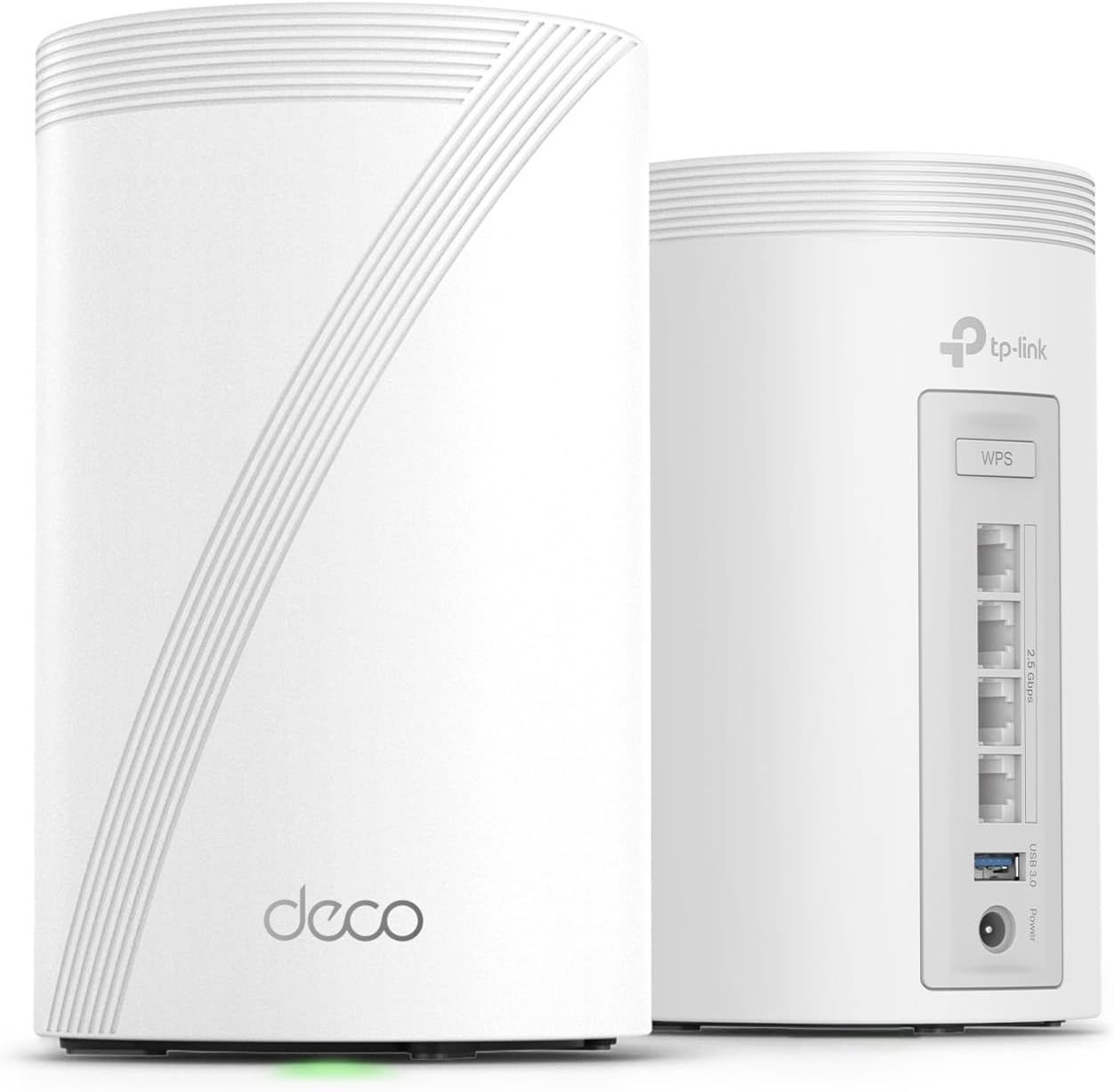
The TP-Link Deco 7 Pro BE63 is a cutting-edge Wi-Fi 7 tri-band mesh system delivering up to 10 Gbps combined speeds and expansive 5,800 sq.ft. coverage. With 4x 2.5G wired ports, AI-driven seamless roaming, and support for 200+ devices, it future-proofs your home network for streaming, gaming, and smart living. Enhanced by HomeShield security and easy app management, it’s the ultimate solution for professional-grade connectivity.


| ASIN | B0CN8WBXY2 |
| Antenna Location | Gaming, Home |
| Antenna Type | Internal |
| Best Sellers Rank | #15 in Computers & Accessories ( See Top 100 in Computers & Accessories ) #3 in Whole Home & Mesh Wi-Fi Systems |
| Brand | TP-Link |
| Built-In Media | 1 RJ45 Ethernet cable, 2 Deco BE63 units, 2 Power adapters, Quick Installation Guide |
| Color | White |
| Compatible Devices | Smartphone |
| Connectivity Protocol | Wi-Fi |
| Connectivity Range | 5800 square_feet |
| Connectivity Technology | Wi-Fi |
| Control Method | App, Voice |
| Controller Type | App Control |
| Coverage | 5,800 square feet |
| Customer Reviews | 4.2 out of 5 stars 603 Reviews |
| Data Transfer Rate | 10 gigabits_per_second |
| Frequency | 6 GHz |
| Frequency Band Class | Tri-Band |
| Item Dimensions L x W x H | 4.23"L x 4.23"W x 6.93"H |
| Item Weight | 3.3 pounds |
| LAN Port Bandwidth | 2.5 Gbps |
| Manufacturer | TP-Link |
| Maximum Upstream Data Transfer Rate | 5188 megabits_per_second |
| Mfr Part Number | Deco BE63(2-Pack) |
| Model Name | WiFi 7 Mesh System |
| Model Number | Deco BE63(2-Pack) |
| Number of Antennas | 4 |
| Number of Ports | 4 |
| Operating System | Omada |
| Other Special Features of the Product | Access Point Mode, Guest Mode, QoS, Remote Access, WPS |
| Router Firewall Security Level | Advanced |
| Router Network Type | hybrid |
| Security Protocol | WPA-PSK, WPA2-PSK, WPA3 |
| Special Feature | Access Point Mode, Guest Mode, QoS, Remote Access, WPS |
| UPC | 840030712692 |
| Unit Count | 1 Count |
| Warranty Description | 2 year manufacturer |
| Wi-Fi Generation | Wi-Fi 7 |
| Wireless Communication Standard | 802.11.be, 802.11ac, 802.11ax, 802.11g, 802.11n |
| Wireless Compability | 802.11.be, 802.11ac, 802.11ax, 802.11g, 802.11n |
A**B
The Best Small Home Network Solution
I have a Cox Gigabit connection and was initially provided their XB7-T modem/router device. In our 1,400 SF home, speeds averaged around 470mbps down. Cox assured us for our home, we would not need an external router. To take full advantage of our plan, I chose to invest in a mesh network. We also purchased our own Cox modem to avoid equipment rental fees. The Deco 7 Pro BE10000 has exceeded all expectations. Based on peer reviews, it seemed to have the most stable MLO and Beam Forming capabilities. The smartphone app made installation a breeze and is very useful in monitoring the network at all times. I have visibility of the network, even when away from the home. We purchased the two (2) pack for our home, with the main unit setup near the modem, and the satellite in our office (across the house). The LAN ports enabled me to hardwire the satellite directly to my laptops dock, which provides a very stable and efficient connection. Our WiFi coverage is strong throughout the home, using only two units. We have a combination of older M1 macbooks, newer macbooks, iphones which have WiFi 6 & 7 chips. Connectivity is lightning fast, and averages 1,170mbps down / 115mbps up. The Deco 7 Pro has not only been a tremendous upgrade to our ISP's hardware now but is also futureproof & will be capable for a future fiber plan. If you are looking to build a cost-effective WiFi 7 home network with strong connectivity, a lot of bandwidth, fast speeds, and ease of use... I highly recommend you try the Deco 7 Pro BE10000. Setup: Modem - Hitron CODA56 / Router - TP-Link Deco 7 Pro BE10000 / Loc - Tempe AZ / Cabling - CAT8
N**L
Blazing fast, rock solid coverage
Upgraded from an older AX mesh system to the Deco BE63 a few weeks ago and the difference is night and day. Setup was painless — the Deco app walked me through everything in about 15 minutes, from plugging in the main unit to placing the satellite across the house. No tech headaches. Speed is insane. I’m pulling close to gigabit wired and wireless speeds throughout the entire house, even in the back rooms where my old system used to drop to like 80mbps. The 6GHz band on WiFi 7 is a game changer if you have devices that support it — pings are super low, no lag on streaming or gaming. Coverage is excellent with just two units. My house is around 2,500 sq ft and signal stays strong from the garage to the upstairs bedrooms. Handoff between nodes is seamless, no dropouts when I’m walking around on a call. The 2.5G WAN/LAN ports are a nice touch for future-proofing, especially if you have a multi-gig internet plan. App controls are solid too — easy to see connected devices, set up guest networks, and run speed tests. Only downsides: it’s expensive, and some advanced features like more in-depth QoS are locked behind the HomeShield paid tier. The units are also a bit large compared to older Deco models, so factor in shelf space. Overall, if you want top-tier mesh performance and have devices that can take advantage of WiFi 7, this is one of the best systems out right now. Worth the price if you care about speed and reliability.
D**.
Absolutely Perfect
Bought this to replace an older Nighthawk WiFi 6 Mesh. This 2 piece Deco upgrade fixed ALL my connection issues, is blazing fast, is very stable, and has excellent range. Easiest setup I’ve ever seen thru their phone app. Best app for managing your a home router I’ve seen to date. Highly recommended.
A**R
well worth the price
Meets all advertised specifications, easy to setup , good coverage and WIFI speed.
V**Y
Complete waste of Money my upgraded network is going back to a basic router that works!
This is maybe the worst tech purchase I have ever made! Replaced a solid TP-Link AX3200 with the Deco BE63 (2-pack) expecting better range, speed and future compatibility . Instead, I've had random, complete internet drops throughout the house (we're talking 2. floors 750 sq feet each here) — full signal bars, but constant drops internet — happening with no pattern, not tied to distance or movement. My old router and even my ISP's basic gateway outperforms my 2 unit mesh system (in that it works) Spent days trying every fix: disabling MLO, turning off 6E/6GHz, toggling Fast Roaming, disabling private MAC addresses, repositioning satellite units, changing the position of nodes. Nothing helped, because it turns out this is a widely reported problem on the BE63 specifically — plenty of others in TP-Link's own community forum describe the identical symptom, and several have given up and returned theirs. The "smart" features (MLO, band steering, tri-band SSID) but the first troubleshooting recommendations are to turn these features off and that didn't work either, made an attempt to go to TP Link directly today only to be sent a troubleshooting guide via email (after the phone rep hangs up) with basic troubleshooting that I had already performed, what a joke when they offer free technical support. If you're currently on a stable older router, I'd think twice before "upgrading" to this model.
M**M
Almost Perfect but lacking pro and enthusiast features
tl:dr; There isn't a real web interface to manage the device and you MUST use the mobile apps but its an otherwise solid device I would reccomend Overall I'm pretty pleased with this but I have a few complaints. The Good: - Unboxing was easy and straight forward. Everything is nicely labeled. - Products themselves feel good in hand and feel stable when plugged in - Setup is VERY straight forward once you download their mobile app. If you run into issues, it presents troubleshooting instructions as you go. - Coverage and signale strength are great. Run the optimization tool af you finish your inital setup and you'll be set! - Wired network speeds seem to be acurate and the included cable is of reasonable quality - Good for folks who just want something that "works" in a basic home setup The Bad - The wall adapter is either going to work great for your or present a nightmare. It's an angled wall wart and in my current setup it didn't fit unless I let it cover other outlets - The web interface it all but useless. You have to configure 98% of things from the mobile app. This is really annoying when just trying to copy and paste settings or just quickly manage things without having to dig through menus. - Various network configuration options aren't really easily configuable and are sometimes problematic (getting static IPs to stick with certain devices was a nightmare). Compared to an older ASUS Zenwifi I had, you can't get as granular. - As far as I can tell, you MUST make a TP Link account to manage the device. Why do I need to make an account? What if I just need Wifi but not a network connected to the internet? - The status LED is on the BOTTOM of the unit. Depending on your setup, it's going to be hard to see In Conclusion - Would I buy it again? Yes - Am I happy with it? For the most part - Would I recomend this to someone with a complex home network? No - Would I recomend this to someone who just wants to add highspeed coverage to their home? Yes
J**N
Excellent product, and incredible support
The product itself is excellent: attractive design, easy setup, and fantastic WiFi performance in terms of throughput and range. I have a two-node setup connected via wired backhaul through MoCA 2.5 Gigabit adapters. I am admittedly not stressing these units since our Internet connection is currently only 300 Mbps and we don’t have any other heavy internal traffic, but I figured I might as well futureproof when moving up from a single WiFi 5 router. And on that topic, I definitely like having 2.5G Ethernet ports, including for a WAN connection. The Deco management app is also very good. I think the layout could be improved, and there are some improvements I definitely wouldn’t mind seeing, such as showing Ethernet link speeds and maybe the option to disable remote management for security reasons. But what impressed me most and may do even more to make me a loyal TP-Link user is their support. I spent 15 years in various Windows IT roles, and shortly after installing these I noticed a problem with outbound L2TP VPN connections from my Windows laptop to remote networks. My iOS devices worked fine, and some troubleshooting indicated that this occurred most often when I also had the L2TP VPN Server function enabled on the Deco to allow me to connect to my home remotely. I posted about it on the TP-Link Community forum, and an engineer reached out asking if we could do some testing via screen share/remote control. I agreed. The engineer was very capable, definitely not your typical first level support person. He accessed the two Decos via console/command-line to gather data and test some configuration tweaks, and performed some packet captures via Wireshark. The session lasted about 2 hours, but he found a temporary workaround that also hinted at the underlying cause, so he asked if we could do this again while a member of their R&D team was available. I agreed, and a few days later they were back for even more advanced analysis and tweaking via console. That was another 2 hours or so, but they gained an even better understanding of the underlying cause and said they would provide a test firmware update soon. That arrived ONE DAY later, and it solved the problem. So now they said they will be incorporating this fix into a future public release. I’ve always said that I don’t mind mistakes so much because I understand that people make them, so what matters to me is how mistakes get handled. In this case, I don’t mind a firmware bug as long as it gets addressed. And TP-Link’s responsiveness in that regard was top notch. It’s rare to see that these days, and it was a hugely unexpected surprise that probably means even more to me in terms of brand loyalty than the quality of the product itself.
C**S
For the price, simply can not be beat. Definitely Recommend.
I have a 2000 square foot home and needed to upgrade with something that would be WIFI 7 capable and offer scalability. I came across the TP-Link Decco B63 Mesh System, and it checked all of the boxes at a reasonable price. I have started with the 2 pack and added a TP-link 5 port 2.5Gb switch for the ethernet backhaul for each node. I decided to also purchase a couple CAT6A cables to complete the system. The Decco App is straight forward, and in 30 min had everything cabled, configured, and operational. For perspective, I have a 2.5Gb ISP copper handoff straight into the Primary Decco B63. Both B63's are then connected to the 5 port switch for the ethernet backhaul. End result, the system delivers and does it very well. I am getting twice the speed on this system and coverage is perfect. No more Wi-Fi dead spots or slow performance in my home, and without doing any adjustments to this system and essentially out of the box, I am getting over 1.3Gbps Down and nearly 200Mbps up on my laptop and smartphone.....I am a Senior Networking Engineer by trade, and have tested many different Wi-Fi home and enterprise systems. There are better performing Wifi 7 Mesh Systems out there, but to that end the price starts to jump quickly.....At the price for the TP-Link Decco B63, it performs excellent and punches above its weight class. I recommend this without hesitation. I have had this system for less than a week, and already have it Alexa integrated and making verbal commands for things like, "Alexa, turn WPS on" which comes in handy when you have a smart home with 40 devices to migrate over into the new system. You can also ask Alexa to turn off/on guest wireless access for example. I am still playing around with Alexa integration, but I am telling you this system is very nice......TP Link has several tiers of Decco product, with the B63 falling in the middle......Highly Recommend .
E**R
good
Working fine but i cant connect my WIFI 7 devices to this, i mean our android phone is showing WIFI 6e and sometimes WIFI 6 but haven't seen WIFI 7 yet
A**A
Fácil de instalar
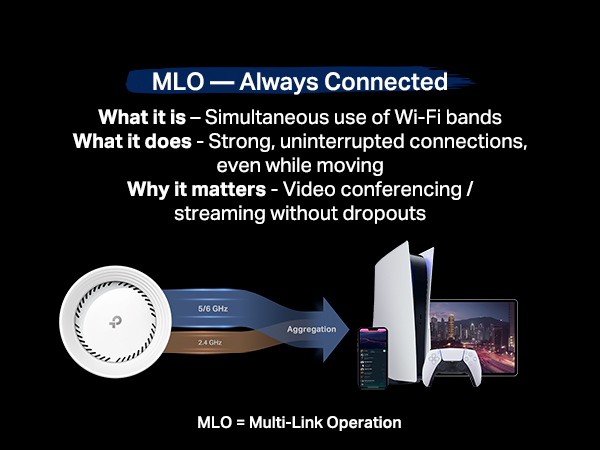
Te permite crear una red de 2.5 a 5GHz, una de 6GHz y una MLO de 5 y 6GHz, además de crear una red para invitados, aislar dispositivos de tu IoT. Con 2 cubre perfectamente 200m² y atraviesa paredes sin tanto problema. Se acabaron mis problemas con la disponibilidad de mis dispositivos.
Trustpilot
1 week ago
2 weeks ago